





Sticking with the budget side of Z890, the next board in our lab is the Asus Prime Z890-P Wifi ($229.99). The Prime series motherboards, according to Asus, are “...expertly engineered to unleash the full potential of the latest Intel Core processors.” The board itself offers robust power design, comprehensive cooling, and intelligent tuning options, such as AI-based overclocking, so it has the tools to get the most out of your system. In all, it’s a solid motherboard for Z890, but the competition in this space, between existing and refreshed motherboards, makes standing out among its peers difficult.
The Z890-P Wi-Fi comes generally well-equipped for the budget price. You get support for the latest processors, including the recently released Core Ultra 7 270K Plus and 250K Plus, It has capable power delivery that can easily handle flagship-class processors like the Core Ultra 285K, too. Connectivity-wise, there are eight total USB ports on the rear IO, including one Thunderbolt 4 (40 Gbps) with a Type-C connection, which may be limiting for some. Storage-wise, it has four M.2 sockets (one PCIe 5.0-capable) and four SATA ports, which should be plenty for most users. The audio section uses the basic Realtek ALC897 codec and, like its peers in the budget-class, does not include a fancy DAC or AMP. But it has all the other fixins. Basics? Check.
As far as aesthetics go, it’s certainly an inexpensive motherboard with a lot of black PCB showing. Outside of the VRMs, the only M.2 socket with a heatsink, a thin plate-style one at that, is the 5.0 X4 socket above the primary PCIe slot. The contrasting black-and-silver appearance won’t win any awards, but it looks fine in most dark build themes. Note that if you would like some RGB bling, you’ll have to add your own, as the board doesn’t include any onboard.
Performance on the Z890-P was good overall, landing somewhere around the Z890 Aorus Elite Duo X running default settings. In other words, it’s competent across a wide swath of PC activities, including gaming, rendering, encoding, and office-type work. It’s worth noting that these tests were conducted with our DDR5-7200 kit, as the DDR5-7600 kit did not play nice with this motherboard. That said, you may still see a slight performance bump on memory-sensitive applications, but as it stands, it performs very well across our testing suite.Below, we’ll examine the board's performance and other features to determine whether it deserves a spot on our list of the best motherboards. But before we share test results and discuss details, here are the specifications from Asus’ website.
Specifications of the Z890-P Wifi
Swipe to scroll horizontally
Socket | LGA 1851 |
Chipset | Z890 |
Form Factor | ATX |
Voltage Regulator | 18 Phase (14x 80A MOSFETs for Vcore) |
Video Ports | (1) DisplayPort (v1.4) |
USB Ports | (1) TB4 (40 Gbps) Type-C |
Network Jacks | (1) 2.5 GbE |
Audio Jacks | (2) Analog + SPDIF |
Legacy Ports/Jacks | ✗ |
Other Ports/Jack | ✗ |
PCIe x16 | (1) v5.0 (x16/x8) |
PCIe x8 | ✗ |
PCIe x4 | ✗ |
PCIe x1 | ✗ |
CrossFire/SLI | Row 14 - Cell 1 |
DIMM Slots | (2) DDR5-8666+ MT/s (OC), 256GB Capacity |
M.2 Sockets | (1) PCIe 5.0 x4 (128 Gbps) / PCIe (up to 110mm) |
SATA Ports | (4) SATA3 6 Gbps |
USB Headers | (1) USB v3.2 Gen 2 (10 Gbps) Type-C |
Fan/Pump Headers | (7) 4-Pin (Accepts PWM and DC) |
RGB Headers | (3) 3-pin ARGB headers |
Diagnostics Panel | ✗ |
Internal Button/Switch | ✗ |
SATA Controllers | ✗ |
Ethernet Controller(s) | (1) Realtek RTL8125 (2.5 GbE) |
Wi-Fi / Bluetooth | Intel Wi-Fi 7 (BE200NGW) - To 2.9 Gbps, 160 MHz, 6 GHz, 5.8 GHz, BT 5.4 |
USB Controllers | Row 26 - Cell 1 |
HD Audio Codec | Realtek ALC897 |
DDL/DTS | ✗ / ✗ |
Warranty | 3 Years |
Inside the Box
Inside the retail packaging, Asus includes a few accessories to help get your system running, hopefully, without a trip to the store. You get a quick-connect Wi-Fi antenna, some M.2 screws and mounting hardware, two SATA cables, and a quick start guide. There isn’t much here, but it is similar to other boards of this ilk.
Design of the Prime
Image
1
of
5
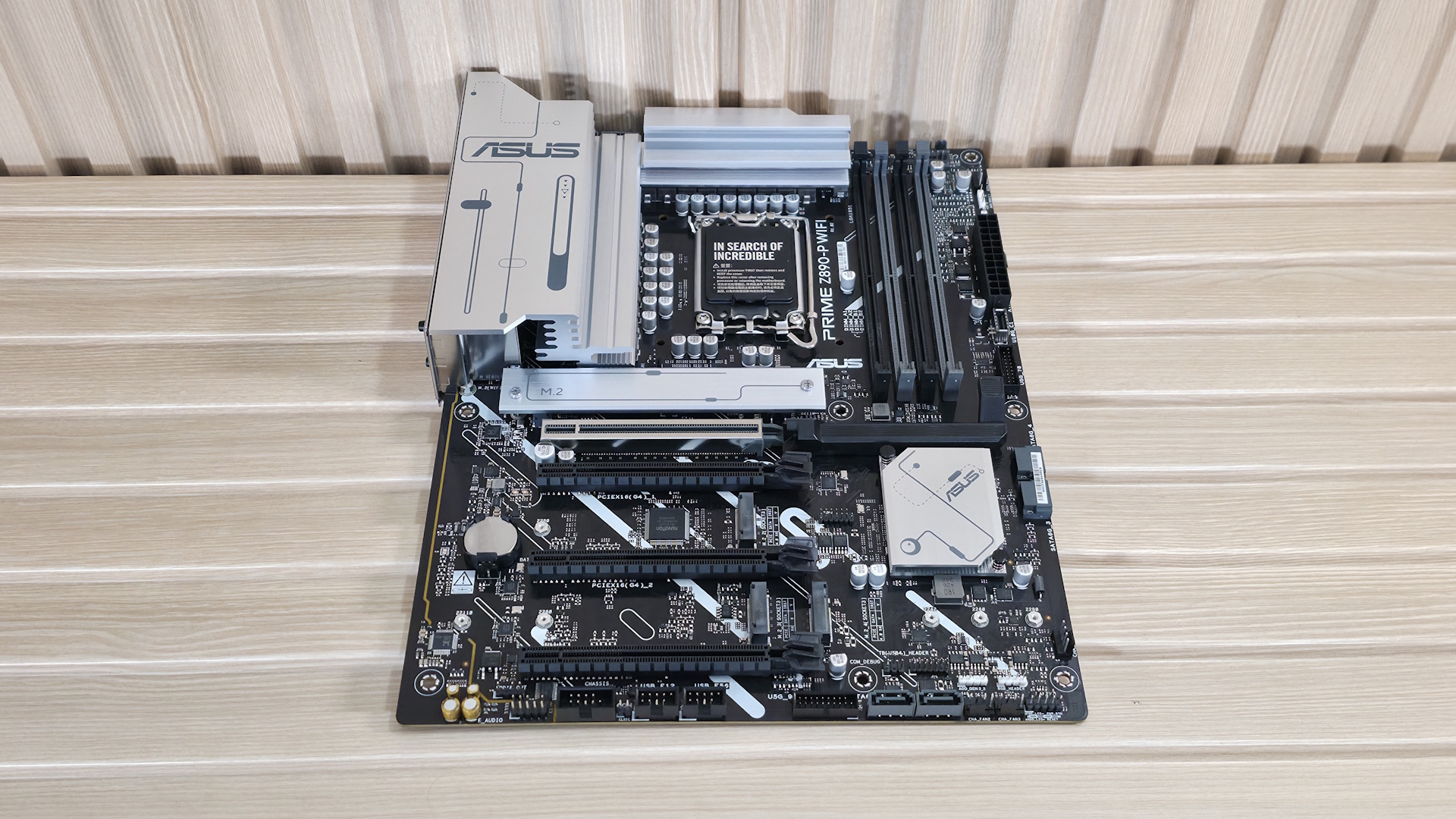
When we look at the Prime Z890-P, it’s clearly not a high-end offering, with only a few slots and sockets visible. Here, almost the entire PCB is exposed with heatsinks and shrouds covering only the minimum, though that is normal for this price point. The black, six-layer PCB gives way to a couple of white lines traversing diagonally through the bottom half of the board to break up the design monotony. The large silver heatsinks on the VRMs connect to share the thermal load.
As for RGB lighting, the Prime Z890-P does not include any onboard, but it does have multiple headers to connect your own, with control over the light show handled through the Armory Crate software with the Aura RGB applet. In all, it’s a simple design aesthetic fitting for its class, and it should look good with any dark-themed build.
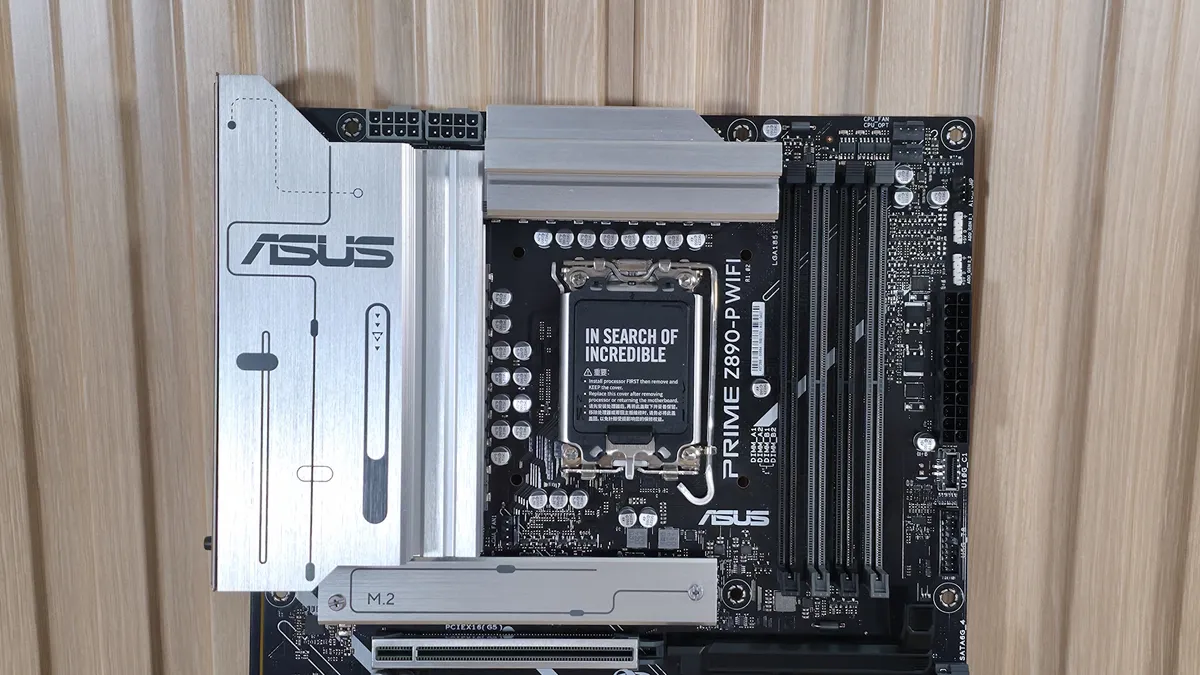
On the top half of the board, we get a better look at the VRM heatsinks, and we spy the two 8-pin EPS ProCool solid-pin connectors (one required) just above. The heatsinks themselves have a diode/slider-type design on top with a brushed aluminum finish. The two heatsinks are connected via a thermal pad. This is better than leaving them separate, but not as good as a heatpipe that distributes the load more efficiently. As you’ll see later, VRM temperatures were fine, so there’s nothing to be concerned about with that configuration.
Past the socket to the right, the first thing we run into are the four DRAM slots with a single locking mechanism at the top (where you have room to reach it). Asus lists support up to DDR5-8666 MT/s (OC), which is plenty fast for the platform. Curiously, our DDR5-7600 kit, the baseline for new Z890 tests, did not work, but the 8200 MT/s kit did. As per usual, stick with the memory QVL for your best chance of compatibility.
Asus’ Enhanced Memory Profile II (AEMP III) feature (a tuning feature that optimizes the clock driver, memory frequency, and timings), as well as DIMM Fit Pro, give you fixed and user-defined tuning options for full memory timing control for more advanced users, which is useful if you’re comfortable with tweaking; it could be overwhelming for novice tweakers. But just input the parameters you want it to change, reboot, and it works through the process. Once completed, the RAM will be set to its optimum values. It’s a good way to get the most out of your kit.
Above the DRAM slots are the first two (of seven) 4-pin fan headers. Each header supports up to 1A/12W. While this isn’t a lot compared to other boards, it’s enough for several fans, an AIO, or even a custom water loop. Control over these headers is handled through Asus Fan Xpert 4, found in the BIOS or Armoury Crate. Just be careful not to overload the headers.
Working our way down the right edge, we run into another 4-pin fan header (AIO_PUMP), and the first two (of three) 3-pin ARGB headers. Below that is the 24-pin ATX connector, a front-panel USB 3.2 Gen 2 (10 Gbps) Type-C header, and, finally, a 19-pin USB 3.2 Gen 1 header — nothing out of the ordinary.
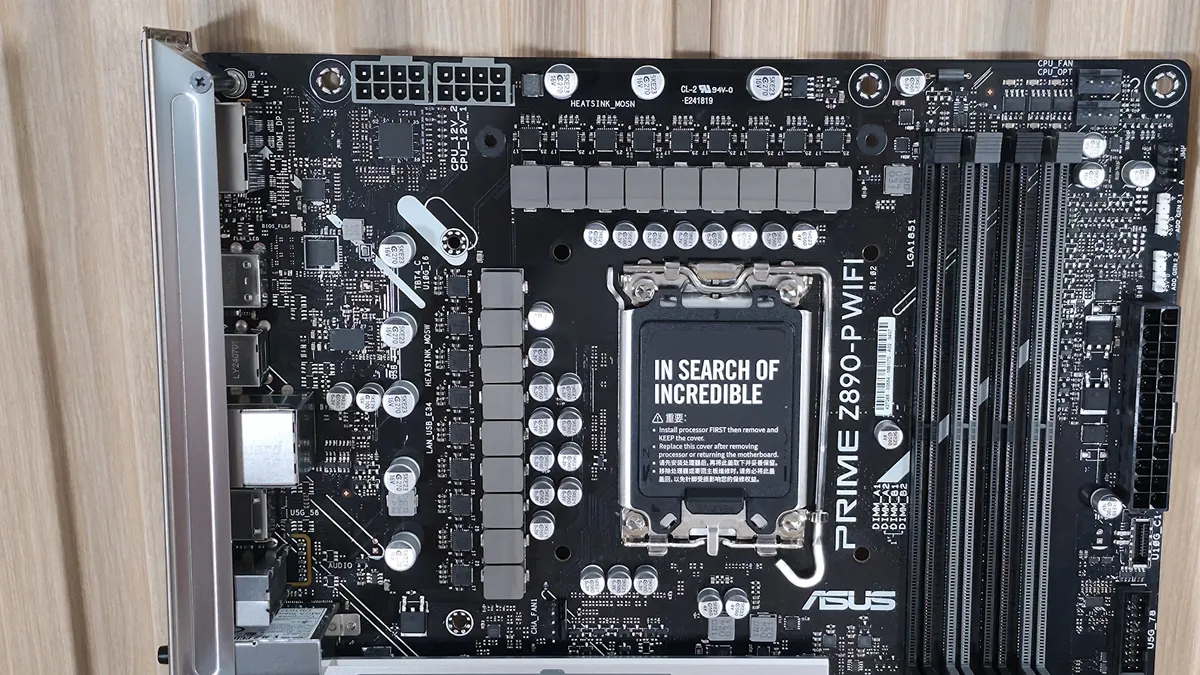
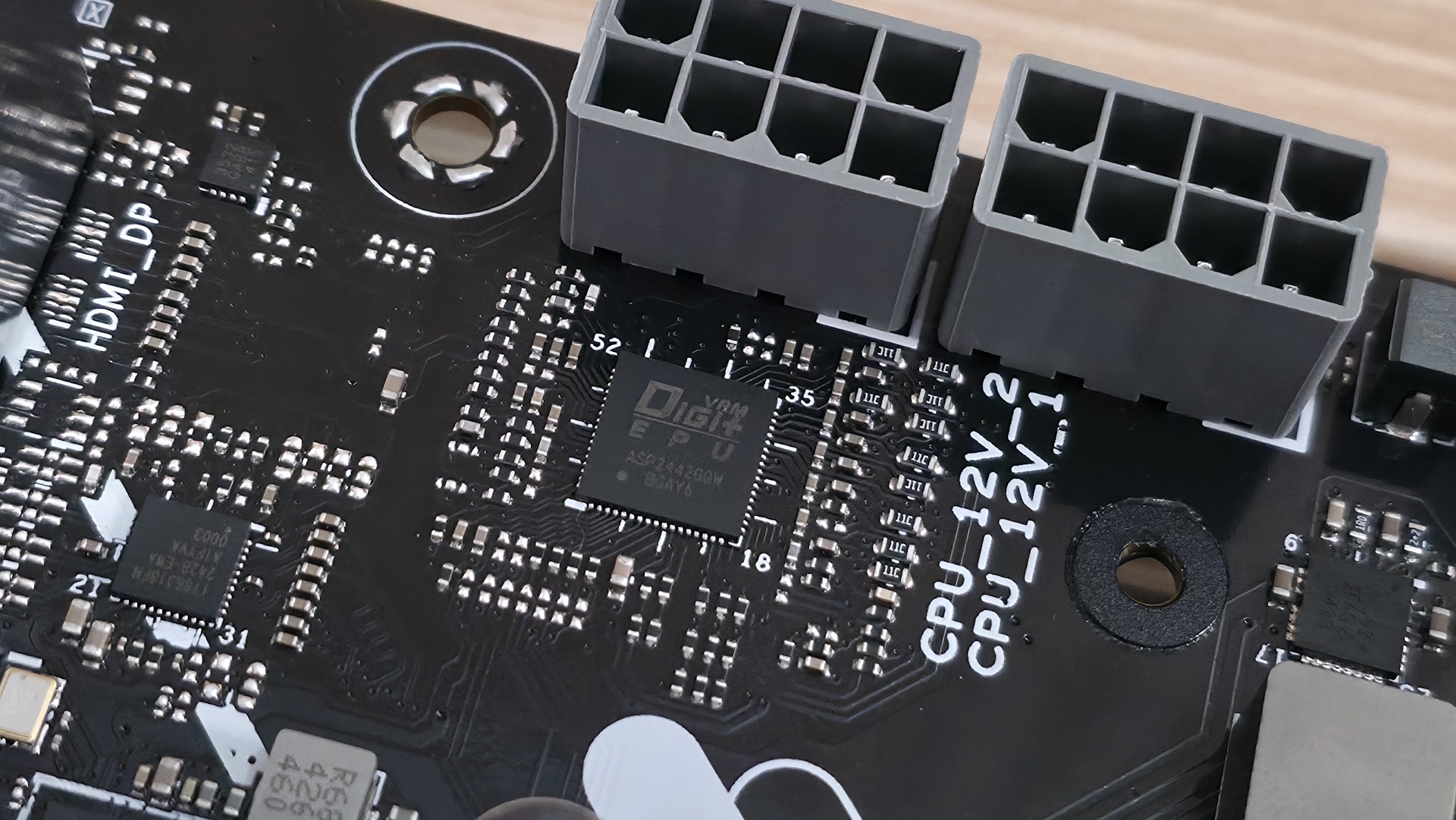
Power delivery on the Prime Z890-P isn’t the most robust we’ve seen, but it is appropriate for this class. It has 18 phases, 14 of which are dedicated to Vcore. Power is supplied to the Digi+ (ASP 2442GQW) controller via the 8-pin EPS connector. From there it heads on to 14 Vishay SIc639 DrMOS 80A MOSETs. The 1,120A available can handle the Core Ultra 7 270K Plus, the Core Ultra 5 250K Plus, and the Core Ultra 9 285K. You can even overclock; just be sure to keep air flowing in your chassis, as the components here will get warm with sustained heavy use.
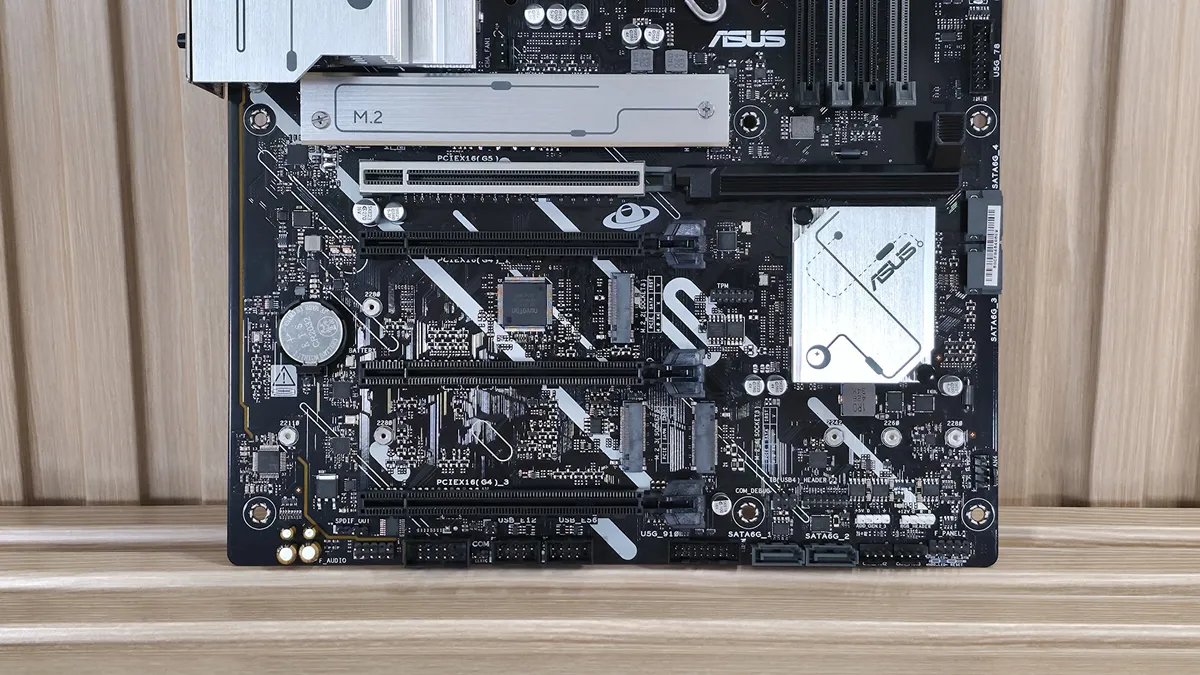
On the bottom half of the board, we’ll start on the left with the audio section. There, we see a couple of dedicated audio capacitors and the basic Realtek ALC897 codec. While this isn’t the best audio solution, it’s par for the course for most budget boards. You should still be happy with it, as it’s difficult to discern most of them without seeing the actual specifications.
In the middle of the board are multiple full-length PCIe slots, including M.2 sockets. Starting with PCIe, the topmost slot has reinforcement, which Asus calls Safeslot. It is your sole PCIe 5.0 x16 slot and connects through the CPU. The bottom three slots all connect through the chipset, and the middle two run up to PCIe 4.0 x4 and the bottom to PCIe 4.0 x1.
Among and around the PCIe slots are four M.2 sockets. The top socket, M.2_1 above the top PCIe slot and under the heatsink, is your CPU-connected PCIe 5.0 x4 (128 Gbps) socket. The other three M.2s all connect through the chipset and run at PCIe 4.0 x4 (64 Gbps), with M.2_4, the bottom-right socket, also supporting SATA-based M.2 devices. If you plan to use the others with hot-running drives, make sure they have heatsinks to prevent thermal throttling under sustained loads. But if you have a large video card, you won’t be able to use one with a large heatsink, as it will likely be under the video card with limited z-height.
All sockets support up to 80mm modules and can run RAID 0/1/5 modes for redundancy and/or increased speed (RAID is not a backup). Finally, moving past the chipset heatsink to the right edge, are two of the four SATA ports (supports RAID 0/1/5/10) - the other two are mounted vertically along the bottom edge.
Between the PCIe slots, M.2, USB, and SATA ports, there is no lane sharing. You can fill all the slots and sockets and still receive the full bandwidth from each. As great as that is, the compromise is fewer USB ports, many of which are slower (think USB 3.2 Gen 1 and 2.0). But you’ll find this in some flavor on all the boards without multiple USB hubs, as it’s a limitation of the Z890 chipset and the number of available lanes.
We've also captured several images of the IC's used to make this motherboard work consisting of a mix of Realtek for USB hub, Ethernet, and audio, and Vishay for MOSFETs.
Image
1
of
4
At the bottom of the board are a slew of headers. It offers your typical set of connectivity in this area, with nothing missing or worth a specific mention. Below we’ve listed all the connections across the bottom of the board.
- 3-pin SPDIF out
- Front panel audio
- 9-pin COM port
- 2-pin Clear CMOS jumper
- (2) USB 2.0 (380 Mbps) headers
- 19-pin USB 3.2 Gen 1 (5 Gbps) header
- (2) SATA ports
- 13-pin TB(USB4) header
- 3-pin ARGB header
- 4-pin RGB header
- (2) 4-pin Chassis fan headers
- Front panel
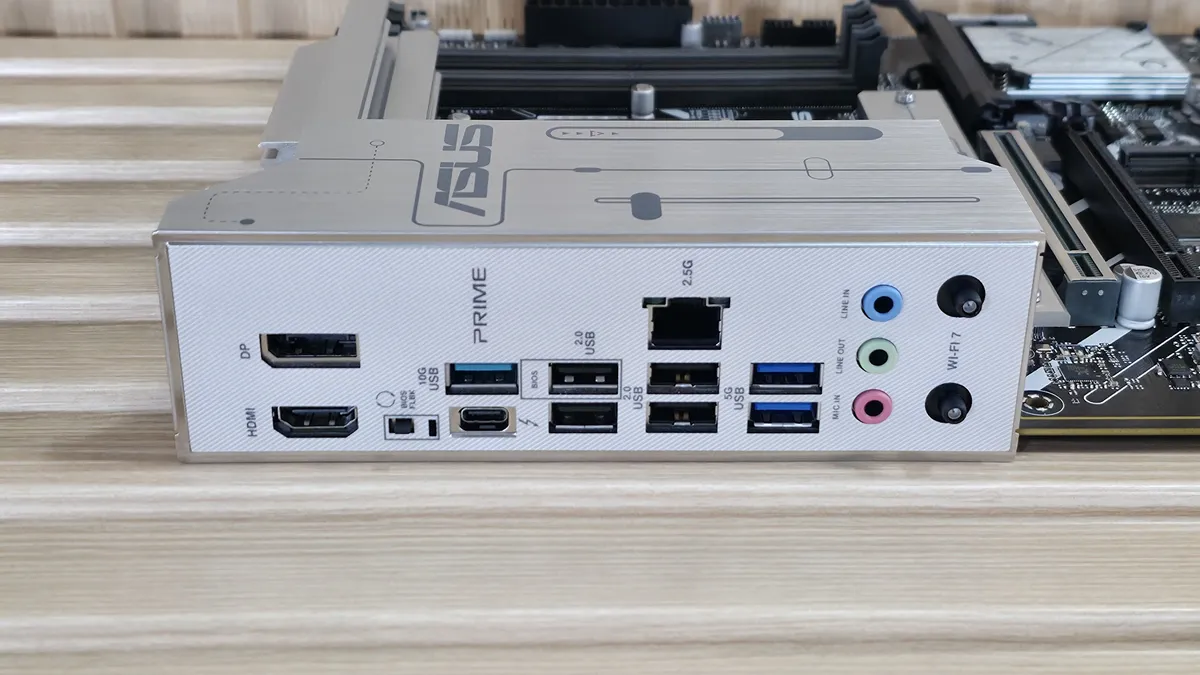
Flipping the board around to the rear IO, the Prime Z890-P offers basic connectivity for the platform. You get everything, but the eight total USB ports could be a challenge for users who rely on many USB-based devices on the back. On the left, we spy the DisplayPort (v1.4) and HDMI (v2.1) outputs to use with integrated video. Next to it is the tiny BIOS FlashBack button. The next stack holds the 40 Gbps Thunderbolt Type-C port and the only USB 3.2 Gen 2 (10 Gbps) port. Next to that are four USB 2.0 ports, and the Realtek-based 2.5 GbE port stacked on top. Rounding out the USB ports back here are two USB 3.2 Gen 1 (5 Gbps) ports. Continuing right, we find the 3-plug (all 3.5mm - there’s an SPDIF header) audio stack and finally, the quick-connectors for the integrated Wi-Fi 7 (2.9 Gbps).
There’s nothing particularly notable here; please confirm you are comfortable with the USB port count and speeds.