




It’s a given that speed and smoothness are what separate the best gaming monitors from average ones. Once you get to the short list of candidates for purchase, the next consideration is brightness and color. A vivid and luminant screen enhances the gaming experience almost as much as high refresh rates.
The brightest and most colorful category right now is Quantum Dot Mini LED. Full-array local dimming, when done right, can deliver blacks almost as deep as a good OLED and peak highlights over 1,000 nits. You’ll be hard-pressed to find an OLED that bright.
Monitors like this were once expensive, but here I have a sample from KTC, the M27T6S. This 27-inch Fast IPS monitor sports QHD 2560x1440 resolution, 200 Hz (210 Hz with overclock), a Mini LED backlight with 1,152 dimming zones, Quantum Dot wide gamut color, Adaptive-Sync, and HDR1000 for just $290 at this writing. Let’s take a look.
KTC M27T6S Specs
Swipe to scroll horizontally
Panel Type / Backlight | IPS / Mini LED |
| Row 1 - Cell 0 | 1,152 dimming zones |
Screen Size / Aspect Ratio | 27 inches / 16:9 |
Max Resolution and Refresh Rate | 2560x1440 @ 200 Hz |
| Row 4 - Cell 0 | 210 Hz w/overclock |
| Row 5 - Cell 0 | FreeSync and G-Sync Compatible |
Native Color Depth and Gamut | 8-bit / DCI-P3 |
Response Time (GTG) | 1ms |
Brightness (mfr) | 450 nits SDR |
| Row 9 - Cell 0 | 1,000 nits HDR |
Contrast (mfr) | 1,000:1 |
Speakers | None |
Video Inputs | 1x DisplayPort 1.4 |
| Row 13 - Cell 0 | 2x HDMI 2.0 |
Audio | 3.5mm headphone output |
USB | None |
Power Consumption | 28.8w, brightness @ 200 nits |
Panel Dimensions WxHxD w/base | 24.3 x 16.1-21.3 x 8.3 inches (617 x 409-541 x 211mm) |
Panel Thickness | 2.8 inches (72mm) |
Bezel Width | Top/sides: 0.35 inch (9mm) |
| Row 20 - Cell 0 | Bottom: 0.63 inch (16mm) |
Weight | 14.41 pounds (6.55kg) |
Warranty | 3 years |
KTC is new to me as a reviewer, but not to the market. It has been selling monitors in the US for 30 years, some under other badges, but since 2021, it has broken out as its own gaming brand. KTC means “Key To Combat” and focuses on high performance and value.
The M27T6S has an impressive list of attributes. A Mini LED panel with 1,152 dimming zones and HDR1000 for $290? That’s enough to drive a purchase on its own. A Quantum Dot film widens the color gamut to a near-record-setting 117.24% coverage of DCI-P3. That’s a lot of color, and it makes a significant difference, easily seen in a side-by-side comparison. You also get selectable gamuts for when you need sRGB or Adobe RGB. Accuracy out of the box is fair and gets better with calibration.
Gamers will enjoy the 200 Hz refresh rate, which can be reliably overclocked to 210 Hz with a switch in the OSD. There’s Adaptive-Sync, of course; it works with Nvidia and AMD graphics cards. And when running at slower frame rates, MPRT activates a backlight strobe to cut motion blur. The overdrive includes an Auto setting, which varies the amount of overshoot with changes in refresh rate.
A full-array local dimming (FALD) Mini LED delivers better depth and contrast than an edge-lit monitor. The M27T6S’s IPS panel had a typical 1,000:1 native contrast. However, turn on local dimming, and dynamic range jumps to over 41,000:1. Peak brightness is very high, with 540 nits in SDR mode and 1,300-nit highlights in HDR. The M27T6S is VESA DisplayHDR 1000 certified.
That super low price means a few things have been left out. There are no USB ports, speakers, or LED lights. But there are some gaming aids like aiming points, a timer, and an FPS counter. Local dimming has four levels, and HDR includes four modes of its own. You also get a somewhat unique look with areas of light gray in the back and on the stand, which makes a refreshing alternative to the usual black. It’s hard to overstate the value of a $290 monitor that offers this much.
Assembly and Accessories
Aside from a few simple white graphics, the M27T6S’s carton does nothing to attract attention. Only a small label on the side tells you what’s inside. The screen and upright, along with the base, are packed in crumbly foam and assembled without tools. A 100mm VESA mount is provided for aftermarket arms, but you’ll have to source your own fasteners. The cable bundle includes IEC for the internal power supply plus DisplayPort.
Product 360
Image
1
of
4
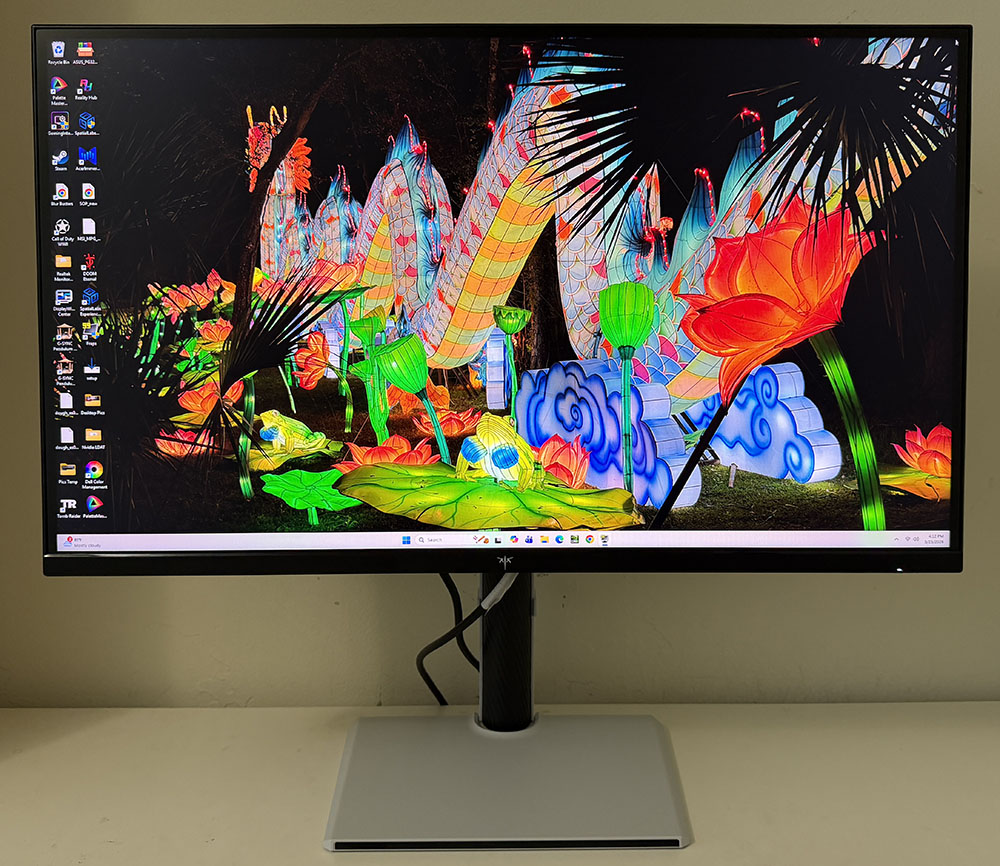
The back and base of the M27T6S look white in the photos, but they are a very light gray with a semi-matte finish. Black accents are textured and look a bit like carbon fiber. A purple KTC logo graces the back of the panel, and though it seems to glow, it is not backlit. The front bezel is flush and narrow with a tiny logo front and center. Reach around the back right to find the OSD joystick, which is the only control.
The upright includes a small cable clip and delivers full ergonomics. There is a 5.2-inch height adjustment, plus 5/20 degrees of tilt, 45 degrees of swivel, and a 90-degree portrait mode. Movements are firm, but there is a little wobble at the fulcrum. The M27T6S is stable, but you’ll need to tweak it a bit to get the screen exactly where you want it. The stand is tall enough to set the panel vertically while centering your eyepoint.
The input panel faces downward and includes two HDMI 2.0 ports, which top out at 144 Hz in QHD resolution. They are compatible with consoles and support HDR and VRR. A single DisplayPort 1.4 supports the full overclocked 210 Hz, along with Adaptive-Sync and HDR. There is a USB port, but it is only for service; it doesn’t accept peripherals or provide power. Audio is only available through the 3.5mm headphone jack; there are no internal speakers.
OSD Features
Pressing the M27T6S’s joystick brings up an organized OSD with six sub-menus. It includes input signal information plus HDR and Adaptive-Sync status.
Image
1
of
7
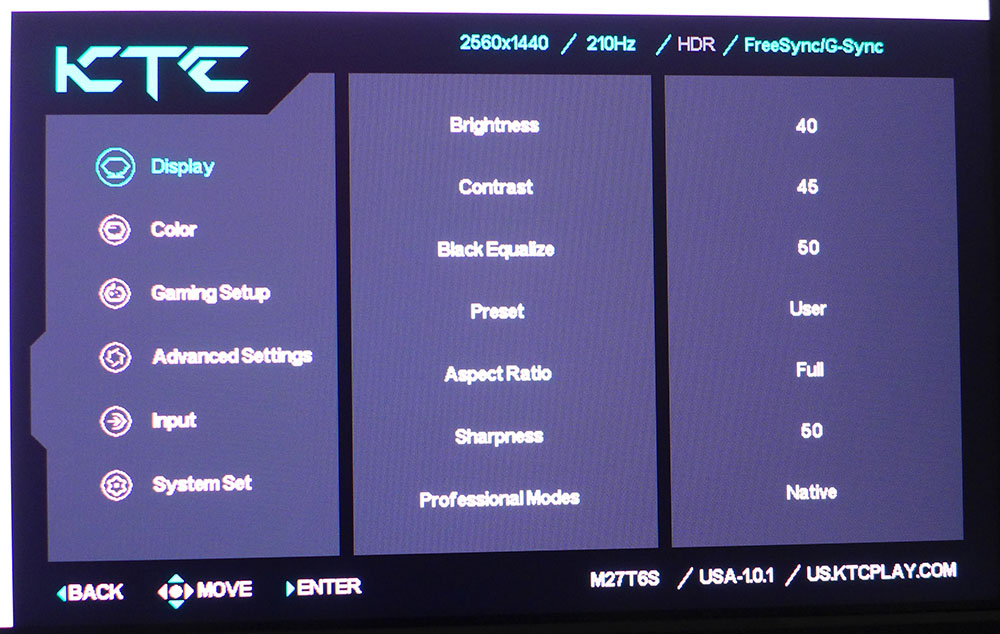
Display includes nearly everything needed to tweak the picture. After brightness and contrast, there’s a black equalizer control that brightens up shadow areas for better visibility. I found no need for this when local dimming was engaged. Preset is where you’ll find the nine picture modes. Changing any parameter puts the M27T6S into User mode, where all controls are active. At the bottom, Professional Modes contain the five color gamut selections. Native shows the monitor’s full color, which covers over 117% of DCI-P3.
The Color menu has four fixed color temps, plus RGB sliders, along with five gamma presets, hue and saturation for all six colors, and a low blue light slider. The M27T6S’s Gaming Setup includes overdrive with three fixed levels and a dynamic option that varies overshoot with frame rate. You can also engage MPRT (backlight strobe) for further blur reduction. It cuts brightness by around 20% and cancels Adaptive-Sync. But it works at 210 Hz and has none of the phasing artifacts common to this tech. It’s one of the best backlight strobes I’ve seen in a while.
Advanced Settings is where you’ll find the four HDR modes, which work when an HDR10 signal is present. HDR Cinema is the default and best choice there. If 1,300-nit highlights are too bright for your environment, the HDR600 mode dials back the peak. Or you can just lower the brightness slider, which remains active in HDR mode. Here also are the local dimming options with three fixed levels and an auto mode. They bump contrast up to over 41,000:1 and are especially effective for HDR content.
KTC M27T6S Calibration Settings
My M27T6S was a little cool in tone out of the box, with a lighter image than I expected. Gamma is set to 2.2 by default, but it measured closer to 2.0. A few tweaks of the RGB sliders and a change to the gamma 2.4 preset set things right. The Native color gamut setting is very colorful, especially in red and blue. It will appeal to most users, but if you want to dial it back just a bit, the Professional Modes include P3 and sRGB options. My recommended settings are below.
Swipe to scroll horizontally
Picture Mode | User |
Brightness 200 nits | 28 |
Brightness 120 nits | 11 |
Brightness 100 nits | 7 |
Brightness 80 nits | 3 (min. 67 nits) |
Contrast | 45 |
Gamma | 2.4 |
Color Temp User | Red 53, Green 48, Blue 46 |
Gaming and Hands-on
The value quotient was uppermost in my mind as I put the M27T6S through its paces. The gaming experience was on par with the best monitors I’ve reviewed, thanks to low input lag and an excellent overdrive. Though variable OD is an option, I found it worked best when set to Advanced. That tracks because my GeForce RTX 4090-equipped system pegged the frame rate at 210fps. QHD will let you do that with a wide variety of video cards. There was no need for additional processing to keep the action smooth and free of artifacts. Blur was minimal, not quite gone but well below the level of distraction.
Control response reminded me of the fastest monitors I’ve tested. You’ll see on the next page that it measures up to many faster, more expensive screens. Mouse and keyboard inputs were instantly translated into 180-degree turns and precise circle strafing. I could aim easily and consistently as well. The M27T6S is fully competition worthy.
The HDR picture was breathtaking in both color and contrast. The Mini LED backlight has 1,152 dimming zones, so it is very effective at boosting dynamic range. I measured almost 45,000:1 in HDR mode, and it presented an almost OLED-quality image. Blacks were true and finely detailed while highlights popped from the screen. I could see a case for the HDR600 mode or simply turning the brightness down because some flashes were a bit too dazzling when playing in my dimly lit office. The M27T6S is one of the few HDR monitors that lets you dial down the output. I noted that there were no internal speakers, so game audio had to be relegated to headphones, which I plugged into the 3.5mm jack. There are also no USB ports so those needing a hub won’t find it here.
For everyday use, the M27T6S works well with its 109ppi and a sharp image. Color is the star with vivid primaries that make it look even brighter. I normally set the peak to 200 nits for testing, but I found I had to reduce it a bit to 180 to keep fatigue from setting in. This is a seriously bright display that stands out from its competitors. My only complaint is that the stand is a bit wobbly. It keeps the display rooted, but adjustments take a little more trial and error to get right. I was happy to see a large height range so I could set the panel at vertical with my eyes at center screen.
Takeaway: The M27T6S is a great all-around display and an excellent gaming monitor. Though there are higher refresh rates out there, it made the most of its 210 Hz with a precise overdrive and completely usable MPRT backlight strobing. With low input lag, it delivered a competition-level play experience. The picture is incredibly bright and colorful for any purpose, from work to entertainment. With such a low price of admission, it’s hard to fault.
MORE: Best Gaming Monitors
MORE: How We Test PC Monitors
MORE: How to Buy a PC Monitor