The best gaming desktops don’t just chase raw speed – they deliver the right balance of power, style, and value. CyberPower’s Gaming Desktop GXi3800BSTV2 ($2,309.99 as tested) comes out swinging with a stylish new case, complete with analog lighting knob, a spotless interior, and plenty of RGB for a showroom look. Backed by an Intel Core Ultra 7 270K Plus and an Nvidia GeForce RTX 5070, it’s built to impress, and despite a few concessions, it’s hard not to admire how much CyberPower gets right for the money.
Design of the CyberPowerPC Gaming Desktop GXi3800BSTV2
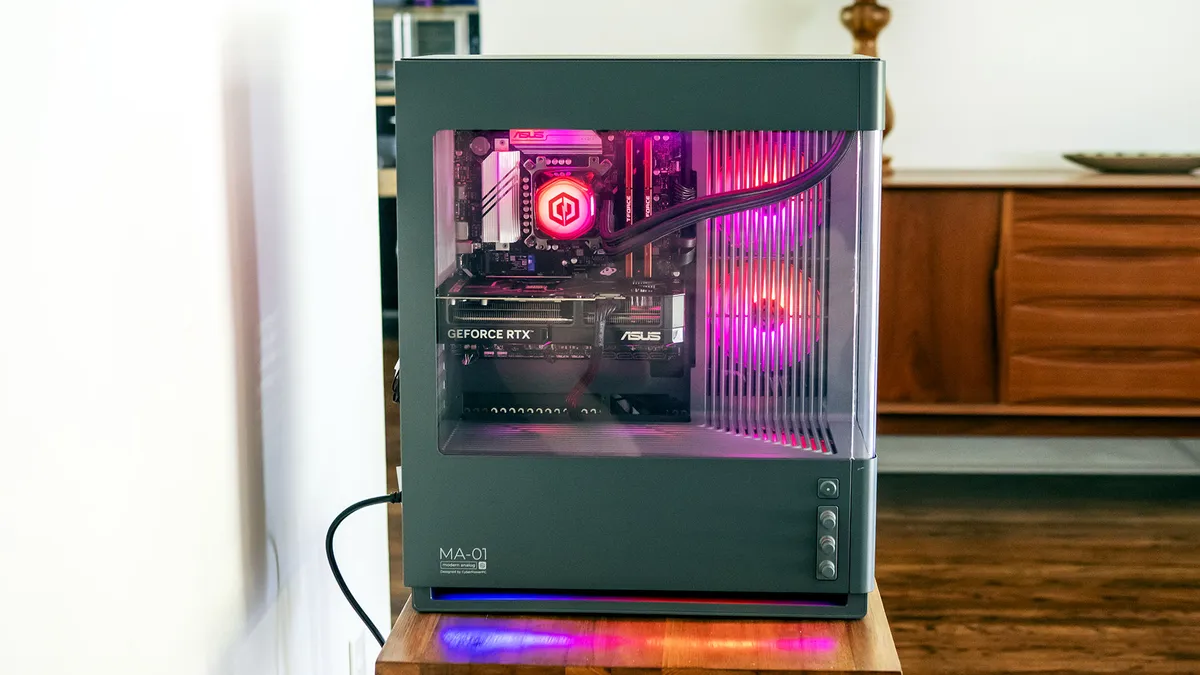
The biggest draw for this particular CyberPower configuration is its MA-01 case. It offers analog RGB controls and hidden fans and radiators for a strikingly modern look. Though the fans aren’t truly hidden – they’re concealed behind plastic grates to give the impression that they’re not there – it adds a level of polish and cleanliness to the interior lines.
Image 1 of 2
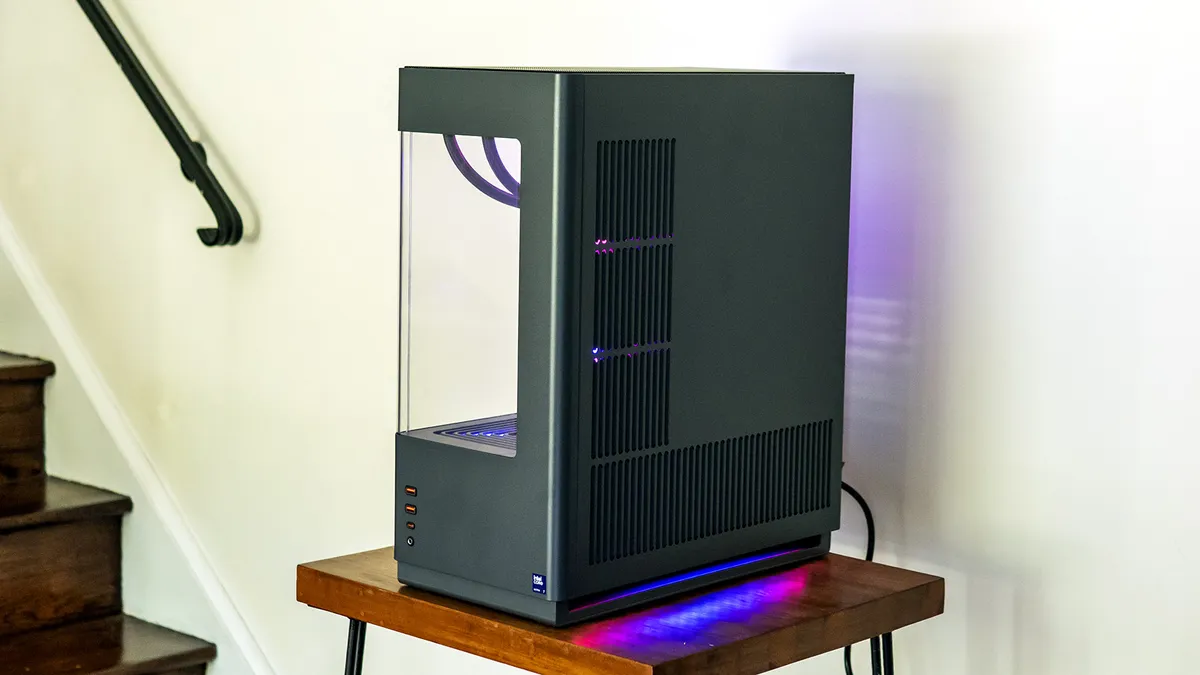
CyberPower did its best to avoid directly visible LEDs for a soft look and mostly succeeded; The LEDs in the CPU water block are an exception. It missed a minor opportunity to add more RGB lighting by using standard DIMMs rather than RGB-lit ones, but this tower arguably already runs over the line of too much RGB. Everything is visible through the artfully curved panel, which highlights the obvious about this case – it’s designed to be seen and shown off.
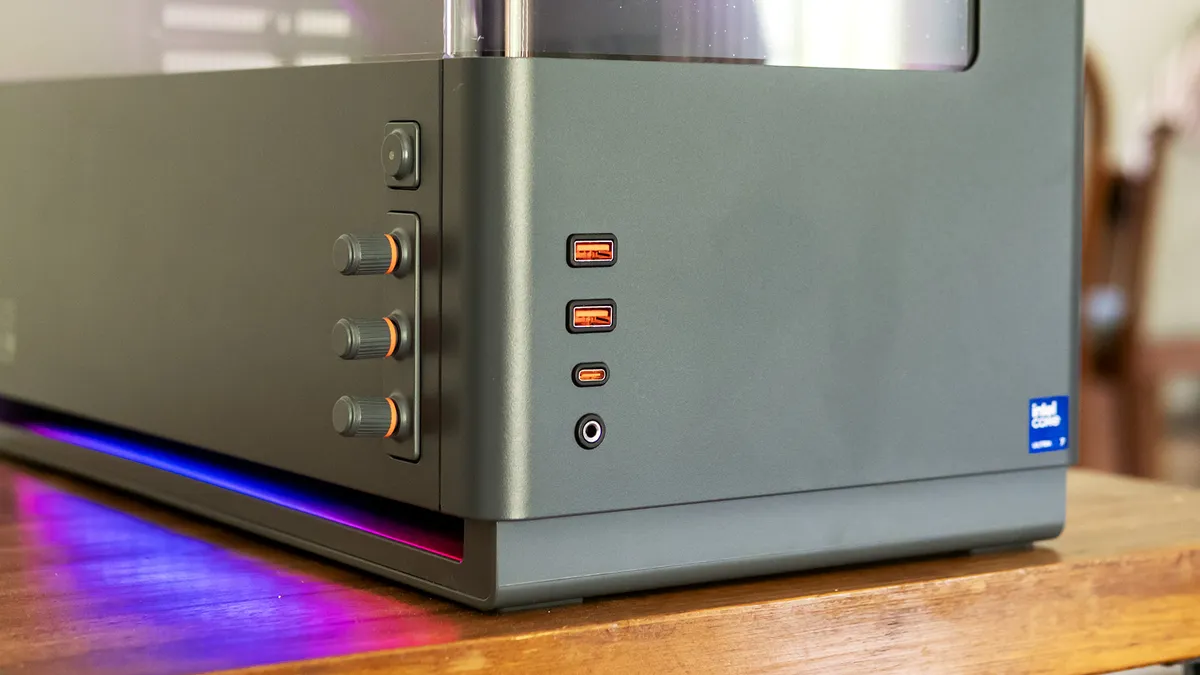
The three lighting dials are unlabeled. Starting from the top are controls for colors, brightness, and patterns; the latter includes breathing, strobing, and rainbow effects. (This seems to be the more basic version of the MA-01 case; on other versions, the dials are for Red, Green, and Blue for finer control.) Changing the color mix takes just seconds. You can also press in on any knob to achieve an all-white look. It’s easy to create a unique look without using software. (In fact, you can’t use software to control the lighting on this PC since the individual RGB elements are only recognized as a generic RGB strip in the Asus Armoury Crate app.)
Build quality is where this case, or at least this version, shows some budget elements. While it didn't creak or bend when I picked it up, the rolled steel panels feel thin. Additionally, the viewing panel is plastic, not tempered glass, and not as clear as it could be. Last, the analog knobs feel cheap, and the bottom one tended to fall off in my testing. Size-wise, this case is decidedly in mid-tower territory at 9.5 x 17.7 x 20.9 inches.
CyberPowerPC Gaming Desktop Specifications
Swipe to scroll horizontally
CPU | Intel Core Ultra 7 270K Plus |
Motherboard | Asus B860M Max Gaming AX |
Memory | 32GB DDR5-6400 (2x 16GB) |
Graphics | Nvidia GeForce RTX 5070 (Asus Dual Gaming OC; 12GB GDDR7, 2,542 MHz boost) |
Storage | 2TB PCIe 4.0 SSD (WD Blue SN5000) |
Networking | Wi-Fi 6 (RealTek RTL8851BE), 2.5 Gbps Ethernet (RealTek RTL8125) |
Front Ports | USB-C 3.2, 2x USB-A 3.2, 3.5 mm audio |
Rear Ports (Motherboard) | USB-C (20 Gbps), 4x USB-A 3.2, 4x USB 2.0, DisplayPort, 3x 3.5 mm audio |
Video Output (GPU) | HDMI, 3x DisplayPort |
Power Supply | 850 W non-modular |
Cooling | 360 mm AIO (CyberPower PC) |
Operating System | Windows 11 Home |
Dimensions (WxDxH) | 9.5 x 17.7 x 20.9 inches (241 x 450 x 531 mm) |
Price (as configured) | $2,309.99 |
Ports and Upgradeability on the CyberPowerPC Gaming Desktop
CyberPower’s desktop offers respectable input and output, starting on the lower front panel with one USB-C and two USB-A ports and a 3.5 mm audio jack. This port placement should work well if this desktop is on top of a desk. The power button is on the adjacent side next to the case lighting control dials.
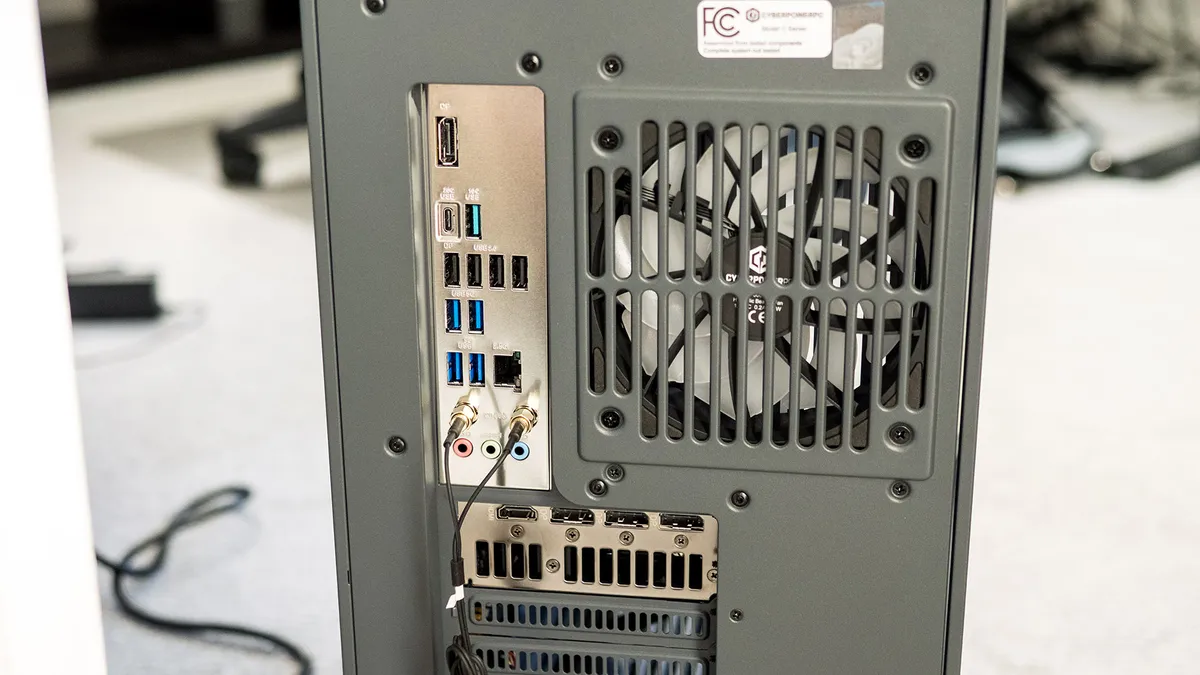
Around back, the Asus B860M Max Gaming AX motherboard offers USB-C (20 Gbps), four USB-A 3.2, four USB 2.0, DisplayPort, and three 3.5 mm audio jacks. At least one truly high-speed port like USB4 or Thunderbolt 4 would have been ideal. Also, Wi-Fi 6 from the built-in RealTek RTL8851BE wireless card is several years out of date.
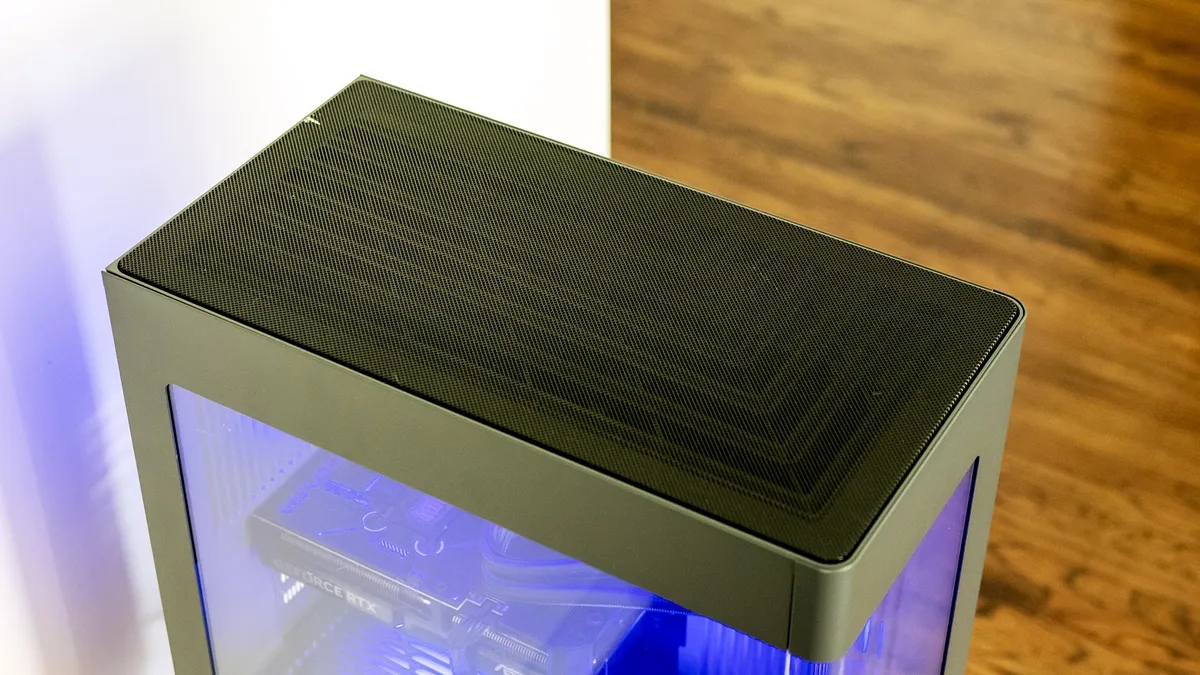
Getting inside this CyberPower’s case isn’t straightforward. Both side panels look like they should pull off, but they are actually screwed in at the top. The top grate, which doesn’t have any obvious fingerholds, must be popped off to access the two Philips-head screws securing each panel. Removable dust filters line the right panel.
Image 1 of 2
Motherboard expansion slots include one PCIe 5.0 x16, two PCIe 4.0 x16 supporting x4, and one PCIe 4.0 x16 supporting x1. Memory can be expanded with four DIMM slots. There are also three M.2 slots, one of which is PCIe 5.0. The other slots support PCIe 4.0, with one on the front and one on the back of the board. The latter is accessible by removing the tower’s right panel. You can also see the 3.5-inch drive cage in the lower chamber.
Image 1 of 2
The 850-watt power supply isn’t modular, leading to a mass of tied-off cables, but it easily supplies enough juice for the components in this PC. CyberPower’s cable management is acceptable, with cables routed and bundled neatly enough for a mass-market PC.
Gaming and Graphics on the CyberPowerPC Gaming Desktop
The CyberPower we tested features a Core Ultra 7 270K Plus processor, Nvidia RTX 5070 graphics, and 32GB of DDR5-6400 RAM.
For some informal play, I launched Crysis Remastered. Playing at a 3840 x 2160 resolution with everything at “Can it run Crysis?” settings, I saw between 75 and 85 frames per second (FPS) outdoors, with slight dips in the jungle and wide-open landscapes with lots of shadows. Overall, the gameplay was exceptionally smooth.
We used two gaming desktops for comparison: the Acer Nitro 65 ($2,069.99 as tested) combines a Ryzen 9 9900X with an RTX 5070 while the iBuyPower Y40 Pro ($1,899.99 when we tested it, but very difficult to find now) pairs a Ryzen 9 7900X with an RTX 5070 Ti.
Image 1 of 5
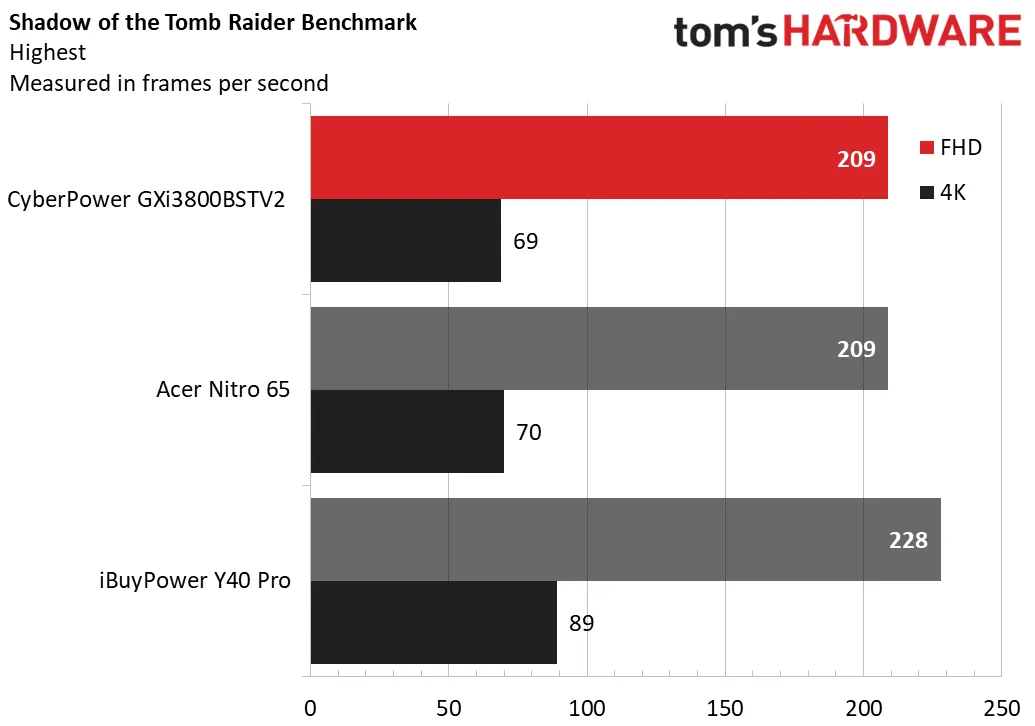
Starting in Shadow of the Tomb Raider at the Highest detail preset, the CyberPower and Acer tied the 1080p numbers at 209 FPS and were within one frame at 4K. Naturally, the RTX 5070 Ti-equipped iBuyPower dominated both, with 228 FPS at 1080p.
The story was similar in CyberPunk 2077 at Ray Tracing Ultra settings. The CyberPower achieved 71 FPS at 1080p but fell to 21 FPS at 4K, being within one FPS of the Acer in both instances. The iBuyPower surged ahead, with 87 FPS at 1080p, but even it couldn’t make a playable time of it at 4K, with just 29 FPS.
In Far Cry 6 at Ultra settings, the CyberPower led the 1080p scores with 141 FPS, well ahead of the Acer (132 FPS) and iBuyPower (125 FPS). Things evened out at 4K, with the CyberPower and Acer at 81 FPS and 82 FPS, respectively, and the iBuyPower about 25% faster, at 102 FPS.
Red Dead Redemption 2 at Medium settings was a disappointment for CyberPower, with its 126 FPS at 1080p noticeably trailing Acer (141 FPS) and especially iBuyPower (161 FPS). The gaps narrowed at 4K, though CyberPower was still last – it scored 51 FPS next to the Acer’s 54 FPS.
CyberPower redeemed itself in Black Myth: Wukong at Cinematic settings, its 55 FPS at 1080p overtaking the Acer (50 FPS) while being behind the iBuyPower (66 FPS). It tied the Acer with 25 FPS at 4K though it couldn’t catch the iBuyPower (32 FPS).
Overall, though CyberPower’s Core Ultra 7 270K Plus didn’t give its RTX 5070 enough of a boost to overcome the iBuyPower’s RTX 5070 Ti, it still produced impressive numbers, often leading the RTX 5070-equipped Acer by a decent amount.
Equipped with the RTX 5070, this CyberPower offers ample horsepower for gaming at 1080p/1440p and 4K, though fluid playability at 4K in the most demanding titles may require reducing the visual quality settings.
To stress test gaming desktops, we simulate half an hour of gaming by running 15 loops of the Metro: Exodus benchmark at RTX settings. The CyberPower desktop averaged 138 FPS with only a few tenths of an FPS variance between runs, indicating stable thermal performance. The Core Ultra 7 270K Plus ran at an average temperature of 48 degrees Celsius while the P-cores ran 5.34 GHz at and the E-cores 3.77 GHz. The RTX 5070 ran at 61 C and had an average core clock of 2.74 GHz.
During testing, the desktop’s fans were noticeable but not intrusive; while gaming, I could hold a conversation with someone sitting next to me without the fan noise becoming a topic.
Productivity Performance on the CyberPowerPC Gaming Desktop
Equipped with a Core Ultra 7 270K Plus, 32GB of RAM, and a 2TB PCIe 4.0 SSD, the CyberPower proved formidable in our productivity testing.
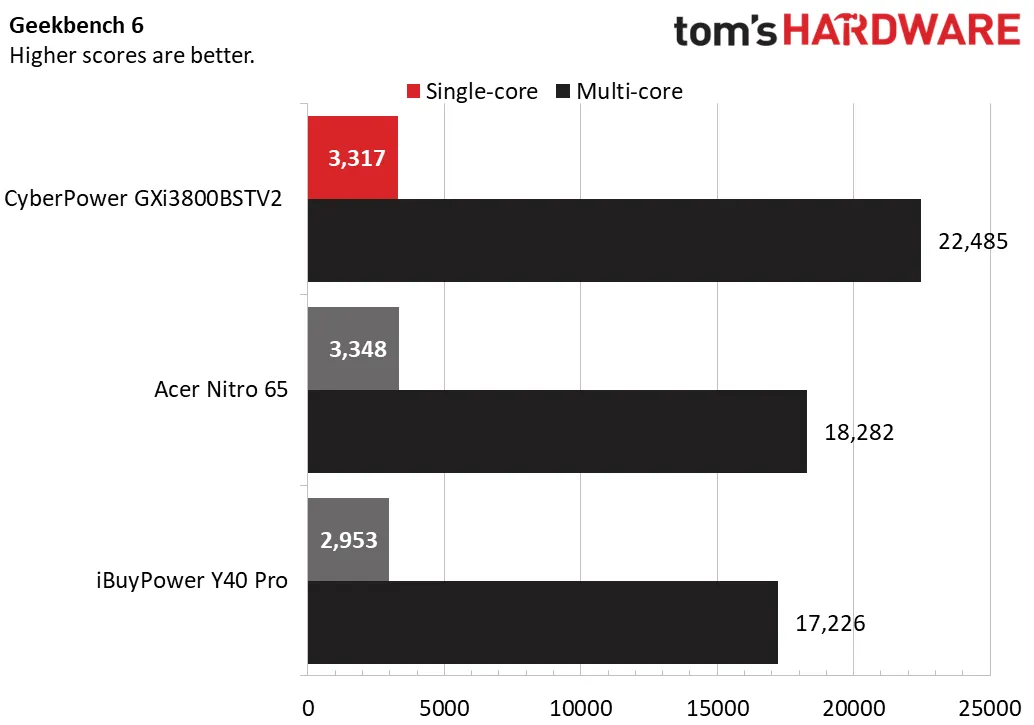
While the rig's single-core score of 3,317 points in the Geekbench 6 benchmark was imperceptibly behind Acer's 3,348 points, it handily outclassed the iBuyPower’s older Ryzen 9 7900X and its 2,953 points. But it truly showed its strength in multi-core, with 22,485 points to Acer’s 18,282 and iBuyPower’s 17,226.
Image 1 of 3
CyberPower slotted into the middle of our 25GB file transfer test, with 1,616.52 MBps to lead iBuyPower’s 1,501.6 MBps and trail Acer’s 1,719.57 MBps.
Last, this CyberPower dominated our 4K-to-1080p Handbrake test, completing the transcode in just 1 minute and 45 seconds. The iBuyPower (2:29) and Acer (2:51) were well off its pace.
Keyboard and Mouse with the CyberPowerPC Gaming Desktop
The GXi3800BSTV2 includes RGB-centric wired peripherals that might tide you over if you’re sticking to a budget. The CyberPower Nohi 02 keyboard is a basic desktop keyboard with a few notable extras. Though it’s described as a mechanical-like feel, its rubbery keypresses say otherwise. I nonetheless found it comfortable for extended typing and gaming. The layout is as expected and there's a handy volume scroller at top left.
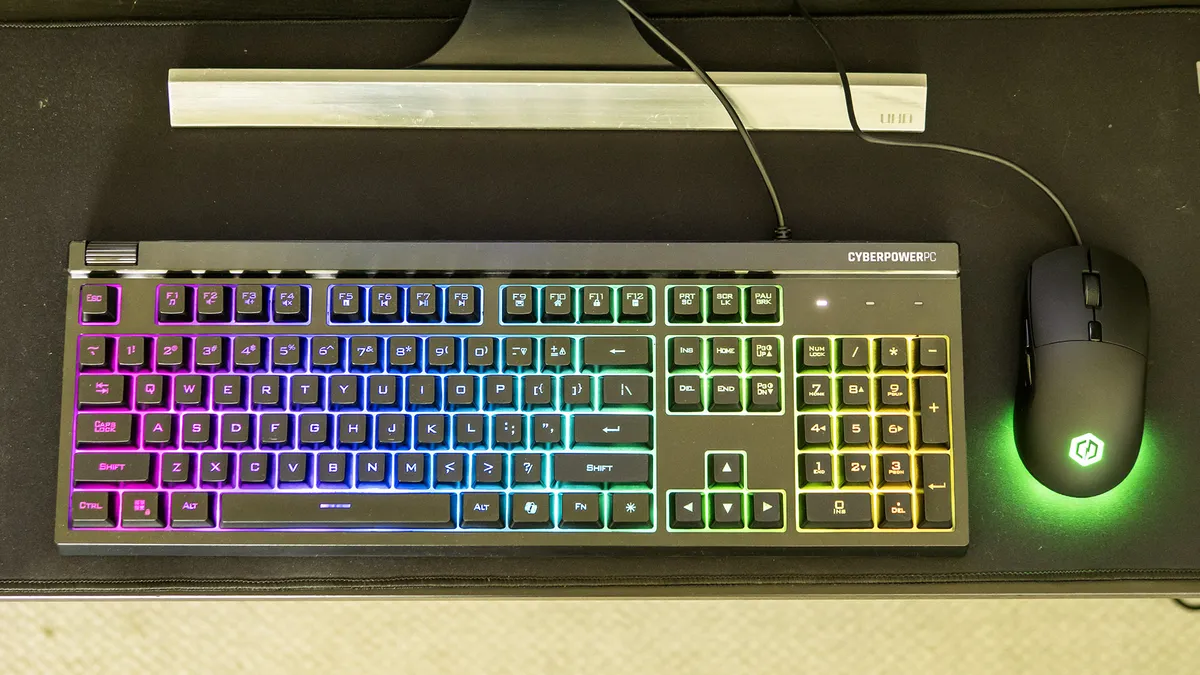
The keyboard's RGB backlighting is bright and vibrant. No peripheral software is included, but you can switch between different lighting patterns using Fn and one of the number keys (1-9). Effects include a respectable assortment of wave, color shift, sweep, solid color, and several breathing variations. Lighting can be toggled with the key next to right Alt, effect speed with Fn + plus or minus, and brightness with Fn + Page Up/Down.
The CyberPower Elite M2 wired mouse is also basic. It’s only for right-handers, featuring two buttons on the left side. There are five sensitivity settings – the DPI numbers aren’t published – which you toggle pressing the button behind the scroll wheel. Average in size, the mouse fits my medium hands well and offers tactile, engaging clicks. The RGB effects illuminate the palm reset logo and the semicircle around the palm rest. Various color cycling patterns are available – simply hold down the DPI button to switch between them.
Software and Warranty on the CyberPowerPC Gaming Desktop
CyberPower’s software loadout is minimal. Asus Armoury Crate provides hardware monitoring and software overclocking but little else – the RGB devices in this desktop are only recognized as an addressable strip, and can’t be controlled there. (That’s what the knobs on the tower are for.) Otherwise, besides the default Windows 11 apps, there’s no extra software.
This CyberPower from Best Buy carries a one-year parts and labor warranty while systems purchased from CyberPower include two years of parts and three years of labor.
CyberPowerPC Gaming Desktop Configurations
Our CyberPower review unit features a Core Ultra 7 270K Plus processor with 360 mm liquid cooling, an Nvidia RTX 5070 graphics card, 32GB of RAM, a 2TB SSD, and Windows 11 Home for $2,309.99 from Best Buy.
Best Buy didn’t have any other CyberPower desktops with the MA-01 case, though CyberPower offered many configurations starting at $1,699, which gets you a Ryzen 7 9700X and an RTX 5060 Ti. The top preconfigured model ran $3,815 with a Ryzen 9 9950X3D, an RTX 5080, 32GB of RAM, and a 4TB SSD. CyberPower also offers built-to-order models starting at $1,245.
Competing desktops with an RTX 5070 bracketed our CyberPower review unit’s price. At Best Buy, an Asus ROG G700 was $2,409.99 with a Core Ultra 7 265KF while an HP Omen 35L was $1,999, though it dropped to a Ryzen 7 8700F and a 1TB SSD.
To compare CyberPower’s prices to what it would cost to build a similar PC yourself, I mock-configured several systems using the AI PC builder on Newegg, landing within $100 in most instances. That's a pretty nominal premium to have the system built and ready to go.
Bottom Line
CyberPower’s GXi3800BSTV2 earns its place among the better prebuilt gaming desktops. The company's MA-01 case gives it a distinctive look, and the analog lighting controls mean you don't need software to dial in a unique theme. Equipped with a Core Ultra 7 270K Plus, 360 mm liquid cooling, and an RTX 5070, it produces strong gaming performance without getting too loud. You even get decent peripherals.
Some concessions were made to hit its price: the case relies on plastic instead of tempered glass, wireless is limited to Wi-Fi 6, and there are no Thunderbolt 4/USB4 ports. Even so, it still makes for a compelling value, even next to DIY builds. For gamers who want a flashy tower with the performance to match – and the convenience of a full-system warranty — the GXi3800BSTV2 is an easy system to recommend.