



惯性聚合 高效追踪和阅读你感兴趣的博客、新闻、科技资讯
阅读原文 在惯性聚合中打开

推荐订阅源

Threat Intelligence Blog | Flashpoint
Microsoft Azure Blog
博客园 - 三生石上(FineUI控件)
WordPress大学
WordPress大学
人人都是产品经理
人人都是产品经理
钛媒体:引领未来商业与生活新知
钛媒体:引领未来商业与生活新知
博客园 - 聂微东
Jina AI
Jina AI
奇客Solidot–传递最新科技情报
奇客Solidot–传递最新科技情报
T
Tailwind CSS Blog
罗磊的独立博客
爱范儿
爱范儿
OSCHINA 社区最新新闻
OSCHINA 社区最新新闻
Apple Machine Learning Research
博客园 - Franky
阮一峰的网络日志
阮一峰的网络日志
雷峰网
雷峰网
博客园 - 叶小钗
美团技术团队
让小产品的独立变现更简单 - ezindie.com
月光博客
月光博客
freeCodeCamp Programming Tutorials: Python, JavaScript, Git & More
大猫的无限游戏
大猫的无限游戏
The Cloudflare Blog
Last Week in AI
Last Week in AI
S
SegmentFault 最新的问题
博客园 - 【当耐特】
小众软件
小众软件
Hugging Face - Blog
Hugging Face - Blog
量子位
宝玉的分享
宝玉的分享
V
Visual Studio Blog
博客园_首页
IT之家
IT之家
V
V2EX
腾讯CDC
aimingoo的专栏
aimingoo的专栏
博客园 - 司徒正美
Microsoft Security Blog
酷 壳 – CoolShell
酷 壳 – CoolShell
H
Hackread – Cybersecurity News, Data Breaches, AI and More
Blog — PlanetScale
Blog — PlanetScale
I
InfoQ
有赞技术团队
有赞技术团队
J
Java Code Geeks
Recorded Future
Recorded Future
Engineering at Meta
Engineering at Meta
Vercel News
Vercel News
CTFtime.org: upcoming CTF events
H
Help Net Security

The GitHub Blog

The cost of saying yes has changed GitHub for Beginners: Your roadmap to mastering the GitHub essentials Better tools made Copilot code review worse. Here's how we actually improved it. How GitHub gave every repository a durable owner Automating cross-repo documentation with GitHub Agentic Workflows GitHub availability report: June 2026 How GitHub Copilot enables zero DNS configuration for GitHub Pages Q1 2026 Innovation Graph update: Open source collaboration is accelerating worldwide How GitHub used secret scanning to reach inbox zero 6 security settings every GitHub maintainer should enable this week How GitHub maintains compliance for open source dependencies Highlights from Git 2.55 Inside the Advisory Database and what happens when vulnerability volume breaks records GitHub and UNDP team up to advance development priorities in Ghana with open source Transitioning as a Hubber Evaluating performance and efficiency of the GitHub Copilot agentic harness across models and tasks I automated my job (and it made me a better leader) GitHub joins coalition advocating for fixes to California AI Transparency Act to protect open source From pledge to practice: Building a more inclusive open source ecosystem How we built an internal data analytics agent How pull request limits are cutting down the noise What are git worktrees, and why should I use them? GitHub Copilot CLI for Beginners: Overview of common slash commands Accelerating researchers and developers building multilingual AI with a new open dataset How we made GitHub Copilot CLI more selective about delegation GitHub availability report: May 2026 Making secret scanning more trustworthy: Reducing false positives at scale Give GitHub Copilot CLI real code intelligence with language servers From one-off prompts to workflows: How to use custom agents in GitHub Copilot CLI GitHub for Beginners: Answers to some common questions GitHub Universe is back: All together now, in the agentic era GitHub Copilot app: The agent-native desktop experience Still a developer. Just outside. Our latest GitHub Shop collection is here. GitHub for Beginners: Getting started with Git and GitHub in VS Code GitHub recognized as a Leader in the Gartner® Magic Quadrant™ for Enterprise AI Coding Agents for the third year in a row Beyond the engine: 10 open source projects shaping how games actually get made Building GitHub’s next chapter in accessibility Investigation update: GitHub Enterprise Server signing key rotation Take your local GitHub sessions anywhere Building a general-purpose accessibility agent—and what we learned in the process Raising the bar: Quality, shared responsibility, and the future of GitHub’s bug bounty program GitHub availability report: April 2026 From latency to instant: Modernizing GitHub Issues navigation performance Dungeons & Desktops: 10 roguelikes that never die (because their communities won’t let them) GitHub Copilot individual plans: Introducing flex allotments in Pro and Pro+, and a new Max plan Dungeons & Desktops: Building a procedurally generated roguelike with GitHub Copilot CLI GitHub for Beginners: Getting started with OSS contributions Why age assurance laws matter for developers How researchers are using GitHub Innovation Graph data to reveal the “digital complexity” of nations Improving token efficiency in GitHub Agentic Workflows Agent pull requests are everywhere. Here’s how to review them. Validating agentic behavior when “correct” isn’t deterministic Welcome to Maintainer Month: Celebrating the people behind the code Register now for OpenClaw: After Hours @ GitHub GitHub Copilot CLI for Beginners: Interactive v. non-interactive mode GitHub for Beginners: Getting started with Markdown Securing the git push pipeline: Responding to a critical remote code execution vulnerability Highlights from Git 2.54 Building an emoji list generator with the GitHub Copilot CLI Bringing more transparency to GitHub’s status page How GitHub uses eBPF to improve deployment safety Build a personal organization command center with GitHub Copilot CLI Developer policy update: Intermediary liability, copyright, and transparency Hack the AI agent: Build agentic AI security skills with the GitHub Secure Code Game How exposed is your code? Find out in minutes—for free GitHub for Beginners: Getting started with GitHub Pages GitHub Copilot CLI for Beginners: Getting started with GitHub Copilot CLI GitHub availability report: March 2026 GitHub Universe is back: We want you to take the stage GitHub Copilot CLI combines model families for a second opinion The uphill climb of making diff lines performant Securing the open source supply chain across GitHub Run multiple agents at once with /fleet in Copilot CLI Agent-driven development in Copilot Applied Science GitHub for Beginners: Getting started with GitHub security What’s coming to our GitHub Actions 2026 security roadmap
Getting more from each token: How Copilot improves context handling and model routing
Natalie Guevara · 2026-06-18 · via The GitHub Blog

As Copilot takes on more agentic work, from planning and editing to debugging, reviewing, and calling tools across longer sessions, efficiency means more than using fewer tokens. It means being smarter about how you use them.

Increasing efficiency starts with reducing what Copilot has to repeat from turn to turn, including context, tool definitions, and cached state. It continues with choosing the right model for the job. A quick explanation, a focused edit, and a complex multi-file change should not all be treated the same way.

We are working on both: improving the Copilot harness so more of each session goes toward the task itself, and expanding Auto so Copilot can pick the model that fits the work without asking developers to make that choice every time. This post focuses on harness improvements in GitHub Copilot for VS Code and on ongoing work to expand Auto across Copilot surfaces.

In longer GitHub Copilot sessions in VS Code, the harness prepares a lot of recurring information for the model: instructions, repository context, conversation history, available tools, and the current state of the task. Some of that context is needed. Some of it can be cached, deferred, or loaded only when it becomes relevant.

Two improvements in GitHub Copilot for VS Code are doing most of the work here. Prompt caching helps Copilot reuse model state for repeated prompt prefixes instead of recomputing the same prefix on every request. Tool search lets the model load tool definitions on demand, instead of sending every full tool schema into context on every turn.

That matters more as agents use more tools. A session may need access to MCP tools, terminal commands, file operations, workspace search, and product-specific actions. Loading every full tool definition up front adds fixed cost to each turn, even when only a small number of tools are relevant to the task. With tool search, Copilot can keep the available toolset broad while sending less unnecessary tool schema into the model.

For a deeper technical look at the implementation, including prompt caching, cache-control breakpoints, provider-specific tool search, and how these changes work across long-running agentic sessions, read the VS Code technical deep dive.

Where GitHub Copilot auto model selection fits in

Auto answers a practical question: which model is the best fit for this task right now?

After your first prompt, Copilot uses task intent and current model health to choose a model that best fits the task. Different kinds of work, like quick explanations, focused edits, or multi-file changes, do not all benefit from the same level of reasoning, so Auto makes that call without requiring you to tune model settings.

In our evaluations, no single model consistently performed best across tasks. In many cases, a more efficient model reached the same outcome, while stronger models mattered most when the task required deeper reasoning. Auto learns where stronger reasoning improves the result. It routes up when the task demands it and stays more efficient when it does not. The goal is not to trade quality for cost, but to use the model that best fits the work.

How Auto selects the right model

Auto combines two signals: what model is healthy and available right now, and what kind of work Copilot is being asked to do.
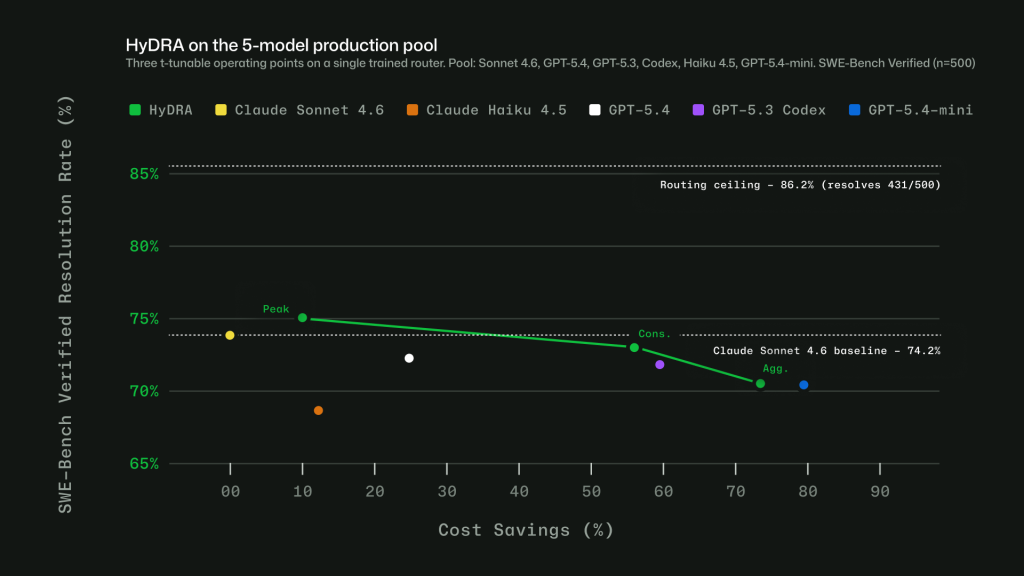
  • Real-time model health: a dynamic engine tracks model availability, utilization, speed, error rates, and cost. A model may be capable of handling a task, but that does not mean it is the best choice at that moment. Auto takes current system conditions into account so Copilot can route to a model that is both capable and ready to respond.
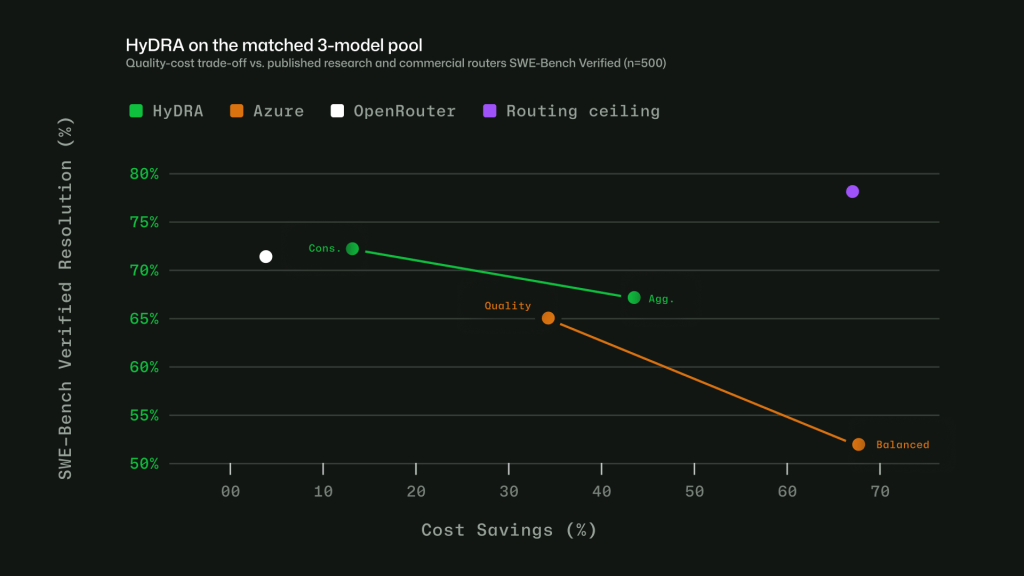
  • Task-aware routing with HyDRA: a routing model that considers factors like reasoning depth, code complexity, debugging difficulty, and tool orchestration needs. HyDRA identifies models that can meet the quality bar for the task, then chooses the best fit among them.
Chart shows HyDRA quality vs cost savings across a 5 model production pool. Three HyDRA operating points illustrate tunability: (peak) exceeds Sonnet at 12.9% savings; (agg.) balances quality for 72.5% savings. 
Figure 1: Three HyDRA operating points illustrate tunability: (Peak) exceeds Sonnet at 12.9% savings; (Agg.) balances quality for 72.5% savings.
Chart showing quality and cost tradeoffs of HyDRA and other published research and commercial routers using SWEBench benchmarks. HyDRA (Cons.) ties OpenRouter Auto on resolution rate (70.8%) at 3.3x the savings. HyDRA (Aggr.) outperforms both Azure Foundry operating modes. 
Figure 2: HyDRA (Cons.) ties OpenRouter Auto on resolution rate (70.8%) at 3.3x the savings. HyDRA (Agg.) outperforms both Azure Foundry operating modes.

Taken together, these signals let Auto avoid a one-size-fits-all approach. The point is not to send every task to the biggest model, or every task to the cheapest one. It is to choose the model that fits the work.

Making Auto work in practice

Getting routing right in evaluations is only part of the problem. To make Auto useful in real workflows, we also had to account for how developers actually use Copilot: conversations get longer, context builds up, tasks shift, and developers work in many languages.

Cache-aware routing. Switching models on every turn may sound flexible, but it can work against efficiency. When a conversation stays on the same model, the prompt prefix can be cached and reused across turns. Switching models mid-conversation breaks that cache, which can cost more than the routing change saves. Auto avoids that by routing at natural cache boundaries: on the first turn, when there is no cache to lose, and after compaction, when Copilot summarizes older turns and the prompt prefix resets. Between those points, the selected model stays in place so the cache can keep building.

Routing across languages. Copilot serves developers around the world, so routing has to work in languages other than English. We trained the routing model on conversations across 16 language families, including CJK, European, and others. In evaluations, routing accuracy stayed within four points of the English baseline across language groups, with no statistically significant quality gap.
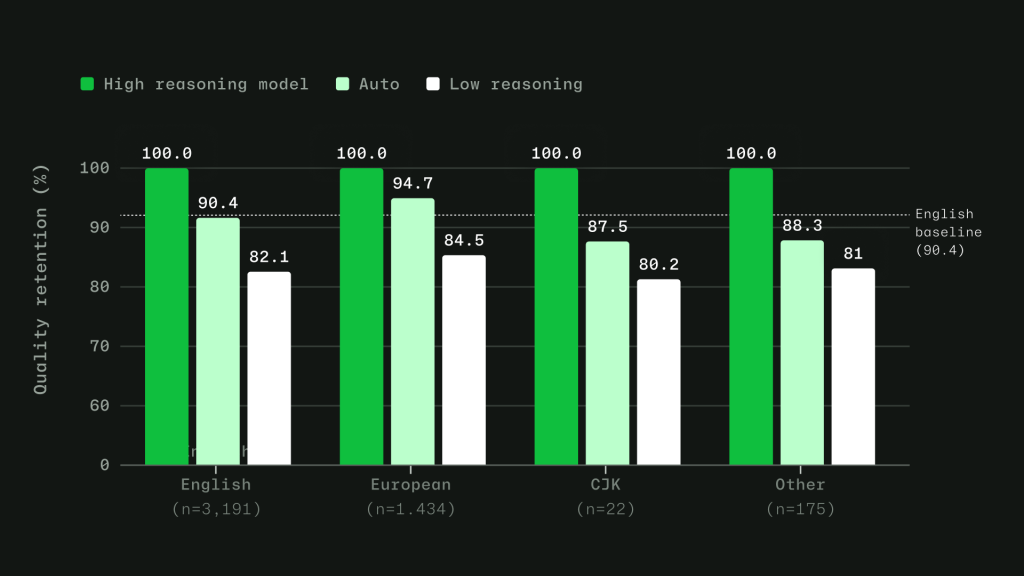
Chart showing the efficacy of high reasoning, low reasoning, and Auto across English, European, CJK, and other script families. Evaluation is based on an evaluation set sampled from production VS Code chat telemetry across 19 languages.
Figure 3: Intelligent routing stays within 4 points of English baseline. Model evaluations across English, European, CJK, and other script families, based on a held out evaluation set sampled from production VS Code chat telemetry across 19 languages.

Learning when escalation matters. Instead of labeling tasks as simply “easy” or “hard,” we trained the router to learn where models actually diverge. For each training query, responses from a less capable model and a more capable model are scored across quality dimensions. The router learns when the stronger model adds value, and when a more efficient model can produce an equally good result. For context-dependent messages in longer agentic sessions, the router is trained on complete multi-turn conversations, including the original user intent, recent assistant responses, and conversation metadata.

Auto with task intent is expanding

Auto with task intent is already live in Visual Studio Code, github.com, and mobile. It gives Copilot more signal about the kind of work you are doing, whether that is coding, debugging, planning, or using tools, so it can make a better model choice for the task.

We are continuing to expand that experience across Copilot. Next, we are bringing Auto with task intent to more surfaces and adding more ways for teams to make Auto the default.

  • Auto with task intent is coming to Copilot CLI, GitHub App, and additional IDEs.
  • Copilot Free and Student plans will be simplified to leverage Auto as the only model selection option.
  • Admin controls will let organizations set Auto as the default or enforce Auto as the only option.

Getting more value from your AI credits

Copilot is getting more efficient by default, but a few habits can help your credits go further.

  • Start with Auto. Auto is the strong default for many tasks because it chooses a model based on what you are trying to do, without making you pick one manually every time.
  • Keep context focused. Start a new session when you switch tasks, compact long-running sessions when needed, and mention the files you want Copilot to use when you already know where the relevant code lives. Less unnecessary context means more of the session goes toward the actual work.
  • Avoid changing models or settings mid-session. Switching models, reasoning levels, context size, or tool configuration can break cache reuse and make Copilot rebuild context. Set up the session the way you want it, then keep related work together.
  • Plan before parallelizing. For larger tasks, ask Copilot to plan first. Parallel agents can be useful when work can truly be split up, but they also consume credits in parallel, so use them deliberately.
  • Use only the tools you need. Tools and MCP servers are powerful, but broad toolsets can add extra context. Enable what is relevant to the task and turn off what you do not need. Check out agent finder in GitHub Copilot to help streamline your tool usage.
  • Check your usage. Your AI usage page shows where credits are going across features and models. In Copilot CLI, session-level usage can also help you spot expensive patterns while you work.

For the full guide, see How to get more out of your AI credits.

Get started

Auto model selection is available today across supported Copilot experiences. To learn more, see the Auto model selection docs. You can also share feedback in Copilot discussions.

We are continuing to make Copilot more efficient across the system so more of your credits go toward useful work, without requiring you to tune every model choice yourself.

Written by

Joe Binder

VP of Product

Explore more from GitHub

Docs

Docs

Everything you need to master GitHub, all in one place.

Go to Docs

GitHub

GitHub

Build what’s next on GitHub, the place for anyone from anywhere to build anything.

Start building

Customer stories

Customer stories

Meet the companies and engineering teams that build with GitHub.

Learn more

GitHub Universe 2026

GitHub Universe 2026

Join us October 28-29 in San Francisco or online for GitHub Universe, our flagship developer event uniting people, agents, and the world’s code.

Register now