





8 / 10
Score
Dell XPS 16
Pros
- Stylish design with solid feel
- Beautiful 16-inch 3.2K OLED display
- Good balance between performance and battery life
- Physical keys in Function row
Cons
- RTX-level price without RTX GPU
- Seams along the edges and below the keyboard are debris magnets
- Few ports, no SD card slot
- Can't upgrade RAM or SSD
With the XPS 16, Dell seemingly has two objectives: re-establishing the XPS brand, which it shuttered last year before bringing it back at CES in January, and positioning it between heavier, pricier, but more powerful content creation laptops such as the Asus ProArt P16, Lenovo Yoga Pro 9i 16 Aura Edition and Apple's 16-inch MacBook Pro and cheaper, thinner and lighter 16-inch models like the Asus Zenbook A16 and Acer Swift 16 AI.
I'd say Dell succeeded on the first mission: the XPS 16 is a fantastic laptop befitting of the premium XPS name. Like the smaller XPS 14 I reviewed, it has sleek looks and a solid feel at a reasonable weight, as well as an optional OLED display that's worth the upgrade. For the second undertaking, the move to Intel's Panther Lake processors allows it to offer strong overall performance in an enclosure that's fairly thin and light for its size. It doesn't have discrete graphics, so it just doesn't have the muscle for more demanding graphics tasks, but editing content and doing a little gaming are possible.
While the XPS 16 is a well-rounded laptop with a good balance between power and portability, I wish its price were closer to that of other 16-inch models with integrated GPUs. The configuration I tested costs well north of $2,000, which puts it squarely in Nvidia RTX territory. And that's something not on offer with the XPS 16, even as an upgrade that would further drive up the price.
Dell XPS 16 (2026)
| Price as reviewed | $2,350 |
|---|---|
| Display size/resolution | 16-inch 3,200x2,000 120Hz touch OLED |
| CPU | Intel Core Ultra X7 358H |
| Memory | 32GB LPDDR5-9600 |
| Graphics | Intel Arc B390 (12 Xe3 cores) |
| Storage | 1TB SSD |
| Ports | USB-C Thunderbolt 4 (x3), combo audio |
| Networking | Wi-Fi 7 and Bluetooth 6.0 |
| Operating system | Windows 11 Home 25H2 |
| Weight | 3.8 pounds (1.7 kilograms) |
Dell sells a handful of fixed configurations of the XPS 16 and a customizable model. Pricing starts at $1,750 for an Intel Core Ultra 5 325 CPU, 16GB of RAM, integrated Intel Graphics with four Xe3 cores, a 512GB SSD and a non-touch 1,920x1,200-pixel LCD.
I tested the next model up in the line with a Core Ultra X7 358H, 32GB of RAM, integrated Intel Arc B390 with 12 Xe3 cores, a 1TB SSD and a 3.2K-resolution (3,200x2,000 pixels) touch OLED for $2,350.
You can outfit the XPS 16 with up to a Core Ultra X9 388H, 64GB of RAM and a 4TB SSD for $3,550. Notably absent is any GPU upgrade. Your choice is either the basic four-core Intel Graphics iGPU courtesy of the Core Ultra 5 325 or Core Ultra 7 355 or the 12-core Intel Arc B390 iGPU that comes with either the Core Ultra X7 358H or Core Ultra X9 388H. Without needing to make room for a dedicated GPU, Dell is able to make the XPS 16 thinner and lighter than it would otherwise be and also run more coolly and quietly.
The XPS 16 starts at £1,679 in the UK and AU$4,100 in Australia.
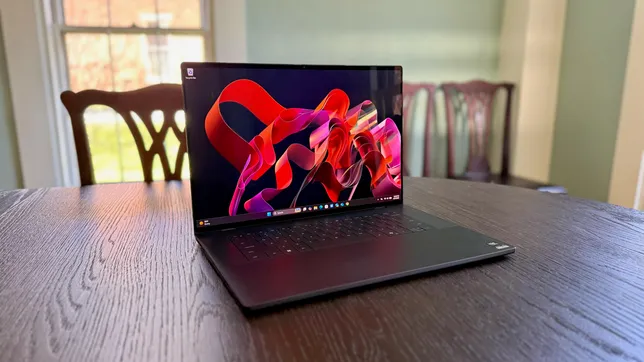
The Dell XPS 16 has Intel silicon inside, offering a selection of Panther Lake processors.
Matt Elliott/CNETDell XPS 16 performance
My XPS 16 test system is based on an Intel Core Ultra X7 358H processor that features 16 cores made up of four performance cores, eight efficient cores and four low-power efficient cores. With it comes Intel's integrated Arc B390 GPU that delivers 12 Xe3 cores.
It turned in competitive multi- and single-core scores on our Geekbench 6 and Cinebench 2024 tests. It couldn't match the performance of the 16-inch MacBook Pro with Apple's M5 Pro chip, but that MacBook Pro costs about $1,000 more than the XPS 16 I tested. The XPS 16 came closer to the 14-inch MacBook Pro with Apple's base M5 chip on the multicore test of Geekbench 6, but was still well off the pace set by the smaller MacBook Pro on the single-core test as well as both Cinebench 2024 tests. And the 14-inch MacBook Pro we tested is $400 cheaper than the XPS 16.
Among its Windows competition, the XPS 16 is right in the mix but finished behind the Asus Zenbook A16 on the Geekbench 6 and Cinebench 2024, where its 18-core Snapdragon X2 Elite Extreme gave it an advantage in both multi- and single-core testing. The Zenbook A16 also enjoyed a large advantage with on-device AI performance, greatly outpacing the XPS 16 on our Geekbench AI test that measures the capabilities of a processor's neural processing unit, but the XPS 16's result was right in line with Apple's latest MacBooks and other recent Windows laptops.
The XPS 16 has an all-aluminum design in a dark gray color that Dell calls graphite.
Matt Elliott/CNETWhere the XPS 16 has the advantage over the Zenbook A16 and most other laptops with integrated graphics is in 3D gaming performance. Its Intel Arc B390 graphics lend it some gaming chops. The XPS 16 produced playable frame rates at 1080p on our Guardians of the Galaxy (76 frames per second) and Shadow of the Tomb Raider (73fps) benchmarks. Those are impressive frame rates for a laptop this thin, and it's so quiet, too.
The XPS 16 also runs longer than the typical big-screen, high-powered laptop. It couldn't match the 20-plus hours of battery life of Apple's latest MacBook Pros, but it lasted 14 hours in our YouTube streaming battery-drain test, which should let you get through most days on a single charge.
Thin and light and latticeless
The XPS 16 is a trimmed-down version of 2024's Dell 16 Premium, but it keeps many of the design elements, including a latticeless keyboard and huge, haptic touchpad. The XPS 16 weighs 3.8 pounds, making it nearly 1.5 pounds lighter than the tank-like 16 Premium that tipped the scales at more than 5 pounds. It's also almost a pound lighter than the 4.7-pound MacBook Pro 16. But if you need an on the go 16-inch laptop, then the 2.9-pound Zenbook A16 is the better choice.
While Dell kept the keyboard and touchpad the same as the 16 Premium, it made improvements to each. It replaced the 16 Premium's touch-sensitive icons in the Function row with normal, physical keys that are easier to use. Let's not overthink the Function row: keep it simple and give me actual keys that provide tactile feedback so I know if I've pressed the key. The touchpad is enormous and provides lively and customizable haptic feedback for clicks, and Dell has added subtle but helpful etched borders on its sides so you know where its active surface ends.
Physical keys returned to the Function row, and there was great rejoicing.
Matt Elliott/CNETI approached the latticeless keyboard with some trepidation, worried that the lack of key spacing would lead to typos and a frustrating typing experience. My fears were unfounded. I enjoyed using the keyboard; the keys offer a shallow but springy response that allowed me to type fast and accurately. The rigid, all-aluminum frame also aids the typing experience; I felt no flex underneath my fingertips as I banged away on the keys.
Another worry: The seams that run along the edges of the keyboard deck and the bottom of the keyboard could collect crumbs, dirt and other debris. Dell says the XPS 16 has a "seamless unibody construction," but it must be overlooking these seams in making that statement. This is not the same as Apple's truly seamless unibody design for its MacBooks.
The seam that runs along the edge of the keyboard deck and the seam that runs across the bottom of the keyboard are certain to collect dust, dirt and debris.
Matt Elliott/CNETThe baseline display for the XPS 16 is a basic 1,920x1,200-pixel, non-touch IPS LCD. The 3.2K OLED upgrade adds only $150 to the cost, and it's money well spent for the higher-resolution and better contrast alone. But you also get touch support and a variable refresh rate up to a smooth 120Hz. It also provides great color performance. On my tests with a Spyder X Elite colorimeter, it covered 100% of the sRGB and P3 gamuts and 97% of the larger AdobeRGB color space. It also achieved a peak brightness of 414 nits, which, combined with the OLED panel's effective zero black levels, creates a beautifully dynamic picture with bright whites, deep blacks and rich, vivid colors.
The speakers below the display and the webcam above it are both top-notch. The quad speakers produce richer, more detailed sound than the average laptop, and the 8-megapixel webcam produces crisp, detailed 4K photos and 1440p video. The webcam is an IR cam, which means you can use it for Windows Hello facial recognition logins. And that's important because the XPS 16 lacks a fingerprint reader.
The Dell XPS 16 cuts a thin profile but also supplies a thin port selection.
Matt Elliott/CNETThe XPS 16 also lacks a bountiful port selection: you get a trio of Thunderbolt 4 ports along with a headphone jack. And without an adapter in the box, you'll need to provide your own for connecting to older USB-A peripherals or an HDMI monitor. And for a laptop with some content creation capabilities, I was disappointed to see that the XPS 16 has no SD card slot -- microSD or full-size.
Inside, expansion is also limited. The RAM is soldered to the motherboard, so you can't replace or upgrade it. And without a second M.2 slot, you'll need to replace the laptop's SSD to increase storage. That's a much trickier operation than simply adding a second SSD. The three USB-C Thunderbolt 4 ports, however, are modular and can be replaced.
With no RAM slots or a free M.2 slot for a second SSD, the XPS 16 does not offer much in the way of interior expansion or upgrades.
Matt Elliott/CNETIs the 2026 Dell XPS 16 worth buying?
The XPS 16 is a good fit for laptop shoppers looking for a do-it-all, big-screen laptop that offers a roomy 16-inch OLED display inside a fairly trim package, backed by solid but not groundbreaking performance. It will let you engage in some content creation, but lacks the additional power you'd get from a laptop with dedicated Nvidia RTX graphics. The Asus Zenbook A16 is more portable and offers better on-device AI performance, while the Asus ProArt P16 and Lenovo Yoga Pro 9i 16 Aura Edition each offer better graphics performance. In between is the Dell XPS 16 that offers a good balance of power and portability.
I'd feel better about recommending the XPS 16 I reviewed if it were closer to $2,000 than its price of $2,350 at the time of this writing. If you can catch one of Dell's rotating discounts, the XPS 16 makes more sense because you're getting it for less than a similar 16-inch laptop with RTX graphics.
Dell never discounted the XPS 16 while I was working on this review, but it is currently offering a "Create & Game" software bundle with the XPS 16 to help justify the laptop's elevated price. It includes two games -- Battlefield 6 and Everwind -- and a free six months of either Adobe Creative Cloud Photography or Premiere.
The review process for laptops, desktops, tablets and other computerlike devices consists of two parts: performance testing under controlled conditions in the CNET Labs and extensive hands-on use by our expert reviewers. This includes evaluating a device's aesthetics, ergonomics and features. A final review verdict is a combination of both objective and subjective judgments.
The list of benchmarking software we use changes over time as the devices we test evolve. The most important core tests we're currently running on every compatible computer include Primate Labs Geekbench 6, Cinebench 2024, PCMark 10 and 3DMark Fire Strike Ultra.
A more detailed description of each benchmark and how we use it can be found on our How We Test Computers page.
Geekbench 6 CPU (multi-core)
Apple MacBook Pro 16 (M5 Pro, early 2026) 28666Asus Zenbook A16 21856Apple MacBook Pro 14 (M5, late 2025) 17946Lenovo Yoga Pro 9i 16 Aura Edition 17748Dell 16 Premium 17037Dell XPS 16 17013MSI Prestige 14 Flip AI Plus 16607Dell XPS 14 16197Acer Swift 16 AI 16187Asus ProArt P16 15377
Geekbench 6 CPU (single-core)
Apple MacBook Pro 16 (M5 Pro, early 2026) 4307Apple MacBook Pro 14 (M5, late 2025) 4263Asus Zenbook A16 3714Lenovo Yoga Pro 9i 16 Aura Edition 2980Dell XPS 16 2920Asus ProArt P16 2905MSI Prestige 14 Flip AI Plus 2896Acer Swift 16 AI 2850Dell XPS 14 2813Dell 16 Premium 2779
Cinebench 2024 CPU (multi-core)
Asus Zenbook A16 1599Lenovo Yoga Pro 9i 16 Aura Edition 1218Asus ProArt P16 1188Apple MacBook Pro 14 (M5, late 2025) 1118Apple MacBook Pro 16 (M5 Pro, early 2026) 1078Dell 16 Premium 984Dell XPS 16 950Acer Swift 16 AI 915Dell XPS 14 700MSI Prestige 14 Flip AI Plus 692
Cinebench 2024 CPU (single-core)
Apple MacBook Pro 14 (M5, late 2025) 199Apple MacBook Pro 16 (M5 Pro, early 2026) 198Asus Zenbook A16 150Lenovo Yoga Pro 9i 16 Aura Edition 130Dell 16 Premium 129Dell XPS 16 125Dell XPS 14 124Acer Swift 16 AI 121MSI Prestige 14 Flip AI Plus 115Asus ProArt P16 115
3DMark Steel Nomad
Asus ProArt P16 2478Apple MacBook Pro 16 (M5 Pro, early 2026) 2328Dell 16 Premium 2279Lenovo Yoga Pro 9i 16 Aura Edition 2278Dell XPS 16 1626MSI Prestige 14 Flip AI Plus 1527Acer Swift 16 AI 1440Dell XPS 14 1286Apple MacBook Pro 14 (M5, late 2025) 1129Asus Zenbook A16 1033
Geekbench AI (Neural engine quantized score)
Asus Zenbook A16 85328Apple MacBook Pro 16 (M5 Pro, early 2026) 57599Apple MacBook Pro 14 (M5, late 2025) 57528Dell XPS 16 56514Dell XPS 14 55366Acer Swift 16 AI 54359MSI Prestige 14 Flip AI Plus 52450Lenovo Yoga Pro 9i 16 Aura Edition 15094
Online streaming battery drain test
MSI Prestige 14 Flip AI Plus 25 hr, 18 minApple MacBook Pro 14 (M5, late 2025) 22 hr, 59 minApple MacBook Pro 16 (M5 Pro, early 2026) 20 hr, 26 minAsus Zenbook A16 14 hr, 25 minDell XPS 14 14 hr, 42 minDell XPS 16 14 hr, 3 minAcer Swift 16 AI 13 hr, 34 minLenovo Yoga Pro 9i 16 Aura Edition 11 hr, 33 minAsus ProArt P16 10 hr, 52 minDell 16 Premium 6 hr, 27 min
System configurations
| Dell XPS 16 | Windows 11 Home; Intel Core Ultra X7 358H; 32GB DDR5 RAM; Intel Arc B390 Graphics; 1TB SSD |
|---|---|
| Acer Swift 16 AI | Windows 11 Home; Intel Core Ultra X7 358H; 32GB DDR5 RAM; Intel Arc B390 Graphics; 1TB SSD |
| Dell XPS 14 | Windows 11 Home; Intel Core Ultra X7 358H; 32GB DDR5 RAM; Intel Arc B390 Graphics; 1TB SSD |
| MSI Prestige 14 Flip AI Plus | Windows 11 Home; Intel Core Ultra X7 358H; 32GB DDR5 RAM; Intel Arc B390 Graphics; 1TB SSD |
| Lenovo Yoga Pro 9i 16 Aura Edition | Windows 11 Home; Intel Core Ultra 9 285H; 32GB DDR5 RAM; Nvidia GeForce RTX 5050; 1TB SSD |
| Dell 16 Premium | Windows 11 Pro; Intel Core Ultra 7 255H; 32GB DDR5 RAM; Nvidia GeForce RTX 5070; 1TB SSD |
| Asus ProArt P16 | Windows 11 Home; AMD Ryzen AI 9 HX 370; 32GB DDR5 RAM; Nvidia GeForce RTX 5070; 2TB SSD |
| Asus Zenbook A16 | Windows 11 Home; Qualcomm Snapdragon X2 Elite Extreme X2-E94-100; 48GB DDR5 RAM; Qualcomm Adreno X2 Graphics; 1TB SSD |
| Apple MacBook Pro 14 (M5, late 2025) | Apple MacOS Tahoe 26.0.1; Apple M5 (10-core CPU, 10-core GPU); 16GB LPDDR5; 1TB SSD |
| Apple MacBook Pro 16 (M5 Pro, early 2026) | Apple MacOS Tahoe 26.3.1; Apple M5 Pro (18-core CPU, 20-core GPU); 48GB LPDDR5; 2TB SSD |