


Every Android application has a “manifest.xml” file located in the root directory of the APK. (Remember APKs are just zip files.) The manifest file is like a guide to the application. It describes all of the components of the app, the application permissions, and the required hardware/software features. Developer misconfigurations to this file — for example, marking an activity as exported — can have serious effects on the application’s security. Many static analysis tools (i.e., MobSF) get a lot of their information by simply parsing this file.
In this blog, we are going to walk through a sample of the fun things you can learn from an apps manifest file as a hacker. We will be using the monolithic social media app “TikTok” for this analysis.
Now, lets have some fun.
The manifest file is in “binary xml” format. This means that if you unzip the APK file, you will see that manifest.xml is mostly undecipherable.
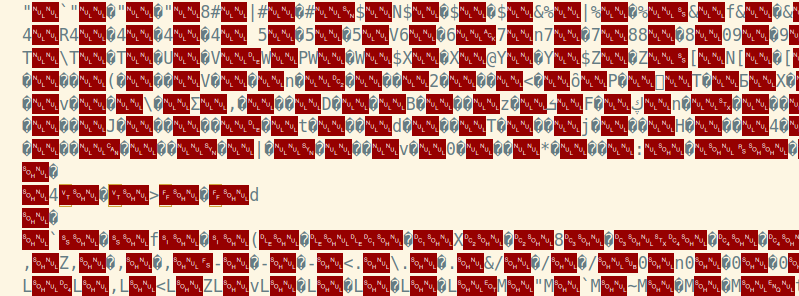
To fix this, we decompile the app with Apktool instead.
Apktool Command: apktool d app.apk
This may take a few minutes since we are using a large app. Now opening the manifest file in a text editor shows us the human-readable version (depending on your definition of human-readable that is).
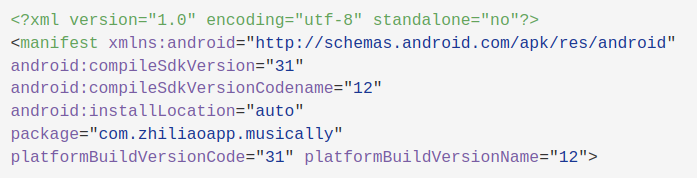
The first thing worth noting is the package name.
package="com.zhiliaoapp.musically"This is what is used by the operating system to identify your app. It also tells you the app’s internal storage location. Apps store their data (cache, databases, etc.) at /data/data/<PackageName>. You can also determine if the app shares a sandbox with any other applications. If the app does share a user ID, it will have the entry android:SharedUserId=<Some UID>. For example, many system applications will share android.uid.system (IID 1000). This allows them to share data and operate with higher permissions than user-installed apps.
In older applications, the manifest file will include the minimum and maximum Android SDK versions. As of Android 11, this is no longer allowed, and these must be declared in the Gradle files instead.
There are also a set of flags that allow/disallow actions on the application. Here are two you should pay attention to as a tester, as they can be dangerous:
Android:Allowbackup = "true" This allows anyone with access to the device to make a copy of all of the application’s data. An example of when this could be dangerous is if an adversary with device access is able to download un unencrypted database.Android:Debuggable = "true" Apps should never be released with the debuggable flag set to true. This can lead to sensitive information exposure. It can also allow an attacker with device access to run arbitrary code using the applications permissions.The manifest file is also required to specify which components of the device the app can interface with. The user decides whether to grant the application these permissions at runtime. An application cannot access any external features of the device unless it is explicitly declared with a <uses-permission> tag. Knowing what permissions an app is likely to have access to can be useful to an attacker when paired with another vulnerability that allows for code execution under the app’s user. As a security tester, you want to call out any permissions that seem unnecessary. Which permissions are necessary depends on the specific application.
Here is a small subset of the permissions requested by the TikTok app:
    <uses-permission
android:name="android.permission.SYSTEM_ALERT_WINDOW"/>
    <uses-permission android:name="android.permission.REORDER_TASKS"/>
    <uses-permission android:name="android.permission.INTERNET"/>
    <uses-permission
android:name="android.permission.ACCESS_NETWORK_STATE"/>
    <uses-permission
android:name="android.permission.READ_EXTERNAL_STORAGE"/>
    <uses-permission
android:name="android.permission.WRITE_EXTERNAL_STORAGE"/>
    <uses-permission android:name="android.permission.ACCESS_WIFI_STATE"/>
    <uses-permission android:name="android.permission.CAMERA"/>
    <uses-permission android:name="android.permission.RECORD_AUDIO"/>
    <uses-permission android:name="android.permission.FLASHLIGHT"/>
    <uses-permission android:name="android.permission.WAKE_LOCK"/>
    <uses-permission android:name="android.permission.GET_TASKS"/>
    <uses-permission android:name="android.permission.READ_CONTACTS"/>
    <uses-permission
android:name="android.permission.RECEIVE_BOOT_COMPLETED"/>
    <uses-permission android:name="android.permission.VIBRATE"/>
    <uses-permission android:maxSdkVersion="30"
android:name="android.permission.BLUETOOTH"/>
    <uses-permission android:name="com.meizu.c2dm.permission.RECEIVE"/>
    <uses-permission
android:name="com.zhiliaoapp.musically.permission.READ_ACCOUNT"/>
In addition to permissions, there is also the <uses-feature> tags. Each of these declares a hardware or software feature the application requires to function properly. The requires="true" means the app will not be able to run in an environment without that feature present (i.e., bluetooth capability). The Google Play Store may filter out applications requiring features the user’s phone does not have.
An application is required to have a manifest entry for each of its components. These include activities, services, content providers, and broadcast receivers. Similar to public/private classes in object-oriented languages, each individual instance of one of these can be exported or not exported. If the exported flag is set, it can be accessed from other apps as well.
First, let’s talk about activities. Each activity will be declared with an <activity> tag in the manifest file.
Activities are activated by “intents” (as are services and broadcast receivers). The intent is passed to the system, and the system determines which component of the app can handle the intent using the intent filters. These filters are declared in the manifest with “intent-filters.”
By declaring intent filter(s) for an activity, you make it possible for other apps (or the system) to launch your application.
Every app will have an activity with an intent-filter block that looks very similar to the following code block:
<intent-filter>
  <action android:name="android.intent.action.MAIN" />
  <category android:name="android.intent.category.LAUNCHER" />
</intent-filter>
This indicates the entry point of the application. The line android.intent.category.LAUNCHER says to the app, “When the user clicks the icon for this app, launch this activity.” Figuring out where the app starts is a good first step in reverse engineering.
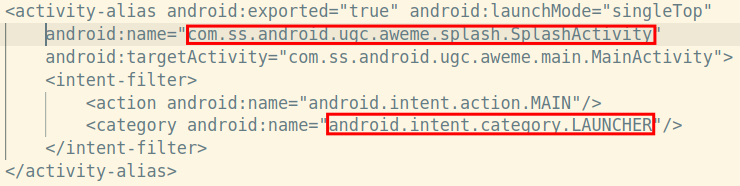
Above shows the entry point for the TikTok app.
Another thing you would want to look for as a tester is exported activities. An activity is exported if either they have the android:exported attribute set to “True”, OR they have an <intent-filters> block and the exported attribute is unset.
Services differ from activities in that they do not have a UI component and are often used to run background tasks. Otherwise, all the rules above still apply.
Looking at the intent filters can also give us clues as to the function of an component. Take this service from the TikTok app for example:
<service android:exported="true"
    android:name="com.heytap.msp.push.service.DataMessageCallbackService"
    android:permission="com.heytap.mcs.permission.SEND_PUSH_MESSAGE">
    <intent-filter>
       <action android:name="com.heytap.mcs.action.RECEIVE_MCS_MESSAGE"/>
       <action android:name="com.heytap.msp.push.RECEIVE_MCS_MESSAGE"/>
    </intent-filter>
</service>
From just the manifest entry and some quick Google searches, without looking at the source code, we can tell that this service is responsible for handline Android push notifications.
If you really want to take a deep dive into how the android manifest works, the Android Developers Reference is a great place to start: https://developer.android.com/guide/topics/manifest/manifest-element
Ready to learn more?
Level up your skills with affordable classes from Antisyphon!
Available live/virtual and on-demand

此内容由惯性聚合(RSS阅读器)自动聚合整理,仅供阅读参考。 原文来自 — 版权归原作者所有。