








, External/Internal, General InfoSec Tips & Tricks, Melissa Bruno, Web App

One of the best early steps to take when testing a network, especially a large one, is to run the tool EyeWitness to gain a quick understanding of what types of web applications are present in the environment.
In some cases, valuable information may be sitting in plain sight on the homepage of a poorly secured web application. Other times, you might glean the names and version numbers of vulnerable pieces of software from HTTP headers and source code, then leverage known exploits to your advantage. Sometimes gaining admin access to software is as simple as looking up the manual for a web content management service, then plugging in the default URL of the admin portal and default credentials.
But what about web applications that don’t give you much to work with? Maybe the root directory returns a blank page, or an HTTP 404 “Not Found” error, and the HTTP headers show up-to-date software version numbers or no useful information at all. This is where automated guesses can come into play.
Scripts and automated tools can be used to check for common files and directories that may be running on a web server.
One such tool is gobuster.
Installing Gobuster
Depending on your operating system, you may be able to install gobuster directly with a package manager. Otherwise, gobuster will run on any system that can run the latest version of the Go programming language. For the latter method, you will first need to download the latest version of Go here: https://golang.org/dl/ and then install it using the instructions here: https://golang.org/doc/install.
Once Go is set up, simply run the command go install github.com/OJ/gobuster/v3@latest to install the latest version of gobuster. The “go install” command will place the gobuster executable file in either the $GOPATH/bin or $HOME/go/bin directories.
Running Gobuster
To demonstrate the usage of gobuster, I set up a directory with a few files and hosted them locally using a simple HTTP server with Python 3, which you can do yourself by creating a directory with the files that you want to host, navigating to that directory, and then using the command:
python3 -m http.server 8000 --bind 127.0.0.1
Next, in the directory containing the gobuster executable file, create two more files — one with a list of filenames that you want to check for and one with a list of directory names. I used SecLists’ raft-medium-directories.txt and raft-medium-files.txt lists. Check if the server has any of the directories in your list with this command:
gobuster dir -u http://127.0.0.1:8000/ -w raft-medium-directories.txt
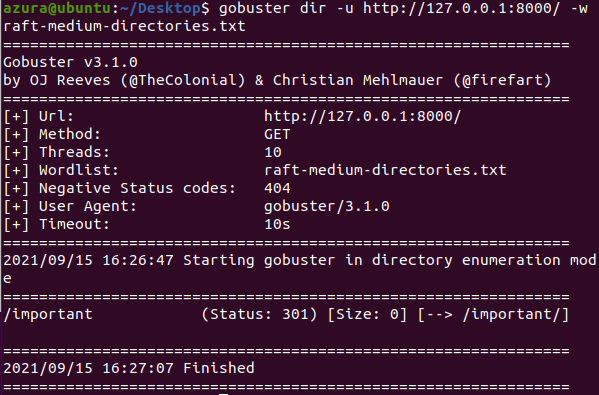
In the output section, we can see that gobuster picked up the /important directory. Now I’ll check that directory for the presence of any of the files in my other list:
gobuster dir -u http://127.0.0.1:8000/important/ -w raft-medium-files.txt
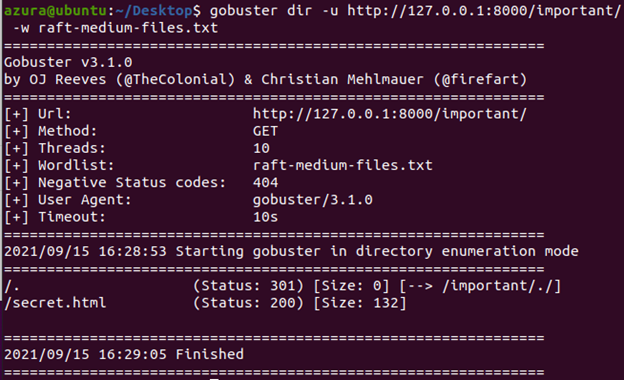
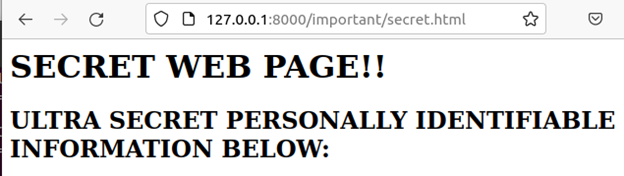
Now, gobuster has identified a file, /secret.html. Navigating to it returns an (admittedly low-effort) representation of a webpage containing confidential data.
Fine-Tuning Gobuster
Because the web server used in this example was bare-bones, the simplest possible gobuster commands returned interesting, easy-to-parse output. This will typically not be the case for production web servers. Some of the more commonly used Gobuster arguments include:
- –user-agent: Increase the likelihood that the web server will return a valid response by using a browser’s user agent string.
- –timeout: Increase the timeout duration to decrease the likelihood of missing pages hosted by slow-to-respond servers.
- –no-tls-validation: Do not require validation of TLS.
- –exclude-length: Do not show results for HTTP responses of a specified length.
- –status-codes: Specify which HTTP response codes should be interpreted as the web application returning a valid file. This can reduce false negatives.
- –status-codes-blacklist: Specify which HTTP response codes should not be interpreted as the web application returning a valid file. This can reduce false positives.
- As always, make sure that you have permission to test the targeted web applications before running these tools!
Ready to learn more?
Level up your skills with affordable classes from Antisyphon!
Available live/virtual and on-demand
