
惯性聚合 高效追踪和阅读你感兴趣的博客、新闻、科技资讯
阅读原文 在惯性聚合中打开

推荐订阅源

F
Full Disclosure
博客园 - 三生石上(FineUI控件)
MyScale Blog
MyScale Blog
Apple Machine Learning Research
L
LINUX DO - 最新话题
T
The Blog of Author Tim Ferriss
P
Proofpoint News Feed
宝玉的分享
宝玉的分享
小众软件
小众软件
Hugging Face - Blog
Hugging Face - Blog
GbyAI
GbyAI
Cyber Security Advisories - MS-ISAC
V
Visual Studio Blog
爱范儿
爱范儿
freeCodeCamp Programming Tutorials: Python, JavaScript, Git & More
博客园_首页
CTFtime.org: upcoming CTF events
月光博客
月光博客
博客园 - 叶小钗
D
Docker
H
Hackread – Cybersecurity News, Data Breaches, AI and More
T
Tailwind CSS Blog
D
DataBreaches.Net
酷 壳 – CoolShell
酷 壳 – CoolShell
B
Blog RSS Feed
量子位
美团技术团队
Vercel News
Vercel News
Y
Y Combinator Blog
IT之家
IT之家
Martin Fowler
Martin Fowler
OSCHINA 社区最新新闻
OSCHINA 社区最新新闻
S
SegmentFault 最新的问题
腾讯CDC
Recent Announcements
Google DeepMind News
罗磊的独立博客
让小产品的独立变现更简单 - ezindie.com
G
Google Developers Blog
Microsoft Azure Blog
The Register - Security
博客园 - 司徒正美
N
Netflix TechBlog - Medium
S
Schneier on Security
博客园 - 聂微东
U
Unit 42
D
Darknet – Hacking Tools, Hacker News & Cyber Security
Threat Intelligence Blog | Flashpoint
雷峰网
雷峰网
Latest news
Latest news

Black Hills Information Security, Inc.

Bad Habits: An ANTISOC Operation Same Problem, Different Angles: When Red Team and Blue Team Actually Talk to Each Other How to Identify and Exploit New Vulnerabilities Swapper – A Pure Regex Match/Replace Burp Extension A Practical Guide to BloodHound Data Collection Network Engineering Basics Signed, Trusted, and Abused: Proxy Execution via WebView2 Getting Started In Pentesting – Advice From The BHIS Pentest Lead Cloud Security: Tips and Resources for Securing the Cloud Lessons From A Chatbot Incident How to Lead Effective Tabletops Understanding GRC: How to Navigate Risks and Compliance Standards The “P” in PAM is for Persistence: Linux Persistence Technique Malware Analysis: How to Analyze and Understand Malware OSINT: How to Find, Use, and Control Open-Source Intelligence What to Do with Your First Home Lab When the SOC Goes to Deadwood: A Night to Remember Social Engineering and Microsoft SSPR: The Road to Pwnage is Paved with Good Intentions Common Cyber Threats Finding the Right Penetration Testing Company Deceptive-Auditing: An Active Directory Honeypots Tool The Curious Case of the Comburglar How to Set Smart Goals (That Actually Work For You) Inside the BHIS SOC: A Conversation with Hayden Covington Abusing Delegation with Impacket (Part 3): Resource-Based Constrained Delegation Why You Got Hacked – 2025 Super Edition Abusing Delegation with Impacket (Part 2): Constrained Delegation Abusing Delegation with Impacket (Part 1): Unconstrained Delegation GoSpoof – Turning Attacks into Intel Model Context Protocol (MCP) Bypassing WAFs Using Oversized Requests Getting Started with AI Hacking Part 2: Prompt Injection Wrangling Windows Event Logs with Hayabusa & SOF-ELK (Part 2) DomCat: A Domain Categorization Tool Wrangling Windows Event Logs with Hayabusa & SOF-ELK (Part 1) Microsoft Store and WinGet: Security Risks for Corporate Environments Default Web Content MailFail Commonly Abused Administrative Utilities: A Hidden Risk to Enterprise Security Stop Spoofing Yourself! Disabling M365 Direct Send Bypassing CSP with JSONP: Introducing JSONPeek and CSP B Gone Offensive Tooling Cheatsheets: An Infosec Survival Guide Resource DNS Triage Cheatsheet GraphRunner Cheatsheet Burp Suite Cheatsheet Impacket Cheatsheet Wireshark Cheatsheet Hashcat Cheatsheet EyeWitness Cheatsheet Nmap Cheatsheet Netcat (nc) Cheatsheet Hunt for Weak Spots in Your Wireless Network with Airodump-ng from the Aircrack-ng Suite Detecting ADCS Privilege Escalation Vulnerability Scanning with Nmap Getting Started with NetExec: Streamlining Network Discovery and Access How to Use Dirsearch Augmenting Penetration Testing Methodology with Artificial Intelligence – Part 3: Arcanum Cyber Security Bot How to Design and Execute Effective Social Engineering Attacks by Phone Abusing S4U2Self for Active Directory Pivoting Why Use a Macro Pad? Espanso: Text Replacement, the Easy Way Caging Copilot: Lessons Learned in LLM Security Augmenting Penetration Testing Methodology with Artificial Intelligence – Part 2: Copilot Augmenting Penetration Testing Methodology with Artificial Intelligence – Part 1: Burpference Intercepting Traffic for Mobile Applications that Bypass the System Proxy How to Root Android Phones Communicating Security to the C-Suite: A Strategic Approach Offline Memory Forensics With Volatility Getting Started with AI Hacking: Part 1 Go-Spoof: A Tool for Cyber Deception How to Test Adversary-in-the-Middle Without Hacking Tools Canary in the Code: Alert()-ing on XSS Exploits How to Hack Wi-Fi with No Wi-Fi Why Your Org Needs a Penetration Test Program Burp Suite Extension: Copy For Light at the End of the Dark Web Wi-Fi Forge: Practice Wi-Fi Security Without Hardware Avoiding Dirty RAGs: Retrieval-Augmented Generation with Ollama and LangChain Gone Phishing: Installing GoPhish and Creating a Campaign 5 Things We Are Going to Continue to Ignore in 2025 John Strand’s 5 Phase Plan For Starting in Computer Security Questions From a Beginner Threat Hunter GRC for Security Managers: From Checklists to Influence AI Large Language Models and Supervised Fine Tuning Attack Tactics 9: Shadow Creds for PrivEsc w/ Kent & Jordan One Active Directory Account Can Be Your Best Early Warning Introduction to Zeek Log Analysis Indecent Exposure: Your Secrets are Showing Creating Burp Extensions: A Beginner’s Guide Pitting AI Against AI: Using PyRIT to Assess Large Language Models (LLMs) The Top Ten List of Why You Got Hacked This Year (2023/2024) ICS Hard Knocks: Mitigations to Scenarios Found in ICS/OT Backdoors & Breaches Intro to Data Analytics Using SQL Finding Access Control Vulnerabilities with Autorize The Detection Engineering Process Cyber Risk Lessons We Can Learn From Hurricane Preparedness Intro to Desktop Application Testing Methodology What Is Penetration Testing? Adversary in the Middle (AitM): Post-Exploitation Pentesting, Threat Hunting, and SOC: An Overview
Testing TLS and Certificates
BHIS · 2024-01-26 · via Black Hills Information Security, Inc.

Pentest reports sometimes include bad information under a heading like, “Weak TLS Configuration” or “Insecure SSL Certificates.” This article will explain how TLS is supposed to work, common ways it goes wrong, and a few pitfalls to avoid when testing. 

First, there are two separate things at play here — the certificate is one, the cryptography for the TLS connection is another. 

Your first thought about certificates and HTTPS may be, “Oh, that’s what keeps my information private. It encrypts the data as it goes across networks so that only the server and I can decrypt it…” but that’s not quite right. The certificate’s primary job is to let you verify who you’re talking to. 

The encryption only happens after that’s done. 

It does little good to encrypt your conversation if you don’t know who you are talking to. 

What a Certificate Does 

The certificate on a TLS server is an X.509 certificate. We sometimes call them “SSL Certificates” or “TLS Certificates.” There’s nothing wrong with that, but it’s good to know their actual name, too. 

A certificate’s purpose is to give a client confidence that the server is who it claims to be before starting a conversation. A certificate for a domain is like a passport for a citizen: it’s a thing you get possession of that allows someone to validate your identity based on the assertions of a trusted third party. 

  • With a passport, that third party is a government. If you have decided to trust a country’s passport issuing system and I show you a valid passport from that country with the name “George Washington” on it, and if you believe the person in the photo on that passport is me, then your trust in that government’s process for issuing passports, and the fact that the passport is not, in your judgement, forged or altered, means that you must believe that’s my name.
  • With a certificate, the third party is a certificate authority (CA). If a website shows you a valid certificate with its domain name on it and that certificate is signed by a CA you trust, then your trust in that CA means that you must believe that the server is who it claims to be.
    • Wrinkle: It’s your browser or web client or OS vendor that decides which CAs to trust. You don’t really get to pick.

When you test a certificate, you are testing it for validity — making sure the signature is valid and that the root certificate that signed it is one that you trust. Anyone can make a forged certificate that claims to be valid for any given domain name, just as anyone can make a forged ID card. The value (in both the passport and the certificate) is in the ability to detect a forged or invalid item by verifying the claim with a trusted third party.

Details: Certificate Validation 

Before issuing a certificate for a given domain, a reputable certificate authority will require the requestor to prove that they control that domain. 

That is the one job of a certificate authority — their signature on a certificate is their statement that whoever controls the domain named in the certificate also controls the private key for the certificate (and by implication is the only one who can use the certificate to establish a TLS connection). 

The certificate authority is saying this: If you get a certificate signed by us when you visit a server by its fully qualified domain name, and if you verify that the signature on the certificate was created with our root certificate (which is pre-installed with your client) then you can have great confidence that the owner of the domain is in control of the server that the certificate came from. That is, you’re talking to who you think you’re talking to. 

Proving control of a domain to a certificate authority is often done by adding a DNS TXT record with content specified by the CA (but the CA can come up with their own requirements). 

The certificate validates ownership of a domain name. 

If you try to validate a certificate when you’ve connected to its server by IP address, that validation will ALWAYS fail. Certificates validate ownership of domain names. If there’s no domain name, there’s no claim to confirm. 

(Aside: It is possible to include an IP address in a certificate as a Subject Alternative Name, and then it would validate. But in practice, nobody does this. No server operator wants to be tied to a single IP address. And no client connects to a web server by its IP address anyhow. Except you, of course. You do that sometimes. But you also know how to use curl . And you know what the -k switch does. You’re slightly atypical there. Play along.) 

Qualys SSL Server Test Knows: Don’t Test TLS by IP Address (see red text) 
Good Trust Rating: Testing by FQDN 
Same Site Tested by IP: “certificate does not match supplied URI” 

It’s common to see a site’s certificate signed by one or more “intermediate” certificates and not directly by the root certificate. This results in a certificate chain, where each certificate is signed by one higher up on the chain until you get to the root certificate. The server you’re talking to should include every certificate in that chain except for the root certificate. It is an error to omit intermediate certificates (but your client often knows where to find them and will do so). It is also an error to include the root certificate, and/but any sane client will just mutter, “nice try,” ignore it, and use what’s in its local certificate store anyhow. 

This chain approach makes it easier to protect the root certificate’s private key by keeping it offline nearly all the time and signing new certificates with an intermediate certificate that is signed by the root instead. This way, if an intermediate certificate is compromised, the CA can revoke it and issue a new one signed by the same root certificate (and not have to immediately distribute a new root certificate to every web client in the world). They can also use different intermediate certificates for different purposes, or cycle through intermediate certificates on a schedule for the same reasons organizations change passwords now and then. 

As in programming, a little indirection adds flexibility. 

Trusting a Certificate (or Not) 

There are only two reasons not to trust a certificate: 

  1. When it is expired or not yet valid based on its own from and to dates, and 
  1. When the signature on the certificate cannot be independently verified. There are two ways this can happen: 
    • The certificate is self-signed, so there is no third-party to consult about its validity. 
    • The certificate is not self-signed, but the signing certificate is neither in the client’s trusted certificate store, nor signed by one that is. 

A certificate that is self-signed cannot be independently validated. That makes it untrusted by default. Some clients allow a user to “trust this certificate from this server in the future” in the same kind of “trust on first use” approach that SSH takes, and so they are not always bad. Just nearly always. 

An organization can create its own root signing certificate. That certificate would be installed on all of the organization’s devices as a custom certificate, similar to how a tester imports the certificate from Burp Suite or ZAP into the browser they use for testing. The organization could then use this certificate to sign certificates for sites intended to be used only from corporate-owned devices. Corporate devices would be able to validate the signature and connect. Other systems would not be able to validate the signature and will throw an error. 

If you see an “untrusted certificate” error, that probably means it’s not self-signed (or the error would have said “self-signed” instead), but one of the following is true: 

  • The client you’re using doesn’t have the signing certificate and so cannot verify the signature. 
  • You do have the signing certificate, but the signature on the certificate failed validation (i.e. the certificate is forged). 
  • The certificate is expired or not yet valid. 

Oddly, perhaps, every root signing certificate we trust is self-signed. But the signing chain has to end somewhere, and these root certificates are widely distributed via controlled methods into secure storage locations. It’s from that delivery process that we derive trust in the root certificates. 

This means that if an attacker can get their own self-signed certificate into your client’s certificate store as a trusted root certificate, that attacker can make certificates for any domain and your client will trust them. It’s important to protect that certificate store. 

Details: Cryptography 

The certificate has almost nothing to do with the encryption used in the TLS conversation. It facilitates the sharing of key material between the client and the server, but it has nothing to say about which algorithms, key exchange methods, or key lengths may be used. The certificate’s primary job is to allow you to confirm that you’re talking to who you think you’re talking to. 

TLS uses the asymmetric keys (a public key and a private key) associated with the certificate to exchange a unique symmetric key for each TLS connection. That symmetric key is what is used to encrypt the data sent over the TLS connection. Once you’ve established that the server is who it claims to be, only then are you able to keep your data private by encrypting it with a key known only to you and the server. 

The network traffic looks something like this: 
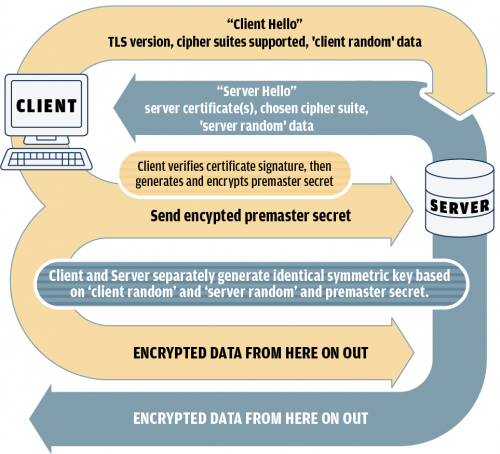
  • Client sends a “client hello” message to start the connection. This includes random bytes called “client random” for later use, along with the version of TLS it wants to use and a list of cipher suites it supports. 
  • Server responds with a “server hello” that includes the server certificate (and sometimes an intermediate certificate or two), the cipher suite the server chose from the list the client gave, and a string of random bytes called “server random” for later use. 
  • Client verifies the signature on the server certificate, using a root certificate it already has in its store of trusted certificates. If this fails, the connection stops. 
  • Client uses the public key in the certificate it got from the server to encrypt another string of random bytes called the “premaster secret” and sends the ciphertext to the server. Server uses private key to decrypt those random bytes. 
  • Client and server separately generate the same session key based on the “client random,” the “server random,” and the “premaster secret.” 
  • Session key is used to encrypt all future data in this connection. 

Key Takeaways

That was a lot of words to explain why we focus on just a few things when testing TLS certificates. Those things are: 

  1. Testing a server’s TLS configuration by using its IP address will ALWAYS result in trust failures, and probably other misinformation too. 
  1. Self-signed certificates cannot be independently validated or trusted. 
  1. A certificate that you cannot validate is not necessarily one that cannot be validated. Corporate certificate authorities are real and need to be taken into account. 
  1. The encryption algorithms supported by a server are not determined by the certificate the server uses. 

We think BB is pretty cool …but we might be biased.

Why not find out for yourself and take a class with him?

Modern WebApp Pentesting

Available live/virtual and on-demand