





Mitchell is a penetration tester with BHIS who loves to find ways to optimize his workflow and grow his skills as a tester. They can be found outside of work improving their skills in photography or archery.
Compression is everywhere—in files, videos, storage, and networks—so it’s only natural it should also be in your workflow too. You can “compress” a series of tedious, repetitive tasks requiring multiple steps and several configurations into a single button press with a macro pad such as the Stream Deck or a fully software-customizable mechanical keyboard.
Please take note: this blog does not require the physical Stream Deck hardware as the mobile Stream Deck app from Elgato also includes the same macro pad functionality.
Sometimes, it feels like half the job of penetration testing is copy-and-pasting from notes or re-typing your go-to commands. Whether it’s firing off an Nmap scan, running your favorite Nuclei templates, or formatting a finding in Word, there’s a surprising amount of repetitive work involved in penetration testing unique and individualized environments, especially in the beginning days of a test.
Before diving into the creation of these macros, some introduction to the basic built-in features of the Stream Deck is required. After all, every expert was once a beginner. Below are the bread-and-butter features I use every day:
However, making the macros takes some time. In my experience, you have to determine what actions you do frequently and progressively add them to the Stream Deck—such as setting up your testing environment or basic recon/testing tasks, for instance.
Every time I load up a new testing VM, I always run the standard “apt” commands: update, upgrade, install. All of these actions can be added to a single Multi-Action macro. For example: “apt update; apt upgrade -y; apt dist-upgrade -y; apt install nuclei” can be placed on a single macro. Even setting up your favorite Screen sessions or TMUX layout can be automated using the same keyboard shortcuts you already use.
I also use a multi-hundred line setup script to configure my virtual machine to be ready for testing. Given this file is hundreds of lines long, the Text action would take too long to complete. In situations such as these, I use the MacOS Terminal and “pbcopy” command to quickly copy the script using a Multi-Action.

This whole action takes less than a second to complete, and you have a fresh copy of your install script to paste into your remote virtual machine in a time faster than it takes to navigate and copy manually. You can even add an extra Hotkey action to alt-tab back to your active window before opening the terminal.
As an example, when testing a network, I know I will use Nmap, Nuclei, and FFuF. All of these commands can be added to the macro pad leaving placeholder text for file input or output such as “Nmap -sC -sV -p 443,80,8443,8080 -iL ” for an Nmap scan targeting web hosts and ports.
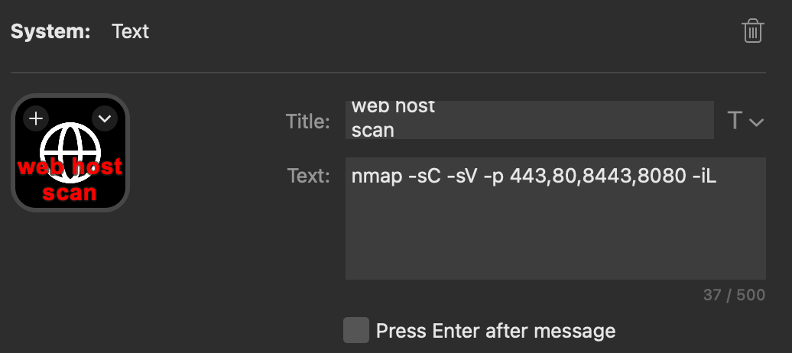
If you are consistent and always use the text file “scope.txt” for your beginning scope file and select “Press Enter after message” to kickstart the command immediately after typing it. You can even chain the output of other commands into each other. Using parsing and format scripts such as “grep” and “sed” outputting to another file, you can automatically separate web hosts for other commands and use those within nuclei, for example.
When testing is done, macros can even help with reporting. Whether it’s documenting findings, formatting screenshots, or citing tool usage in footnotes, reporting is where automation and time-saving shines for my personal workflow. For example, I use a dedicated profile that activates when Microsoft Word is opened that includes macros for:
This is made possible with Word’s customizable key bind options within the Tools > Customize Keyboard option and the Hotkey and Multi-Action features of the Stream Deck. This allows me to stay focused on what I’m writing instead of breaking up my flow to manually select styles and formats.


Similarly, inserting a footnote can be done using a Multi-Action which begins with a Hotkey for Word’s “Insert Footnote” keybind and then a Text action to insert the URL for specific tools.

Using this methodology, my main reporting layout is shown below.

You can further supercharge Word by using Word’s own built-in Visual Basic macro system. For example, running a script that turns Markdown code snip/block format into the proper style in Word.

While the Text action is useful for short blurbs for reporting or commands, large commands are still best to be copied and pasted into a terminal. The Text action types a character with a delay of 1-10ms on average, making large blurbs slow over the course of a full paragraph.
Also, don’t forget to also check out the Stream Deck’s plugin store (https://marketplace.elgato.com/stream-deck/plugins). There are so many productivity-based functions you can use—such as controlling Microsoft Teams, a Pomodoro Timer, Home Assistant control, or IP address listing—so you always know where you’re testing from.
Ready to learn more?
Level up your skills with affordable classes from Antisyphon!
Available live/virtual and on-demand

此内容由惯性聚合(RSS阅读器)自动聚合整理,仅供阅读参考。 原文来自 — 版权归原作者所有。