









Terry is a seasoned penetration tester with a diverse background across IT, cybersecurity, and military service. Before joining Black Hills Information Security in 2022, he performed various roles including pentesting, incident response, and forensic analysis.
Nmap, also known as Network Mapper, is a commonly used network scanning tool. As penetration testers, Nmap is a tool we use daily that is indispensable for verifying configurations and identifying potential vulnerabilities. With so many options and capabilities, it’s no surprise how many use cases there are for Nmap. Everything from general TCP and UDP port scanning, verifying running versions of software for a service, brute forcing commonly used credentials, and validating vulnerabilities found with other tools.
In this blog, we will cover basic vulnerability scanning with Nmap using built-in Nmap NSE scripts. This blog assumes you have some general knowledge of Nmap’s core functionality and NSE scripts. If you’re not Nmap savvy, I recommend checking out Serena DiPenti’s blog Using Nmap Like a Pro (https://www.blackhillsinfosec.com/shenetworks-recommends-using-nmap-like-a-pro/) for a quick primer on basic Nmap functions and commonly used scripts.
First, a little about the NSE script categories. The Nmap scripting engine (NSE) has defined categories to group scripts with similar properties together. Scripts can belong to multiple categories based on their function. They are broken down into the following fourteen categories.
For this blog, we will primarily focus on the default and vuln categories. Scripts included in the default category were chosen based on factors related to speed, usefulness, verbosity, reliability, and intrusiveness. If you’re curious about what scripts are included in a particular category, you can use the following command to view the scripts included in each category, with this command providing the scripts included in the vuln category.
nmap --script-help vuln The output includes details for all scripts in that category, shown in the following screenshot. Each entry also includes the category memberships for each script. For example, the afp-path-vuln script is included in the exploit, intrusive, and vuln categories.

Using Nmap to find some of the low hanging fruit in an environment can be accomplished using the following command. We will be scanning a lab network using the subnet 192.168.56.0/24, comprised of vulnerable virtual machines for demonstration purposes.
nmap -sC -sV -p- -oA labscan-sC-sV-allports 192.168.56.0/24 Let’s break this command down, and then we’ll discuss the results. The command runs Nmap with the -sC, -sV, -p-, and -oA options. The following is a breakdown of the purpose of each option.
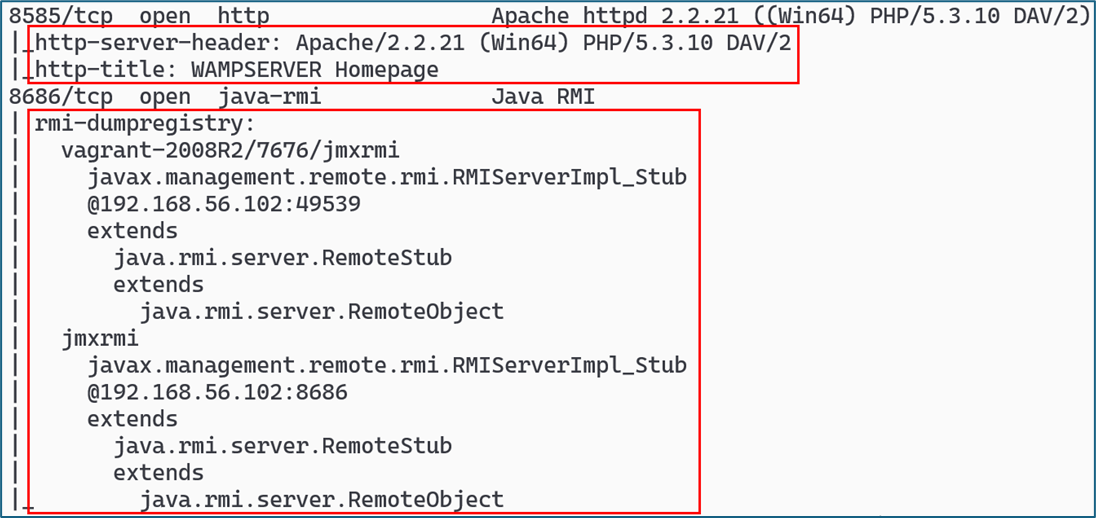
-sC: Executes the “default” category scripts of the NSE. These scripts provide safe and useful checks for basic vulnerabilities, service metadata, SSL details, and default configurations. -sV: Enables service version detection. This helps determine the specific version of services running on open ports, which can be useful for identifying vulnerabilities tied to those versions. It also provides data that can be leveraged by other scripts during a scan. -p-: Scans all 65,535 TCP ports. This is a comprehensive port scan and can be replaced with -p 1-65535 for the same effect; the difference is purely stylistic. -oA: Generates three types of output simultaneously (normal, XML, and greppable) using a specified filename base. This is useful for keeping a comprehensive record of scan results in multiple formats. -A: Activates aggressive scanning features, which include OS detection (-O), service version detection (-sV), default script scanning (-sC), and traceroute (--traceroute). This option is a powerful tool for thorough enumeration, though it is more intrusive and can be more easily detected. Output from this command is shown in the following screenshots. The first image shows the output for two different services on a Windows host, with call outs on the additional information generated by the default scripts.
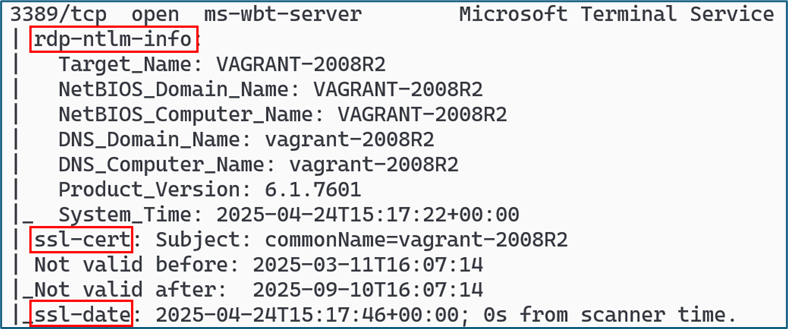
The next image shows information on the Terminal Services (RDP) service, with the scripts rdp-ntlm-info, ssl-cert, and ssl-date providing additional information, including information on the domain name and system time.
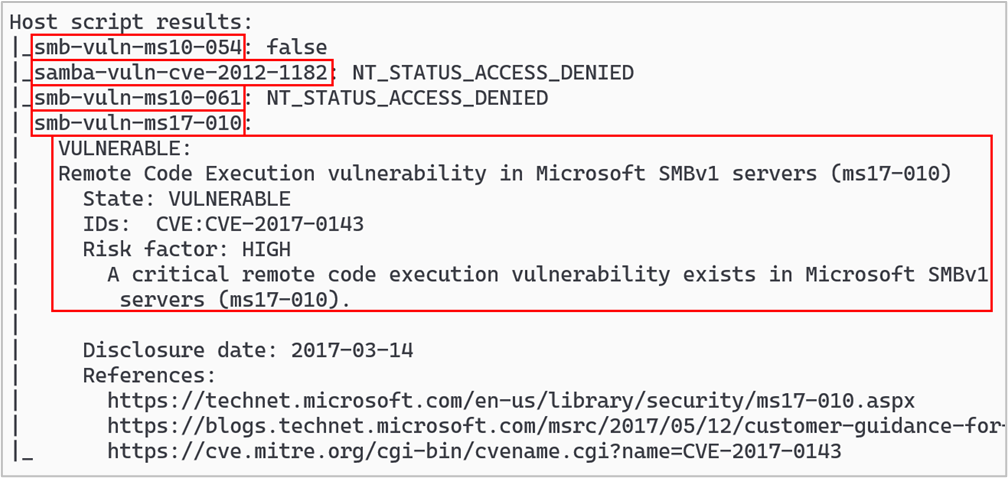
The default scripts can provide a significant amount of information on a host but don’t really provide direct vulnerability information, such as whether a host is vulnerable to a particular CVE. That’s where the vuln category comes in handy. This is a built-in category of NSE scripts for vulnerability checks called vuln. To invoke this set of scripts, the following command syntax would be used. Note the -sC option is not enabled, but this can be included depending on your scanning needs.
nmap -sV --script vuln -oA labscan-sV-vuln 192.168.56.0/24 The screenshot below shows some of the additional vuln scripts that were run against the same Windows host we scanned earlier. The host was running SMB services, and you’ll notice the vulnerability checking scripts are focused on SMB or SAMBA vulnerabilities. This host was missing the patch for the well-known SMB vulnerability patched by MS17-010, and the Nmap script provided information on the CVE number, as well as additional links to gather more information.
If you want even more information on CVEs that affect a particular system you are testing, check out the vulners NSE script. This script provides a significant amount of information on potentially applicable CVEs for each service on a target system. It is important to note that the database containing the CVEs is not local, and this script will send traffic out of a network to the Vulners API. This is important to note if you do not have internet access from your scanning host. To invoke this script, the following syntax would be used. Note that the -sV option is required for this script.
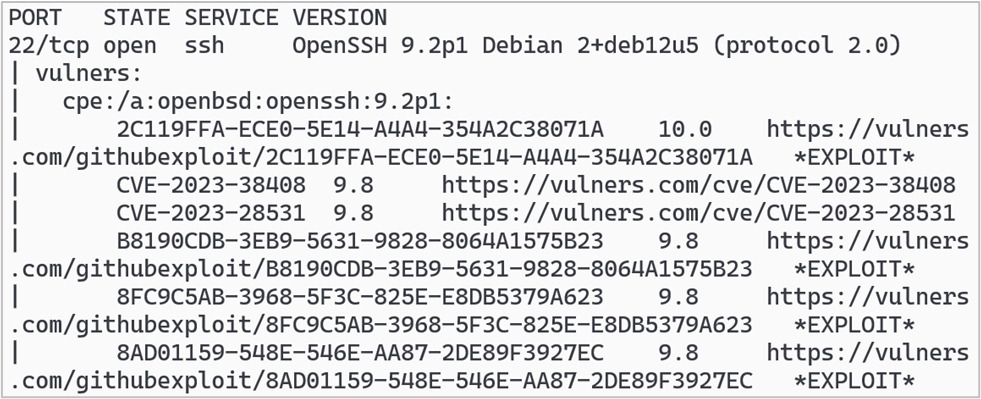
nmap -sV -p- --script vulners -oA labscan-vulners-192.168.56.0/24 The output from this script is voluminous, to say the least. The sample output in the following screenshot shows some of the exploits and CVEs that were pulled from the Vulners database for OpenSSH 9.2p1, along with links to the Vulners website with more information for each item. The version information was provided by the -sV option.
As we’ve seen, Nmap NSE scripts can provide a lot of additional vulnerability data in addition to ports and service versions. There are even more options with Nmap, and I’d recommend looking through the Nmap documentation at https://nmap.org/docs.html and on their GitHub page at https://github.com/nmap/nmap.
Ready to learn more?
Level up your skills with affordable classes from Antisyphon!
Available live/virtual and on-demand

此内容由惯性聚合(RSS阅读器)自动聚合整理,仅供阅读参考。 原文来自 — 版权归原作者所有。