


The internet is a product of a global group effort to build an interoperable network connecting billions of devices, regardless of country, region, or manufacturer. That effort yielded hundreds of protocols defining standards for how devices communicate. The Internet Protocol (IP) is the most widely known, but myths and conspiracies have plagued it since its inception.
The myths might be widespread but are easy to dispute. Several organizations, including IEEE, IETF, and ISO, have published standards or Requests for Comments (RFCs) online. These documents can be dense with technical jargon but are a goldmine of information. The current Internet Protocol standard (RFC 791) was published in 1981.
This article intends to demystify the Internet Protocol.
If you’re familiar with how physical mail delivery works, then it will be easy to understand how traffic moves through a network. For example, say you need to relocate from New York to California. Your belongings won’t fit into one box, so you must divide everything into multiple boxes and slap on a destination and return address before shipping them off.
The same concept works for data moving through a network. When you send an email or stream the latest movie, that data will be transmitted with the help of the Internet Protocol (among many others). However, instead of household items, you will send a datagram, and the data is split up into packets instead of boxes.
The Internet Protocol has two main functions: addressing and fragmentation.
The source and destination will have an IP address.
Two versions of the Internet Protocol are in use today: IPv4 and IPv6. An IPv4 address is fixed length with four octets. It looks like this: 192.168.1.1. IPv4 addresses are in limited supply, and currently, there are more network-capable devices than IPv4 addresses available. Network Address Translation (NAT) and IPv6 are two solutions to help deal with IPv4 address exhaustion.
There are a few variations of NAT; one of the most common is Port Address Translation (PAT). Your internet service provider will give your home one IP address. Still, you most likely have more than one device that needs an internet connection: gaming systems, laptops, cell phones, smart TVs, Alexa, and so on. Since it is impossible for each device to have its own unique IP address, your home router will assign each one a private IP address and a port number. Your router will then send all the traffic from every device onto the public internet using its single public address assigned by the ISP.
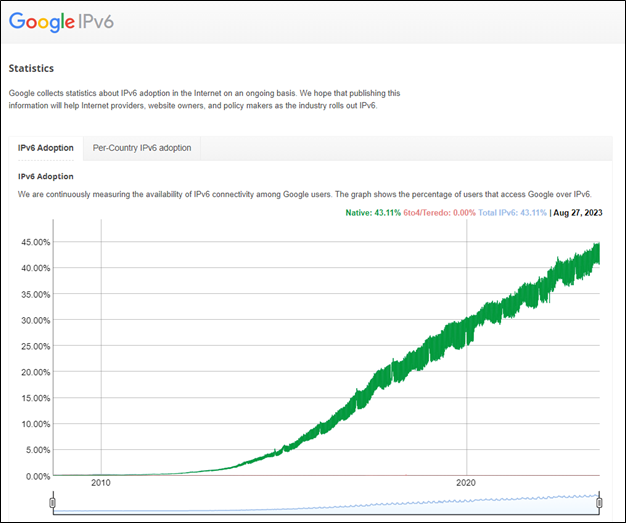
IPv6 was developed to replace IPv4 fully. IPv4 has a total of 4.3 billion addresses, and IPv6 has around 340 trillion. For various reasons, the rollout of IPv6 has been slow, but adoption is increasing. Google publishes statistics on IPv6 connectivity amongst its users.
Fragmentation is necessary when a datagram is too large to traverse the network.
Due to various packet size limitations, the Internet Protocol must break up datagrams into an arbitrary number of pieces that can be reassembled later.
An IP packet contains two vital sections: header and data.
The IP header contains instructions for transmitting and reassembling data. The illustration below shows an IPv4 header.
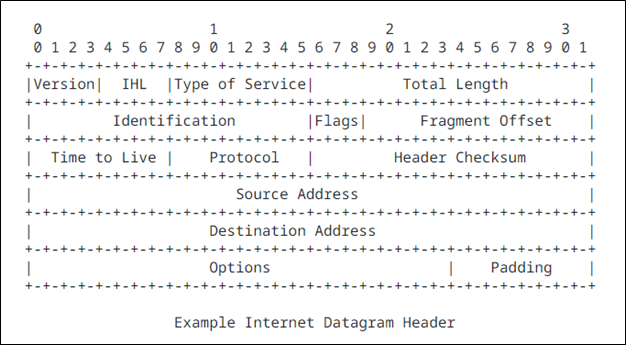
Summary of each header component:
Version: There are two IP versions used today, IPv4 and IPv6. The illustration above shows the format of an IPv4 header.
Internet Header Length: This field indicates where the header ends, and the data begins.
Type of Service (ToS): While not widely used, ToS gave administrators the ability to prioritize different traffic, requesting a route that would offer low-latency, high-throughput, or highly reliable service. This component has changed over the years in different RFCs.
Total Length: Total length of the packet, including headers and data.
Identification: If the datagram has been fragmented into multiple IP packets, each packet will contain the same 16-bit identification number to indicate they belong together.
Flags: This field will indicate if and how the datagram should be fragmented.
Fragment Offset: This field will identify the order of the fragmented data.
Time to Live: Maximum time the packet is allowed to remain on the network. This feature is necessary for preventing routing loops and congestion from packets that are unable to reach their destination.
Protocol: The IP packet will be encapsulated by another transmission protocol; this field will indicate which protocol to use.
Header Checksum: Headers can change while en route (e.g., time to live) and the checksum can indicate if there is an error.
Source Address: IP address of the sender.
Destination Address: IP address for the destination.
Options: Special delivery instructions. This field is disabled by default and not used often.
Padding: Used to make sure the IP header has a length of 32 bits.
The Internet Assigned Numbers Authority (IANA)
Almost everyone has an IP address, but most are unfamiliar with how it’s assigned. There are several common misunderstandings about IP addresses and what they can do. The internet is full of videos claiming an IP address can pinpoint someone’s exact location. Location was not mentioned in the previous breakdown of how the Internet Protocol works. A packet does not contain location information or coordinates, and an IP address is just a number that is almost randomly assigned to you.
The Internet Assigned Numbers Authority (IANA) is an organization dedicated to tracking and distributing the limited supply of IPv4 addresses. IANA delegates blocks of IP addresses to Regional Internet Registries (RIR), who then allocate those blocks to different requesting organizations across their region, such as Internet Service Providers (ISPs). Internet Service Providers then can allocate those IP addresses to their customers. This is how your home and cell phone get assigned an address, which allows you to send data across the Internet. There are five main regions:
AFRINIC: Africa Region
APNIC: Asia/Pacific Region
ARIN: Canada, United States, and some Caribbean Islands
LACNIC: Latin America and some Caribbean Islands
RIPE NCC: Europe, the Middle East, and Central Asia
So, what’s the deal with IP addresses and geolocating?
There are several geolocation companies with proprietary location databases. These databases have different degrees of accuracy and conflicting data. While writing this article, WhatIsMyIPAddress shows my location as Washington, while MaxMind says Texas. There is no official and accurate database; geolocation data is all compiled by third-party companies. Geolocation data can be valuable for advertisers wanting to reach their intended audience; if your local ice cream parlor wants to advertise online, they want to reach people in their area. Geolocation data does not give exact coordinates of the user but can be accurate up to zip code.
How is the information collected?
Location data can be unreliable for several reasons.
Users may be using a VPN or proxy to hide their real IP address.
IP address blocks can be transferred and sold. Universities like MIT were assigned IP addresses when the idea of everyone owning a personal computer sounded like science fiction. There was no concern for address exhaustion, so address blocks were assigned liberally. Some early internet pioneers sold unused addresses once they became a hot commodity. For example, MIT sold around 8 million IP addresses to Amazon. But there are plenty of other reasons addresses might be transferred or sold off, like a company going out of business.
Company mergers happen all the time. Large ISPs buy up smaller ISPs, which can create an interesting problem for network engineers. These mergers may result in significant network changes.
Most IP addresses are assigned dynamically and can change without the individual knowing. There are several reasons why your IP address might change. You could be assigned a new IP address when your router loses connection during a power outage or when it’s reset. A new IP address will be assigned when switching internet service providers. IP addresses are recycled and reassigned to different people, possibly in a different location.
The rumors and misconceptions about location data have resulted in several issues.
ARIN published a blog on their website in 2018 explaining that there is no master IP geolocation database and that they have no control over how third-party sites gather their data. The blog even cited an academic paper published in 2017 that studied the accuracy of geolocation data. The study concluded that city-level location data from ARIN should not be trusted.
In 2016, a Kansas family sued geolocation company MaxMind after living through what their lawyer called “digital hell.” Police and government officials repeatedly visited the family farm to investigate various crimes, missing persons, and even a suicide attempt. Eventually, the family discovered the geolocation company MaxMind used the Kansas farm as the default location for 600 million IP addresses. The company changed the default location to a lake in Kansas, and the suit was privately settled. A different family in South Africa has a similar issue, again with MaxMind using their location by default for thousands of IP addresses.
There are many intricacies to the Internet Protocol, but hopefully this will serve as a good starting point for foundational knowledge.
Ready to learn more?
Level up your skills with affordable classes from Antisyphon!
Available live/virtual and on-demand

此内容由惯性聚合(RSS阅读器)自动聚合整理,仅供阅读参考。 原文来自 — 版权归原作者所有。