













Joff Thyer //
I woke up this Monday morning thinking that it’s about time I spent time looking at my Domain Name Service (DNS) configuration in my network. (This thought also emanated from watching many discussions and participating in conversations with Paul Vixie at Wild West Hackin’ Fest in Reno, Nevada 2021.)
To put this in context, I have never been a person that assumes my local Internet Service Provider (ISP) DNS infrastructure is something I should rely upon. No offense intended, but I have always assumed that ISP infrastructure is held together by duct tape and bailing wire, and I have always been a “do it yourself” sort of person.
Another way to say this is, “Hey guys, just give me a fiber optic to Ethernet handoff, route my static addresses to me, pass my packets, and the rest is on me.” I have had the amazing luck of finding an ISP that does exactly that, and even went as far to say they would pass me a Border Gateway Protocol (BGP) table if I owned the address block. Wow, music to my ears!
It should come as no surprise that I have, in the past, managed massive networks myself with thousands of endpoints and that my home network is a tight ship. You bet that I roll my own routing, network address translation, dynamic host configuration protocol (DHCP), and DNS services. My network is rock-solid reliable — if my upstream passes those packets, of course!
And now, for the uncomfortable discussion. We live in the age of surveillance capitalism today, and as a world Internet community, we have literally let various companies get away with murder by mining the data exhaust that we continuously produce.
DNS is foundational to the Internet. Its very design is highly distributed, by definition! It is 100% acceptable and encouraged to run your own DNS server in your own network and instruct DHCP to tell your network endpoints that your own DNS is the right and true place to translate domain names to IP addresses. Unfortunately, when it comes to home networks, most people don’t have the skills to do it themselves and rely on small office/home office (SOHO) router vendor products, many of which are cheaply engineered and highly vulnerable; alas, that topic is for another day.
When DNS meets surveillance capitalism, bad things happen. When any plaintext protocol is readable over the network, and is mined for monetary reward, your privacy is being violated and you are becoming the source of a vast amount of revenue.
There is a tiny saving grace if you run your own DNS server, and that is the idea of caching. Any DNS request that your local DNS server makes upon a client stub resolver’s (endpoint) behalf will have a cache value known as a Time to Live (TTL), which your DNS server must honor. Your DNS server “remembers” the answer to a request for a TTL number of seconds.
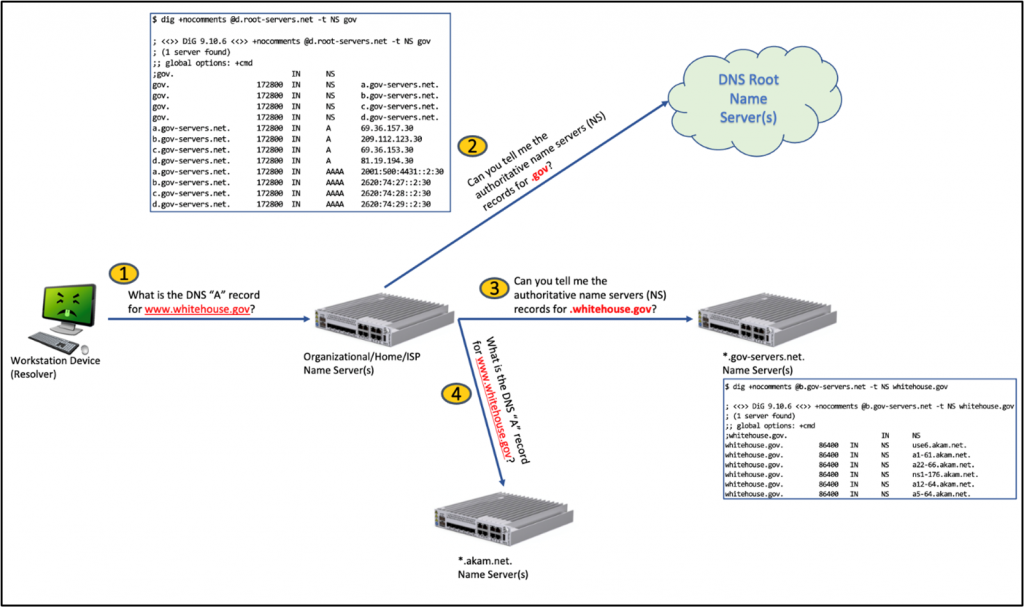
If you run your own DNS server and you DO NOT forward all requests to another DNS provider (such as 8.8.8.8), your DNS server must ask the root name servers to aid in resolving a request. The diagram below shows essentially how your local DNS server behaves when looking up www.whitehouse.gov for example.
What’s the problem? As security professionals, we love good encryption and, let’s face it, DNS is not too pleasing because it’s not encrypted.
What about DNSSEC? Sorry, DNSSEC cannot help us because its goal is to ensure the accuracy of the answer / prevent spoofing, which in turn helps address the cache poisoning issue, but DNSSEC does not protect data in transit.
Well, it turns out that the various browser vendors came up with one of the worst ideas ever. That idea was to transmit DNS requests over HTTPS. https://datatracker.ietf.org/doc/html/rfc8484
Now, you may be having an adverse reaction right about now. I mean, HTTPS is encrypted, right? Yes, true, it is encrypted, but remember the surveillance capitalism comment above?
Think about this… if your DNS traffic is sent to the browser vendor infrastructure, your data is even more subject to surveillance. In fact, what has happened is a consolidation of significant control and power over your data! Furthermore, by doing this, the extreme operational stability of a highly distributed architecture has suddenly become centralized in the hands of a few. All the precepts of an open standard and free Internet are being subverted by the data-mining few.
We are additionally crossing the streams here from a protocol perspective. HTTP = “Hypertext Transfer Protocol” and DNS is NOT hypertext! As a result, we have a situation of vertical protocol stack single browser vendor lock in that has developed. Is this what we want? Is this the right solution?
I find myself extremely conflicted at this point in the article. I mean, is it not true that solid encryption is a good thing? As security professionals, we stand behind well-tested, researched, strong encryption, but I personally cannot stand behind this whilst my privacy is being so thoroughly violated.
I am further conflicted in that I have no real assurance that my local ISP is not mining my encrypted data either. Where do we turn from here?
There is another form of DNS encryption that has existed for a while known as DNS over Transport Layer Security (DoT). https://datatracker.ietf.org/doc/html/rfc7858
Without diving into too deep a hole, in short, DoT at least tries to do the right thing by having an appropriate listening TCP service on TCP port 853 and using Transport Layer Security (TLS) as it’s intended in an appropriate open standard protocol compliant fashion. The challenge is just that DoT is indeed a new protocol, and how can we / do we instruct our client endpoint stub resolvers to properly use this protocol? Sure, we can turn back to our good old friend DHCP and have some sort of option; then, we must hope that all the operating system vendors do the right thing with the DNS stub resolver code implementing TLS support as needed.
Well, not surprisingly, the “right solution” does not always win in favor of the “easy solution.” DoT would require a lot of change, and people don’t like change, especially with something with an expectation level as ubiquitous as electricity.

But wait just a minute — I am not being entirely fair on the topic of data surveillance.
Below is a sample list of DNS over HTTPS providers by domain name (ironic, huh?). Many of these purport value-added service through operational resiliency, and filtering malware/spyware domains/advertisements.
Alright, well, having gone through this list, it’s a fair statement to say that most of the above have a reasonably strong statement about your privacy (with one notable exception).
Thus, my strongest objections come down to the violation of the protocol stack, and individual browsers assuming the function of the client stub resolver process regardless of your local network configuration. This is far from acceptable in large enterprise network operations who absolutely need to exercise security control over their network protocols.
As it happens, many of the above DoH providers also support DoT. So, coming full circle back to my Monday morning goal of reexamining DNS in my network, I took a moment to focus and think about my level of comfort. It came down to this:
I settled on the idea that I will continue to run my own DNS server but will encrypt the traffic coming from that server to Quad9 using DoT. Upon reading, it feels as if Quad9 has the best interest and best intent of providers out there. In conjunction with this, I will actively block DoH to any of these public providers through an iptables rule updated with a dynamic IP set that I can change as needed. Yes, this means directly blocking TCP port 443 destined traffic to a set of specific IP addresses because someone thought it was a good idea to conflate protocols (sigh). I can maintain the domain list and update sporadically as needed.
Since my perimeter firewall is an Ubuntu-based device, I needed to find software that can listen to the DNS request, and then formulate it as a DNS over TLS (DoT) transaction to Quad9. I suspect there might be a number of choices available, however I chose to use the DNS privacy daemon aptly named “Stubby” (https://dnsprivacy.org/dns_privacy_daemon_-_stubby/). Installation was as simple as “sudo apt install stubby”.
Stubby acts as a local DNS privacy stub resolver, sending DNS queries over an encrypted TLS connection using DoT. Stubby is configured via a Yaml file named /etc/stubby/stubby.yml, and as you might expect, Quad9 publishes a configuration for you. Refer to https://support.quad9.net/hc/en-us/articles/4409217364237-DNS-over-TLS-Ubuntu-18-04-20-04-Stubby- for more information.
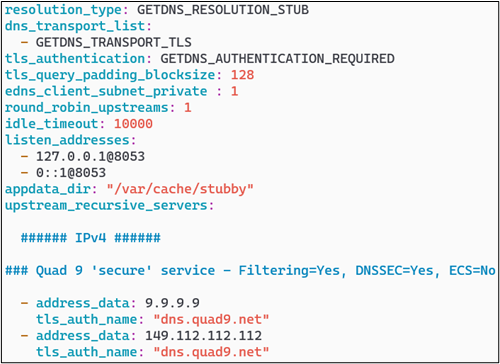
If you desire to look up all the various settings, you can find them here at https://getdnsapi.net/documentation/manpages/stubby/. A few highlights for you, as follows:
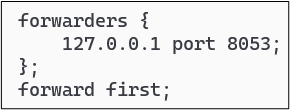
The next step is to change the bind configuration so that it “forwards” DNS requests to the local Stubby instance, rather than using other DNS name servers to populate its cache. You have two options here, either forward all requests, or forward requests unless the forwarder fails, then fallback to normal DNS protocol operations. In terms of bind configuration syntax, this amounts to using the directive “forward only” versus “forward first” whereby the latter will fallback upon failure. You are also required to configure the address you are forwarding to. The screenshot below shows my configuration which is placed in the /etc/bind/named.conf file within the options section.
Final steps are to ensure that Stubby is running, and also to ensure that Stubby is configured to start automatically in system services using the command ‘systemctl enable stubby’ as root.
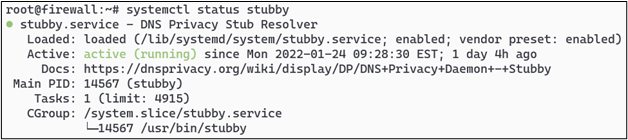
Then finally, you can reload your bind name server using ‘rndc reload’ and you will now be encrypting your Internet-bound DNS traffic to Quad9.
In my specific case, I use iptables to enforce my perimeter firewall rules and thus, after I managed to get the DNS configuration updated, I did need to change some things as follows:
One possible method I use to create the IP set for the DoH provider list is to list out the providers by domain name as above, and then perform DNS lookups on each on a daily basis to ensure that if the providers are using anycast addresses, the blocking list always has a current set of addresses. Using a simple shell script and the “ipset” command provides an easy method to do this.
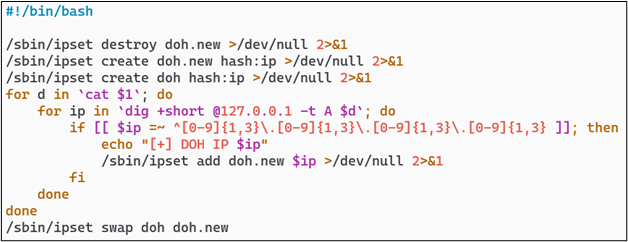
After you have this configuration in place, you can easily create a crontab entry to continuously maintain the list on a periodic basis.
Making the assumption that your firewall is the perimeter device and that you are performing NAT and IP traffic forwarding, you would need some sort of iptables rule to prevent forwarding any traffic to the DoH provider list. In my configuration, this rule looks as follows:

You will also need to ensure that Stubby can communicate outbound from your firewall for its DNS over TLS traffic to be able to resolve domains against the Quad9 servers.

The final pièce de résistance is to ensure that any endpoints inside of your network cannot completely bypass your internal DNS server and send traffic to any DNS provider on the Internet. It may not surprise you that many devices produced by Google just love to come preconfigured with 8.8.8.8 as their DNS resolver. That shall not happen on my network!
If, for example, your internal network ranges are in the 10.0.0.0/8 class A somewhere, a pair of rules similar to the below screenshot will happily accomplish this.

And there we have it! I have achieved temporary piece of mind by encrypting Internet-destined DNS traffic, at least across to Quad9, while keeping my own ability to monitor normal DNS traffic inside my network. I feel this is a fair balance of encryption, privacy, security, and operational availability.
Happy trails in your own quest to surviving the mess that is DNS over HTTPS!
此内容由惯性聚合(RSS阅读器)自动聚合整理,仅供阅读参考。 原文来自 — 版权归原作者所有。