


Kent Ickler //
It’s been over two years since Jordan and I talked about a Blue Team’s perspective on Red Team tools.
A Blue Team’s Perspective on Red Team Hack Tools – YouTube
The webcast itself had interesting topics; at the end of the discussion, we talked about a tool we wrote. PlumHound is a report engine for BloodHoundAD to make actionable reports for Blue Teams, Systems Administrators, and Analysts. We figured it’s about time we got around to writing this blog.

The framework for PlumHound is relatively simple: utilize the control path-finding capabilities of BloodHoundAD in Neo4j to build actionable intelligence for blue teams to identify Active Directory problems.
A while into development, we ran into Mathieu Saulnier (Scoubi) who had a similar project. Finding similar objectives, we merged our efforts. Mathieu brought in additional modules that would identify the weakest link (AnalyzePath) to a control path vulnerability and the most important paths to remediate first (BusiestPath) to be most effective— both modules of his BlueHound project.
On pentests where we found interesting control path vulnerabilities, we took a few moments to analyze the condition and, if it was something new, write a new PlumHound report using Neo4j cyphers. Meanwhile, other information security teams began to use the report engine to build their own reports as well.
Today, we have 69 PlumHound reports in the packaged “Default” reports, plus the Busiest Path and Analyze Path functions of Mathieu Saulnier’s BlueHound.
First off, we have to acknowledge that we stand on the shoulders of the giants that built Neo4j, BloodHoundAD, and its data collectors. With that said, PlumHound uses Python to connect to the Neo4j database after BloodHoundAD has ingested and parsed data. PlumHound then uses Neo4j’s cypher language to query its database for information and output that information into CSV or HTML reports (or, alternatively, to standard output). That is, the BloodHoundAD analysis can be normalized into a reporting format that can be consumed for data-driven decision making about correcting common Active Directory control path vulnerabilities.
Running PlumHound is easy: specify the Neo4j database connection and specify the “task-list” you want to do. Task-lists are sets of cypher queries and metadata that tell PlumHound what query to run and how to generate a report from the output. The “Default” task-list included with PlumHound includes 69 reports plus an index.
To shorthand things even further, if your Neo4j server is on localhost, you won’t need to specify a Neo4j connection.
For versions of Neo4j that still use “default” credentials, you must first update the default credentials to use the service. If you’re like me, you source-filter the Neo4j service and update credentials to be something… easy… lazy… terrible? Anyway, I change the password from “neo4j” to “neo4jj” because source-filter the service. Remember, if you source-filtered the service, you will need to run PlumHound from that trusted source.
If your username is “neo4j” and your updated password is “neo4jj”, you won’t need to specify your username and password to connect to the Neo4j database, because the default is “neo4jj”.
That will execute the default included task-list.
PlumHound.py -x tasks/default.tasks
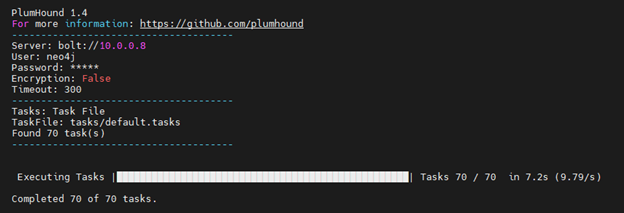
That’s it, 69 PlumHound reports + a report index are ready for your review, nice!
The TaskList files allow PlumHound to be fully scripted with batch jobs after the SharpHound dataset has been imported not BloodHoundAD on Neo4j. The TaskList file syntax is as follows. (Note that any cypher query containing a double quote must be modified to use a single quote instead of double.)
["Report Title","[Output-Format]","[Output-File]","[CypherQuery]"]
The “default.tasks” instructs PlumHound to also generate an index of all the produced reports, index.html.
Opening the index.html file shows us the list of reports. The reports start out pretty typical and provide a general report-based picture of the Active Directory environment.
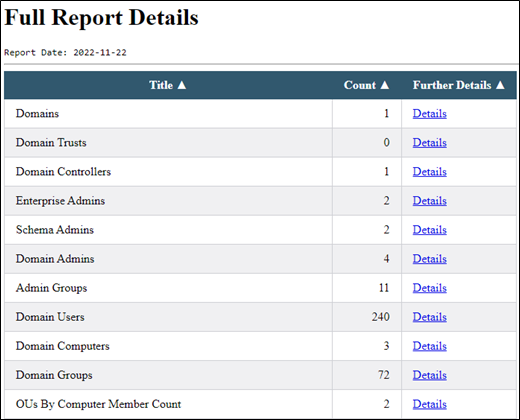
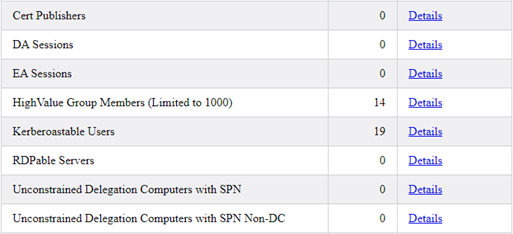
Then, our first interesting set of reports. Our test database we used isn’t super interesting, but each of the reports below provide information that, as penetration testers, we use to find a foothold or escalate privileges on the network. Of course, as a Blue Teamer, we’d recommend thinking critically about each of the items in these reports.
Next up, reports that tell us if common or overly-used groups have been potentially mistakenly provided Active Directory delegation. In the group below, PasswordResetter groups let us know that a group has been delegated to reset passwords and will count how many users are delegated to the group.
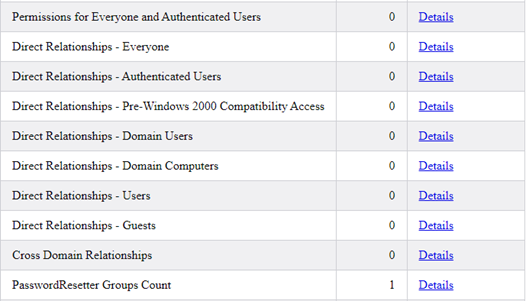
Next up, reports regarding the domain’s GPOs and analysis of the GPO owners. Then RDP groups that tell us if RDP access is provisioned via groups and which groups provide access to a count of systems.
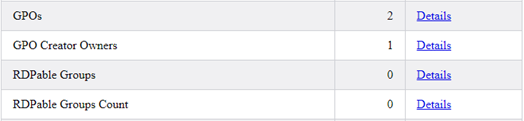
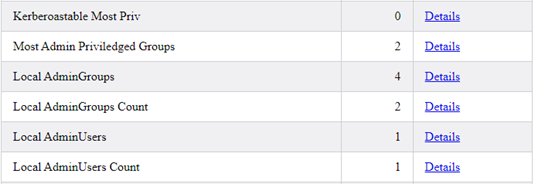
Then, reports of Kerberoastable users with the most privileges and an analysis of Local Administrators.
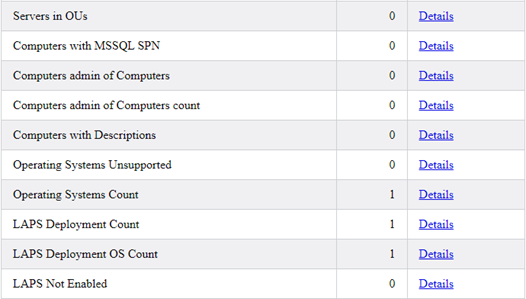
And onto reports about Computer Objects, Operating Systems, and LAPS Deployments.
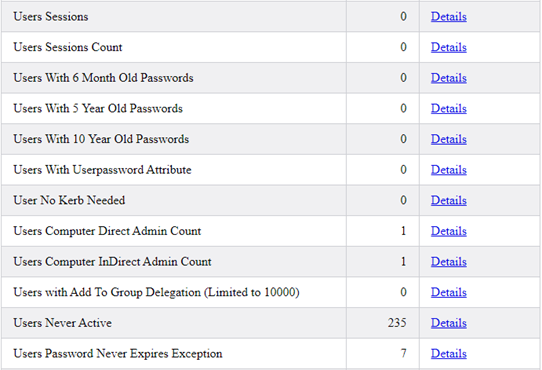
After computers, we look at user accounts. We report all identified user sessions and users with multiple sessions on different systems. We then look at user accounts with old passwords. We look at users with vulnerable “userpassword” attributes and users with no Kerberos pre-authentication needed. We also have reports of users with administrative control of a system both directly and indirectly. Users with “Add To Group Delegation” tell us which users have been delegated to change group membership – both directly and indirectly. We report on users that have never logged in, and finally, users that are never required to change their passwords.
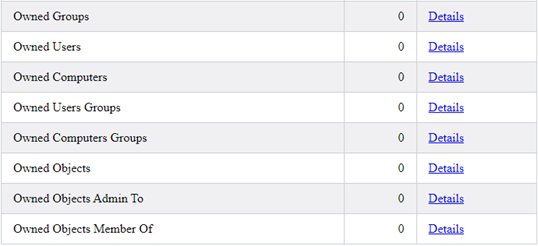
Finally, we have reports that are populated by the user of BloodHoundAD’s “Owned” flags, allowing an analyst to produce detailed reports of post-exploitation, defining exactly which user and computer accounts were compromised during an engagement.
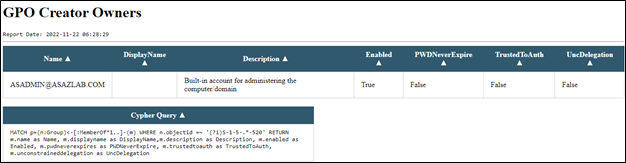
Each of the produced reports includes the cypher query used to generate the report. While useful for troubleshooting and developing the reports, it also allows the analyst the ability to utilize the cypher query as an ingest to other tooling.
In the below report, “GPO Creators Owners”, we see that [email protected] is a GPO Creator/Owner. Included in the report are the date and time the report was executed, as well as the cypher query used to generate the report.
A penetration tester can find quick information – for example: what user accounts don’t require a password change but have also ever been an admin? The “User Password Never Expires Exception” report will tell us just that by checking the “AdminCount” column.
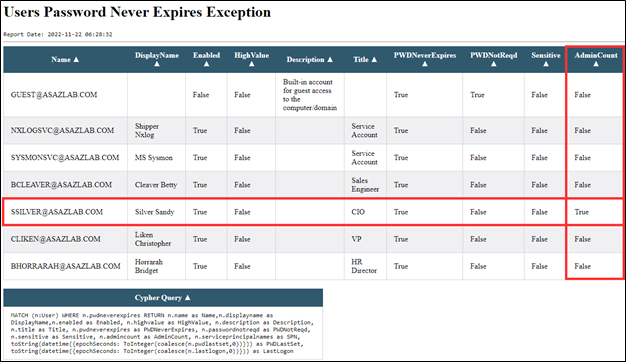
A defensive or Blue Team analyst can also use the same reports but with the objective of identifying vulnerable configurations to be remedied.
PlumHound’s interface with Neo4j also means that you can quickly and easily execute cypher queries and output directly to the console. In the below example, we query for users that never require a password change.
./PlumHound.py -q "MATCH (n:User) WHERE n.pwdneverexpires RETURN n.name as Name,n.displayname as DisplayName,n.enabled as Enabled, n.title as Title, n.pwdneverexpires as PWDNeverExpires, n.passwordnotreqd as PWDNotReqd, n.admincount as AdminCount"
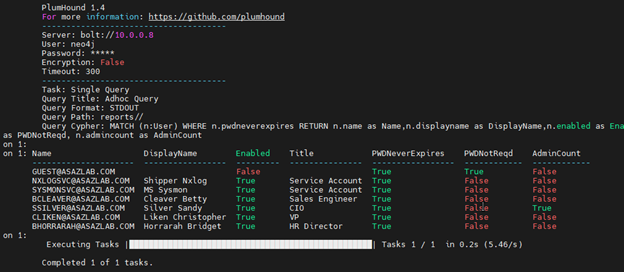
PlumHound also includes other task-lists that are more specific to looking for specific data. For example, we’ve bundled Kerberoasting specific reports into its own task-list. We’ve produced a task-list to generate CSV reports instead of HTML. We also have a task-list that will hunt for interesting things, such as passwords in description, or comment attributes of Active Directory objects.
The Analyze path function allows us to identify what relationship to break to stop a control path vulnerability. The command syntax is simple: use flag -ap and specify either user, group, computer, ou, or GPO as a start to the path analysis.
./PlumHound.py -ap user
In the below screenshot, user [email protected] has a path to OU “AdminAccounts”. The output below details the path.
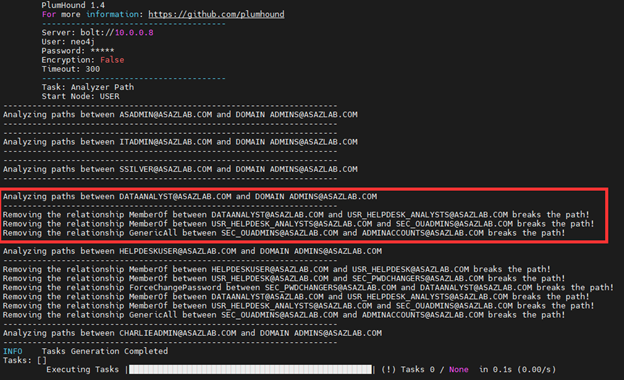
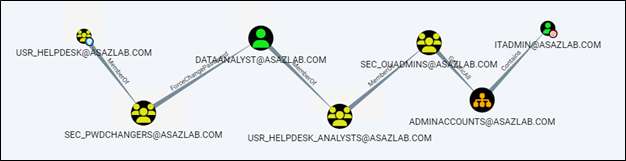
For those more familiar with BloodHound’s GUI, this is the same representation as below, but indicating the specific relationships to break.

The AnalyzePath query will effectively produce a kill-chain for every vulnerable path by user, group, computer, OU, or group.
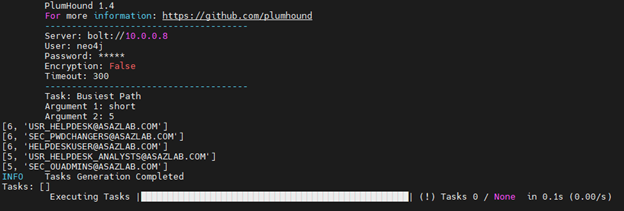
The Busiest Path finds the shortest (or all) paths that give the most users a path to Domain Admin and gives us number of affected users. The most “busiest path” is listed first. This informs a team tasked with remediating path vulnerabilities information about which paths to start remediating first to most effectively use their time and effort.
In the case below, we search for the top 5 most user-affected shortest paths to Domain Admin.
./PlumHound.py -bp short 5
The first path described below affects six users and is a path starting from group [email protected] to Domain Admins
We can see the path in BloodHoundAD by using the control-paths search:
This tool was made by someone who doesn’t write code for a living, or at least not full-time. As a clutch for not writing in a debug IDE, I’ve written in a function that causes the PlumHound tool to have a very configurable debug verbosity. This helps the process of testing cypher queries and writing task lists.
The verbosity argument for PlumHound is -v (number). The verbose number can be 0-1000, where “0” is quiet and 1000 produces a message on every crucial step of the PlumHound process, somewhere in between is just that. Too verbose? Reduce your -v setting. Not enough? Increase it. In addition to this, verbose logging is also configured to review prior logs generated by the tool.
We invite you to checkout the PlumHound report engine. We’ve built it open-source to help administrators and analysts make the most of BloodHoundAD’s control path analysis.
If you find a useful cypher query you want added, let us know, or make a pull request.
GitHub Link: PlumHound (github.com)
Documentation: PlumHound | Bloodhound for Blue and Purple Teams
Interested in knowing more about securing Active Directory and Enterprise environments? Check out our class presented by AntiSyphon Security, Defending the Enterprise.
Want to learn more mad skills from the person who wrote this blog?
Check out these classes from Jordan and Kent:
此内容由惯性聚合(RSS阅读器)自动聚合整理,仅供阅读参考。 原文来自 — 版权归原作者所有。