


Steve Borosh //
Those of us on the offensive side of security often find ourselves in the position to test our clients’ resilience to phishing attacks. According to the Verizon 2021 Data Breach Investigations Report,1 phishing comprises 25% of all breaches. Phishing remains one of the top ways adversaries enter networks.
The phrase “defense-in-depth” has been used in the information security realm for a few years now, meaning defenders layer their protections instead of leaning too hard on a single solution. Email security especially requires the use of a defense-in-depth approach to phishing attacks. Enterprises may monitor for newly created phishing domains, filter, or block spam in the cloud, set SPF, DKIM, DMARC protection records, and scan or block file attachments. Along with user awareness training and offensive training engagements, these protections provide multiple layers of defense that create hurdles adversaries must clear, reducing their chances for success.
There are several types of phishing engagements often used for testing enterprises. Some types are:
Many organizations have automated phishing training. Often, these programs require users to click a link in an email which tracks their “bad” behavior. These training scenarios are great to introduce users to the potential hazards of phishing attacks, however, they may miss the mark when modeling more advanced adversaries.
Phishing is the bane of many when trying to gain access to their target enterprise. Phishing takes time and patience — lots of patience. If you’re on offense with a limited timeframe and budget, getting through all the defensive layers, and staying there, takes precision. Even with all the patience and care taken to set up infrastructure, craft a phishing email, create a payload, and get it through defenses, all it takes is one user to report the phish and it’s back to square one. Setting up new infrastructure, creating new pretext, generating new payloads, and sending from a new source all without being detected takes time, and again, patience.
What if we could cut out the infrastructure pieces, skip past domain categorization, reputation, and “bypass” all the target enterprises’ defenses with one command? Sound difficult? Let’s dive in.
Microsoft has documentation on a feature named “direct send”.2 Direct send is most used by devices such as printers that print or scan to email inside an enterprise. Direct scan requires no authentication and may be sent from outside of the enterprise network.
Prerequisites: Microsoft 365 subscription and an Exchange Online Plan.
Direct send connects to an MX endpoint called a “smart host.” The smart host is in the format of “company-com.mail.protection.outlook.com” and is created by default when a new Exchange Online plan is created. Your device or host connects to the smart host via telnet on port 25 and sends unauthenticated email to internal users. Outbound emails are blocked. See the mail flow in the diagram3 below.
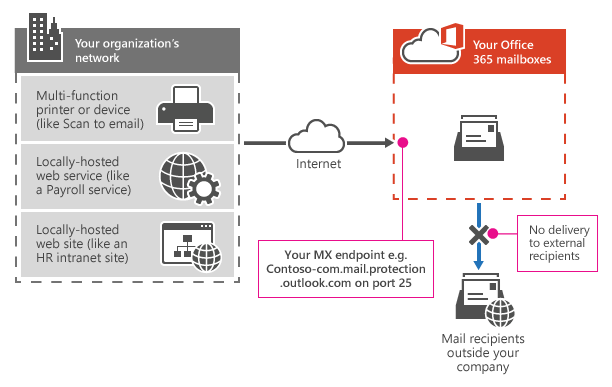
Settings for direct send:
With Microsoft direct send, inbound email will make it into the enterprise if that domain is trusted. So, in most cases with direct send, we can send mail from [email protected] to anyone else inside company.com since the domain will trust itself. In many cases, we’re also able to spoof external email addresses to internal users if those domains are trusted by the mail gateway — such as, “[email protected]” (used from Microsoft security emails) could be used as a From address.
Microsoft direct send does not allow mail to be delivered outside of the enterprise. So, no spoofing internal to external.
An added benefit of spoofing is that the From field populates with the From user’s Microsoft icon as well. If we send an email from [email protected] to [email protected], the email from field will show the avatar of the “noreply” user, typically the company logo.
To test this against your own newly created Exchange Online plan, add a “Bypass Spam Filter” rule in the exchange admin center.4
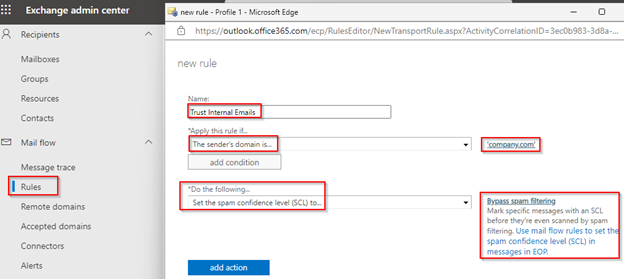
This rule allows internal emails to land in the inbox instead of “Junk” on default initial installations.
Sending a spoofed email is as simple as using a PowerShell command.
Here’s an example PowerShell command:
Send-MailMessage -SmtpServer company-com.mail.protection.outlook.com -To [email protected] -From [email protected] -Subject “Urgent Update Required” -Body “Frank,<br>We need you to update your Microsoft Office software. Run this update as soon as you can please. No need to let me know when it’s complete. <a href=’https://myphishsite.azurewebsites.net/’>Download</a>” -BodyAsHTMLThis PowerShell cmdlet can also be found in PowerShell for Linux. With that in mind, it’s possible to send your phishing emails from just about anywhere. One of my favorites is to send directly from Azure Cloud Shell, which is easily accessible from Windows Terminal. It’s easy to rotate IP addresses this way. Azure Cloud Shell is easily accessible from the Windows Terminal App.
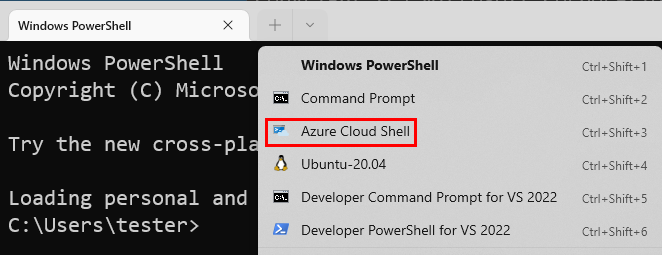

SPAMHAUS will block most residential IP addresses from sending emails. Don’t send phishing emails from your house.
In testing against enterprises that utilize third-party mail gateways, spoofing has been extremely successful using this technique. While mail may still flow through the email gateway, default configurations may trust email originating from their own domain and *.mail.protection.outlook.com.
Exchange Online Protection (EOP) is a Microsoft cloud-based email filter that protects enterprises against email threats. EOP is included by default with all Microsoft 365 enterprises using Exchange Online mailboxes. Keep in mind that “Microsoft Defender for Office 365” is a separate offering and not covered in this blog post.
Email flows through Exchange Online as detailed in the diagram5 below.
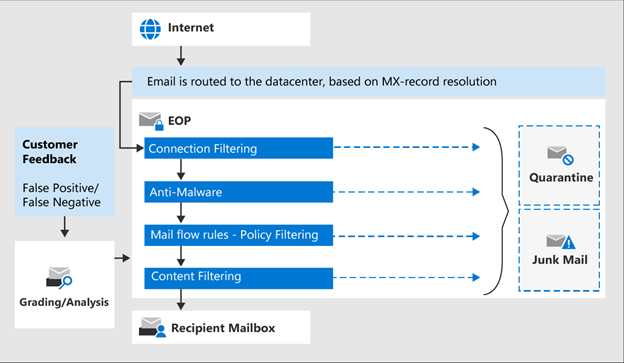
Inbound email is first scrutinized for sender reputation where most spam is diverted or stopped.
Next, each message is scanned for malware. Learn more about anti-malware protection here. It should be noted that direct-send-spoofed messages still pass through these protections. Attachments may be detonated in a sandbox. Microsoft provides a “common attachments filter” that enables defenders to block specific file types by default. This setting is disabled by default and when enabled, blocks these file extensions by default: ace,ani,app,cab,docm,exe,iso,jar,jnlp,reg,scr,vbe,vbs.
Messages then continue through mail flow rules.
Finally, messages pass through content filtering (anti-spam, anti-spoofing) and are routed accordingly.
For a full list of features available by EOP, visit: https://docs.microsoft.com/en-us/microsoft-365/security/office-365-security/exchange-online-protection-overview?view=o365-worldwide#eop-features.
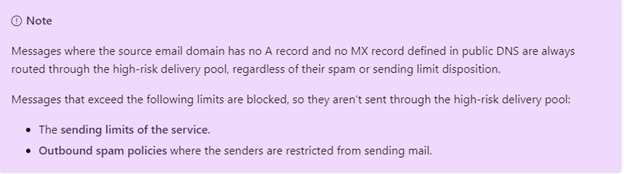
Unfortunately, if we’re sending our spoof through a proxy that doesn’t have A and MX records matching the From domain, our mail will be even more scrutinized. A phishing template often used for Microsoft device code phishing6 currently enters an unknown abyss when sent.
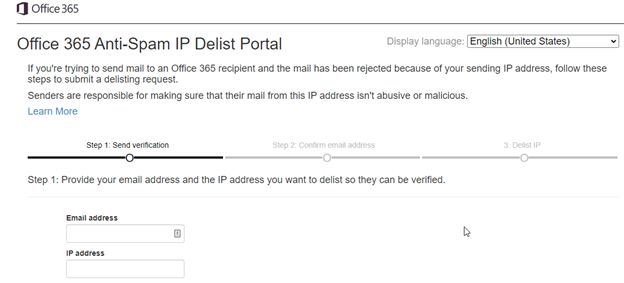
During a phishing engagement, your IP may become soft-banned by Microsoft. No worries there, you may submit a request to be unbanned or change your IP address. If you’re using Cloud Shell to send a phishing email, restarting the console will provide you with a new IP address. If you want to unblock an IP, it takes just a few minutes and you’re back in business. Visit https://sender.office.com and enter the details to unblock.
With Microsoft direct send, we’re able to send emails on behalf of external or internal users to other internal users inside enterprises using Microsoft 365; in essence, spoofing emails into many organizations.
This works because Microsoft utilizes “smart hosts” for Exchange typically located at an address like company-com.mail.protection.outlook.com that allows unauthenticated SMTP relays to internal users.
External third-party email gateways are a great way to catch most spam or spoofing attempts. Spoofing with Microsoft direct send may bypass many of these gateways and land you in the inbox.
This spoofing technique has been extremely successful in landing phishes into enterprise inboxes. However, while simple emails may land in the inbox, common phishing templates or attachments may be blocked. As always, it’s important to test your infrastructure prior to sending live emails into your target enterprise.
Defenders should test the ability to send internal emails via direct send and ensure that any email gateways adhere to the proper mail flow for internal recipients. There is no “Disable Direct Send” feature in Microsoft 365. It is necessary to correctly set your mail gateway settings to allow specific IP addresses to send emails on behalf of the enterprise. Refer to your mail gateway documentation.
At the time of this writing, this finding has been submitted to MSRC and CLOSED per Microsoft without a fix. I hope this blog post highlights the dangers posed by Microsoft direct send regarding spoofed phishing attacks and enables defenders to better protect their network while providing offensive operators another technique to test and enhance enterprise defenses.
Special thanks to @ustayready for pointing me down this research path. Check out his handy Python script7 for sending spoofed messages as well.
1. https://www.verizon.com/business/resources/reports/dbir/2021/results-and-analysis/
4. https://admin.exchange.microsoft.com/#/transportrules
6. https://0xboku.com/2021/07/12/ArtOfDeviceCodePhish.html
7. https://gist.github.com/ustayready/b8314a4a964ff498f7b4682fc66475cc
Available live/virtual and on-demand

此内容由惯性聚合(RSS阅读器)自动聚合整理,仅供阅读参考。 原文来自 — 版权归原作者所有。