

惯性聚合 高效追踪和阅读你感兴趣的博客、新闻、科技资讯
阅读原文 在惯性聚合中打开

推荐订阅源

C
Cybersecurity and Infrastructure Security Agency CISA
N
News and Events Feed by Topic
S
Securelist
Threat Intelligence Blog | Flashpoint
Spread Privacy
Spread Privacy
T
Threat Research - Cisco Blogs
T
Tor Project blog
C
Cyber Attacks, Cyber Crime and Cyber Security
K
Kaspersky official blog
L
LINUX DO - 热门话题
T
The Exploit Database - CXSecurity.com
S
Schneier on Security
A
Arctic Wolf
Security Latest
Security Latest
T
Threatpost
P
Palo Alto Networks Blog
Simon Willison's Weblog
AWS News Blog
AWS News Blog
Cyberwarzone
Cyberwarzone
L
Lohrmann on Cybersecurity
P
Privacy International News Feed
V
Vulnerabilities – Threatpost
D
Darknet – Hacking Tools, Hacker News & Cyber Security
Cisco Talos Blog
Cisco Talos Blog
C
CXSECURITY Database RSS Feed - CXSecurity.com
G
GRAHAM CLULEY
The Hacker News
The Hacker News
C
CERT Recently Published Vulnerability Notes
Know Your Adversary
Know Your Adversary
I
Intezer
Scott Helme
Scott Helme
T
Tenable Blog
NISL@THU
NISL@THU
cs.CL updates on arXiv.org
C
Cisco Blogs
N
News and Events Feed by Topic
P
Proofpoint News Feed
P
Privacy & Cybersecurity Law Blog
Project Zero
Project Zero
Latest news
Latest news
Hacker News: Ask HN
Hacker News: Ask HN
Recent Commits to openclaw:main
Forbes - Security
Forbes - Security
Security Archives - TechRepublic
AI
AI
S
Security Affairs
cs.AI updates on arXiv.org
D
Docker
P
Proofpoint News Feed
博客园 - Franky

Black Hills Information Security, Inc.

Bad Habits: An ANTISOC Operation Same Problem, Different Angles: When Red Team and Blue Team Actually Talk to Each Other How to Identify and Exploit New Vulnerabilities Swapper – A Pure Regex Match/Replace Burp Extension A Practical Guide to BloodHound Data Collection Network Engineering Basics Signed, Trusted, and Abused: Proxy Execution via WebView2 Getting Started In Pentesting – Advice From The BHIS Pentest Lead Cloud Security: Tips and Resources for Securing the Cloud Lessons From A Chatbot Incident How to Lead Effective Tabletops Understanding GRC: How to Navigate Risks and Compliance Standards The “P” in PAM is for Persistence: Linux Persistence Technique Malware Analysis: How to Analyze and Understand Malware OSINT: How to Find, Use, and Control Open-Source Intelligence What to Do with Your First Home Lab When the SOC Goes to Deadwood: A Night to Remember Social Engineering and Microsoft SSPR: The Road to Pwnage is Paved with Good Intentions Common Cyber Threats Finding the Right Penetration Testing Company Deceptive-Auditing: An Active Directory Honeypots Tool The Curious Case of the Comburglar How to Set Smart Goals (That Actually Work For You) Inside the BHIS SOC: A Conversation with Hayden Covington Abusing Delegation with Impacket (Part 3): Resource-Based Constrained Delegation Why You Got Hacked – 2025 Super Edition Abusing Delegation with Impacket (Part 2): Constrained Delegation Abusing Delegation with Impacket (Part 1): Unconstrained Delegation GoSpoof – Turning Attacks into Intel Model Context Protocol (MCP) Bypassing WAFs Using Oversized Requests Getting Started with AI Hacking Part 2: Prompt Injection Wrangling Windows Event Logs with Hayabusa & SOF-ELK (Part 2) DomCat: A Domain Categorization Tool Wrangling Windows Event Logs with Hayabusa & SOF-ELK (Part 1) Microsoft Store and WinGet: Security Risks for Corporate Environments Default Web Content MailFail Commonly Abused Administrative Utilities: A Hidden Risk to Enterprise Security Stop Spoofing Yourself! Disabling M365 Direct Send Bypassing CSP with JSONP: Introducing JSONPeek and CSP B Gone Offensive Tooling Cheatsheets: An Infosec Survival Guide Resource DNS Triage Cheatsheet GraphRunner Cheatsheet Burp Suite Cheatsheet Impacket Cheatsheet Wireshark Cheatsheet Hashcat Cheatsheet EyeWitness Cheatsheet Nmap Cheatsheet Netcat (nc) Cheatsheet Hunt for Weak Spots in Your Wireless Network with Airodump-ng from the Aircrack-ng Suite Detecting ADCS Privilege Escalation Vulnerability Scanning with Nmap Getting Started with NetExec: Streamlining Network Discovery and Access How to Use Dirsearch Augmenting Penetration Testing Methodology with Artificial Intelligence – Part 3: Arcanum Cyber Security Bot How to Design and Execute Effective Social Engineering Attacks by Phone Abusing S4U2Self for Active Directory Pivoting Why Use a Macro Pad? Espanso: Text Replacement, the Easy Way Caging Copilot: Lessons Learned in LLM Security Augmenting Penetration Testing Methodology with Artificial Intelligence – Part 2: Copilot Augmenting Penetration Testing Methodology with Artificial Intelligence – Part 1: Burpference Intercepting Traffic for Mobile Applications that Bypass the System Proxy How to Root Android Phones Communicating Security to the C-Suite: A Strategic Approach Offline Memory Forensics With Volatility Getting Started with AI Hacking: Part 1 Go-Spoof: A Tool for Cyber Deception How to Test Adversary-in-the-Middle Without Hacking Tools Canary in the Code: Alert()-ing on XSS Exploits How to Hack Wi-Fi with No Wi-Fi Why Your Org Needs a Penetration Test Program Burp Suite Extension: Copy For Light at the End of the Dark Web Wi-Fi Forge: Practice Wi-Fi Security Without Hardware Avoiding Dirty RAGs: Retrieval-Augmented Generation with Ollama and LangChain Gone Phishing: Installing GoPhish and Creating a Campaign 5 Things We Are Going to Continue to Ignore in 2025 John Strand’s 5 Phase Plan For Starting in Computer Security Questions From a Beginner Threat Hunter GRC for Security Managers: From Checklists to Influence AI Large Language Models and Supervised Fine Tuning Attack Tactics 9: Shadow Creds for PrivEsc w/ Kent & Jordan One Active Directory Account Can Be Your Best Early Warning Introduction to Zeek Log Analysis Indecent Exposure: Your Secrets are Showing Creating Burp Extensions: A Beginner’s Guide Pitting AI Against AI: Using PyRIT to Assess Large Language Models (LLMs) The Top Ten List of Why You Got Hacked This Year (2023/2024) ICS Hard Knocks: Mitigations to Scenarios Found in ICS/OT Backdoors & Breaches Intro to Data Analytics Using SQL Finding Access Control Vulnerabilities with Autorize The Detection Engineering Process Cyber Risk Lessons We Can Learn From Hurricane Preparedness Intro to Desktop Application Testing Methodology What Is Penetration Testing? Adversary in the Middle (AitM): Post-Exploitation Pentesting, Threat Hunting, and SOC: An Overview
Lessons Learned While Pentesting GraphQL
Kassie Kimball · 2022-07-07 · via Black Hills Information Security, Inc.

Sean Verity //

GraphQL is one of those technologies that I heard about several years ago but had not encountered during an actual pentest. After reading a blog or two, I remember thinking “JSON, database queries, got it” and then I moved on. I didn’t see GraphQL during an actual pentest until about a month ago.

There were a few pain points that I worked through to bootstrap my GraphQL pentesting chops. Hopefully, I can help you avoid these same pain points when you come across GraphQL for the first time during a pentest, bug bounty hunt, or CTF.

There are several tools out there. I started out doing things manually, which is good to learn GraphQL, but gets really hard, really fast when you start getting into something beyond a very basic GraphQL query. Therefore, I’m going to suggest using a tool that can automate, or at the very least, create queries that are good from a syntax perspective.

This blog also assumes that GraphQL introspection is enabled. There are tools to enumerate GraphQL schemas when introspection is disabled but that is outside the scope of this blog. But, in case you need one, here you go:

How to Find GraphQL

The easiest way to find GraphQL is to look at your Burp History logs. In the HTTP History tab, filter by the search term, “graphql,” and see if anything pops up. You could also search your target in the “Site map” tab for “graphql”. If the app is using GraphQL on the frontend, you’ll see an endpoint that includes “graphql” somewhere in a URL.

But what if GraphQL wasn’t intended to be exposed?

Well, there’s a GraphQL SecList for that! Feed the GraphQL SecList to Gobuster or your favorite forced browsing tool for effect. (BTW – Did you see our recent blog on Gobuster? https://www.blackhillsinfosec.com/for-web-content-discovery-who-you-gonna-call-gobuster/)

Speaking GraphQL

After finding GraphQL, one of the first things you might want to do is send the request to Burp Suite’s Repeater tab for further analysis. One thing that jumped out for me is that GraphQL is VERY transparent. Take a look at the following error message:
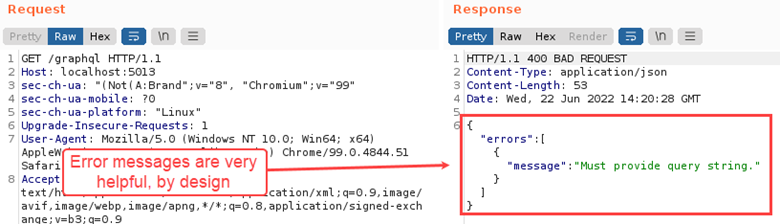
There’s actually a few things wrong with this query, but from reading the error message, it is plainly obvious where we can start to fix it.

GraphQL also has this wonderful feature called “introspection.” GraphQL’s introspection feature is a convenient way for GraphQL to share details about itself with other developers or consumers of the GraphQL instance. When introspection is enabled, the entire GraphQL schema can be retrieved with a single query. This provides a significant advantage to pentesters, bug bounty hunters, or anyone looking for vulnerabilities.

The GraphQL visualization tool, graphql-voyager, can import a GraphQL schema and turn it into a map with nodes and edges. This can be a nice way to get an overview of the types, queries, and size of the schema. Here’s a snippet from an example GraphQL schema that describes a popular movie franchise set in a galaxy far, far away:
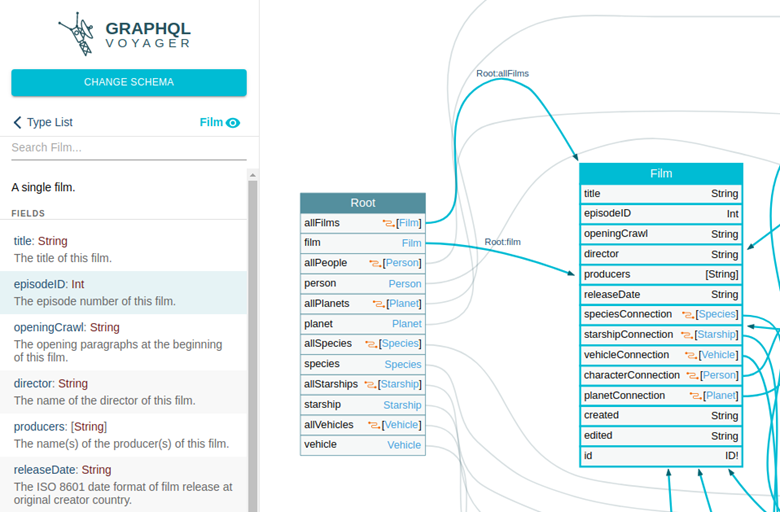
As a side note, the first time I saw GraphQL during a pentest, I imported a schema into graphql-voyager and started writing GraphQL queries in Repeater from scratch. This was fun from a learning perspective and was no big deal for simple queries. I quickly realized that this approach was unsustainable though as I dug further into the schema where there were more complex queries. It was really easy to include a misplaced curly brace.

And then I learned about this awesome project called InQL (Introspection Query Language). InQL can retrieve a GraphQL schema from a remote server through GraphQL’s introspection feature and parse it into request templates. InQL can also import a file if you have the schema saved on disk. InQL can be run as a CLI tool or as a Burp Suite extension. Running InQL as a Burp Extension offers the benefit of a workspace where you can copy and paste the request templates into other tools such as Repeater or Intruder for further testing.

Installing the InQL Burp Suite Extension

Installing the InQL Burp Suite extension is as simple as searching for it in the BApp store and clicking the install button.
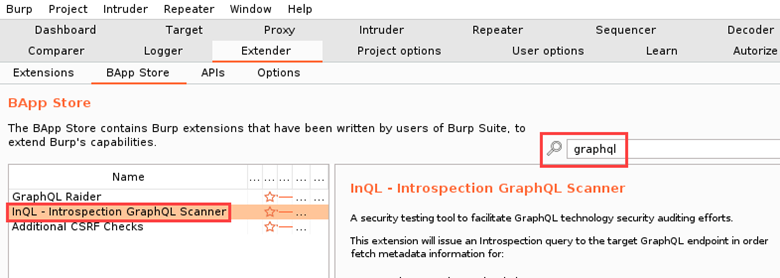
You might be wondering why I searched for “graphql” in the BApp Store as opposed to “inql”. During a test, I’ll often search for a particular technology or thing in the BApp Store (e.g. JavaScript, secrets, Node, etc.) as opposed to searching for a tool. I have found this to be helpful in the situation where I’m running into issues with a particular extension and I need an alternative that works.

After installing InQL, fetching a schema is as simple as copying the GraphQL endpoint into the address bar and clicking the “Load” button. It might take a few seconds for the schema to load. Upon completion, the interface should look similar to below.
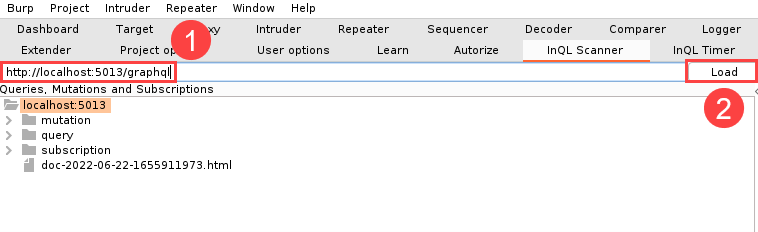
The schema in the screenshot above was grabbed from Damn Vulnerable GraphQL Application. As can be seen in the figure above, the InQL will parse the schema into queries, mutation, and subscriptions. InQL will also do you the favor of documenting the associated fields and arguments in request templates.

When you come across GraphQL during a pentest, you might find subscriptions, but you will almost certainly come across queries and mutations. Queries, as you likely guessed, will fetch data from the GraphQL data store. I like to think of mutations as functions because their purpose is to modify data in the GraphQL data store. Both queries and mutations can accept arguments which are good to fuzz.

After you load a schema into InQL, you can inspect the objects and copy the request templates from InQL to Repeater for further testing.

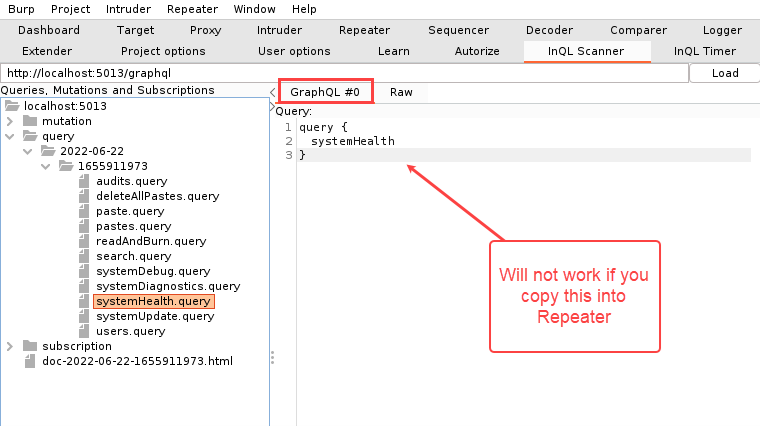
When you copy request templates from InQL to Repeater, pay attention to which tab you copied from. Copying a request template from the GraphQL tab into Repeater will not work.
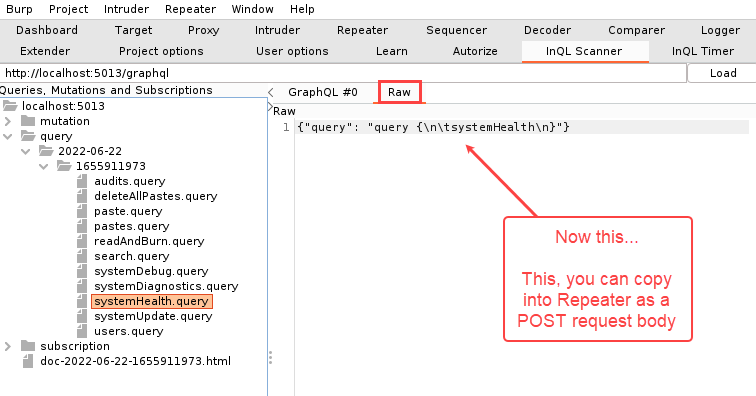
However, you can copy a request from the “Raw” tab into the body of a POST request in Repeater.

Ok, so actually, when InQL is installed, an extra tab is included in Repeater to paste or tweak your GraphQL queries. The important thing to remember though is that you need to put the right query format into the right Repeater tab. In the example below, a GraphQL query from InQL was copied into the GraphQL tab in Repeater.
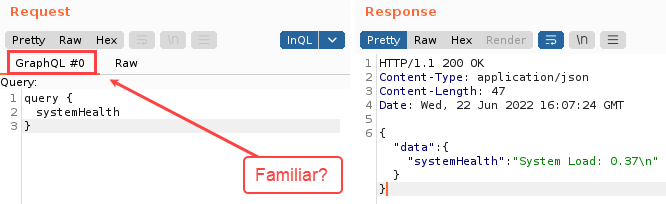
When querying the systemHealth type, we see a reasonable response. As a basis for comparison, here’s what happens when you accidentally put a “raw” query into the GraphQL query tab.
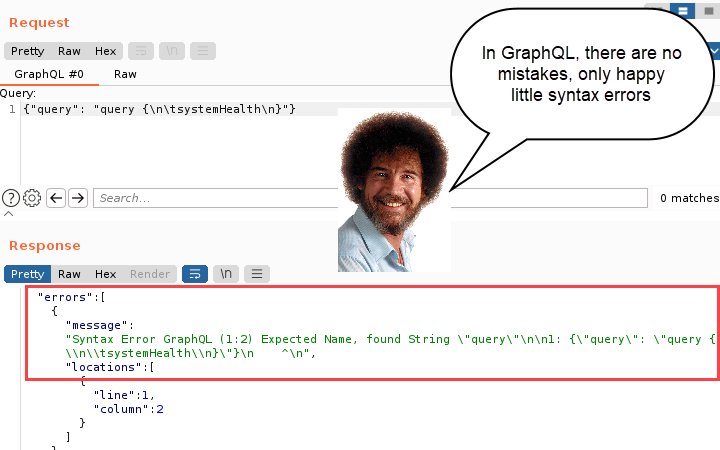
Now look at that beautiful error message. Isn’t that nice? Even though the query was not formatted correctly, GraphQL is generous enough to respond with a helpful error message that you can use to troubleshoot.

From this point, you could continue manually testing with Repeater, or send it to Intruder for fuzzing. Think of the GraphQL API as a roundabout way of interacting with the application’s back end. Here are a few hacking ideas:

Other GraphQL Testing Tips

  • Found a query that needs arguments?
    • Search Burp History for the arguments. Search for substrings or variants of what’s in the schema. As an example, the schema might have enumerated an argument named “fooBar”. Try searching for “foo” in Burp History in case the front end uses a different naming convention such as “foo_bar”. See if Burp’s Target Analyzer uncovered GraphQL arguments for you as well. In the Sitemap tab, right-click on the target’s base node, then choose “Engagement Tools > Analyze Target”.
    • Watch for error messages in the GraphQL response. GraphQL will clearly tell you what is wrong with your query. You may have forgotten an argument or passed an integer when it expected a string, etc.
  • Take Modern WebApp Pentesting w/ BB King. Other testing techniques that will come in handy for testing GraphQL (such as NoSQL injection) are covered.

Troubleshooting

One of the most frustrating things that I encountered when testing GraphQL was when a query would work and then the next day, it didn’t.

The problem was usually pretty simple and easy to overlook. Here are a few things to check if you’re in that situation:

  • Make sure you’re sending a POST request. A GET request might trigger an error message to tip you off that GraphQL is present. But, you gotta use POST requests for valid queries.
  • Make sure that the following request header is present: Content-Type: application/json
  • Read error messages in the response and modify your request accordingly.
  • Double-check which context you pasted a query into. GraphQL queries can only be pasted into the GraphQL context in Repeater. Raw requests will not work when pasted into the GraphQL context in Repeater.
  • If you don’t see the “InQL” dropdown option in Repeater: Copy a query from InQL into “raw” format into a POST request in Repeater, then click Send. This will usually bootstrap the InQL context in Repeater.

GraphQL Security Testing Resources for Further Learning


Ready to learn more?

Level up your skills with affordable classes from Antisyphon!

Pay-What-You-Can Training

Available live/virtual and on-demand
