惯性聚合 高效追踪和阅读你感兴趣的博客、新闻、科技资讯
阅读原文 在惯性聚合中打开

推荐订阅源

Apple Machine Learning Research
AWS News Blog
AWS News Blog
Google DeepMind News
U
Unit 42
博客园 - 叶小钗
博客园 - 聂微东
GbyAI
GbyAI
Stack Overflow Blog
Stack Overflow Blog
有赞技术团队
有赞技术团队
aimingoo的专栏
aimingoo的专栏
D
DataBreaches.Net
CTFtime.org: upcoming CTF events
Jina AI
Jina AI
美团技术团队
The Cloudflare Blog
M
MIT News - Artificial intelligence
Microsoft Azure Blog
I
InfoQ
S
Schneier on Security
C
Check Point Blog
Project Zero
Project Zero
The Hacker News
The Hacker News
Scott Helme
Scott Helme
K
KPMG report finds enterprise disconnect between AI and its ROI | CIO
Cisco Talos Blog
Cisco Talos Blog
P
Privacy International News Feed
SecWiki News
SecWiki News
Latest news
Latest news
MongoDB | Blog
MongoDB | Blog
S
Secure Thoughts
Google Online Security Blog
F
Fortinet All Blogs
博客园 - 三生石上(FineUI控件)
H
Help Net Security
TaoSecurity Blog
TaoSecurity Blog
cs.CL updates on arXiv.org
Last Week in AI
Last Week in AI
P
Privacy & Cybersecurity Law Blog
Forbes - Security
Forbes - Security
G
GRAHAM CLULEY
N
Netflix TechBlog - Medium
L
Lohrmann on Cybersecurity
A
About on SuperTechFans
T
The Exploit Database - CXSecurity.com
C
Cisco Blogs
PCI Perspectives
PCI Perspectives
大猫的无限游戏
大猫的无限游戏
T
Troy Hunt's Blog
H
Hacker News: Front Page
Vercel News
Vercel News

Black Hills Information Security, Inc.

Bad Habits: An ANTISOC Operation Same Problem, Different Angles: When Red Team and Blue Team Actually Talk to Each Other How to Identify and Exploit New Vulnerabilities Swapper – A Pure Regex Match/Replace Burp Extension A Practical Guide to BloodHound Data Collection Network Engineering Basics Signed, Trusted, and Abused: Proxy Execution via WebView2 Getting Started In Pentesting – Advice From The BHIS Pentest Lead Cloud Security: Tips and Resources for Securing the Cloud Lessons From A Chatbot Incident How to Lead Effective Tabletops Understanding GRC: How to Navigate Risks and Compliance Standards The “P” in PAM is for Persistence: Linux Persistence Technique Malware Analysis: How to Analyze and Understand Malware OSINT: How to Find, Use, and Control Open-Source Intelligence What to Do with Your First Home Lab When the SOC Goes to Deadwood: A Night to Remember Social Engineering and Microsoft SSPR: The Road to Pwnage is Paved with Good Intentions Common Cyber Threats Finding the Right Penetration Testing Company Deceptive-Auditing: An Active Directory Honeypots Tool The Curious Case of the Comburglar How to Set Smart Goals (That Actually Work For You) Inside the BHIS SOC: A Conversation with Hayden Covington Abusing Delegation with Impacket (Part 3): Resource-Based Constrained Delegation Why You Got Hacked – 2025 Super Edition Abusing Delegation with Impacket (Part 2): Constrained Delegation Abusing Delegation with Impacket (Part 1): Unconstrained Delegation GoSpoof – Turning Attacks into Intel Model Context Protocol (MCP) Bypassing WAFs Using Oversized Requests Getting Started with AI Hacking Part 2: Prompt Injection Wrangling Windows Event Logs with Hayabusa & SOF-ELK (Part 2) DomCat: A Domain Categorization Tool Wrangling Windows Event Logs with Hayabusa & SOF-ELK (Part 1) Microsoft Store and WinGet: Security Risks for Corporate Environments Default Web Content MailFail Commonly Abused Administrative Utilities: A Hidden Risk to Enterprise Security Stop Spoofing Yourself! Disabling M365 Direct Send Bypassing CSP with JSONP: Introducing JSONPeek and CSP B Gone Offensive Tooling Cheatsheets: An Infosec Survival Guide Resource DNS Triage Cheatsheet GraphRunner Cheatsheet Burp Suite Cheatsheet Impacket Cheatsheet Wireshark Cheatsheet Hashcat Cheatsheet EyeWitness Cheatsheet Nmap Cheatsheet Netcat (nc) Cheatsheet Hunt for Weak Spots in Your Wireless Network with Airodump-ng from the Aircrack-ng Suite Detecting ADCS Privilege Escalation Vulnerability Scanning with Nmap Getting Started with NetExec: Streamlining Network Discovery and Access How to Use Dirsearch Augmenting Penetration Testing Methodology with Artificial Intelligence – Part 3: Arcanum Cyber Security Bot How to Design and Execute Effective Social Engineering Attacks by Phone Abusing S4U2Self for Active Directory Pivoting Why Use a Macro Pad? Espanso: Text Replacement, the Easy Way Caging Copilot: Lessons Learned in LLM Security Augmenting Penetration Testing Methodology with Artificial Intelligence – Part 2: Copilot Augmenting Penetration Testing Methodology with Artificial Intelligence – Part 1: Burpference Intercepting Traffic for Mobile Applications that Bypass the System Proxy How to Root Android Phones Communicating Security to the C-Suite: A Strategic Approach Offline Memory Forensics With Volatility Getting Started with AI Hacking: Part 1 Go-Spoof: A Tool for Cyber Deception How to Test Adversary-in-the-Middle Without Hacking Tools Canary in the Code: Alert()-ing on XSS Exploits How to Hack Wi-Fi with No Wi-Fi Why Your Org Needs a Penetration Test Program Burp Suite Extension: Copy For Light at the End of the Dark Web Wi-Fi Forge: Practice Wi-Fi Security Without Hardware Avoiding Dirty RAGs: Retrieval-Augmented Generation with Ollama and LangChain Gone Phishing: Installing GoPhish and Creating a Campaign 5 Things We Are Going to Continue to Ignore in 2025 John Strand’s 5 Phase Plan For Starting in Computer Security Questions From a Beginner Threat Hunter GRC for Security Managers: From Checklists to Influence AI Large Language Models and Supervised Fine Tuning Attack Tactics 9: Shadow Creds for PrivEsc w/ Kent & Jordan One Active Directory Account Can Be Your Best Early Warning Introduction to Zeek Log Analysis Indecent Exposure: Your Secrets are Showing Creating Burp Extensions: A Beginner’s Guide Pitting AI Against AI: Using PyRIT to Assess Large Language Models (LLMs) The Top Ten List of Why You Got Hacked This Year (2023/2024) ICS Hard Knocks: Mitigations to Scenarios Found in ICS/OT Backdoors & Breaches Intro to Data Analytics Using SQL Finding Access Control Vulnerabilities with Autorize The Detection Engineering Process Cyber Risk Lessons We Can Learn From Hurricane Preparedness Intro to Desktop Application Testing Methodology What Is Penetration Testing? Adversary in the Middle (AitM): Post-Exploitation Pentesting, Threat Hunting, and SOC: An Overview
Who’s Bootin’? Dissecting the Master Boot Record
Kassie Kimball · 2023-02-08 · via Black Hills Information Security, Inc.

Hal Denton //

Have you ever been given an encrypted hard drive to perform forensic analysis on? What could go wrong?

Probably the first thought rolling through your mind is wondering if the decryption key was included with the drive. If so, you are spot on in questioning that, as the analysis would be pretty much undoable without the decryption key. What if you have the decryption key but your forensic software doesn’t prompt you for the challenge/response to decrypt the drive? What do you do next?

In this blog, I will be talking about a scenario where things went wrong with what was supposed to be an acquisition of an encrypted full disk image, but… I received an encrypted volume. At the end of this post, you should understand the Master Boot Record (MBR) and how to manipulate it.  

As a forensic practitioner, sometimes we need to dig in and figure out how things work.  

Before we get started, one core term you will need to know: what is a sector on a hard drive? A sector is the smallest storage unit on disk and, typically, 512 bytes in size (it could also be bigger depending on the capacity of the drive). Additionally, you will need to know common sector address types, such as Cylinder Head Sector (CHS) and Logical Block Address (LBA). CHS uses disk geometry to map sectors to a head and cylinder number per platter, which requires a translation from the OS to BIOS to find the data on disk. CHS does not work on disks larger than 8.1GB. A predecessor to CHS is LBA, and it assigns sequential addresses to each sector, which eliminates the need to do a translation. The Operating System tells BIOS the address for where to find it on disk. LBA works on disks as large a 2TB due to the limitation of the MBR 32bit addressing.

Master Boot Record (MBR) Summary

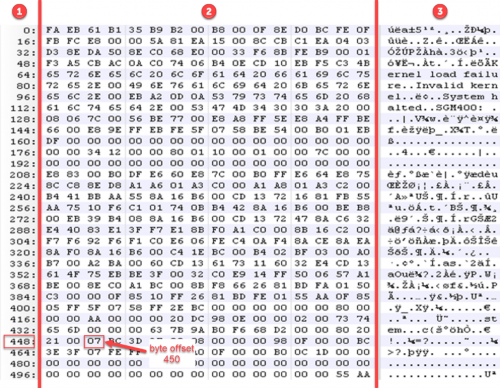
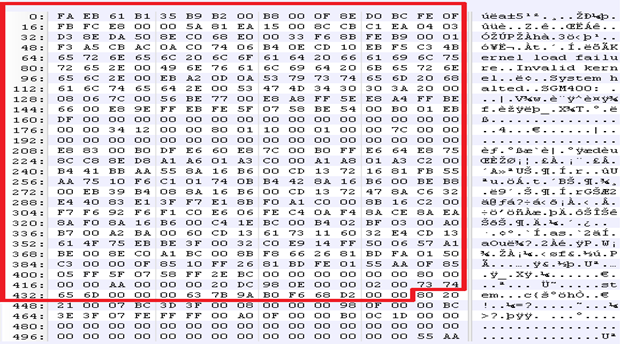
The MBR is assembly code that is 512 bytes in length and is located at sector 0 on a hard drive. Below is an example of an MBR viewed in a hex editor that I will be using to breakdown the 3 data structures that make up the MBR.

To help understand the hex editor view, the one I am using displays data into 3 columns, as labeled below. Column 1 tells you the byte offset of the first byte in the row. For example, if I wanted to manually check what the value is at byte offset 450, I can use column 1 to find the closest offset to 450, which is 448 (value 21) below, and count to the right two bytes (value 07). Column 2 shows the hex values of the data that was loaded into the hex editor, and column 3 shows the ASCII character conversion of the hex values.
MBR – Data Structure Overview

The 3 data structures that make up the MBR is boot code, partition data, and the end of MBR signature. I will break down each structure by byte range and byte length so you will have a general understanding of each. 
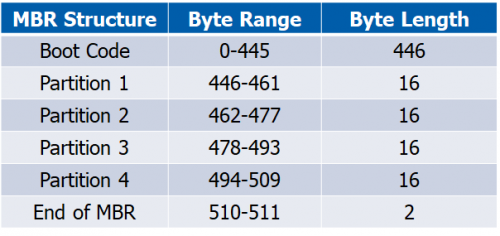
To validate our MBR by math, the total byte size should be 512 bytes (446+16+16+16+16+2=512 bytes).

MBR – Boot Code Summary

Boot code holds instructions to tell the computer how to process the partition tables and locate the operating system.

MBR – Partition Information Summary

Partitions are 16 bytes in length and hold up to four standard partitions for drives with 512 byte sectors. There can be more than 4 partitions by using an extended partition. A type field identifies what type of data should exist, such as FAT, NTFS, etc. Below shows where all 4 partitions are in the MBR and identifies each one.


MBR – 1st Partition

MBR – 2nd Partition

MBR – 3rd Partition

MBR – 4th Partition

MBR – End of MBR Signature

At the end of the MBR is 55 AA. You can think of this as a footer of the MBR. The footer typically signifies the end of the structure. Some file structures have headers and footers to identify the beginning and end of the structure. For an example, you can reference JPEG’s file structure to see the header (SOI) and footer (EOI).


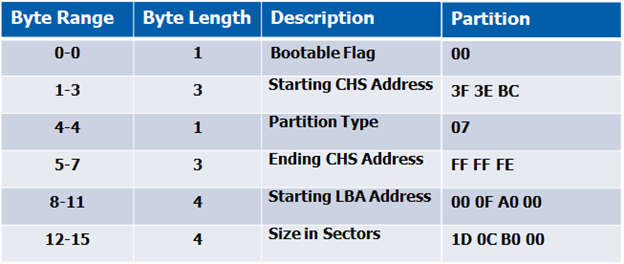
Now that you have a general understanding of the MBR data structures, let’s break down the partition information even more so we know how to manipulate it. I will break down partition 1 and 2 below to help you grasp what the bytes mean by including a table of the bytes that make up their partition information. Partitions 3 and 4 are null (00), or blank, which means the MBR only has two partitions (partition 1 and 2).

MBR – 1st Partition Explained

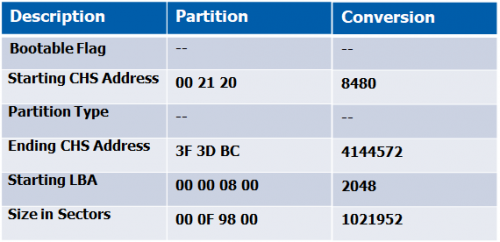
When reading the MBR, remember this is assembly code and needs to be read from right to left. To help with the conversion, I read from byte 461 to byte 446 from right-to-left, and write down left-to-right. Additionally, if you decide to use the table below, fill in the partition data from bottom-to-top, starting with the size in sectors.

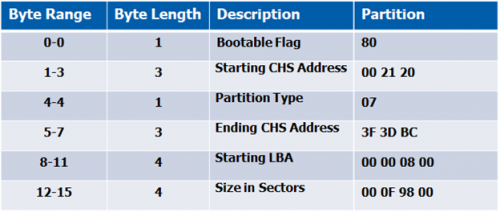
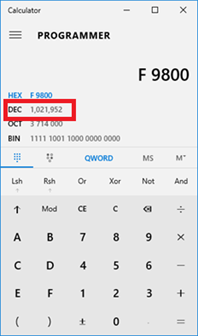
Convert addresses from hex to decimal, to identify starting sector and size of the partition. Yep, just like in school — let’s pull out those TI’s, your OS calculator, or online converter (*cough* CyberChef *cough*) to make the conversion. Below is a screenshot of the Windows calculator (changed to programmer mode). When you enter the hex values, it will be converted to decimal for you.
MBR – 2nd Partition Explained

Repeat the same process as in breaking down the 1st partition, but read from byte 477 to byte 462 from right-to-left, but write down left-to-right.

Putting it all together now…

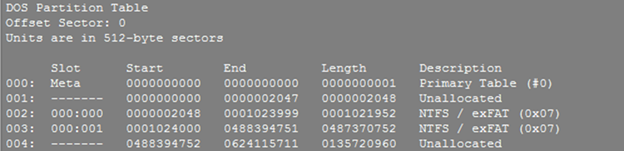
Now that I understood how the MBR works, I created a 512 byte MBR file and modified “partition 1” information for the LBA start address to be at sector 1. To accomplish that, I had to convert 1 (decimal) into hex (0001) but also put in reverse order (1000) so the LBA address could be properly read. Then I appended the acquired image to my synthetic MBR file.  I proceeded to add the new image to the forensics tool and — badda bing badda boom — received my challenge and response prompt to decrypt the drive.

Tools

Partition identification/validation:

  • The Sleuth Kit (TSK) utility called mmls can identify partition information, including start and end locations, and length of each partition.

Partition data manipulation:

A hex editor can be used to view raw contents of a drive or make modifications. Several are available that are open source or have free trials —

  • Linux: Bless, hexyl
  • Windows: 010 Editor, Notepad++

References

File System Forensic Analysis by Brian Carrier: https://www.amazon.com/System-Forensic-Analysis-Brian-Carrier/dp/0321268172

Master Boot Record: https://www.researchgate.net/publication/300373786_Analyzing_Master_Boot_Record_for_Forensic_Investigations

JPEG file structure: https://en.wikipedia.org/wiki/JPEG#Syntax_and_structure

The Sleuth Kit: https://sleuthkit.org/

Bless Hex Editor: https://github.com/afrantzis/bless

Hexyl Hex Editor: https://github.com/sharkdp/hexyl

010 Editor: https://www.sweetscape.com/010editor/

Notepad++ Hex Editor: https://notepad-plus-plus.org/


Ready to learn more?

Level up your skills with affordable classes from Antisyphon!

Pay-What-You-Can Training

Available live/virtual and on-demand