惯性聚合 高效追踪和阅读你感兴趣的博客、新闻、科技资讯
阅读原文 在惯性聚合中打开

推荐订阅源

aimingoo的专栏
aimingoo的专栏
G
GRAHAM CLULEY
A
Arctic Wolf
The Last Watchdog
The Last Watchdog
J
Java Code Geeks
Security Archives - TechRepublic
小众软件
小众软件
S
Schneier on Security
N
Netflix TechBlog - Medium
云风的 BLOG
云风的 BLOG
V
Visual Studio Blog
Blog — PlanetScale
Blog — PlanetScale
Webroot Blog
Webroot Blog
美团技术团队
T
Tor Project blog
F
Full Disclosure
H
Hacker News: Front Page
www.infosecurity-magazine.com
H
Hackread – Cybersecurity News, Data Breaches, AI and More
Google Online Security Blog
Help Net Security
Help Net Security
B
Blog RSS Feed
酷 壳 – CoolShell
酷 壳 – CoolShell
T
Troy Hunt's Blog
SecWiki News
SecWiki News
P
Proofpoint News Feed
Microsoft Security Blog
PCI Perspectives
PCI Perspectives
The Hacker News
The Hacker News
M
MIT News - Artificial intelligence
宝玉的分享
宝玉的分享
MyScale Blog
MyScale Blog
Schneier on Security
博客园_首页
K
Kaspersky official blog
MongoDB | Blog
MongoDB | Blog
V
Vulnerabilities – Threatpost
D
DataBreaches.Net
OSCHINA 社区最新新闻
OSCHINA 社区最新新闻
The GitHub Blog
The GitHub Blog
Scott Helme
Scott Helme
T
Tenable Blog
L
Lohrmann on Cybersecurity
CTFtime.org: upcoming CTF events
U
Unit 42
Threat Intelligence Blog | Flashpoint
Hacker News: Ask HN
Hacker News: Ask HN
A
About on SuperTechFans
B
Blog
Last Week in AI
Last Week in AI

Black Hills Information Security, Inc.

Bad Habits: An ANTISOC Operation Same Problem, Different Angles: When Red Team and Blue Team Actually Talk to Each Other How to Identify and Exploit New Vulnerabilities Swapper – A Pure Regex Match/Replace Burp Extension A Practical Guide to BloodHound Data Collection Network Engineering Basics Signed, Trusted, and Abused: Proxy Execution via WebView2 Getting Started In Pentesting – Advice From The BHIS Pentest Lead Cloud Security: Tips and Resources for Securing the Cloud Lessons From A Chatbot Incident How to Lead Effective Tabletops Understanding GRC: How to Navigate Risks and Compliance Standards The “P” in PAM is for Persistence: Linux Persistence Technique Malware Analysis: How to Analyze and Understand Malware OSINT: How to Find, Use, and Control Open-Source Intelligence What to Do with Your First Home Lab When the SOC Goes to Deadwood: A Night to Remember Social Engineering and Microsoft SSPR: The Road to Pwnage is Paved with Good Intentions Common Cyber Threats Finding the Right Penetration Testing Company Deceptive-Auditing: An Active Directory Honeypots Tool The Curious Case of the Comburglar How to Set Smart Goals (That Actually Work For You) Inside the BHIS SOC: A Conversation with Hayden Covington Abusing Delegation with Impacket (Part 3): Resource-Based Constrained Delegation Why You Got Hacked – 2025 Super Edition Abusing Delegation with Impacket (Part 2): Constrained Delegation Abusing Delegation with Impacket (Part 1): Unconstrained Delegation GoSpoof – Turning Attacks into Intel Model Context Protocol (MCP) Bypassing WAFs Using Oversized Requests Getting Started with AI Hacking Part 2: Prompt Injection Wrangling Windows Event Logs with Hayabusa & SOF-ELK (Part 2) DomCat: A Domain Categorization Tool Wrangling Windows Event Logs with Hayabusa & SOF-ELK (Part 1) Microsoft Store and WinGet: Security Risks for Corporate Environments Default Web Content MailFail Commonly Abused Administrative Utilities: A Hidden Risk to Enterprise Security Stop Spoofing Yourself! Disabling M365 Direct Send Bypassing CSP with JSONP: Introducing JSONPeek and CSP B Gone Offensive Tooling Cheatsheets: An Infosec Survival Guide Resource DNS Triage Cheatsheet GraphRunner Cheatsheet Burp Suite Cheatsheet Impacket Cheatsheet Wireshark Cheatsheet Hashcat Cheatsheet EyeWitness Cheatsheet Nmap Cheatsheet Netcat (nc) Cheatsheet Hunt for Weak Spots in Your Wireless Network with Airodump-ng from the Aircrack-ng Suite Detecting ADCS Privilege Escalation Vulnerability Scanning with Nmap Getting Started with NetExec: Streamlining Network Discovery and Access How to Use Dirsearch Augmenting Penetration Testing Methodology with Artificial Intelligence – Part 3: Arcanum Cyber Security Bot How to Design and Execute Effective Social Engineering Attacks by Phone Abusing S4U2Self for Active Directory Pivoting Why Use a Macro Pad? Espanso: Text Replacement, the Easy Way Caging Copilot: Lessons Learned in LLM Security Augmenting Penetration Testing Methodology with Artificial Intelligence – Part 2: Copilot Augmenting Penetration Testing Methodology with Artificial Intelligence – Part 1: Burpference Intercepting Traffic for Mobile Applications that Bypass the System Proxy How to Root Android Phones Communicating Security to the C-Suite: A Strategic Approach Offline Memory Forensics With Volatility Getting Started with AI Hacking: Part 1 Go-Spoof: A Tool for Cyber Deception How to Test Adversary-in-the-Middle Without Hacking Tools Canary in the Code: Alert()-ing on XSS Exploits How to Hack Wi-Fi with No Wi-Fi Why Your Org Needs a Penetration Test Program Burp Suite Extension: Copy For Light at the End of the Dark Web Wi-Fi Forge: Practice Wi-Fi Security Without Hardware Avoiding Dirty RAGs: Retrieval-Augmented Generation with Ollama and LangChain Gone Phishing: Installing GoPhish and Creating a Campaign 5 Things We Are Going to Continue to Ignore in 2025 John Strand’s 5 Phase Plan For Starting in Computer Security Questions From a Beginner Threat Hunter GRC for Security Managers: From Checklists to Influence AI Large Language Models and Supervised Fine Tuning Attack Tactics 9: Shadow Creds for PrivEsc w/ Kent & Jordan One Active Directory Account Can Be Your Best Early Warning Introduction to Zeek Log Analysis Indecent Exposure: Your Secrets are Showing Creating Burp Extensions: A Beginner’s Guide Pitting AI Against AI: Using PyRIT to Assess Large Language Models (LLMs) The Top Ten List of Why You Got Hacked This Year (2023/2024) ICS Hard Knocks: Mitigations to Scenarios Found in ICS/OT Backdoors & Breaches Intro to Data Analytics Using SQL Finding Access Control Vulnerabilities with Autorize The Detection Engineering Process Cyber Risk Lessons We Can Learn From Hurricane Preparedness Intro to Desktop Application Testing Methodology What Is Penetration Testing? Adversary in the Middle (AitM): Post-Exploitation Pentesting, Threat Hunting, and SOC: An Overview
Constrained Language Mode Bypass When __PSLockDownPolicy Is Used
Kassie Kimball · 2022-09-27 · via Black Hills Information Security, Inc.

, , , , ,

Carrie Roberts //

PowerShell’s Constrained Language (CLM) mode limits the functionality available to users to reduce the attack surface. It is meant to be used in conjunction with application control solutions like Device Guard User Mode Code Integrity. If CLM is enabled without proper application control settings, it is not an effective security solution.

One method for enabling CLM the wrong way is using the __PSLockDownPolicy environment variable. This is what Microsoft has to say about that:

As part of the implementation of Constrained Language, PowerShell included an environment variable for debugging and unit testing called __PSLockdownPolicy. While we have never documented this, some have discovered it and described this as an enforcement mechanism. This is unwise because an attacker can easily change the environment variable to remove this enforcement. In addition, there are also file naming conventions that enable FullLanguage mode on a script, effectively bypassing Constrained Language.

reference

A malicious user with admin privileges could simply remove the environment variable, but what about a user without admins privs? At the end of the quote above, there is a very intriguing statement.

In addition, there are also file naming conventions that enable FullLanguage mode on a script, effectively bypassing Constrained Language.

There are file naming conventions to enable Full Language mode? Do tell — inquiring minds want to know!

I’m preparing a 16-hour course on “PowerShell For InfoSec” where I will be covering this topic, and I didn’t feel comfortable making such a statement without actually knowing how to do it. So I put Google Search through the paces trying to find the magic file naming convention with no luck. Ultimately, I bit the bullet and actually looked at the PowerShell source code and now I share the magic with you. reference
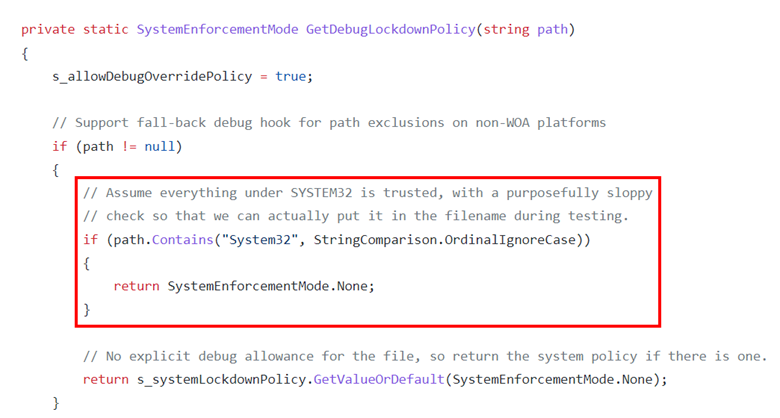
And there we have it. We just need to have “System32” somewhere in the path of the PowerShell script that we want to run in Full Language mode and it will do it. Let’s test it out. First, from an administrative PowerShell prompt, enable CLM using the environment variable (aka “the wrong way).

  • [Environment]::SetEnvironmentVariable(‘__PSLockdownPolicy‘, ‘4’, ‘Machine‘)

Now, we will use this super simple script just to print out the current language mode.

Let’s run the script first from a path that does not contain “System32” and then again from a path that does.
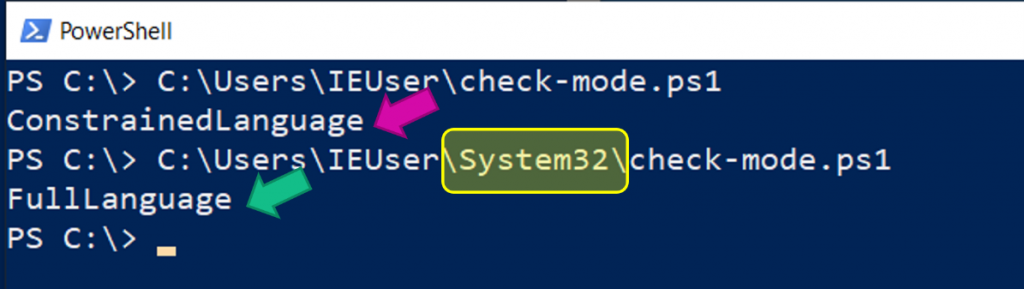
And there you have it; we can easily run any script in full language mode in this case, even without administrative access.

Keep this trick in mind the next time you run into CLM on a pentest to help ensure the organization has implemented it correctly.

If you are interested in learning more about PowerShell topics such as ‘Just Enough Admin’, PowerShell remoting, language modes, and more, check out my 16-hour course called “PowerShell For InfoSec” here.