


惯性聚合 高效追踪和阅读你感兴趣的博客、新闻、科技资讯
阅读原文 在惯性聚合中打开

推荐订阅源

Threat Intelligence Blog | Flashpoint
MyScale Blog
MyScale Blog
Jina AI
Jina AI
爱范儿
爱范儿
cs.CL updates on arXiv.org
I
Intezer
The Cloudflare Blog
T
Threat Research - Cisco Blogs
G
Google Developers Blog
Stack Overflow Blog
Stack Overflow Blog
freeCodeCamp Programming Tutorials: Python, JavaScript, Git & More
D
Docker
AI
AI
Scott Helme
Scott Helme
Attack and Defense Labs
让小产品的独立变现更简单 - ezindie.com
L
LangChain Blog
Recent Announcements
Security Latest
Security Latest
Hugging Face - Blog
Hugging Face - Blog
W
WeLiveSecurity
Last Week in AI
Last Week in AI
Security Archives - TechRepublic
OSCHINA 社区最新新闻
OSCHINA 社区最新新闻
P
Proofpoint News Feed
S
Securelist
S
Security Affairs
Project Zero
Project Zero
博客园 - 叶小钗
Google DeepMind News
T
Tor Project blog
A
About on SuperTechFans
V2EX - 技术
V2EX - 技术
宝玉的分享
宝玉的分享
T
Tenable Blog
博客园 - 聂微东
人人都是产品经理
人人都是产品经理
Simon Willison's Weblog
Forbes - Security
Forbes - Security
K
KPMG report finds enterprise disconnect between AI and its ROI | CIO
V
V2EX
AWS News Blog
AWS News Blog
The GitHub Blog
The GitHub Blog
酷 壳 – CoolShell
酷 壳 – CoolShell
P
Privacy & Cybersecurity Law Blog
阮一峰的网络日志
阮一峰的网络日志
I
InfoQ
C
CXSECURITY Database RSS Feed - CXSecurity.com
H
Hacker News: Front Page
美团技术团队

Black Hills Information Security, Inc.

Bad Habits: An ANTISOC Operation Same Problem, Different Angles: When Red Team and Blue Team Actually Talk to Each Other How to Identify and Exploit New Vulnerabilities Swapper – A Pure Regex Match/Replace Burp Extension A Practical Guide to BloodHound Data Collection Network Engineering Basics Signed, Trusted, and Abused: Proxy Execution via WebView2 Getting Started In Pentesting – Advice From The BHIS Pentest Lead Cloud Security: Tips and Resources for Securing the Cloud Lessons From A Chatbot Incident How to Lead Effective Tabletops Understanding GRC: How to Navigate Risks and Compliance Standards The “P” in PAM is for Persistence: Linux Persistence Technique Malware Analysis: How to Analyze and Understand Malware OSINT: How to Find, Use, and Control Open-Source Intelligence What to Do with Your First Home Lab When the SOC Goes to Deadwood: A Night to Remember Social Engineering and Microsoft SSPR: The Road to Pwnage is Paved with Good Intentions Common Cyber Threats Finding the Right Penetration Testing Company Deceptive-Auditing: An Active Directory Honeypots Tool The Curious Case of the Comburglar How to Set Smart Goals (That Actually Work For You) Inside the BHIS SOC: A Conversation with Hayden Covington Abusing Delegation with Impacket (Part 3): Resource-Based Constrained Delegation Why You Got Hacked – 2025 Super Edition Abusing Delegation with Impacket (Part 2): Constrained Delegation Abusing Delegation with Impacket (Part 1): Unconstrained Delegation GoSpoof – Turning Attacks into Intel Model Context Protocol (MCP) Bypassing WAFs Using Oversized Requests Getting Started with AI Hacking Part 2: Prompt Injection Wrangling Windows Event Logs with Hayabusa & SOF-ELK (Part 2) DomCat: A Domain Categorization Tool Wrangling Windows Event Logs with Hayabusa & SOF-ELK (Part 1) Microsoft Store and WinGet: Security Risks for Corporate Environments Default Web Content MailFail Commonly Abused Administrative Utilities: A Hidden Risk to Enterprise Security Stop Spoofing Yourself! Disabling M365 Direct Send Bypassing CSP with JSONP: Introducing JSONPeek and CSP B Gone Offensive Tooling Cheatsheets: An Infosec Survival Guide Resource DNS Triage Cheatsheet GraphRunner Cheatsheet Burp Suite Cheatsheet Impacket Cheatsheet Wireshark Cheatsheet Hashcat Cheatsheet EyeWitness Cheatsheet Nmap Cheatsheet Netcat (nc) Cheatsheet Hunt for Weak Spots in Your Wireless Network with Airodump-ng from the Aircrack-ng Suite Detecting ADCS Privilege Escalation Vulnerability Scanning with Nmap Getting Started with NetExec: Streamlining Network Discovery and Access How to Use Dirsearch Augmenting Penetration Testing Methodology with Artificial Intelligence – Part 3: Arcanum Cyber Security Bot How to Design and Execute Effective Social Engineering Attacks by Phone Abusing S4U2Self for Active Directory Pivoting Why Use a Macro Pad? Espanso: Text Replacement, the Easy Way Caging Copilot: Lessons Learned in LLM Security Augmenting Penetration Testing Methodology with Artificial Intelligence – Part 2: Copilot Augmenting Penetration Testing Methodology with Artificial Intelligence – Part 1: Burpference Intercepting Traffic for Mobile Applications that Bypass the System Proxy How to Root Android Phones Communicating Security to the C-Suite: A Strategic Approach Offline Memory Forensics With Volatility Getting Started with AI Hacking: Part 1 Go-Spoof: A Tool for Cyber Deception How to Test Adversary-in-the-Middle Without Hacking Tools Canary in the Code: Alert()-ing on XSS Exploits How to Hack Wi-Fi with No Wi-Fi Why Your Org Needs a Penetration Test Program Burp Suite Extension: Copy For Light at the End of the Dark Web Wi-Fi Forge: Practice Wi-Fi Security Without Hardware Avoiding Dirty RAGs: Retrieval-Augmented Generation with Ollama and LangChain Gone Phishing: Installing GoPhish and Creating a Campaign 5 Things We Are Going to Continue to Ignore in 2025 John Strand’s 5 Phase Plan For Starting in Computer Security Questions From a Beginner Threat Hunter GRC for Security Managers: From Checklists to Influence AI Large Language Models and Supervised Fine Tuning Attack Tactics 9: Shadow Creds for PrivEsc w/ Kent & Jordan One Active Directory Account Can Be Your Best Early Warning Introduction to Zeek Log Analysis Indecent Exposure: Your Secrets are Showing Creating Burp Extensions: A Beginner’s Guide Pitting AI Against AI: Using PyRIT to Assess Large Language Models (LLMs) The Top Ten List of Why You Got Hacked This Year (2023/2024) ICS Hard Knocks: Mitigations to Scenarios Found in ICS/OT Backdoors & Breaches Intro to Data Analytics Using SQL Finding Access Control Vulnerabilities with Autorize The Detection Engineering Process Cyber Risk Lessons We Can Learn From Hurricane Preparedness Intro to Desktop Application Testing Methodology What Is Penetration Testing? Adversary in the Middle (AitM): Post-Exploitation Pentesting, Threat Hunting, and SOC: An Overview
Gowitness, a Tester’s Time Saver
Kassie Kimball · 2023-02-17 · via Black Hills Information Security, Inc.

Alyssa Snow //

During an external or internal network penetration test, it can be challenging to comb through each web server in scope to find the juicy stuff. During a timeboxed assessment, a tool like Gowitness (https://github.com/sensepost/gowitness/wiki) can help prioritize the web applications available on your target network.  

Gowitness is an automated website screenshot tool, inspired by Eyewitness (https://github.com/FortyNorthSecurity/EyeWitness), written in Golang. Gowitness navigates to each web application and uses a headless browser to generate screenshots of the web application. It fingerprints these applications by capturing the HTML response and HTTP headers. Additionally, Gowitness attempts to identify technologies used by the application. Next, it generates a report that allows the tester to browse through the available web services easily. 

Installation 

Gowitness installation can be as simple as downloading one of the prebuilt binaries found here: https://github.com/sensepost/gowitness/releases

You can install the tool with go as follows:  

go install github.com/sensepost/gowitness@latest  

You can run the tool using a docker container:  

docker pull leonjza/gowitness  

You can also clone the repository and compile the tool from the source code:  

git clone https://github.com/sensepost/gowitness.git  
cd gowitness  
make linux  

Make sure you have Chrome and Golang installed on your machine before attempting to use the tool. 

Gowitness Scanning

There are many other automated screenshot tools, and I encourage you to investigate whichever interests you most. We also have another blog post about Eyewitness (https://www.blackhillsinfosec.com/eyewitness-and-why-it-rocks/). One cool feature Eyewitness has that I hope to see Gowitness implement at some point is default credential identification. Eyewitness will supply the user with default credentials (if it knows them) alongside the application HTTP header information. I use Gowitness because I am a fan of Golang, and I like the tool’s UI.  

I typically use Gowitness to process Nessus and Nmap scan results. Gowitness accepts targets in several formats. You can provide the tool with a single target URL, a list of URLs, IPs, or CIDRs.  

Process Nessus scan command: 

gowitness nessus -f basic-scan.nessus  

GoWitness can process Nmap results in XML format. To output Nmap results in XML format you can run Nmap using the -o flag with argument X. An example of this is shown below. 

nmap <TARGET> -oX nmap-results.xml  

Partial Nmap XML Results 

Process Nmap scan command: 

gowitness nmap -f nmap-results.xml  

Gowitness has various flag options that can be used to fine-tune your scan. For example, the --user-agent flag. The default user agent string is “Mozilla/5.0 (Macintosh; Intel Mac OS X 10_15_7) AppleWebKit/537.36 (KHTML, like Gecko) Chrome/102.0.0.0 Safari/537.36“. Let’s say you wanted to experiment with different results using a mobile user-agent string; you may set this flag value to something like --user-agent “Mozilla/5.0 (iPhone; CPU iPhone OS 10_3 like Mac OS X) AppleWebKit/603.1.23 (KHTML, like Gecko) Version/10.0 Mobile/14E5239e Safari/602.1”.  

I have listed a couple of other useful flags below: 

  • --timeout – timeout string. The default is 10 seconds. 
  • -t/--threads – threads used to run Gowitness. The default is 4 threads. 

If you are on a reliable network but you have many invalid domains, you might consider reducing the timeout to 4 to reduce the scanning time. 

I recommend setting the thread count to somewhere between 1 and 2 times the number of cores on your system. So, if your system has 4 cores, you could set the threads to 8. You can keep an eye on your CPU usage and tune up or down if you hit bottlenecks or still have unused cycles. 

 Gowitness Results  

Gowitness stores a screenshot of each of the target URLs in a folder called screenshots. Additionally, Gowitness creates an SQLite database stored in the file gowitness.sqlite. To view the Gowitness results first, start up the web server, run the following command, then navigate to http://localhost:7171 in your browser. 

 gowitness server -A  
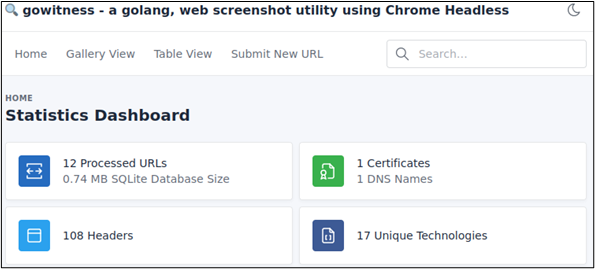
Statistics Dashboard 

The landing page of our Gowitness server displays the statistics detailing the number of processed URLs, DNS names, and certificates, as well as unique technologies observed on the target web servers. If a new target pops up, you can easily submit a new URL via the UI by clicking “Submit New URL.” 
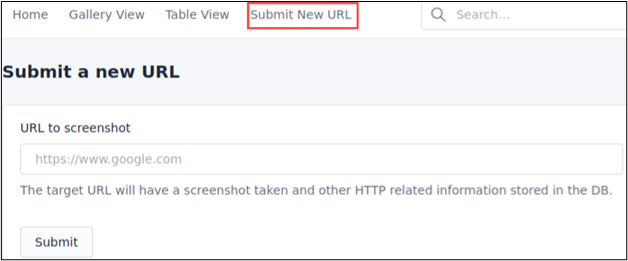
Submit New Target 
 

Gowitness also supports dark mode, which does not necessarily make a difference functionally, but it is a feature I love.  
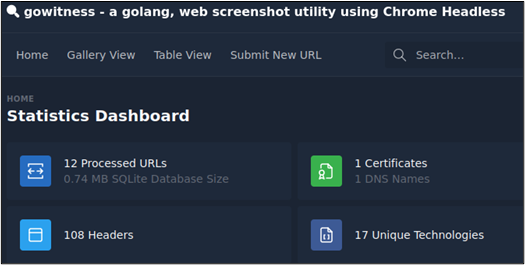
Dark Mode  

You can review the results in a table format by clicking “Table View” or view the various web applications in “Gallery View.”  
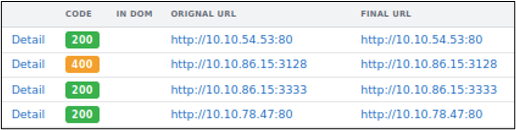
Table View  

While viewing the results in Gallery mode, you can enable perception sort, which will sort the results based on images that look alike. Perception sort allows you to group targets running the same web services and makes testing for issues like default credentials a breeze.  
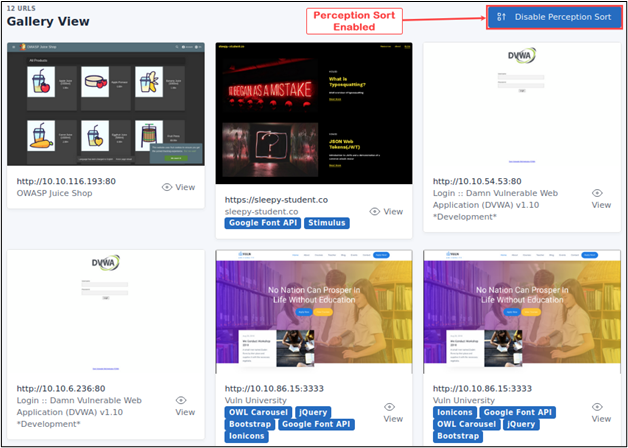
Perception Sort Gallery Mode  

Each entry displays the screenshot captured, technologies, the HTTP Response Headers, and other details such as the console log, network log, DOM, and TLS information.  
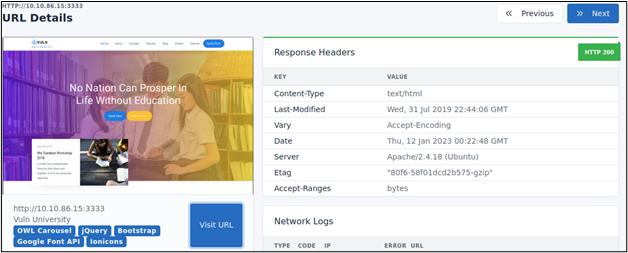
Screenshot and HTTP Headers  

Gowitness results are easily searchable. You can retrieve results for URLs, HTTP Headers, Console logs, and network logs by typing a query in the search bar. For example, the following figure shows the search results for all web servers running JQMIGRATE. 
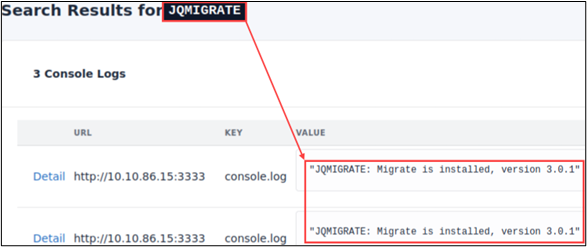
JQMIGRATE Query  

We can identify Apache web servers by searching for Apache in the HTTP headers.  
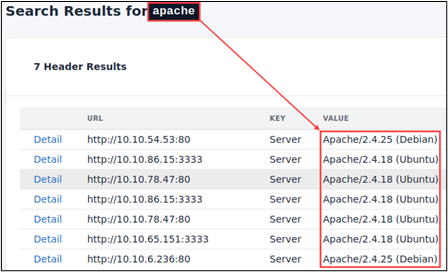
Apache Headers  

We could also query Gowitness API to gather similar details.
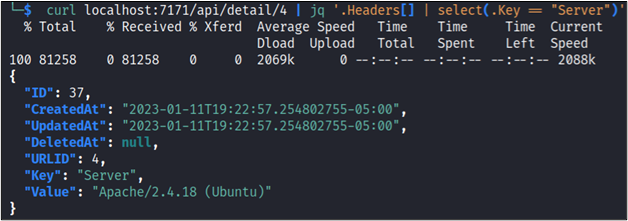
API Query  

Once you have investigated the processed Gowitness results, you can generate a consolidated report. Gowitness will create a zip archive of the necessary files and an HTML document of the results.  

gowitness report -f example.zip  
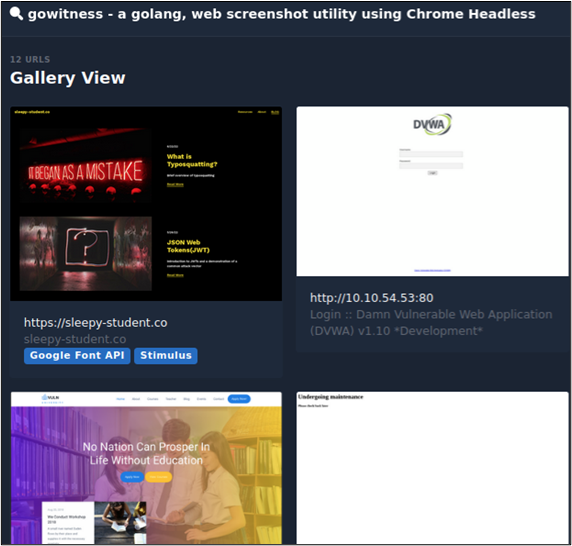
Consolidated Report  

Gowitness is an excellent automated screenshot tool that can be extremely useful to help a tester get a quick overview of an extensive list of URLs or scan data post-processing.  


Ready to learn more?

Level up your skills with affordable classes from Antisyphon!

Pay-What-You-Can Training

Available live/virtual and on-demand
