


With so many organizations transitioning to remote work in order to stem the tide of COVID-19 infections, we wanted to cover some of the configuration elements you should be considering to ensure that your network perimeter is properly protected. Employee remote access is often a target for attackers looking to gain initial access into an organization’s network. With authenticated remote access, an attacker may be able to run roughshod through your environment in a very short time.

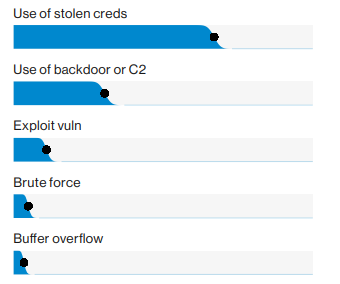
As employees are transitioned to work from home, it is critical to ensure that your organization is using Multi-Factor Authentication (MFA) on all Internet-facing portals leading to corporate information. In the 2019 Verizon Data Breach Investigation Report (DBIR), use of stolen credentials was the number one hacking technique observed.
Attackers often use tools to gather employee names, mangle those results into usernames, and perform attacks like password spraying against exposed portals in order to gain access. Without MFA, an attacker just needs to guess a correct password and access is obtained. Since the number of remote workers is typically increasing due to the spread of COVID-19, the attack surface is also increasing which is likely to increase the overall risk of NOT using MFA.
In addition, you should not just be concerned with the obvious portals. Dig into your vulnerability scan results and investigate anything requesting external authentication. Especially if those hosts and applications are requesting NTLM over HTTP authentication. We are often successful in gaining access using applications other than Webmail and VPN.
MFA is not a silver bullet given that many transparent proxies (like CredSniper and Evilginx) exist. But it will increase the work factor for an attacker to gain access to your environment. Improved security can be gained by requiring client certificates on connecting devices. However, if you are not doing this already, it may be difficult to implement securely in an expedited fashion.
External hygiene is on everyone’s radar. However, there have been a rash of vulnerabilities discovered in VPN and other remote access technologies that should be checked.
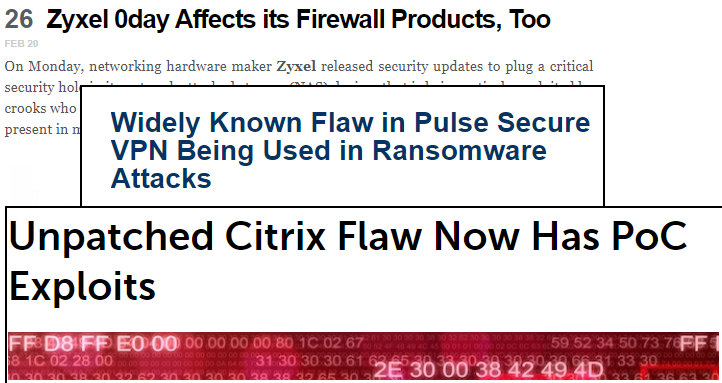
Many of the recently discovered vulnerabilities require very little sophistication and no credentials to exploit. To make matters worse, the exposed devices are typically missing security controls that are deployed to all of our workstations (like antivirus and endpoint threat detection). In addition, increased utilization is likely to make detection using log files generated by the devices difficult, at best.
When scanning these devices, ensure that appropriate checks are enabled to detect the known flaws. You may also be able to use one of the publicly published vulnerability scanning or exploitation scripts to perform a targeted check for vulnerable conditions. Just make sure that you get the script from a reputable source and that you understand what the script is doing. Often, the scripts simply make HTTP requests for resources exposed by the appliance.
IKE Aggressive Mode
The configuration of your VPN concentrator is another important aspect of security. We often see the age-old “IKE Aggressive Mode with Pre-Shared Key (PSK)” vulnerability on external penetration tests. The aggressive mode IKE handshake exposes enough information to attempt to recover the Pre-Shared Key (PSK) used to protect the VPN tunnel. To avoid this situation, the VPN device can be configured to accept only main mode handshakes. A main mode handshake does not disclose the same details that can be used to recover the PSK.

In reality, this can be a difficult condition to exploit because the attacker typically needs to know the group name for the connection. Once the PSK is cracked, the attacker may have to deal with inner authentication as well. This may provide an additional opportunity for password attacks. In any case, it is a good idea to address this configuration element.
Split-Tunneling
Another VPN configuration item that can pose problems is allowing split-tunneling. A split-tunnel is formed when the employee is allowed to openly browse the Internet, bypassing the VPN connection, while connected to the VPN. Only requests for corporate resources traverse the VPN itself.

This is excellent for bandwidth conservation but completely bypasses the infrastructure used to enforce corporate IT policy (like web proxies, execution sandboxes, SSL/TLS inspection devices, full packet capture devices, etc). Allowing split-tunneling can make the investigation of an intrusion more difficult, if not impossible. Now responders must consider traffic that is not traversing the corporate network and are likely to have reduced visibility on the employee’s network.
Organizations should seriously consider their security posture, the inherent costs, and implications of the configuration before allowing split tunneling.
On the bright side, there are various cloud-based protections that can help mitigate this risk, if you are a subscriber. Technologies like Cisco Umbrella and Zscaler provide some of the capabilities afforded by Internal infrastructure regardless of the device’s path to the Internet.
What does your corporate wireless configuration have to do with remote security? As noted above, the use of stolen credentials is number one on the hacking activity list. Your corporate wireless configuration could be another way to obtain credentials for employees.
Your wireless network infrastructure affords at least some protection while in the office. Some equipment also may have active protection to prevent various attacks. An attacker often needs to transmit a signal that is more powerful than a legitimate access point in order to execute an evil twin attack.
In the evil twin attack, the attacker advertises an identical SSID in hopes to entice devices to connect to it. When those devices use Active Directory domain authentication, the attacker AP challenges for credentials and the computer sends those credentials automatically. Connections usually require no user interaction since the attacker is advertising what appears to be a known network. The affected device simply connects when the SSID is observed.

A problem arises when corporate equipment (and other devices using domain authentication) is away from the corporate infrastructure. Now, the attacker has an advantage in that there is no legitimate signal to compete with or actively prevent client connections from occurring.
As a result, organizations should ensure that wireless networks are configured to perform mutual authentication between the client and the infrastructure. This means that the client should be validating the certificate of the AP and vice-versa.
In addition, keep an eye on those mobile devices. In several organizations that we have tested, the organization has a mobile network segment but is using Active Directory authentication to minimize the number of credentials the user must remember. Without deploying client certificates to these devices, an attacker can intercept credentials from them as well.
Once the attacker has credentials, they can try to use them on Internet-facing portals or they may physically steal a device where they can legitimately authenticate from.
One last concern to consider is the separation of employees’ home and work lives. Modern home networks are often teeming with IoT devices, smartphones, and gaming consoles. The organization often cannot attest to the security of these devices or the network itself.
The best option is likely to be the most difficult to implement, in that the organization should ensure that corporate devices are segmented from personal devices on the employee’s network. We will be covering this topic in an upcoming blog post in detail.

A more palatable alternative may be to deploy an always-on VPN configuration to corporate devices. The employee would be allowed to authenticate using cached credentials, then join the wireless network, and the VPN client connects automatically anytime the network is accessed.
This limits the exposure of the device while connected to the employee’s home network and prevents local interaction while connected through the tunnel.
As organizations are taking measures to respond to COVID-19, it is important to do so in a manner that does not increase exposure to the business. Ensuring that remote access is securely configured is an important consideration before allowing remote operations in mass. Hopefully, this post will help identify areas to check as your business becomes more distributed.
Ready to learn more?
Level up your skills with affordable classes from Antisyphon!
Available live/virtual and on-demand

此内容由惯性聚合(RSS阅读器)自动聚合整理,仅供阅读参考。 原文来自 — 版权归原作者所有。