


惯性聚合 高效追踪和阅读你感兴趣的博客、新闻、科技资讯
阅读原文 在惯性聚合中打开

推荐订阅源

B
Blog RSS Feed
V2EX - 技术
V2EX - 技术
P
Privacy & Cybersecurity Law Blog
T
The Exploit Database - CXSecurity.com
美团技术团队
WordPress大学
WordPress大学
博客园 - 司徒正美
S
Securelist
奇客Solidot–传递最新科技情报
奇客Solidot–传递最新科技情报
博客园 - Franky
Attack and Defense Labs
Security Latest
Security Latest
L
LINUX DO - 最新话题
NISL@THU
NISL@THU
freeCodeCamp Programming Tutorials: Python, JavaScript, Git & More
cs.AI updates on arXiv.org
让小产品的独立变现更简单 - ezindie.com
腾讯CDC
Y
Y Combinator Blog
The Hacker News
The Hacker News
Security Archives - TechRepublic
IT之家
IT之家
T
Threatpost
Hugging Face - Blog
Hugging Face - Blog
Scott Helme
Scott Helme
S
SegmentFault 最新的问题
Cyberwarzone
Cyberwarzone
C
Cisco Blogs
阮一峰的网络日志
阮一峰的网络日志
U
Unit 42
B
Blog
Microsoft Azure Blog
P
Proofpoint News Feed
小众软件
小众软件
V
Vulnerabilities – Threatpost
J
Java Code Geeks
V
Visual Studio Blog
Cyber Security Advisories - MS-ISAC
A
Arctic Wolf
博客园 - 【当耐特】
Microsoft Security Blog
S
Security @ Cisco Blogs
雷峰网
雷峰网
Help Net Security
Help Net Security
The Last Watchdog
The Last Watchdog
Recent Announcements
G
Google Developers Blog
C
CERT Recently Published Vulnerability Notes
T
Troy Hunt's Blog
MyScale Blog
MyScale Blog

Black Hills Information Security, Inc.

Bad Habits: An ANTISOC Operation Same Problem, Different Angles: When Red Team and Blue Team Actually Talk to Each Other How to Identify and Exploit New Vulnerabilities Swapper – A Pure Regex Match/Replace Burp Extension A Practical Guide to BloodHound Data Collection Network Engineering Basics Signed, Trusted, and Abused: Proxy Execution via WebView2 Getting Started In Pentesting – Advice From The BHIS Pentest Lead Cloud Security: Tips and Resources for Securing the Cloud Lessons From A Chatbot Incident How to Lead Effective Tabletops Understanding GRC: How to Navigate Risks and Compliance Standards The “P” in PAM is for Persistence: Linux Persistence Technique Malware Analysis: How to Analyze and Understand Malware OSINT: How to Find, Use, and Control Open-Source Intelligence What to Do with Your First Home Lab When the SOC Goes to Deadwood: A Night to Remember Social Engineering and Microsoft SSPR: The Road to Pwnage is Paved with Good Intentions Common Cyber Threats Finding the Right Penetration Testing Company Deceptive-Auditing: An Active Directory Honeypots Tool The Curious Case of the Comburglar How to Set Smart Goals (That Actually Work For You) Inside the BHIS SOC: A Conversation with Hayden Covington Abusing Delegation with Impacket (Part 3): Resource-Based Constrained Delegation Why You Got Hacked – 2025 Super Edition Abusing Delegation with Impacket (Part 2): Constrained Delegation Abusing Delegation with Impacket (Part 1): Unconstrained Delegation GoSpoof – Turning Attacks into Intel Model Context Protocol (MCP) Bypassing WAFs Using Oversized Requests Getting Started with AI Hacking Part 2: Prompt Injection Wrangling Windows Event Logs with Hayabusa & SOF-ELK (Part 2) DomCat: A Domain Categorization Tool Wrangling Windows Event Logs with Hayabusa & SOF-ELK (Part 1) Microsoft Store and WinGet: Security Risks for Corporate Environments Default Web Content MailFail Commonly Abused Administrative Utilities: A Hidden Risk to Enterprise Security Stop Spoofing Yourself! Disabling M365 Direct Send Bypassing CSP with JSONP: Introducing JSONPeek and CSP B Gone Offensive Tooling Cheatsheets: An Infosec Survival Guide Resource DNS Triage Cheatsheet GraphRunner Cheatsheet Burp Suite Cheatsheet Impacket Cheatsheet Wireshark Cheatsheet Hashcat Cheatsheet EyeWitness Cheatsheet Nmap Cheatsheet Netcat (nc) Cheatsheet Hunt for Weak Spots in Your Wireless Network with Airodump-ng from the Aircrack-ng Suite Detecting ADCS Privilege Escalation Vulnerability Scanning with Nmap Getting Started with NetExec: Streamlining Network Discovery and Access How to Use Dirsearch Augmenting Penetration Testing Methodology with Artificial Intelligence – Part 3: Arcanum Cyber Security Bot How to Design and Execute Effective Social Engineering Attacks by Phone Abusing S4U2Self for Active Directory Pivoting Why Use a Macro Pad? Espanso: Text Replacement, the Easy Way Caging Copilot: Lessons Learned in LLM Security Augmenting Penetration Testing Methodology with Artificial Intelligence – Part 2: Copilot Augmenting Penetration Testing Methodology with Artificial Intelligence – Part 1: Burpference Intercepting Traffic for Mobile Applications that Bypass the System Proxy How to Root Android Phones Communicating Security to the C-Suite: A Strategic Approach Offline Memory Forensics With Volatility Getting Started with AI Hacking: Part 1 Go-Spoof: A Tool for Cyber Deception How to Test Adversary-in-the-Middle Without Hacking Tools Canary in the Code: Alert()-ing on XSS Exploits How to Hack Wi-Fi with No Wi-Fi Why Your Org Needs a Penetration Test Program Burp Suite Extension: Copy For Light at the End of the Dark Web Wi-Fi Forge: Practice Wi-Fi Security Without Hardware Avoiding Dirty RAGs: Retrieval-Augmented Generation with Ollama and LangChain Gone Phishing: Installing GoPhish and Creating a Campaign 5 Things We Are Going to Continue to Ignore in 2025 John Strand’s 5 Phase Plan For Starting in Computer Security Questions From a Beginner Threat Hunter GRC for Security Managers: From Checklists to Influence AI Large Language Models and Supervised Fine Tuning Attack Tactics 9: Shadow Creds for PrivEsc w/ Kent & Jordan One Active Directory Account Can Be Your Best Early Warning Introduction to Zeek Log Analysis Indecent Exposure: Your Secrets are Showing Creating Burp Extensions: A Beginner’s Guide Pitting AI Against AI: Using PyRIT to Assess Large Language Models (LLMs) The Top Ten List of Why You Got Hacked This Year (2023/2024) ICS Hard Knocks: Mitigations to Scenarios Found in ICS/OT Backdoors & Breaches Intro to Data Analytics Using SQL Finding Access Control Vulnerabilities with Autorize The Detection Engineering Process Cyber Risk Lessons We Can Learn From Hurricane Preparedness Intro to Desktop Application Testing Methodology What Is Penetration Testing? Adversary in the Middle (AitM): Post-Exploitation Pentesting, Threat Hunting, and SOC: An Overview
Phishing Made Easy(ish)
Kassie Kimball · 2022-06-07 · via Black Hills Information Security, Inc.

Hannah Cartier //

Social engineering, especially phishing, is becoming increasingly prevalent in red team engagements as well as real-world attacks. As security awareness improves and systems become more locked down, it is unsurprising that the human element of security is becoming a more appealing attack vector. In addition, phishing campaigns can be used to test the controls surrounding a company’s employees. Scoring one valid login to a target’s resources can save a tester hours or even days of vulnerability scanning and exploitation.

In this blog, we are going to walk through setting up a simple yet effective landing page for your phishing campaigns. We will be using an open-source tool developed by BHIS that requires minimal installation and does not use any paid or third-party components.

Motivation

A while back, I was asked to set up a landing page for a phishing engagement. And that was the extent of the instructions I received. To build this page, I first attempted to create a simple registration form using WordPress. It turned out that either WordPress was more complicated than I had anticipated, or I wasn’t as tech-savvy as I liked to believe. (In hindsight, it was probably a bit of both.) After fighting the interface for a few hours with my patience diminishing and the test date soon approaching, I decided it might be time to jump ship. However, I am also a rather mediocre web developer, and setting up everything from scratch each time clearly was not a sustainable solution.

Ultimately, I set the thing up from scratch. I designed the landing page using open-source HTML templates, served them up with NGINX, and forwarded the form submissions through the NGINX reverse proxy to a flask server where the client IP, user-agent, and form data are written to a log. Then I developed a tool called Sinker to automate this entire process so I would never have to do it again.

The remainder of this blog walks through an example of how one would use this tool to set up a phishing campaign.

Target: Black Hills Information Security
Domain: blackhills.phishingdomain.com

Phishing Email:

RE: New Health and Safety Measures. Complete before ARBITRARY_DATE

Black Hills Infosec understands that the health and wellbeing of our employees is of upmost importance. Amid the current Covid-19 climate, along with recent CDC amendments to health and safety measures, it is important to take precautions and respect each others concerns. Our insurance partners are working with PCHC to bring you the most up to date information on risks and information including covid-19 booster information, internal case counts, etc. Please follow the link below to set up your account on our health and safety portal. This must be completed in order to stay enrolled in any of our insurance plans. (Note: For your convenience, please use your Black Hills Infosec email and password for registering)

Bam. Now, all we need is for there to actually be something at that “link below” through which we can capture credentials. This is precisely what our tool, Sinker, assists in building and deploying.

Deployment

Requirements

  • An internet-accessible server on which to host your landing page (running Debian, ideally Ubuntu)
  • A domain with DNS A records pointing to your server

Setup

Clone the GitHub repository located here: https://github.com/Hannnah1/Sinker

Open the inventory file and replace the IP address with the public IP of your server. If you wish to deploy the phish on more than one, add another line for each additional IP.

If you do not have Ansible installed on your local machine, run runme_first.sh (Note: For Windows users, you will have to install Ansible manually or run the program through WSL).

Next, open vars.yml and change the following configuration variables:

  • site: The directory containing the landing page. This must exactly match one of the directory names under the phishinglines/ directory.
  • target_name: The name of the target company as we would like it to appear on our landing page
  • ssh_key: The location of the SSH key to be used for logging in to the remote server
  • domain_name: Your domain name
  • certbot_mail_address: The email to be used for generating the letsencrypt certificate. We will only be allowing our targets to connect over https.

Example:

#--------------------------------------------------------------------------#
# Config variables. Do change these #
#--------------------------------------------------------------------------#
site: covidruse

Target_Name: Black Hills # Spaces are OK, no quotes please
ssh_key: $HOME/.ssh/id_rsa
domain_name: blackhills.phishingdomain.com
certbot_mail_address: [email protected]

# CSS For landing page NO SEMICOLONS
background_color: white
primary_color: rgba(156, 191, 191, 1)
secondary_color: black

The code snippet above has been edited for attacking Black Hills Information Security. In addition to the company name, we have also customized the primary and secondary color values for the CSS. Using the colors of our target company will help with the believability of our page due to the element of familiarity.

That’s it for configuration, now it’s time to run the playbook. This can be done by entering the following command in your terminal:

ansible-playbook main.yml

This next step is the most important:

Take your hands off the keyboard, stand up, and go make a nice hot cup of coffee while the program does the following on your behalf.

  1. Updates packages
  2. Installs nginx
  3. Configures nginx for your domain and landing page
  4. Generates a letsencrypt certificate using certbot
  5. Copies the templates and any other contents of your landing page directory to /var/www/
  6. Installs tmux
  7. Runs a flask app inside of the tmux session to receive form submissions forwarded by nginx and write them to a log file

If all goes well you should see the following output:
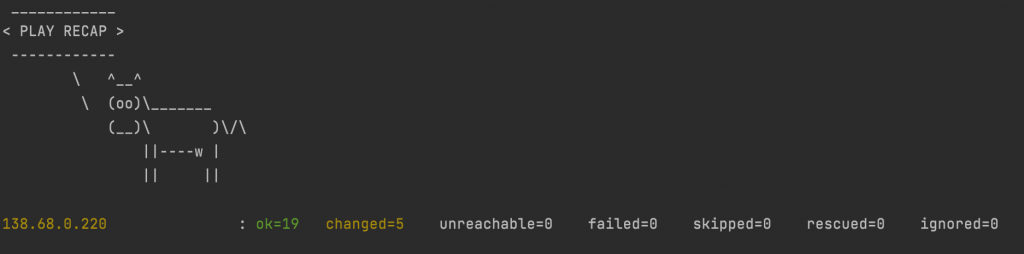
If you do not have Cowsay installed, the output will be formatted a bit differently, and you will be seen by your coworkers as much less cool. As long as no failed or unreachable errors are produced, you’re good to go.

Browsing blackhills.phishingdomain.com demonstrates that our landing page is displayed as expected.
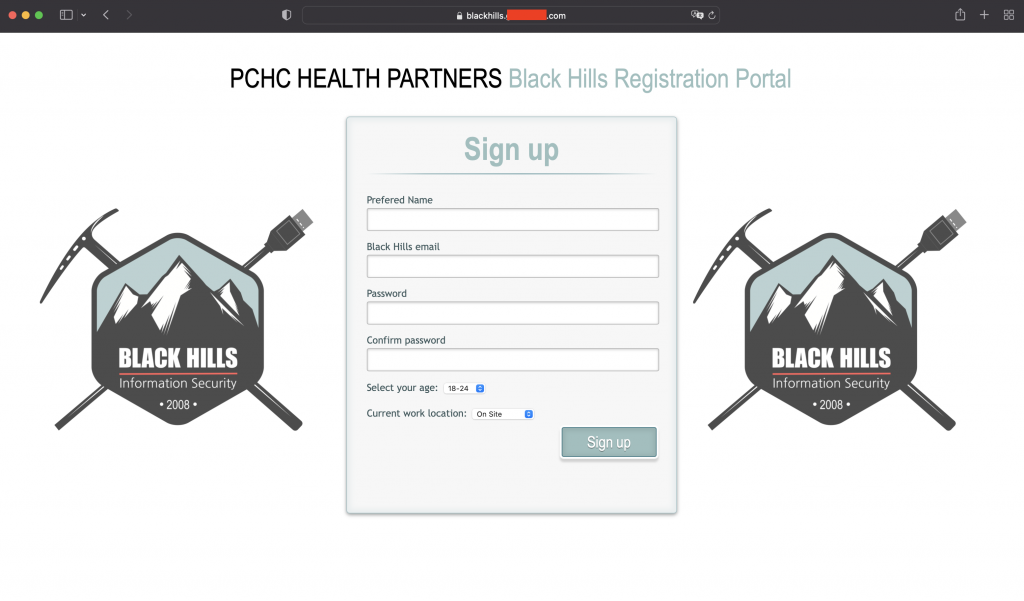
Upon submitting the form, the target received the following acknowledgment that their submission was received. The objective of this confirmation is to not raise suspicion.

The server logs the IP address of the client, the name, email, and password they entered, as well as the user agent. If we log into our server console and look at forms.txt, we will see the following:

Creating Additional Landing Pages

There are hundreds of free HTML templates that can be quickly edited to fit your needs.

For example, in this blog, we adapted the template found here: https://tympanus.net/Tutorials/LoginRegistrationForm/index3.html#toregister

To be compatible with these automated setup scripts, you will need to make the following changes:

  • Anywhere you want the target company’s name to appear, replace that spot with the exact text {{ Target_Name }}
  • Your form must have an element with id="name", id="email" and id="password"
  • You must ensure your submit button is of type “submit”, and insert the send.js script.
<button type="submit">Complete Registration</button>
<script src="send.js"></script>
  • Your page must be titled target.html.j2 following the template format.

Congrats! You now have a landing page that can be quickly spun up for multiple engagements.

Conclusion:

Phishing is easy but can be time-consuming. Hopefully this program can help make it a little simpler and faster. The author recommends NOT including the names and emails of people who fell for the phish in the report for the client. Knowing exactly whose credentials you gained does not help in remediation and could potentially get that person in trouble.


Ready to learn more?

Level up your skills with affordable classes from Antisyphon!

Pay-What-You-Can Training

Available live/virtual and on-demand
