


惯性聚合 高效追踪和阅读你感兴趣的博客、新闻、科技资讯
阅读原文 在惯性聚合中打开

推荐订阅源

S
Securelist
SecWiki News
SecWiki News
Help Net Security
Help Net Security
Attack and Defense Labs
L
LINUX DO - 最新话题
H
Heimdal Security Blog
cs.AI updates on arXiv.org
H
Hacker News: Front Page
Hacker News - Newest:
Hacker News - Newest: "LLM"
Google DeepMind News
V2EX - 技术
V2EX - 技术
Hacker News: Ask HN
Hacker News: Ask HN
O
OpenAI News
Threat Intelligence Blog | Flashpoint
T
Threat Research - Cisco Blogs
A
Arctic Wolf
Simon Willison's Weblog
P
Privacy & Cybersecurity Law Blog
T
Threatpost
cs.CL updates on arXiv.org
C
Cyber Attacks, Cyber Crime and Cyber Security
T
Tor Project blog
C
CXSECURITY Database RSS Feed - CXSecurity.com
Spread Privacy
Spread Privacy
奇客Solidot–传递最新科技情报
奇客Solidot–传递最新科技情报
人人都是产品经理
人人都是产品经理
S
SegmentFault 最新的问题
www.infosecurity-magazine.com
P
Palo Alto Networks Blog
C
CERT Recently Published Vulnerability Notes
PCI Perspectives
PCI Perspectives
AWS News Blog
AWS News Blog
IT之家
IT之家
美团技术团队
OSCHINA 社区最新新闻
OSCHINA 社区最新新闻
freeCodeCamp Programming Tutorials: Python, JavaScript, Git & More
T
Tailwind CSS Blog
M
MIT News - Artificial intelligence
V
Visual Studio Blog
Schneier on Security
T
The Exploit Database - CXSecurity.com
有赞技术团队
有赞技术团队
小众软件
小众软件
Google Online Security Blog
N
News | PayPal Newsroom
博客园_首页
T
Tenable Blog
酷 壳 – CoolShell
酷 壳 – CoolShell
S
Secure Thoughts
I
Intezer

Black Hills Information Security, Inc.

Bad Habits: An ANTISOC Operation Same Problem, Different Angles: When Red Team and Blue Team Actually Talk to Each Other How to Identify and Exploit New Vulnerabilities Swapper – A Pure Regex Match/Replace Burp Extension A Practical Guide to BloodHound Data Collection Network Engineering Basics Signed, Trusted, and Abused: Proxy Execution via WebView2 Getting Started In Pentesting – Advice From The BHIS Pentest Lead Cloud Security: Tips and Resources for Securing the Cloud Lessons From A Chatbot Incident How to Lead Effective Tabletops Understanding GRC: How to Navigate Risks and Compliance Standards The “P” in PAM is for Persistence: Linux Persistence Technique Malware Analysis: How to Analyze and Understand Malware OSINT: How to Find, Use, and Control Open-Source Intelligence What to Do with Your First Home Lab When the SOC Goes to Deadwood: A Night to Remember Social Engineering and Microsoft SSPR: The Road to Pwnage is Paved with Good Intentions Common Cyber Threats Finding the Right Penetration Testing Company Deceptive-Auditing: An Active Directory Honeypots Tool The Curious Case of the Comburglar How to Set Smart Goals (That Actually Work For You) Inside the BHIS SOC: A Conversation with Hayden Covington Abusing Delegation with Impacket (Part 3): Resource-Based Constrained Delegation Why You Got Hacked – 2025 Super Edition Abusing Delegation with Impacket (Part 2): Constrained Delegation Abusing Delegation with Impacket (Part 1): Unconstrained Delegation GoSpoof – Turning Attacks into Intel Model Context Protocol (MCP) Bypassing WAFs Using Oversized Requests Getting Started with AI Hacking Part 2: Prompt Injection Wrangling Windows Event Logs with Hayabusa & SOF-ELK (Part 2) DomCat: A Domain Categorization Tool Wrangling Windows Event Logs with Hayabusa & SOF-ELK (Part 1) Microsoft Store and WinGet: Security Risks for Corporate Environments Default Web Content MailFail Commonly Abused Administrative Utilities: A Hidden Risk to Enterprise Security Stop Spoofing Yourself! Disabling M365 Direct Send Bypassing CSP with JSONP: Introducing JSONPeek and CSP B Gone Offensive Tooling Cheatsheets: An Infosec Survival Guide Resource DNS Triage Cheatsheet GraphRunner Cheatsheet Burp Suite Cheatsheet Impacket Cheatsheet Wireshark Cheatsheet Hashcat Cheatsheet EyeWitness Cheatsheet Nmap Cheatsheet Netcat (nc) Cheatsheet Hunt for Weak Spots in Your Wireless Network with Airodump-ng from the Aircrack-ng Suite Detecting ADCS Privilege Escalation Vulnerability Scanning with Nmap Getting Started with NetExec: Streamlining Network Discovery and Access How to Use Dirsearch Augmenting Penetration Testing Methodology with Artificial Intelligence – Part 3: Arcanum Cyber Security Bot How to Design and Execute Effective Social Engineering Attacks by Phone Abusing S4U2Self for Active Directory Pivoting Why Use a Macro Pad? Espanso: Text Replacement, the Easy Way Caging Copilot: Lessons Learned in LLM Security Augmenting Penetration Testing Methodology with Artificial Intelligence – Part 2: Copilot Augmenting Penetration Testing Methodology with Artificial Intelligence – Part 1: Burpference Intercepting Traffic for Mobile Applications that Bypass the System Proxy How to Root Android Phones Communicating Security to the C-Suite: A Strategic Approach Offline Memory Forensics With Volatility Getting Started with AI Hacking: Part 1 Go-Spoof: A Tool for Cyber Deception How to Test Adversary-in-the-Middle Without Hacking Tools Canary in the Code: Alert()-ing on XSS Exploits How to Hack Wi-Fi with No Wi-Fi Why Your Org Needs a Penetration Test Program Burp Suite Extension: Copy For Light at the End of the Dark Web Wi-Fi Forge: Practice Wi-Fi Security Without Hardware Avoiding Dirty RAGs: Retrieval-Augmented Generation with Ollama and LangChain Gone Phishing: Installing GoPhish and Creating a Campaign 5 Things We Are Going to Continue to Ignore in 2025 John Strand’s 5 Phase Plan For Starting in Computer Security Questions From a Beginner Threat Hunter GRC for Security Managers: From Checklists to Influence AI Large Language Models and Supervised Fine Tuning Attack Tactics 9: Shadow Creds for PrivEsc w/ Kent & Jordan One Active Directory Account Can Be Your Best Early Warning Introduction to Zeek Log Analysis Indecent Exposure: Your Secrets are Showing Creating Burp Extensions: A Beginner’s Guide Pitting AI Against AI: Using PyRIT to Assess Large Language Models (LLMs) The Top Ten List of Why You Got Hacked This Year (2023/2024) ICS Hard Knocks: Mitigations to Scenarios Found in ICS/OT Backdoors & Breaches Intro to Data Analytics Using SQL Finding Access Control Vulnerabilities with Autorize The Detection Engineering Process Cyber Risk Lessons We Can Learn From Hurricane Preparedness Intro to Desktop Application Testing Methodology What Is Penetration Testing? Adversary in the Middle (AitM): Post-Exploitation Pentesting, Threat Hunting, and SOC: An Overview
Your Browser is Not a Safe Space
Kassie Kimball · 2023-03-14 · via Black Hills Information Security, Inc.

Corey Ham //

Tl;dr  

Use a password manager instead of browser storage for passwords, credit card numbers, and other autofill items.  

Personal security: Do not save anything sensitive in your browser, especially credentials. This data will probably be spread further than you realize, and it can be accessed by malware. Consider deleting all credentials and autofills from your browser of choice.  

Enterprise security: Prevent users from both saving credentials in browser credential stores and consider preventing users from logging into their browsers on enterprise-managed hosts. Enforce access controls that prevent users from signing into browsers on non-managed hosts, if possible. Monitor for credential abuse.  

The Story  

I do red team engagements for BHIS. These engagements are designed to cover the widest attack surface possible for a target entity. We operate with broad scoping — meaning we can attack any user, computer, application, or fax machine we identify as owned by the target, unless explicitly provided as out-of-scope ahead of time.  

During a recent red team engagement, I gained access to employee credentials, browser cookies, screenshots of a user’s desktop, and some interesting files on the first day of testing. Now, you might be thinking this sounds like a brag about my god-tier hacker skills or that the target had terrible security if I managed to get that far on day one. The truth is, I probably didn’t even have command-and-control infrastructure set up yet, and the target had excellent security. So how did this happen? I found all this data in some Stealer Logs.  

Stealer Logs?  

I first became aware of stealer logs at WWHF Deadwood 2022, where I had a great conversation with Mishaal Khan after his talk where he demonstrated using them for OSINT. I’m something of an OSINT fan myself, and the main data breach wrangler at BHIS, so I resolved to get my hands on some of this data and check it out for myself. I eventually managed to get heaps and heaps of it, totaling over 10TB of data. I then worked to process as much of the data as possible to make it searchable. I’ll spare you the boring details of this, but suffice it to say that black hat hackers are absolutely TERRIBLE at organizing files. Let me know if you’d like to see a separate blog post or webcast detailing how I processed the data and made it searchable in our private breach database.  

For a quick overview of what the logs themselves look like, check out this excellent blog from IntelTechniques (https://inteltechniques.com/blog/2022/07/06/new-breach-data-lesson-ii-stealer-logs/).

A brief overview:  

  • Stealer malware is distributed in a variety of ways, including being packaged with cracked/pirated software, in phishing campaigns, and in malvertising.  
  • Stealers are commodity malware that are cheap ($100), and there are quite a few variants, including Redline, Raccoon, Vidar, and more. Stealers commonly grab the following information from the victim:  
    • System information (running processes, installed software, screenshots) 
    • Browser data (credentials, history, cookies, autofills, etc.)  
    • Browser credential data is generally reported with four fields:  
      • Host/URL 
      • Username 
      • Password  
      • Browser version (i.e. Chrome 104)  
    • Interesting-looking files  
    • Specific extractors are built for high-value software, such as cryptocurrency wallets, video games, discord authentication tokens, etc.  
    • Webcam captures, depending on variant  

The malware doesn’t stick around for long, but grabs what it can and sends it off to a central server for processing. Once there, each victim’s data is packaged, and the data is sold on forums and telegram groups, often in large collections. They are not particularly expensive, with the average victim’s data costing cents or even fractions of a cent. For reference, a victim’s folder might look something like this:  
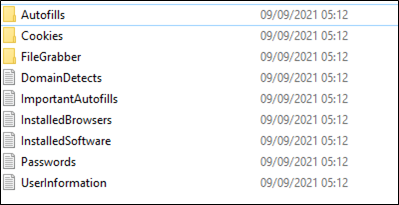
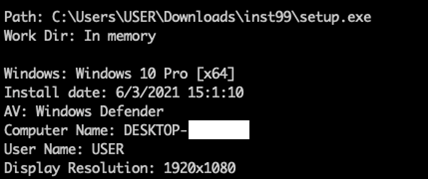
The contents are pretty much self-explanatory. Some variants list what anti-virus programs are present, whether the process is elevated, and what UAC permissions the user has.  
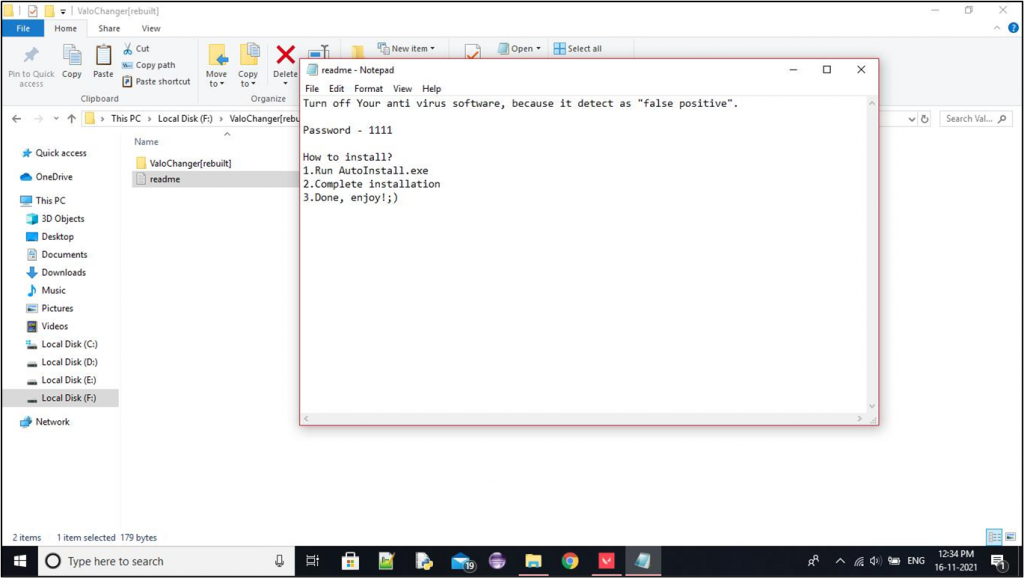
The screenshots of victim’s desktops are equal parts sad and hilarious. Some of them make me feel like I am way over-engineering my payloads… 
The Victim  

So. back to the story.

As you’d probably imagine, reconnaissance is a huge part of a red team. I personally enjoy the recon process, as I use it to gather the situational awareness and confidence I need to execute attacks later on. The more I know about how the target entity operates, the more I can use it against them, especially during social engineering and post-exploitation. After I started processing stealer logs, I added searching for them to my recon workflow on all engagements; specifically, searching for client domains in the host field and username fields. This started turning up results almost immediately, but here’s a specific story that I think illustrates the risks well.  

I discovered a result where one of the captured credentials had a URL like https://citrix.client.com/vpn/login. The username captured for this site appeared to be a valid username, but the password saved was a six digit number. This was likely a temporary MFA code, and we were unable to access the Citrix interface using the captured information.

I extracted and browsed through the user’s entire log folder, which contained roughly 67 sets of credentials but no other information we could leverage for initial access. We launched a long-running credential stuffing campaign targeting this user, using all the credentials listed in the stealer log. Bad for us (but good for the client), this attack was unsuccessful, and we hit smart lockout on that user’s account in all data centers.

Once we admitted defeat on using the data for initial access, we contacted the client to inform them of the situation, and to have them put us in touch with the victim. I wanted to provide the user with the full stealer log file archive, so they could attempt to invalidate all the information that had been disclosed. However, I was not comfortable with sharing the entire dump with the victim’s employer, given the personal nature of the data. At the same time, our client would not want to be responsible for transmitting and storing the user’s personal data. Eventually, we settled on sending the contents within an encrypted zip file, with the password being verbally exchanged over the phone. The victim was very polite and appreciative of the heads up, which I found admirable.  

The part that surprised me the most was that the victim had no awareness that their computer was compromised, or even that their data was exposed. I asked if they had received spurious MFA push notifications, suspicious login notifications, or any other indicators of compromise, but they were aware of none. The malware executed over a year before I discovered it during this engagement. This leads me to believe that the attackers that collect this data must triage it and only act against the most valuable targets — those with credit cards, cryptocurrency wallets, and other information that can lead to quick and direct financial gain.  

As for how the victim was infected, one of their children managed to infect the family computer while installing cracked software. The victim mentioned to me during our conversation that they would be having a “family meeting” to work together to change all the affected passwords, and use it as a teachable moment, which is great. At this point we went our separate ways, and we continued our red team engagement.  

What Next?  

As we concluded the engagement and moved to reporting, I began to consider what the client could do to prevent this kind of thing from happening again.  

First, I considered the technical mechanism that led to this data leakage in the first place. I do not have enough evidence to prove exactly what happened, but I thought of some possibilities:  

  1. The user logged into their work browser with their personal account, causing existing and future credentials to be synced via their personal Google/Microsoft account to their home computer.  
  1. The user logged into their home computer browser with their work account, syncing all the credentials stored there to their home computer.  
  1.  The client uses a bring-your-own-device (BYOD) access model that allows employees to remotely access company resources from personal computers.  

In all cases, personal and work data would be commingled, leading to potential data leakage.  

Technical Controls?  

For years, I have been reporting “browser credential storage allowed” as a finding, mainly when we use tools like SharpChromium and SharpDPAPI during post-exploitation, and discover users saving their passwords in browser credential storage as opposed to a password manager. The recommendation there is to use GPO or MDM to fully disable this functionality in all browsers. There is a possibility that this would have prevented the user from saving the password in the first place, if they only ever logged into the Citrix interface from a managed computer.  

This situation brought up the possibility of an additional recommendation, which is to prevent users from signing into their browsers at all. While I considered this, it could reduce the efficiency of some workers that switch between approved devices often. It also is the kind of security solution that I hate — one that blocks a bunch of useful features to prevent a subset of them from being abused.  

User Security Awareness?  

As much as I hesitate to pull this lever so often, I think making users aware of the implications of browser sync is helpful for the employee and the employer. This goes way beyond security; I think most people would not want their browser history shared with their spouse or close friends, let alone their employer. As more applications move to the web client model, we put more sensitive data into our browsers than ever before.  

Detection?

Although breached data might seem outside of our control, monitoring and detection can prevent this data from being abused.  

Knowing exactly what data is breached in the first place goes a long way, both for companies and individuals. At the time of writing, there is no public site I am aware of that is like HaveIBeenPwned but for stealer logs. If you know of a good one, please get in touch.  

  • For companies, there are likely paid data breach monitoring services that ingest stealer logs. You could also subscribe to our Continuous Testing offering, which is structured in a way that allows us to use these techniques long-term just like real attackers do (shameless plug).
  • For individuals, searching for your data in stealer logs is more difficult. There is a government website (https://raccoon.ic3.gov/home) that will allow you to determine if your data was stolen by Raccoon Stealer. HaveIBeenPwned has roughly 400,000 records from the Redline stealer, which is a limited subset. Currently, my dataset contains close to 10 million victims, and I am likely missing quite a bit of data.  

Companies should also monitor for credential stuffing attacks and respond accordingly, especially if a valid login occurs. Defenders should also be aware of the security implications of browser data.  

My Advice  

  1. Use good password manager, for both enterprise and personal security.  
  1. Disable browser credential storage for all browsers on all managed computers using Group Policy or Device Management tools like Intune
  1. Clean up previously saved logins and other sensitive data.  
  1. Educate users and defenders:  
    • Bring awareness to the amount of data exchanged when signing in to a browser.
    • Demonstrate how to manually disable credential storage, export old credentials, and import them into a password manager of their choice . 

Thanks for reading! 


Ready to learn more?

Level up your skills with affordable classes from Antisyphon!

Pay-What-You-Can Training

Available live/virtual and on-demand
