We avoid tasks that are too hard. When we avoid them (consciously or unconsciously) the things we do instead are called “avoidance behaviors.” Adults and teachers alike demonstrate avoidance behavior when it comes to digital print.
One of the main ways that parents can ensure their children learn to read is to demonstrate an interest in reading. This is done by reading around them. You can read anything, it doesn’t matter. Children imitate activities we enjoy and show them we enjoy. If we model avoidance behaviors when it comes to reading electronic texts, the children in our lives will be, in my opinion, less likely to be able to read things like websites, articles, and online dictionaries. In a world where digital print is not just an option, but in many cases the standard, avoidance behavior when it comes to digital print cannot be tolerated.
If you are worried about the children in your life not having the life skills necessary to navigate to safe, quality websites, you are correct. If you fear that children don’t really understand what they are reading on the screen, your fears are validated. But there are resources to help children of all ages to navigate safely and understand what they read. Common Sense Media is a great resource. But in this blog post, I will specifically address how our negative attitude towards digital print transfers to our children and explain why we should not avoid reading and teaching children to read digital print.
Digital print is all around us. We read Twitter for professional development, Reddit for entertainment, use Flipboard and news websites (CNN, FOX news, Washington Post) to educate ourselves as a member of our wider community. It’s not just news sites that we don’t understand. The other day my husband misunderstood a text because he was using skills that he learned from reading printed text in order to understand what our friend was trying to tell us about a birthday brunch. Here is a short story about this misunderstanding.
A Personal Story about Digital Misunderstanding
On December 9th, my husband and I got a text from our friend, Jamie. It read something like this:
Tony’s birthday is on Sunday. We will all be working on Sunday, so we thought we’d do lunch on Saturday at 11:15. Will you be joining us? I need to make a reservation.
Friday night as I was going to bed, I assumed that my husband set the alarm for us to get to brunch on time because he responded to the group text that we would like them to add us to the reservation. I woke up at 11:30. I looked at my husband and said, “What day was that brunch?”
“Sunday,” he said.
I smiled to myself, realizing that electronic text includes not only pdf’s or ebooks, it also includes texts you send on your phone. I said to my husband, realizing that a whirlwind of showers and panic-getting ready was in store for us. “I think you should check again.”
“Most of us simply don’t have the comprehension skills necessary to accumulate evidence, synthesize our experiences, and propose a position supported by text we find online. “
Millennials Are not Immune to Misunderstanding Digital Print
Generation X, Baby Boomers, all of us “older folk” are all at a disadvantage for reading electronic text. Most of us simply don’t have the comprehension skills necessary to accumulate evidence, synthesize our experiences, and propose a position supported by text we find online. In school we were taught to read books and articles printed on a page. We were not taught to read online.
This lack of exposure to electronic texts can be seen even in my world as a project manager for BHIS. I have seen information security professionals accidentally click on an advertisement. I have also seen them only answer one of three questions proposed on an email. It’s not a criticism, it’s just that we haven’t been equipped with the strategies and skills necessary to be effective and safe online. This lack of skill does not just pertain to Generation X and older. Millennials also have difficulty with electronic text.
Studying for my undergraduate degree also showed me evidence that Millennials didn’t know how to process electronic texts. The printer at my college was consistently hot, printing article after article which students needed in order to write their papers. It would cost them 5 cents a page, and some of these poor students were printing out articles that were a hundred pages of text or more.
“Why would frugal college students be printing out articles? It’s because they understand an article better if it’s printed.”
As an elementary literacy teacher and coach in the Rapid City Area School District, I noticed that teachers were also hesitant to give students electronic text. The majority of their reading is done either on paper or in books held in their hands, turning the pages one by one. The argument that I heard over and over again is that students just don’t understand what they’re reading if it’s on a screen.
Playing with Books is Learning Concepts of Print
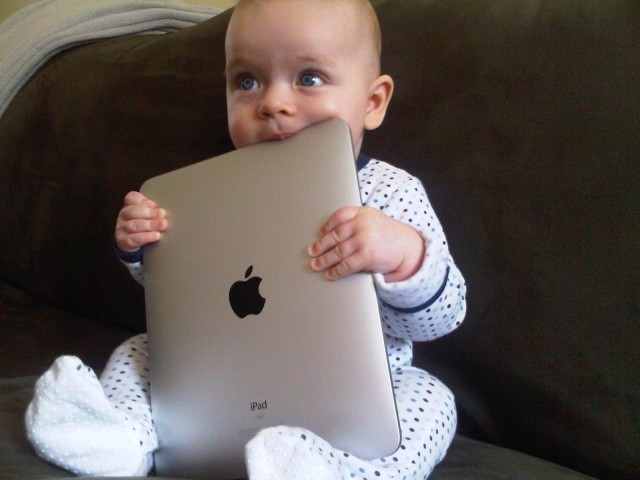
Have you ever seen a toddler with a board book? Toddlers don’t read the pages, they flip through them, bite one them, they explore the format of the text, the “concepts of print,” before they’re ever ready to read. I argue that electronic texts have a format as well, many formats in fact.
If we never give children electronic texts, the same is true, they’ll flip through the pages, glance at pictures, much like a toddler does with a board book.
We have electronic books, articles downloaded as PDFs, web pages, and these are just three of the many types of electronic texts we are exposed to. If we never give children a magazine, they’ll never know how to read one. If we never give children electronic texts, the same is true, they’ll flip through the pages, glance at pictures, much like a toddler does with a board book. Just because we don’t feel at ease reading an ebook or article doesn’t mean our children can’t learn.
Digital Print is the Standard
People of all ages have the ability to learn to digest information in electronic format. But you never stop learning how to read better, no matter what the format. Electronic format is an increasingly important way to read, and your skill influences your attitude to what your children will read. If your attitude towards reading a PDF or an ebook is that you would prefer a print book, that, my friends, means that you have more comprehension skills and strategies for a print book than electronic text. And electronic text is not the future of information, it is the standard.
Find Easy Books to Enjoy with your children
People find their lives and experiences more rich if the challenge they are presented matches their skill. If you or your children do not enjoy electronic text, the answer is that your family needs to increase your skill. The simplest way to help your children increase their skill is to find their “zone of proximal development.” The Zone of Proximal Development is a fancy way of saying, “Find a skill that is a little bit too hard for the child and teach them.” Find a single skill to teach (like turning pages) and show them how to do it. Then do it with them, Then they can do it on their own. The trick is to find that skill. My advice, watch them try to read an easy book on a kindle. Praise them for what they do well, and find one thing to help them with. Just teach them that one skill for a week or more.
One student said, “I would have liked an easier book so that I could learn how to use the Kindle better.”
When teaching children how to read electronic books, find an easy book. The challenge shouldn’t be the words, you want the challenge to be navigating the text. Find a book that is easy for them to read so they may concentrate on learning how to understand the format. When I asked my 5th grade students what would have made reading on an ebook a more pleasant experience, I got valuable advice. One student said, “I would have liked an easier book so that I could learn how to use the Kindle better.” What she was trying to say was that her cognitive demand was too high because she was working on her reading skill while she was presented with a challenging book.
If you have nostalgia for old books, please, continue to read and enjoy them, but for your child’s sake, let them “bite the pages of their electronic board book.” Read easy articles to them that you find online from National Geographic for Kids. Borrow electronic books from your local library and have lap time with your little ones. Show your 4th graders how to avoid clicking on ads. And above all, keep a positive attitude about reading electronic texts. Children know how you feel about reading articles and books you find online.
“The best moments in our lives are not the passive, receptive, relaxing times… The best moments usually occur if a person’s body or mind is stretched to its limits in a voluntary effort to accomplish something difficult and worthwhile.” ~ Mihaly Csikszentmihalyi (1990, p. 3)
Works Cited:
http://www.pursuit-of-happiness.org/history-of-happiness/mihaly-csikszentmihalyi/
http://researchguides.weebly.com/e-books-audiobooks-and-video-from-overdrive.html
此内容由惯性聚合(RSS阅读器)自动聚合整理,仅供阅读参考。 原文来自 — 版权归原作者所有。