
惯性聚合 高效追踪和阅读你感兴趣的博客、新闻、科技资讯
阅读原文 在惯性聚合中打开

推荐订阅源

Vercel News
Vercel News
SecWiki News
SecWiki News
WordPress大学
WordPress大学
小众软件
小众软件
博客园 - 司徒正美
酷 壳 – CoolShell
酷 壳 – CoolShell
V
Visual Studio Blog
Y
Y Combinator Blog
freeCodeCamp Programming Tutorials: Python, JavaScript, Git & More
云风的 BLOG
云风的 BLOG
MyScale Blog
MyScale Blog
K
Kaspersky official blog
T
The Exploit Database - CXSecurity.com
腾讯CDC
Scott Helme
Scott Helme
I
InfoQ
Cyberwarzone
Cyberwarzone
Cyber Security Advisories - MS-ISAC
Security Latest
Security Latest
The Register - Security
Project Zero
Project Zero
F
Fortinet All Blogs
C
CERT Recently Published Vulnerability Notes
A
Arctic Wolf
C
Cisco Blogs
L
LINUX DO - 热门话题
P
Privacy International News Feed
IT之家
IT之家
U
Unit 42
P
Privacy & Cybersecurity Law Blog
H
Help Net Security
K
KPMG report finds enterprise disconnect between AI and its ROI | CIO
C
Cyber Attacks, Cyber Crime and Cyber Security
P
Palo Alto Networks Blog
F
Full Disclosure
宝玉的分享
宝玉的分享
Simon Willison's Weblog
L
Lohrmann on Cybersecurity
Google DeepMind News
cs.CL updates on arXiv.org
H
Hacker News: Front Page
Know Your Adversary
Know Your Adversary
PCI Perspectives
PCI Perspectives
Hugging Face - Blog
Hugging Face - Blog
AWS News Blog
AWS News Blog
MongoDB | Blog
MongoDB | Blog
S
Schneier on Security
Recent Announcements
Forbes - Security
Forbes - Security
Cisco Talos Blog
Cisco Talos Blog

Black Hills Information Security, Inc.

Bad Habits: An ANTISOC Operation Same Problem, Different Angles: When Red Team and Blue Team Actually Talk to Each Other How to Identify and Exploit New Vulnerabilities Swapper – A Pure Regex Match/Replace Burp Extension A Practical Guide to BloodHound Data Collection Network Engineering Basics Signed, Trusted, and Abused: Proxy Execution via WebView2 Getting Started In Pentesting – Advice From The BHIS Pentest Lead Cloud Security: Tips and Resources for Securing the Cloud Lessons From A Chatbot Incident How to Lead Effective Tabletops Understanding GRC: How to Navigate Risks and Compliance Standards The “P” in PAM is for Persistence: Linux Persistence Technique Malware Analysis: How to Analyze and Understand Malware OSINT: How to Find, Use, and Control Open-Source Intelligence What to Do with Your First Home Lab When the SOC Goes to Deadwood: A Night to Remember Social Engineering and Microsoft SSPR: The Road to Pwnage is Paved with Good Intentions Common Cyber Threats Finding the Right Penetration Testing Company Deceptive-Auditing: An Active Directory Honeypots Tool The Curious Case of the Comburglar How to Set Smart Goals (That Actually Work For You) Inside the BHIS SOC: A Conversation with Hayden Covington Abusing Delegation with Impacket (Part 3): Resource-Based Constrained Delegation Why You Got Hacked – 2025 Super Edition Abusing Delegation with Impacket (Part 2): Constrained Delegation Abusing Delegation with Impacket (Part 1): Unconstrained Delegation GoSpoof – Turning Attacks into Intel Model Context Protocol (MCP) Bypassing WAFs Using Oversized Requests Getting Started with AI Hacking Part 2: Prompt Injection Wrangling Windows Event Logs with Hayabusa & SOF-ELK (Part 2) DomCat: A Domain Categorization Tool Wrangling Windows Event Logs with Hayabusa & SOF-ELK (Part 1) Microsoft Store and WinGet: Security Risks for Corporate Environments Default Web Content MailFail Commonly Abused Administrative Utilities: A Hidden Risk to Enterprise Security Stop Spoofing Yourself! Disabling M365 Direct Send Bypassing CSP with JSONP: Introducing JSONPeek and CSP B Gone Offensive Tooling Cheatsheets: An Infosec Survival Guide Resource DNS Triage Cheatsheet GraphRunner Cheatsheet Burp Suite Cheatsheet Impacket Cheatsheet Wireshark Cheatsheet Hashcat Cheatsheet EyeWitness Cheatsheet Nmap Cheatsheet Netcat (nc) Cheatsheet Hunt for Weak Spots in Your Wireless Network with Airodump-ng from the Aircrack-ng Suite Detecting ADCS Privilege Escalation Vulnerability Scanning with Nmap Getting Started with NetExec: Streamlining Network Discovery and Access How to Use Dirsearch Augmenting Penetration Testing Methodology with Artificial Intelligence – Part 3: Arcanum Cyber Security Bot How to Design and Execute Effective Social Engineering Attacks by Phone Abusing S4U2Self for Active Directory Pivoting Why Use a Macro Pad? Espanso: Text Replacement, the Easy Way Caging Copilot: Lessons Learned in LLM Security Augmenting Penetration Testing Methodology with Artificial Intelligence – Part 2: Copilot Augmenting Penetration Testing Methodology with Artificial Intelligence – Part 1: Burpference Intercepting Traffic for Mobile Applications that Bypass the System Proxy How to Root Android Phones Communicating Security to the C-Suite: A Strategic Approach Offline Memory Forensics With Volatility Getting Started with AI Hacking: Part 1 Go-Spoof: A Tool for Cyber Deception How to Test Adversary-in-the-Middle Without Hacking Tools Canary in the Code: Alert()-ing on XSS Exploits How to Hack Wi-Fi with No Wi-Fi Why Your Org Needs a Penetration Test Program Burp Suite Extension: Copy For Light at the End of the Dark Web Wi-Fi Forge: Practice Wi-Fi Security Without Hardware Avoiding Dirty RAGs: Retrieval-Augmented Generation with Ollama and LangChain Gone Phishing: Installing GoPhish and Creating a Campaign 5 Things We Are Going to Continue to Ignore in 2025 John Strand’s 5 Phase Plan For Starting in Computer Security Questions From a Beginner Threat Hunter GRC for Security Managers: From Checklists to Influence AI Large Language Models and Supervised Fine Tuning Attack Tactics 9: Shadow Creds for PrivEsc w/ Kent & Jordan One Active Directory Account Can Be Your Best Early Warning Introduction to Zeek Log Analysis Indecent Exposure: Your Secrets are Showing Creating Burp Extensions: A Beginner’s Guide Pitting AI Against AI: Using PyRIT to Assess Large Language Models (LLMs) The Top Ten List of Why You Got Hacked This Year (2023/2024) ICS Hard Knocks: Mitigations to Scenarios Found in ICS/OT Backdoors & Breaches Intro to Data Analytics Using SQL Finding Access Control Vulnerabilities with Autorize The Detection Engineering Process Cyber Risk Lessons We Can Learn From Hurricane Preparedness Intro to Desktop Application Testing Methodology What Is Penetration Testing? Adversary in the Middle (AitM): Post-Exploitation Pentesting, Threat Hunting, and SOC: An Overview
Got Enough Monitors?
Kassie Kimball · 2023-03-28 · via Black Hills Information Security, Inc.

Carrie Roberts // Guest Blog

OK, I admit it: I might have a problem. But seriously, can you ever really have enough screen space? In this blog post, I’ll describe a cheap solution for having a lot of screen space for your work-from-home office. I will also share other aspects of my office that make it functional and enjoyable (links are included if you are interested in imitating any of it).
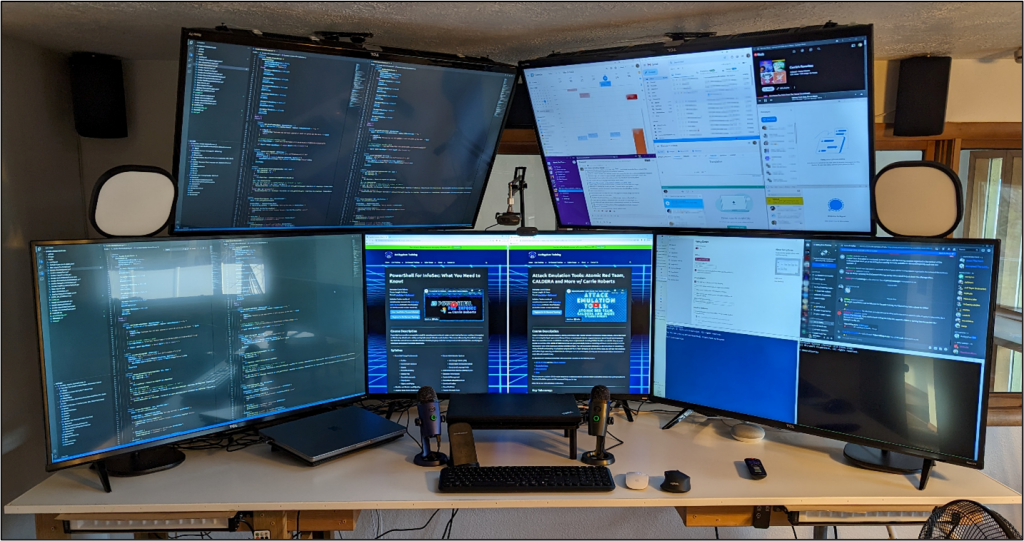
I’m using five 43” 4K televisions as monitors for my work-from-home office. Each TV is less than $200, and they work great for everything I do — from viewing Office documents to joining Zoom meetings. I’m not a graphic designer, I’m clueless about color accuracy, and I don’t play games where you would most likely notice issues using TVs as monitors.

I have two computers hooked up to these five monitors. The screen in the middle is hooked to an HDMI switch for easy switching back and forth between my work computer and my personal computer, depending on what I am focusing on at the time. The two monitors on the left are always hooked up to my work computer, and the two monitors on the right are always hooked up to my personal computer. It is important to switch the middle monitor with the switch instead of the TV’s input switcher, because windows will hide on the invisible screen using the TV’s input switcher. I like to use the upper monitors for things like keeping an eye on my calendar, email, messaging apps, and as one consistent place for controlling my music.

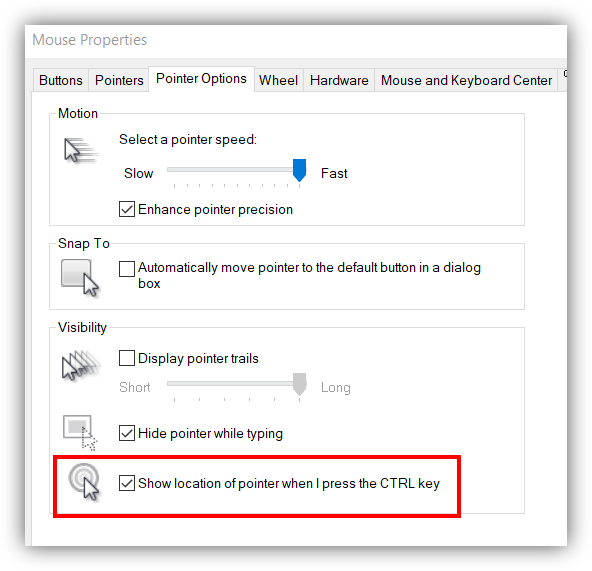
I recommend setting your mouse pointer options to move “fast” so that you can get to all edges of your monitors in one wrist motion without having to lift up your mouse. It takes some adjustment to get used to, but then is easily doable. Sometimes you lose track of where the mouse pointer is on the screen and it is hard to find. On macOS, you can quickly move the mouse pointer back and forth and the pointer will show up much larger for a second so you can find it (go to Settings→Accessibility→Display→Pointer to customize). On Windows, this option works well.
On my personal computer, I use the free Microsoft FancyZones tool to break the screen up into any layout I want and easily snap my windows to the layout. I recorded a demo of it here. My monitors are very close to the ceiling because I have a raised desk to allow for the treadmill underneath, but that’s another story.

I record a lot of content for online training, so I’ve doubled up on my webcams and microphones so that I don’t have to switch them back and forth between my work and personal computers. I had a USB switch originally, but I ruined two Yeti Nano microphones and two USB switches doing that. I don’t think they are built for that kind of switching.

You also see that my personal computer is on a stand in the middle and one of my cameras is on an adjustable arm. This is so I can present from a 1080p monitor and lower the camera, so it looks like I am looking into the camera more. (If I didn’t record so much content, I wouldn’t go through so much trouble.)

Of course, I want to be able to switch my keyboard and mouse back and forth between the two computers, but the 1-2 second delay on all the switches can be annoying when I just want to skip a song or respond to a message with an emoji on my personal computer. For this reason, I keep one mouse for each computer by my keyboard. I don’t switch the keyboard between computers nearly as much, so I just use this cheap multi-computer keyboard. I do have a mouse that can switch between 3 computers easily but not fast enough for me, so I prefer two different mice.

For my recordings and online meetings, I wanted to have something cool in the background, so I built this Wonderstructs marble maze and I love it! It looks deceptively small in the picture, but it is 6 ft tall x 10.5 ft wide and takes up the entire wall.

I use two LED wall washer lights to give it the color. You can see them mounted just under my desk on the left and right in the photo with the monitors. I also use two studio lights to allow me to have consistent lighting, day and night, for my recordings. The lights are also shown in the monitor picture on the outside of the upper monitors. The lights are wirelessly connected, and I can control their brightness and color from an app on the computer, as well as on my phone.

Some other things I enjoy in my office are a booming stereo system, a multi-port usb charging station, this super comfy swinging chair, my under-desk treadmill, this wall mounted coat rack, a mega powerstrip, and this 100 oz jug full of diet coke!

It takes a very large desk to house this much screen real estate because the screens are ideally set back a fair distance from your face. My center screen is 3 feet away from my face. The desk itself is made from a sheet Melamine and is 3.5 ft x 8ft.

If you do decide to try these TVs for monitors, remember to set your display settings from your computer to 30 Hz and to play with the TV settings (press * on the remote) and try the different picture modes to see which you like best. I had a couple of TVs where the text on the screen didn’t look sharp until I changed the mode. Some cables, dongles, and docking stations don’t support 4K and will limit your resolution on these TV’s. You may need to buy a few HDMI to USB-C cables to hook the TVs up directly to your computer. And remember, you must get the 4K version of the TV or life will not be good.

Good Luck!! I’ve been working from these monitors for 4 years and I’m very happy with them.

Check out a related blog of Carrie’s: Healthy Hacking with the Treadmill Elliptical Desk