


Spring AI 1.0 shipped in May 2025. The 1.1 follow-up added full MCP integration, 20+ AI model backends, and a structured Advisors API for RAG and conversation memory. For the first time, Java developers can build AI agents that feel genuinely native — no Python sidecar, no LangChain wrapper, no second deployment.
Java developers have been building enterprise backends for decades. Now that AI agents are becoming first-class production components — not experiments, not demos — the question is whether those same developers need to learn Python, adopt LangChain, and maintain a sidecar service just to add intelligence to their applications. Spring AI 1.1 is the most complete answer the JVM has offered: no, you don’t.
Spring AI 1.1 GA shipped on November 12, 2025, after a development cycle that accumulated over 850 improvements across five milestone builds and an RC. The headline features are Model Context Protocol integration, a matured Advisors API, structured output converters, and an expanded set of model backends. Together they add up to something the Java ecosystem hasn’t had before: a full-featured AI agent framework that integrates naturally with Spring Boot, Spring Security, Micrometer, and the rest of the Spring portfolio. Let’s unpack what that means in practice.
1. The Python Tax — and Why It Exists
The phrase “Python tax” captures something real that Java and Kotlin teams deal with daily. Most AI tooling — LangChain, LlamaIndex, AutoGen, CrewAI — was built in Python because the early ML ecosystem lived there. As a result, Java teams adding AI capabilities to their services face a common set of choices: wrap a Python microservice and add an inter-process boundary to every AI call, run a sidecar container that the Java service depends on, or accept a JavaScript SDK that doesn’t fit enterprise architecture patterns.
Each option adds operational complexity, introduces latency at the inter-service boundary, fragments observability across two runtimes, and creates deployment coupling that engineering teams actively try to avoid. Additionally, Spring Security, Spring Data, and the broader Spring ecosystem simply don’t apply to a Python sidecar — so enterprise cross-cutting concerns like authentication, authorisation, audit logging, and distributed tracing have to be re-implemented or bridged.
Python AI stack (LangChain)
- Separate runtime, deployment, and Docker image
- HTTP/gRPC boundary between Java service and AI logic
- Spring Security context does not cross the boundary
- Two observability stacks (Micrometer + Python agent)
- Two sets of model configuration and credentials
- Team must maintain Python dependency tree
- Cold-start latency on first AI call per container
Spring AI 1.1 (Java/Kotlin)
- Single JVM process, single Spring Boot app
- Direct in-process method call to ChatClient
- @PreAuthorize on MCP tool methods — full Spring Security
- Native Micrometer integration — one dashboard
- Single application.yml for all model config
- Standard Maven/Gradle dependency management
- Spring Boot startup, no separate warm-up needed
Consequently, the operational argument for Spring AI is at least as strong as the developer experience argument. An AI agent that runs inside a Spring Boot process inherits everything that process already has — including configuration management, health checks, graceful shutdown, and native AOT compilation for GraalVM. That’s not something any Python sidecar can match without substantial extra work.
2. What Spring AI 1.1 Actually Ships
Before diving into code, it helps to understand the architecture. Spring AI is structured around a set of abstraction layers — a portable API that sits above individual model providers, with higher-level features like the Advisors API and ChatMemory built on top of it. The diagram below illustrates how the layers connect.
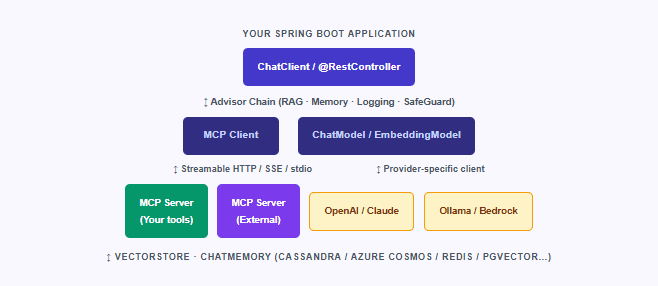
The most significant new layer in 1.1 is the MCP integration. Spring AI’s MCP Boot Starters, introduced during the 1.1 development cycle, let you expose any Spring bean method as an MCP tool with a single annotation — and consume MCP tools from external servers with a single YAML configuration entry. We’ll look at that in detail shortly. First, it helps to understand what model backends are available.
2.1 Model Provider Coverage
One of Spring AI’s foundational properties is a portable, provider-agnostic API. Switching from OpenAI to Claude to a locally-running Ollama model requires changing only a single application.yml property and swapping a Boot Starter dependency — the ChatClient call in your service class stays completely unchanged. As of 1.1, the following providers are fully supported:
| Cross-Cutting Concern | Python Sidecar | Spring AI (In-Process) |
|---|---|---|
| Authentication | Must re-implement or bridge separately | Native Spring Security — @PreAuthorize works directly on @Tool methods |
| Authorisation | No shared security context across the HTTP boundary | Full RBAC via Spring Security roles and method-level security |
| Audit Logging | Separate logging pipeline, no shared MDC or trace context | Spring AOP + Advisors API — audit as a custom CallAdvisor |
| Distributed Tracing | Second trace agent required (e.g. Python OpenTelemetry SDK) | Native Micrometer Tracing — one trace spans the full request |
| Configuration Management | Separate config files, env vars, secrets rotation | Single application.yml / Spring Cloud Config for all model + app config |
| Health Checks | Separate /health endpoint, separate probe configuration | Spring Boot Actuator — AI backends included in health indicators automatically |
| Data Access (Spring Data) | No shared repository, connection pool, or transaction context | Direct @Repository injection into @Tool methods — same transaction scope |
| Metrics & Observability | Separate Prometheus scrape target, separate dashboard | Single Micrometer registry — token usage, latency, and app metrics unified |
| Graceful Shutdown | Separate shutdown lifecycle, risk of in-flight AI call loss | Spring Boot shutdown hooks cover ChatClient and MCP connections |
| Dependency Management | Separate requirements.txt, Python version, virtual env | Standard Maven/Gradle BOM — one dependency graph for the whole application |
3. The Model Context Protocol: What It Is and Why Spring Joined Early
The Model Context Protocol (MCP), introduced by Anthropic, standardises how AI applications interact with external tools and resources. Before MCP, every AI framework had its own custom tool-calling format — meaning a tool you wrote for LangChain couldn’t be used by a Claude application without rewriting it. MCP provides a shared client-server protocol so that any MCP client (like a Spring AI application) can use any MCP server (a weather API, a filesystem tool, a database query engine), regardless of which language or framework built it.
“Spring joined the MCP ecosystem early as a key contributor, helping to develop and maintain the official MCP Java SDK that serves as the foundation for Java-based MCP implementations.”— Christian Tzolov, Spring AI Lead, spring.io (September 2025)
Spring AI’s MCP Boot Starters, available since 1.1.0-M1, let you build both sides of this protocol in pure Java. An MCP Server exposes your business logic as tools, resources, and prompt templates. An MCP Client connects to any MCP server — yours or a third party’s — and makes its tools available to the AI model. The model then decides autonomously when and how to call those tools based on the user’s request.
As of 1.1 GA, Spring AI supports MCP Java SDK v0.14, protocol version 2025-06-18, with three transport types: Streamable HTTP (the modern standard), Server-Sent Events (SSE, for backward compatibility), and stdio (for local process tools). The Streamable HTTP transport, in particular, is designed to scale — its stateless mode is explicitly suited for microservice deployments where session state is not maintained between requests.
4. Building an MCP Tool Server and a RAG Agent in Spring AI 1.1
The best way to see how these pieces fit together is to work through a real example. Below, we’ll build a simple but complete agent: an MCP tool server that exposes an inventory lookup tool, and a ChatClient that wires it together with RAG-based product documentation context. All code is runnable with Java 21+ and a valid OpenAI (or Anthropic) API key.
Step 1: Maven Dependencies
pom.xml: Spring AI 1.1 BOM + starters for MCP server, OpenAI, and PGVector
<dependencyManagement>
  <dependencies>
    <dependency>
      <groupId>org.springframework.ai</groupId>
      <artifactId>spring-ai-bom</artifactId>
      <version>1.1.0</version>
      <type>pom</type>
      <scope>import</scope>
    </dependency>
  </dependencies>
</dependencyManagement>

<dependencies>
  <!-- Core Spring Boot -->
  <dependency>
    <groupId>org.springframework.boot</groupId>
    <artifactId>spring-boot-starter-web</artifactId>
  </dependency>

  <!-- MCP server (exposes tools) -->
  <dependency>
    <groupId>org.springframework.ai</groupId>
    <artifactId>spring-ai-starter-mcp-server-webmvc</artifactId>
  </dependency>

  <!-- OpenAI chat model -->
  <dependency>
    <groupId>org.springframework.ai</groupId>
    <artifactId>spring-ai-starter-model-openai</artifactId>
  </dependency>

  <!-- PGVector for RAG -->
  <dependency>
    <groupId>org.springframework.ai</groupId>
    <artifactId>spring-ai-starter-vector-store-pgvector</artifactId>
  </dependency>
</dependencies>
Step 2: Exposing a Business Method as an MCP Tool
The @Tool annotation is the centrepiece of Spring AI’s MCP server support. Any Spring bean method annotated with it is automatically discovered, serialised into a JSON Schema tool definition, and made available to connected AI models. Spring Security’s @PreAuthorize applies directly to these methods — making MCP tools first-class citizens of your security model.
MCP tool server — exposing inventory lookup to connected AI models
import org.springframework.ai.tool.annotation.Tool;
import org.springframework.ai.tool.annotation.ToolParam;
import org.springframework.security.access.prepost.PreAuthorize;
import org.springframework.stereotype.Service;

@Service
public class InventoryService {

    @Tool(description = """
        Look up the current stock level and warehouse location
        for a product SKU. Returns null if the SKU is not found.
        """)
    @PreAuthorize("hasRole('AGENT')")  // Spring Security works directly here
    public InventoryRecord getStock(
            @ToolParam(description = "The product SKU code, e.g. PROD-4521")
            String sku) {
        // In production: call your actual inventory repository
        return inventoryRepository.findBySku(sku)
            .map(p -> new InventoryRecord(p.getSku(), p.getQuantity(), p.getWarehouse()))
            .orElse(null);
    }

    // MCP also supports resources (read-only data) and prompt templates
    record InventoryRecord(String sku, int quantity, String warehouseCode) {}
}
Zero registration boilerplate: With Spring AI MCP Boot Starters, you do not need to register your
@Toolmethods manually. Spring Boot’s auto-configuration discovers all beans with@Toolmethods and registers them with the MCP server automatically. The server then exposes them over Streamable HTTP at/mcpby default.
Step 3: The ChatClient — RAG + MCP Tools + Conversation Memory
The real power emerges when you wire together the ChatClient with an Advisors chain. The following example combines conversation memory, RAG (vector-store document retrieval), and MCP tool access in a single, readable builder pattern — the kind of thing that would take hundreds of lines of custom code in a Python framework.
ChatClient with Advisors chain — memory + RAG + MCP tools in one builder
import org.springframework.ai.chat.client.ChatClient;
import org.springframework.ai.chat.client.advisor.MessageChatMemoryAdvisor;
import org.springframework.ai.chat.client.advisor.QuestionAnswerAdvisor;
import org.springframework.ai.chat.memory.InMemoryChatMemory;
import org.springframework.ai.vectorstore.VectorStore;
import org.springframework.ai.mcp.SyncMcpToolCallbackProvider;
import org.springframework.stereotype.Service;

@Service
public class ProductAgent {

    private final ChatClient chatClient;

    public ProductAgent(
            ChatClient.Builder builder,
            VectorStore productDocs,           // PGVector auto-configured
            SyncMcpToolCallbackProvider tools  // MCP tools auto-discovered
    ) {
        this.chatClient = builder
            .defaultSystem("""
                You are a product support agent. Use the inventory tool
                to check live stock levels. Use your document context to
                answer questions about product specifications.
                Always cite your sources.
                """)
            .defaultAdvisors(
                // 1. Conversation memory — persists across turns
                MessageChatMemoryAdvisor.builder(new InMemoryChatMemory())
                    .build(),
                // 2. RAG — retrieves relevant product docs before each call
                QuestionAnswerAdvisor.builder(productDocs)
                    .searchRequest(r -> r.similarityThreshold(0.65).topK(5))
                    .build()
            )
            .defaultTools(tools)               // 3. MCP tools injected here
            .build();
    }

    public String ask(String conversationId, String userMessage) {
        return chatClient.prompt()
            .advisors(a -> a.param(
                MessageChatMemoryAdvisor.CHAT_MEMORY_CONVERSATION_ID_KEY,
                conversationId))
            .user(userMessage)
            .call()
            .content();
    }
}
What just happened in those 40 lines: The agent above: (1) maintains per-user conversation history across HTTP requests using
MessageChatMemoryAdvisor, (2) performs a vector similarity search against a PGVector store on every call and injects the top-5 relevant product docs into the model’s context window, and (3) makes all MCP tool methods available so the model can autonomously call live inventory data when needed. In a Python LangChain equivalent, this would involve separate chain construction, callback handlers, and memory store configuration spread across multiple files.
5. The Advisors API: More Than RAG
The Advisors API is one of Spring AI’s most elegant abstractions. An advisor is conceptually similar to a Spring AOP interceptor — it wraps a ChatClient call and can inspect, modify, or short-circuit the request and response. Advisors chain in order, and they participate fully in Spring’s Observability stack, meaning you get Micrometer metrics and distributed traces for every advisor execution automatically.
| Built-in Advisor | What it does | When to use |
|---|---|---|
MessageChatMemoryAdvisor | Stores and injects per-conversation message history into every prompt | Any multi-turn conversational interface |
QuestionAnswerAdvisor | Performs vector similarity search and injects retrieved docs as context (Naive RAG) | Knowledge base Q&A with a single vector store |
RetrievalAugmentationAdvisor | Modular RAG — configurable query transformers, expanders, re-rankers, and multiple retrievers | Advanced RAG: query rewriting, hybrid search, multi-source retrieval |
VectorStoreChatMemoryAdvisor | Retrieves semantically relevant conversation history from a vector store rather than all history | Long-running sessions where full history is too large for the context window |
SafeGuardAdvisor | Intercepts requests and blocks generation of harmful or inappropriate content | Public-facing assistants with safety requirements |
Custom (CallAdvisor) | Your own intercept logic — A/B testing, prompt versioning, cost tracking, audit logging | Any cross-cutting concern that shouldn’t live in service code |
Building a custom advisor is straightforward. The following example shows a cost-tracking advisor that logs estimated token usage per conversation — the kind of production instrumentation that matters when model API costs are a real budget item.
Custom advisor — token usage tracking per conversation ID
import org.springframework.ai.chat.client.advisor.api.*;
import org.springframework.ai.chat.metadata.Usage;
import org.springframework.core.Ordered;

// Implements CallAdvisor for non-streaming; StreamAdvisor for reactive Flux paths
public class TokenUsageAdvisor implements CallAdvisor {

    private final TokenUsageRepository usageRepo;

    @Override
    public ChatClientResponse aroundCall(
            ChatClientRequest request, CallAdvisorChain chain) {

        // Let the request pass through the rest of the chain
        ChatClientResponse response = chain.nextAroundCall(request);

        // Inspect the usage metadata after the model responds
        Usage usage = response.chatResponse().getMetadata().getUsage();
        String conversationId = (String) request.context()
            .get(MessageChatMemoryAdvisor.CHAT_MEMORY_CONVERSATION_ID_KEY);

        if (usage != null && conversationId != null) {
            usageRepo.record(conversationId,
                usage.getPromptTokens(),
                usage.getGenerationTokens());
        }

        return response;
    }

    @Override
    public int getOrder() {
        return Ordered.LOWEST_PRECEDENCE;  // Run last — after all other advisors
    }
}
6. Structured Output: Mapping Model Responses to Java Types
One of the more quietly powerful features in Spring AI is structured output. Instead of parsing JSON strings from model responses yourself, you call .entity(YourRecord.class) on the ChatClient and Spring AI handles prompt engineering the model to produce valid JSON and deserialising the result into a type-safe Java object. In 1.1, this is reinforced by native structured output support where providers offer it (OpenAI’s JSON mode, Gemini’s response schema validation).
Structured output — model response mapped directly to a Java record
// Define your output schema as a plain Java record or class
record ProductSummary(
    String name,
    String category,
    List<String> keyFeatures,
    double estimatedPrice,
    String availabilityStatus
) {}

// Ask the model — Spring AI handles prompt engineering + deserialisation
ProductSummary summary = chatClient.prompt()
    .user("Summarise the PROD-4521 product based on the provided documentation.")
    .advisors(QuestionAnswerAdvisor.builder(productDocs).build())
    .call()
    .entity(ProductSummary.class);  // Direct Java type — no JSON parsing

System.out.println(summary.name());            // "ProBook X500 Laptop"
System.out.println(summary.availabilityStatus()); // "In Stock (warehouse: EU-3)"
Production note on structured output: Structured output reliability varies by model. GPT-4o and Claude Sonnet 4 produce valid JSON on nearly every call when native JSON mode is enabled. Smaller local models via Ollama may occasionally produce malformed output. For production paths, always wrap
.entity()calls in error handling and consider fallback strategies for parsing failures — Spring AI does not currently retry automatically on deserialization errors.
7. Production Readiness: What’s Actually Ready and What to Watch
Spring AI 1.1 is a GA release, which means the Spring team considers its core APIs stable. However, given the rapidly evolving AI landscape, some areas are more battle-tested than others. The table below gives an honest assessment of what’s production-ready today versus what warrants caution.
| Feature Area | 1.1 Status | Production Readiness | Notes |
|---|---|---|---|
| ChatClient + ChatModel API | GA Stable | Production Ready | Core API stable since 1.0. OpenAI, Anthropic, Bedrock well-tested. |
| MCP Server (WebMVC) | GA Stable | Production Ready | Stateless server issues fixed in 1.1.0-M2. OAuth2 available. |
| MCP Client (Streamable HTTP) | GA Stable | Production Ready | Protocol 2025-06-18 compliant. SSE available for legacy servers. |
| Advisors API (RAG, Memory) | GA Stable | Production Ready | QuestionAnswerAdvisor stable. RetrievalAugmentationAdvisor mature. |
| Structured Output | GA Stable | Use with error handling | Reliability varies by model. Native JSON mode preferred. |
| Prompt Caching (Anthropic/Bedrock) | GA Stable | Production Ready | Up to 90% cost reduction on long system prompts. TTL: 5min or 1hr. |
| ReasoningContent API | New in 1.1 | Evaluate per model | Thinking mode support varies: Anthropic & OpenAI most stable. |
| GraalVM / AOT compilation | MCP AOT in M2+ | Test your specific stack | MCP annotation AOT added in 1.1.0-M2. Not all vector stores tested. |
| Spring AI Agents framework | Community preview | Not yet production | Agentic loop / multi-agent patterns in active development as of late 2025. |
Spring AI 1.1 Development Cycle: Improvements per Milestone Build
The Honest Verdict
Spring AI 1.1 is the most significant milestone for AI on the JVM since Java itself added modern concurrency primitives. The combination of a portable model API, MCP integration that works with any language’s MCP server, a composable Advisors API for RAG and memory, and native Spring Security support for agent tools is genuinely novel — and genuinely useful for the teams that build enterprise systems in Java and Kotlin.
The “Python tax” is now a choice, not a mandate. Teams that want the operational simplicity of a single JVM process, the security model they already have, and the observability stack they already understand now have a credible, GA-quality path to production AI agents. The areas that still need care — structured output reliability, agentic loop patterns, and GraalVM compatibility at the edges — are real but limited in scope. For the vast majority of production AI agent workloads, Spring AI 1.1 is ready.
8. What We Have Learned
This article has moved from the structural argument — why the Python tax is a real operational problem, not just a language preference — through the architectural choices Spring AI makes, and into the actual production code you would write today. Several important points emerge from that journey.
First, Spring AI 1.1’s most important property is not any individual feature but its cohesion with the Spring ecosystem. MCP tool methods participate in Spring Security. The Advisors API integrates with Micrometer. Auto-configuration handles most wiring. ChatClient follows the same fluent builder pattern as WebClient. This is not accidental — it reflects a deliberate design philosophy that AI capabilities should integrate naturally into existing Java services, not sit alongside them as separate systems.
Second, the MCP integration changes the economics of tool-building. Because any MCP server can talk to any MCP client regardless of language, the investment in building a Spring AI MCP server is not locked to Spring AI clients. A tool server you expose for your Java application can equally be consumed by a Python AI workflow, a TypeScript agent, or any other MCP-compliant host. That cross-language interoperability is the protocol’s most durable value.
Third, the Advisors API deserves more attention than it typically receives. Most tutorials show RAG and memory as the primary use cases, but the pattern is equally suited to cost tracking, safety filtering, prompt versioning, audit logging, and A/B testing model responses — exactly the kind of cross-cutting concerns that enterprise teams manage daily and that have no clean equivalent in LangChain’s callback architecture.
Finally, the honest note on maturity: Spring AI 1.1 is a GA release with real production users, but the AI tooling landscape is still moving fast. The core ChatClient, MCP, and Advisors APIs are stable. The agentic loop and multi-agent orchestration patterns — where most of the AI framework competition is fiercest — are still evolving in Spring’s community preview Spring AI Agents project. That gap will close, but it’s worth knowing where the current boundaries sit before committing production workloads to the more experimental edges of the framework.