


Follow us on LinkedIn, X, Bluesky
Release date: May 28, 2026
Update 1.122.1: The update addresses these issues.
Downloads: Windows: x64 Arm64 | Mac: Universal Intel silicon | Linux: deb rpm tarball Arm snap
Welcome to the 1.122 release of Visual Studio Code. This release further enhances the agent experience and makes BYOK more flexible, while adding new capabilities for testing web apps across different devices.
Larger context windows: Support for 1M context windows for Anthropic and OpenAI models.
Air-gapped BYOK: Use your own language models, even when you're not connected.
Browser device emulation: Test your website's responsiveness across different devices directly in the integrated browser.
Rich issue reporting: Create rich VS Code issue reports, including screenshots and video recordings.
Happy Coding!
GitHub Copilot has moved to usage-based billing.
Under the new model, each interaction consumes AI credits, which are calculated based on token (input, output, and cached) cost and on the model used. Complex interactions and more capable models consume more credits, while lightweight models and simpler tasks use fewer. Learn more about how you can optimize your usage.
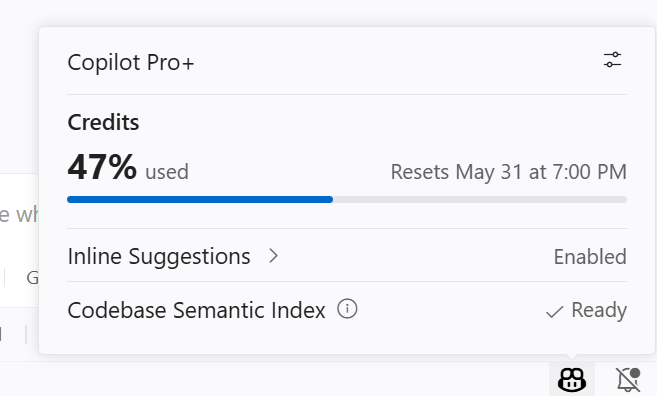
The Copilot status dashboard now reflects usage-based billing. You can view your AI credits consumption, so you can monitor your usage at a glance.
The model picker now displays cost information to help you make informed model choices. Different models have different costs per token type, so choosing the right model for your task can help extend your usage.
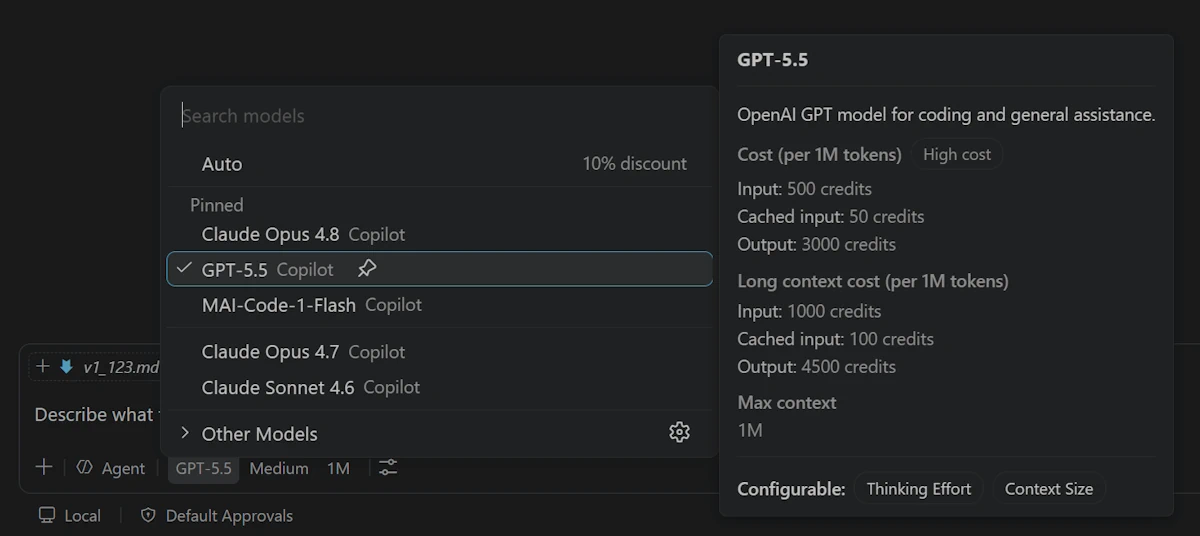
You can view all available models, their capabilities, context sizes, and billing details in the Language Models editor. Open it from the model picker by selecting ⚙️, or run the Chat: Manage Language Models command from the Command Palette.
The Agents window is a dedicated companion window optimized for exploring, iterating on, and reviewing agent sessions across projects, harnesses, and machines. We keep improving it and the updates for this release include:
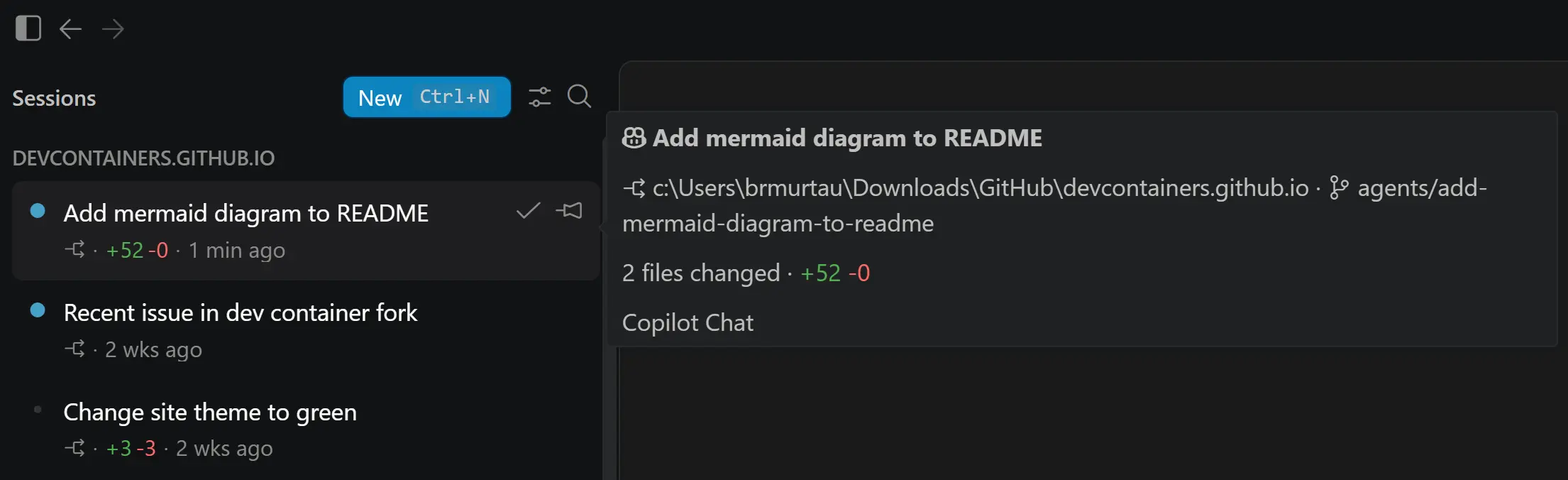
Session hover details: Hover over a session in the session list to see its details at a glance. The hover shows the session title with an icon indicating the harness used, along with the project, worktree, and files changed.
Local VS Code harness (Insiders only): We're continuing to iterate on the ability to use the local harness in the Agents window, such as improvements to the custom agent picker. The availability of the local harness is an early, experimental feature available only in VS Code Insiders. To try it out, you can enable the sessions.chat.localAgent.enabled setting in Insiders.
You can open the Agents window in several ways, including the Open in Agents button in the VS Code title bar. To learn more about how it works and what you can do with it, visit the Agents window documentation. You can also check out our new VS Code Insiders podcast episode about how the Agents window fits into agent-first development workflows.
Your feedback continues to be a great help in shaping Agents. If you've already been using it and providing feedback, thank you! Please continue to file issues on GitHub or browse existing issues.
Local agent sessions now emit a canonical github.copilot.* attribute namespace to OpenTelemetry, matching the GitHub Copilot CLI OpenTelemetry conventions. New signals add repository context, agent type, structured tool parameters, and hook outcomes to each session.
For the full attribute reference, see Monitor agent usage with OpenTelemetry.
Setting: chat.agent.sandbox.enabled This setting is managed at the organization level. Contact your administrator to change it.
Previously, when you ran commands with Bypass Approvals or Autopilot mode, they were first attempted in the sandbox. If the command failed with a non-zero exit code, it was automatically retried outside the sandbox. Since approvals were bypassed anyway, this did not provide a meaningful safety benefit and could make the behavior harder to reason about.
Based on feedback from Insiders users, terminal sandboxing now only applies when you use Default Approvals, where it provides a clearer balance between safety and usefulness.
VS Code now supports 1 million token context windows for compatible Anthropic and OpenAI models. This expanded context window enables you to work with significantly larger codebases and longer conversations without losing important context. The expanded context window is available when using supported models, such as Claude Opus 4.7 and GPT-5.5.
Note: Larger context windows may consume more tokens per interaction, which increases AI credits usage under usage-based billing.
Previously, using your own language model API key in VS Code required signing in to GitHub. Now, Bring Your Own Key (BYOK) works without signing in, so you can use chat, tools, and MCP servers in air-gapped or restricted environments where GitHub sign-in isn't possible. This also enables fully offline workflows with local models like Ollama.
To get started, run Manage Language Models from the Command Palette and add a provider such as Anthropic, Azure, Gemini, OpenAI, Ollama, OpenRouter, or a custom endpoint. Once at least one BYOK model is configured, the Chat view becomes available and sign-in prompts are suppressed.
Built-in tools and any configured MCP servers continue to work. Requests go directly to your provider.
Note: Inline suggestions and next edit suggestions (NES) still require a GitHub sign-in. BYOK powers chat, tools, and MCP servers only.
Settings: chat.utilityModel , chat.utilitySmallModel
A few flows in VS Code, such as chat title generation, commit message generation, and feedback, use a smaller utility model that normally comes from your Copilot subscription. When you use BYOK while signed out, the default utility models are unreachable, so a notification in the chat input prompts you to point them at one of your BYOK models.
You have two options:
Select Configure to open settings and pick a BYOK model for chat.utilityModel and chat.utilitySmallModel . This unlocks the full set of AI features using your own language model.
Dismiss the notification if you only need to use chat. The utility-driven features remain inactive until you configure a model.
The notification hides automatically once you configure both utility settings, sign in to GitHub, or remove all BYOK models.
The Custom Endpoint provider lets you connect models that implement Chat Completions, Responses, or Messages APIs, so you can use chat with your own endpoint and API key. You can use it to connect to self-hosted, enterprise, or other compatible AI endpoints.
The Custom Endpoint provider is now available in VS Code Stable.
To learn how to set it up, see Add a custom endpoint model.
You can now run the command Chat: Manage Language Models directly from the Agents window to configure the language models you want to use while working there.
To use BYOK models, you must use the Local agent provider which is enabled in VS Code Insiders with sessions.chat.localAgent.enabled . Model configuration is shared with the editor window, so changes you make in either place are reflected in both.
Managing BYOK providers often means making small updates, such as rotating an API key or renaming a provider group without opening and editing the full JSON configuration by hand.
In the Language Model editor, supported provider groups now expose targeted actions based on the provider schema: Update API Key, Add Model, Rename Group, and Delete. This makes common provider maintenance tasks faster while keeping you in the same flow.
The Remote Development extensions, allow you to use a Dev Container, remote machine via SSH or Remote Tunnels, or the Windows Subsystem for Linux (WSL) as a full-featured development environment.
Highlights include:
You can learn more about these features in the Remote Development release notes.
The integrated browser now includes out-of-the-box support for device emulation including screen sizes, mobile / touch emulation, custom user-agents, and more. This is especially useful for web development and debugging, allowing you to quickly test your website's responsiveness and behavior across different devices directly from VS Code without needing to switch to a separate browser or use external tools.
To get started from a browser tab, select the Show Emulation Toolbar command from the overflow menu.
Agents can also trigger device emulation via Playwright code, for example to catch mobile responsiveness issues:
The new Add Screenshot to Chat feature lets you attach a screenshot of the current browser viewport to the chat as context. This is especially useful for UI-related tasks, such as debugging a layout issue.
Setting: issueReporter.wizard.enabled
To help us better understand and fix any problems you might run into in VS Code, we've improved the issue reporting flow with a new issue reporting wizard. The wizard guides you through creating high quality issues directly from VS Code, including adding relevant details, screenshots, and video recordings.
Enable the issueReporter.wizard.enabled setting to opt in to the new issue reporter.
Contributions to our issue tracking:
Contributions to vscode:
We really appreciate people trying our new features as soon as they are ready, so check back here often and learn what's new.
If you'd like to read release notes for previous VS Code versions, go to Updates on code.visualstudio.com.
此内容由惯性聚合(RSS阅读器)自动聚合整理,仅供阅读参考。 原文来自 — 版权归原作者所有。