





What is a product listing page?
A product listing page (PLP) is a page on a website that presents a list of products based on a category or search query. This page is an essential element of the eCommerce experience as it funnels site visitors to product detail pages and closer to conversion. Often referred to as “category pages,” PLPs are also rich with metadata, and because each product links back to a category page, they can heavily influence SEO rankings and internal link building strategies.
Today, the majority of eCommerce traffic is sent to product listing pages, either from an email campaign, social media, or advertisement. Therefore, it’s important to ensure the PLP experience is carefully designed to:
- Promote product discovery
- Encourage user engagement
- Decrease time to purchase
With hundreds – if not thousands – of potential products listed, users need to be able to quickly and efficiently scroll and sort through results.
Product listing page design
There are a number of ways to enhance product listing pages, with optimization and personalization helping shoppers narrow down a given selection and find relevant products.
Let’s take a look at the main components of a PLP on a retail site:
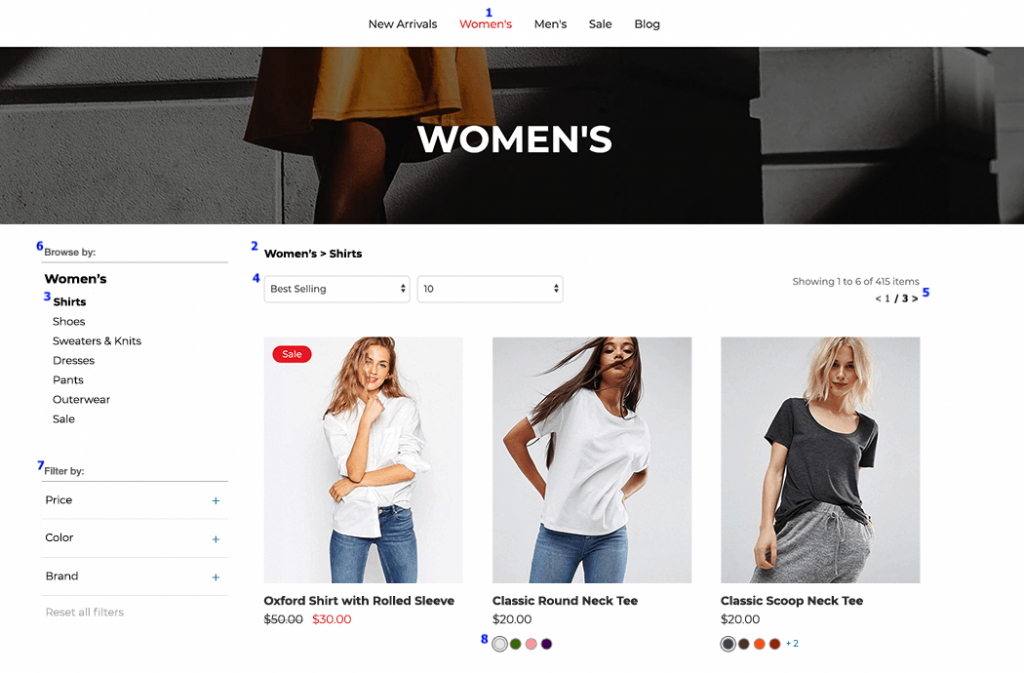
- Category name: The top navigation menu is fixed across all site pages, and on a PLP, a design element is added to highlight which category the PLP in view falls under to better orient the shopper.
- Breadcrumbs: Breadcrumbs display what parent category or sub-categories the list of products belong to, offering users an easy way to navigate back and forth between different product listing pages for deeper browsing.
- PLP page name: The name of each PLP typically appears highlighted in the category section or atop the page. Additionally, the number of products matching the PLP criteria typically appears somewhere on the page.
- Sort menu: Users can sift through products listed on a PLP using a dropdown menu displaying the various sorting options available to them. Options include “Featured,” “Price: Low to High,” “Newest,” and “Rating: High to Low.”
- Pages: Users can browse through multiple pages if enough SKUs match the criteria of the PLP using this navigational element. Additionally, an option to view items by 10, 50, or 100+ products per page can offer flexibility for shoppers based on their preferred browsing method.
- Browse by: If a PLP has sub-category pages that fall below it, users can navigate to more specific category pages using this menu bar.
- Filter menu: This menu bar displays the various filtering options available for further refinement of the listing page by attributes such as price, color, style, in-store availability, brand, and more.
- Product Details: Below each product on a PLP, brands typically include the item name, price (or range), and available colors. This can be customized to also include customer ratings, any promotional offers associated with the product, and more.
Some retailers even include a “Quick View” functionality on desktop, whereupon hover, the shopper can click to open a popup and scroll through more images, as well as find even more product details without leaving the listing page.
While the components above are considered best practices, how they are implemented can vary, which is why it’s important to experiment with each to maximize performance.