





Every day we interact with different sites created using single page application frameworks such as YouTube, Netflix, Facebook, and many others.
An increasingly popular architecture for building web applications and sites, we wanted to provide some clarity on the topic. In this post, we’ll dive into the rise of single page applications, what they are, the pros and cons, as well as how to overcome some common challenges presented when using them within the context of A/B testing and personalization.
Before we dive in, let’s define some common terms we’ll be using throughout this article.
XMLHttpRequest (XHR): An object-based API used to interact with servers (aka send HTTP or HTTPS requests) to retrieve data from the URL without fully refreshing the page.
Single Page Application (SPA): A web application using a single HTML file that dynamically updates the content of the current page based on an interaction occurring on the client-side or browser.
Multi-Page Application (MPA): Traditional web applications conformed by multiple HTML files that reload the entire page and display a new one upon user interaction.
Client-Side: The browser, i.e. Google Chrome, Safari, Internet Explorer, Firefox, etc., where dynamic action is taken. For single page applications, most of the logic and operations are executed client-side.
Server-Side: This is where most of the data processing takes place for traditional multi-page applications – typically developed using server-side languages like PHP, native React, Node JS, and others.
AJAX: A set of web development techniques used for building asynchronous web applications that are executed on the client-side.
Application Programming Interface (API): A collection of methods that enable applications to send requests for a service and receive a response back, usually in the form of a JSON.
Before SPAs, when technical teams wanted to build a web application, multiple HTML files were created to represent all possible pages visitors could navigate. But as time passed, new technologies like AJAX appeared, making it possible to retrieve data from the server without the need to load individual HTML pages with new content simplifying the navigation experience across pages.
As AJAX matured, a new concept developed where all of the site’s content was preloaded onto a single HTML file, and different sections were shown to visitors based on their interactions. An architecture defined in large by mobile applications, it allowed visitors to move faster across areas of the site by making light internet calls to the server to load the necessary data and content for the desired section.
With these improvements, more and more technical teams began exploring avenues for migrating to SPA frameworks in order to reduce site load times for their visitors. And this trend has only grown as businesses compete to grab and hold the attention of consumers who now expect seamless, fast, and highly tailored experiences online.
With traditional MPAs, after an action is taken on a website, most of the logic is executed on the server, where numerous processing requests must be made to load each new HTML page. SPAs, on the other hand, move this logic client-side (or the browser), loading all of the required HTML, CSS, and Javascript from the server just once. Subsequent visitor interactions are then handled using lighter XRH to only retrieve the data needed to render the new content or virtual page that must be loaded after the interaction has taken place in the browser.
The key difference between the two being that visitors remain on a single page (typically the homepage or index.html) that loads virtual page views as they engage with different areas of the site, instead of the browser being fully refreshed and loading new HTML, CSS, and Javascript files with every new pageview. As a result, the user experience is faster and much more fluid.
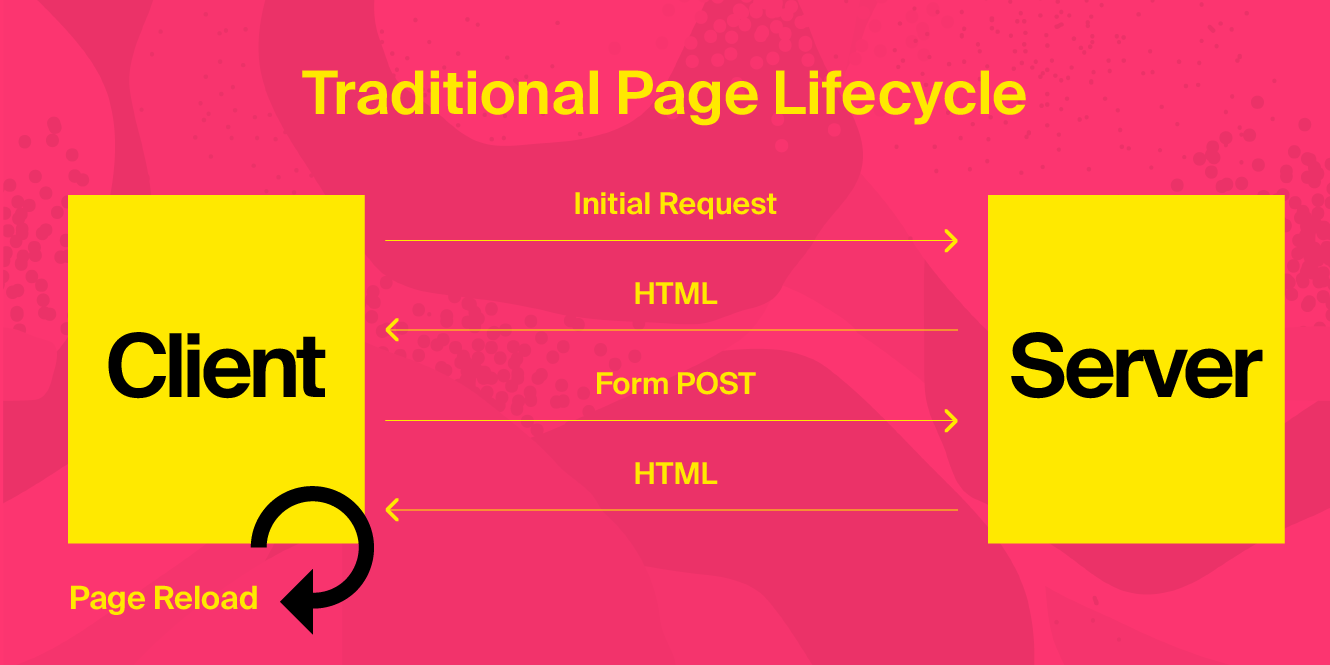
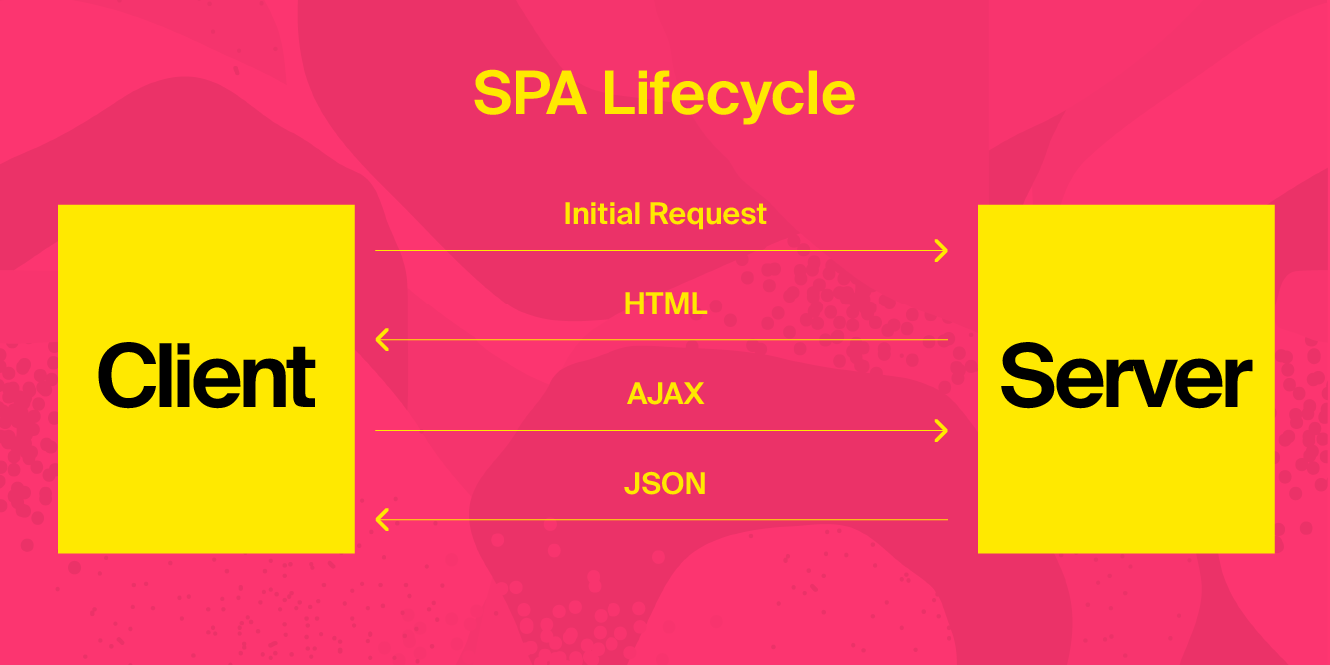
Some of the main aspects when designing a single page application architecture can be summarized in the following points:
In essence, a single page application is a Javascript framework that also uses HTML5 and CSS3. These become the main components to building SPAs, however, there are a few libraries and frameworks that have emerged and become popular in development using the previous components:
React.js: Developed by Facebook, it is mainly for developing user interfaces, typically in conjunction with Redux to manage the state of the application components.
Angular.js: Developed by Google, it uses a Model View Controller (MVC) architecture that allows for updates to the model every time the view changes, which are managed by the controller.
Vue.js: An MIT licensed open software used not only to build Single Page Applications but also to render content server-side as well sites that are statically generated. React Vue also requires state management handled by Vuex.
Meteor: There are additional packages compatible with Meteor that help to resolve the impact SPAs have on SEO by rendering the pages server-side.
Much like the debate between client-side vs. server-side testing (which is actually closely related to our conversation on SPAs today), there are always important factors to consider when implementing new technologies or frameworks. Below, find a deeper breakdown into the advantages and disadvantages of utilizing single page applications.
Important factors to consider before implementing SPAs | |||||||||||||||||||||||||||||||||||||||||||||||||||||||||||||||||||||||||||||||||||||||||||||||||||
Upsides | Downsides | ||||||||||||||||||||||||||||||||||||||||||||||||||||||||||||||||||||||||||||||||||||||||||||||||||
Speed |
|
| |||||||||||||||||||||||||||||||||||||||||||||||||||||||||||||||||||||||||||||||||||||||||||||||||
SEO |
|
| |||||||||||||||||||||||||||||||||||||||||||||||||||||||||||||||||||||||||||||||||||||||||||||||||
Implementation |
|
| |||||||||||||||||||||||||||||||||||||||||||||||||||||||||||||||||||||||||||||||||||||||||||||||||
Reach |
|
| |||||||||||||||||||||||||||||||||||||||||||||||||||||||||||||||||||||||||||||||||||||||||||||||||
Architecture |
|
| |||||||||||||||||||||||||||||||||||||||||||||||||||||||||||||||||||||||||||||||||||||||||||||||||
Security |
|
| |||||||||||||||||||||||||||||||||||||||||||||||||||||||||||||||||||||||||||||||||||||||||||||||||
User Experience |
|
| |||||||||||||||||||||||||||||||||||||||||||||||||||||||||||||||||||||||||||||||||||||||||||||||||
Most A/B testing software and personalization platforms rely on complete page loads to render experiences. As this concept is not present when using SPAs like React or Angular, when visitors request new page views, it becomes harder to determine if new content has been added to the page or if the status of existing content has changed – and most importantly, when to inject the personalized content.
A personalization platform must now understand the context of the visitor, i.e. whether they’ve landed on a product listing, detail, or cart page and at what stage the new content should be delivered. This requires keeping up with a constant state of changing modularised React SPA or Angular SPA components and updating the experiences affecting those components in real-time.
Although not the traditional environment in which A/B testing and personalization has been known to thrive, advancements in technology to keep up with these emerging frameworks have been made to ensure businesses of varying architectures can still effectively implement tailored experiences.
Below, we’ll walk through a few ways that teams are adapting to better meet their SPA needs.
REST APIs can be used to identify the content, or state of the SPA, to deliver experiences on the server-side. And depending on the platform, non-technical users should be able to define this content via the UI, where different types of variables can be created and fed to the SPA.
Furthermore, businesses can test different variations of the content according to their desired traffic allocation method, allowing them to optimize any given business metric for specific audiences.
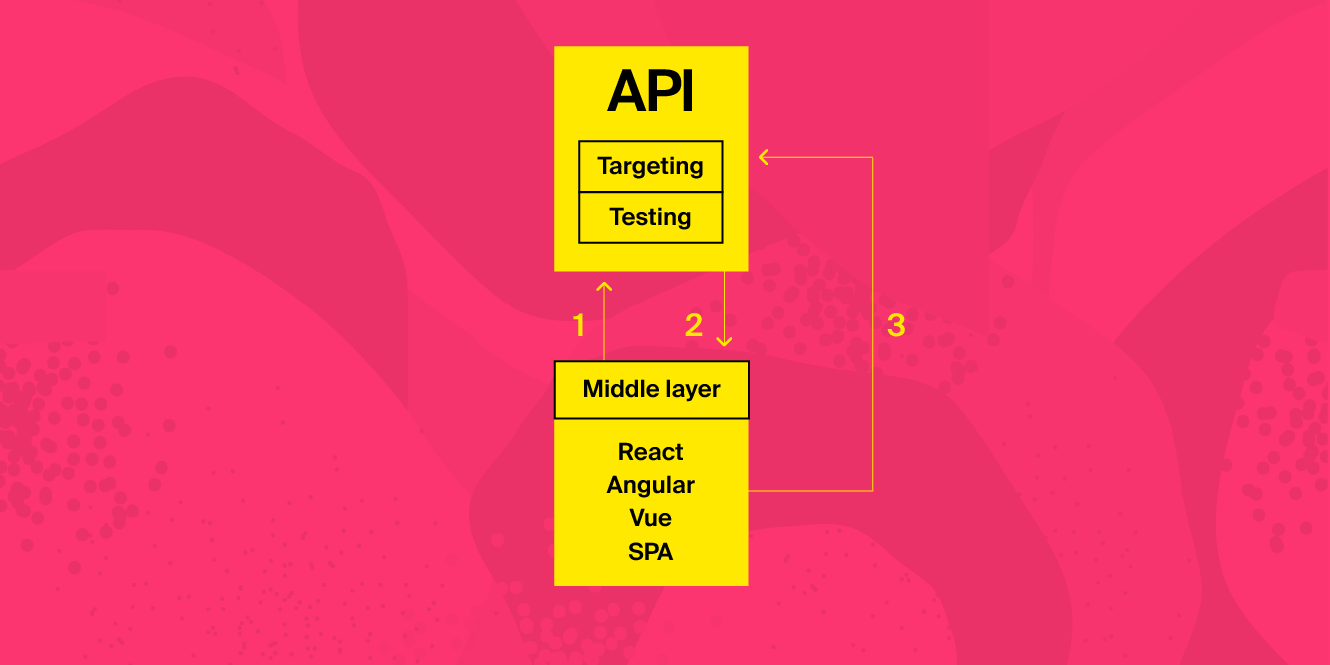
The workflow is described in the following diagram:

An alternative to the pure server-side approach, a personalization platform’s API can be implemented to make calls from the clients to update the state of the SPA components instead of directly from the server. This reduces response times even further as fewer trips are needed for the data to render the content.
Here’s how this would look:
SPAs may become more widely adopted due to improvements in how content is processed and delivered, but it’s important to understand that this new technology does present challenges when integrating with optimization and personalization platforms, which typically work with more traditional MPA setups.
I hope this article has touched on the different aspects of SPAs as well as some alternatives to overcoming those challenges on your mission to delivering faster, more intuitive, and tailored digital experiences to visitors. However, it is recommended to partner with a solution provider that offers seamless support for single page applications, including the ability to automatically detect changes in UI elements and page types for dynamic personalization without interfering with the source code.
此内容由惯性聚合(RSS阅读器)自动聚合整理,仅供阅读参考。 原文来自 — 版权归原作者所有。