Looks can be deceiving, so much so that the familiar icon could mask malware designed to steal your data and money.
06 Oct 2025 • , 5 min. read
PDF files have become a staple of our daily digital lives, both at work and at home. They work seamlessly across operating systems and devices, and they couldn’t be easier to create and share. Every day, countless PDF (Portable Document Format) files are exchanged across inboxes and messaging platforms, and chances are, you’ve opened one today without a second thought.
However, this all is also partly what makes PDFs the perfect disguise for all manner of threats. At first glance, PDF files seem about as benign as digital files get. To the naked eye, a malware-laced PDF or, indeed, another file type spreading under the guise of a PDF doesn’t necessarily look much different from an ordinary invoice, resume or government form.
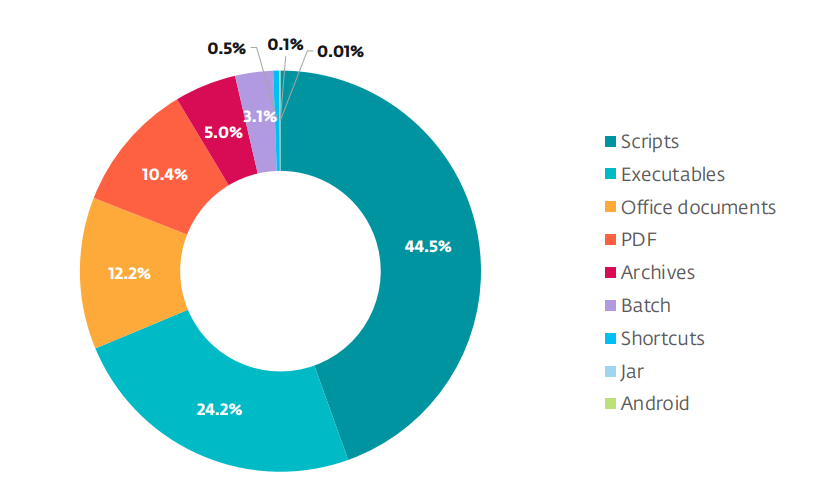
Security researchers are seeing PDF files show up again and again as lures especially in mass social engineering campaigns, but also in APT group operations and even in sophisticated zero-day attacks. Recent ESET telemetry confirms that PDFs rank among the top file types abused in malicious campaigns.
Booby-trapped PDFs typically arrive as email attachments or links in phishing messages that trick victims into taking action. As is common with social engineering campaigns, the lures are carefully crafted to spark emotion, such as urgency (think “final notice”), fear (“account suspended”) or curiosity (“test results available”). The end goal is to get you to lower your guard and using all manner of exhortations, such as “pay now” and “review immediately”, pressure you into opening a file or clicking a link.
The attack techniques vary and have over the years included:
Embedded scripts that run when the file opens, letting attackers launch various actions and deploy additional payloads. JavaScript in PDFs can perform legitimate tasks, such as creating interactive forms and automating processes, but it’s also abused to download or execute code.
Hidden or malicious links: Links contained in the PDF can redirect you to credential-harvesting pages or prompt you to download a malicious ZIP archive or executable.
Exploiting vulnerabilities in PDF readers: Malformed objects or specially crafted content can take advantage of bugs in vulnerable versions of common PDF readers and lead to code execution, as was the case with a software loophole affecting Adobe Reader and documented by ESET researchers.
Files that only pose as PDFs and are instead scripts, executables or even malicious Microsoft Office files, among others, but their true file extensions may be hidden. While you may see a file called “invoice.pdf”, clicking it actually launches an executable.
Speaking of which, earlier this year we wrote about a campaign that distributed the Grandoreiro banking trojan and started with an email urging the victim to open a document, ostensibly in PDF format. In reality, it’s a ZIP archive containing, among other things, a VBScript file that unleashes Grandoreiro on the device and ultimately gives criminals access to the victim’s banking credentials.
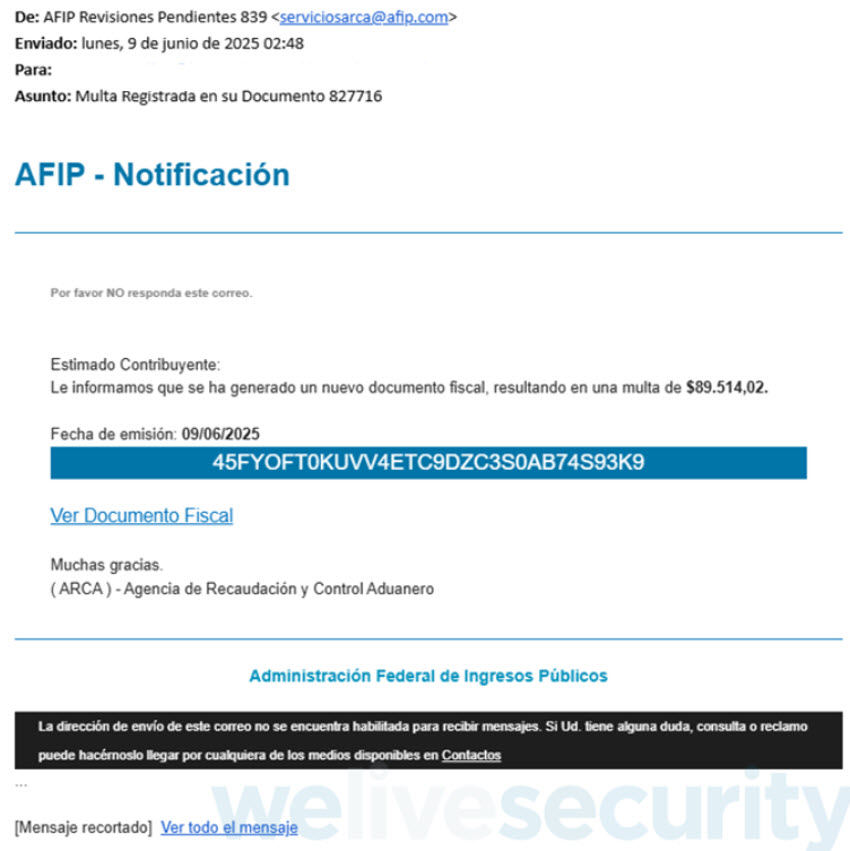
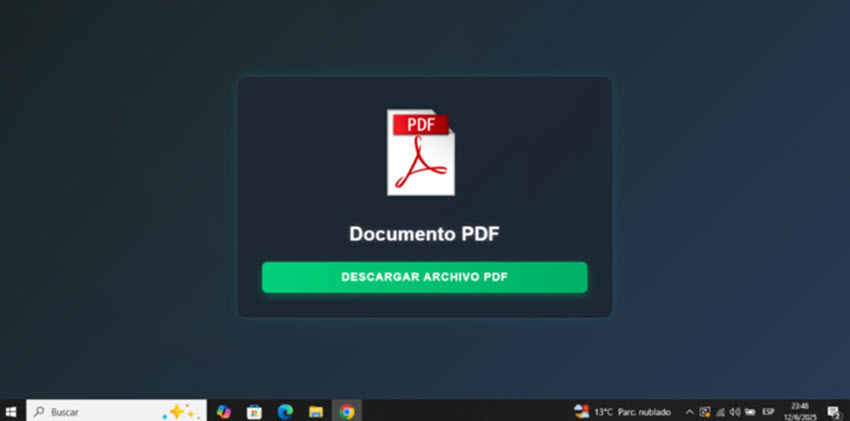
Figure 2. Phishing email impersonating an Argentinian government agency, complete with a link leading to what poses as a PDF fileFigure 3. The site you’re taken to after clicking on the link in Figure 2
How to spot a suspicious PDF
So what are the red flags that should put you on high alert?
The file has a misleading visible name or double extension. This is the case with names like invoice.pdf.exe or document.pdf.scr, especially where attackers cast their nets wide and intend to ensnare as many people as possible. These files actually aren’t PDFs at all – they are just dressed up to look like PDFs.
The sender’s email address or name doesn’t match what the file says. The email sender’s address is different from the organization that the document claims to be from, or the domain is misspelled or suspicious.
The PDF is compressed inside a ZIP or RAR archive. The PDF arrives inside a ZIP or RAR – that’s in a bid to circumvent detection by email filters.
The entire message is unexpected or sounds “out of context”. Ask yourself: did I ask for this file? Do I know the sender? Does it make sense for them to send it to me?
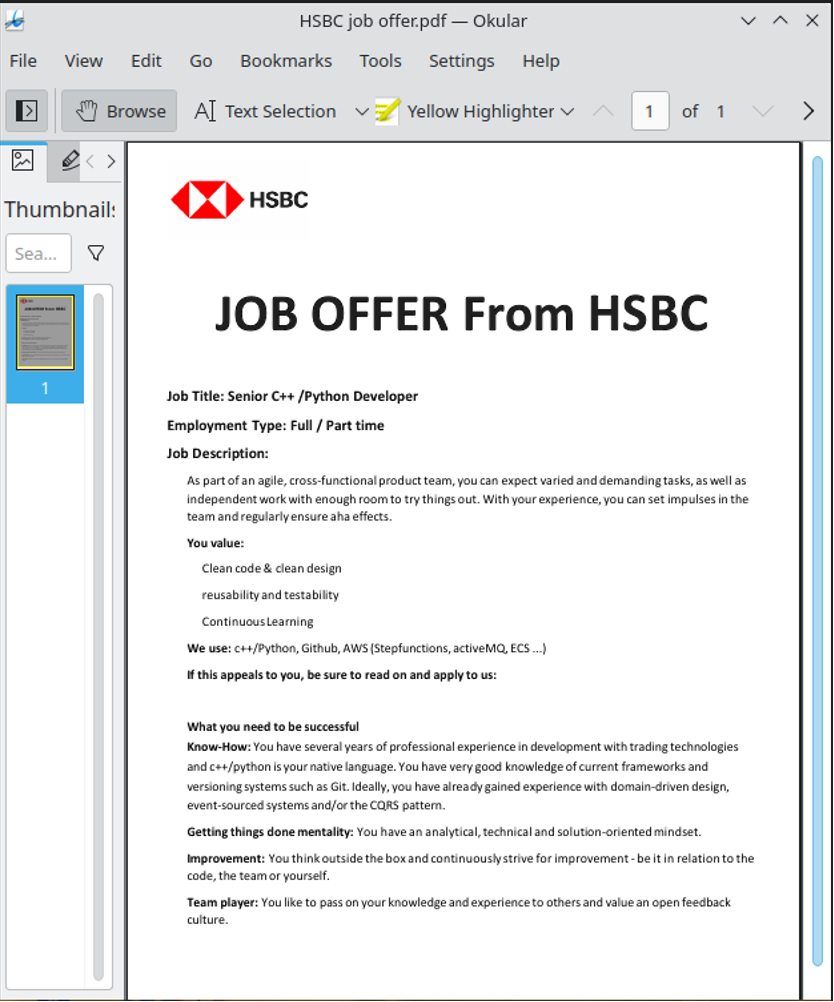
Figure 4. Fake job offer disguised as a PDF file (source: ESET Research)
What to do if you receive a suspicious PDF
If a PDF raises red flags, take these precautions:
Resist the temptation to immediately download or open the file. The adage “when in doubt, kick it out” works here nicely.
Verify the sender and context. Before opening the potentially sketchy attachment, contact the sender by a separate communication channel, such as a phone call, to check that they have really sent it.
Check the file extension and size. Toggle “show file extensions” or similar in your operating system and confirm the file is a real .pdf (not an .exe, for example) and that the file size seems plausible.
Scan the file with your security software (or alternatively, upload it to VirusTotal to get a quick first look).
Open with care. If you absolutely must open it and have taken the other precautions, use an up-to-date PDF viewer with sandboxing or a protected view feature enabled (such as Adobe’s Protected View).
What to do if you suspect you’ve opened a sketchy PDF
Disconnect from the internet to reduce the chance of data exfiltration or further payload downloads.
Run a full computer scan with an updated security solution. If you don’t have any, run a one-time check as available courtesy of ESET’s free scanner.
Check running processes and network connections for anomalies. If you’re not experienced, get a professional to investigate.
Change passwords especially for your financial and other valuable accounts, particularly where you suspect your credentials may have been stolen – but do so from a device other than the one where you downloaded the PDF.
Report the incident to your IT/security team (in case you opened the file on your work machine).
Parting thoughts
These tried-and-tested rules will go a long way towards keeping you safe from dodgy PDFs:
If you weren’t expecting the file, don’t open it, at least not without checking first that the file is legitimate.
Use reputable, multi-layered security software on all your devices.
It’s safe to say that cybercriminals will continue to exploit the trust we place in PDFs. The use of PDFs for malicious ends is also a reminder that security threats typically don’t arrive wrapped in suspicious-looking files. The tried-and-true rule applies here, too: Treat every unexpected link and attachment with caution and rely on trusted tools to protect your data and devices.