












Primakov/Shutterstock
Of all the symbols that may appear next to songs in Apple Music, there's one that can confuse users, as there's no clear explanation for its significance. It's a little gray dot that shows up to the left of tracks in Apple Music without any label or menu indicator. The dot doesn't designate favorite tracks in the album in view, as it can't be assigned by the user. Instead, songs seem to appear with the gray dot automatically next to them. Apple has support documents that explain the various symbols that may appear in Apple Music on iPhone, iPad, and Mac, but the gray dot is not explained. Some users have speculated online that the gray dot is an indicator of the popularity of a specific song, a way for Apple to show users what songs may be trending and indirectly help them discover those tracks.
Apple Music users have been discussing the gray dot on public forums, including Reddit and Apple's own support community, for several years, speculating on what it may mean. In 2020, an Apple Community Specialist addressed an Apple Music user's question about gray stars appearing next to songs. "If you see a star next to a song in Apple Music, it means it's one of the most popular songs on the album," the specialist explained at the time. However, Apple seems to have replaced stars with dots. As of this writing, marking a track as a favorite in Apple Music places a gray star on the left of the song, which covers the gray dot, if there was one.
The best available explanations

indraprojects/Shutterstock
In 2023, Reddit users started noticing the gray dot appearing next to songs. A user answered one of these threads noting that the dots indicate the top songs in an album. The person explained that Apple had used a star previously, but switched to a gray dot, as the star was associated with favorite tracks selected by the user. At the time of those comments, the gray dot had appeared in a beta version of the software. The same user explained that they did not read an official announcement from Apple on the matter, but the dot's behavior in Apple Music seemed to indicate Apple was marking the most streamed titles on the platform. "Usually after a few days the first few songs will all have dots. And then after a few weeks those dots will go away and then it will just have one or two dots for specific songs," Reddit user BoysenberryTrue1360 said. "This isn't always the case. But I've seen it happen enough to confidently assume."
This was just speculation, but a Redditor in a different thread shared screenshots that appeared to support the theory a year later. User xezrunner provided images displaying Xcode View Hierarchy information for the gray dot, which is called "TrackFavoriteView" in the code. The user also found code references that identify the indicator as related to track popularity, though it's unclear how the popular tracks are chosen. Apple Music may use internal ranking signals to determine which songs are popular at any given time.
What about favorite tracks?
Chris Smith, BGR
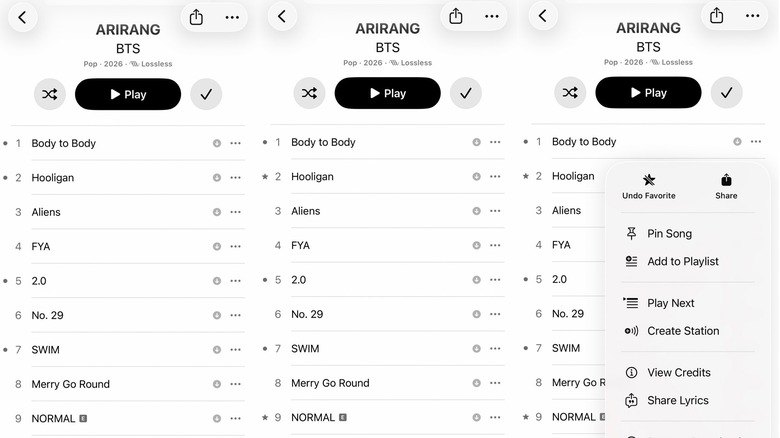
Since BTS's Arirang World Tour is a major music event in 2026, we looked at the "Arirang" album in Apple Music to see how many tracks have gray dots next to them. Out of 16 tracks, which aren't all songs, five have the indicator next to them as of this writing: "Body to Body," "Hooligan," "2.0," "Swim," and "Like Animals." Of these, "Swim" is the lead song of the album. The gray dot indicators that Apple uses for this album suggest that several songs in the album are popular with BTS fans on Apple Music. On the Apple Music web version of the "Arirang" album, only "Swim" has a gray dot indicator next to it.
Apple's popularity indicator may not impact any algorithms meant to improve the Apple Music experience based on your preferences. But you can mark songs as favorites by tapping the three-dot menu on the right side of a track and tapping the gray star symbol, which will improve your Apple Music recommendations. The star will appear on the left of the song regardless of whether it has a gray indicator or not. For the BTS example above, marking as favorites "Hooligan" (which has a gray dot) and "Normal" (which doesn't) will give both tracks a star on the left (see the screenshots above). The gray dot will continue to appear for the titles that have not been designated favorites.