


We all judge the book by its cover. The better the book cover the more we believe the content is better.
A functional and usable website or product is no longer enough for most users these days. People expect usability by default, and are seeking products that are more than functional and usable. We can’t stop ourselves looking at something we find beautiful.
This has increased the importance of visuals on website and application.
Now images alone account for more than 60% of the total web page weight. If we talk about e-commerce, then product images make up to even 80% of the total page weight.
Beautiful images on the websites make it more appealing to visitors, but at the same time it increases the page weight significantly. This causes your website to load slowly, and the visitors operating on flaky mobile connections suffer the most.
In addition to a slow website, it costs more money to transmit that high volume of bandwidth. It is one of the major IT costs incurred, other than hosting and storage costs.
Talking about some of the common problems that we noticed while working with our customers in helping them succeed, here are some common mistakes that we all make while handling the website images:
- Using Incorrect Image Format
- Doing Browser Side Resizing
- No Image Optimization
- Using the Same Image Size Across All Platforms
- Not Setting Proper Caching Headers in Response
- Not Using a CDN
- Using Image for Button Background
Using Incorrect Image Format
The most common image formats are JPEG, PNG, and GIF. It's common, while using an image for a website, the content creator may select any type of format resulting in unwanted results at times.
All these formats are so for a particular reason and so shall be their use, or else it may waste both your time as well as your money. Using an inappropriate format while serving images on your website can make your website very slow.
The best way to make your website run smooth is to use a format best suited for the images you are serving. For example, if you are using a captured image on your website, you should use the “.jpeg” format, but when it comes to logos & charts, “.png” is a better option, and when you are serving some short-looped videos, you should use GIFs.

More suitable the image formats you use on your website, more bandwidth will be saved, which, in turn, will make your website run faster and smoother.
Doing Browser Side Resizing
This is the most common mistake most of the developers make while using shortcuts to optimize website images. Browser-side image resizing is not a recommended practice.
Sometimes, developers deliver the maximum sized image and make the changes in the CSS height and width for the browser. As a result of this, you end up delivering a large image to your users and wasting your bandwidth. The image will take more time to download, and also consume more data of your users. Talking about the result, modern browsers display a good image result but the old browsers may not deliver a quality result.
The solution is very simple.
Do not rely on the browsers to resize your website images. Follow the practice of creating website thumbnails and images in all required dimensions, and use those images to deliver the right result as per client resolution.
No Image Optimization
Image optimization has become an important aspect to improve your website performance and for a great user experience.
Your website images should be optimized across all platforms. This helps you in improving your page load speed. Using the right image formats and the right image optimization solutions can help you immensely.
To optimize images for a WordPress website there are many plugins available such as WP Smush, EWWW, etc. You can also use Tiny PNG to compress your images effectively. Just make sure to deliver the quality images. Do not compromise with the quality of images.
You can also go for real-time image optimization solutions of ImageKit, which provide URL-based transformations and delivers images through its global CDN.
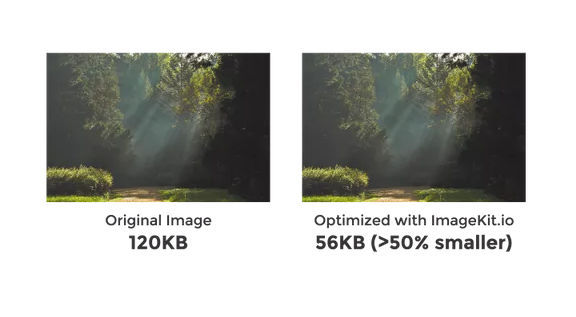
ImageKit delivers smallest sized images with the best quality
Using the Same Image Size Across All Platforms
Traditionally, most of the websites were designed to suit a better desktop experience, but that has now changed drastically.
Now, more and more people are using smartphones, and with the easy availability of internet services, they are able to access any website from anywhere they want. If your website has an unresponsive design and your images are not optimized for all platforms, it can waste both mobile data and time of your website visitors.
Also, when your users unnecessarily download large images, you pay for the extra bandwidth.
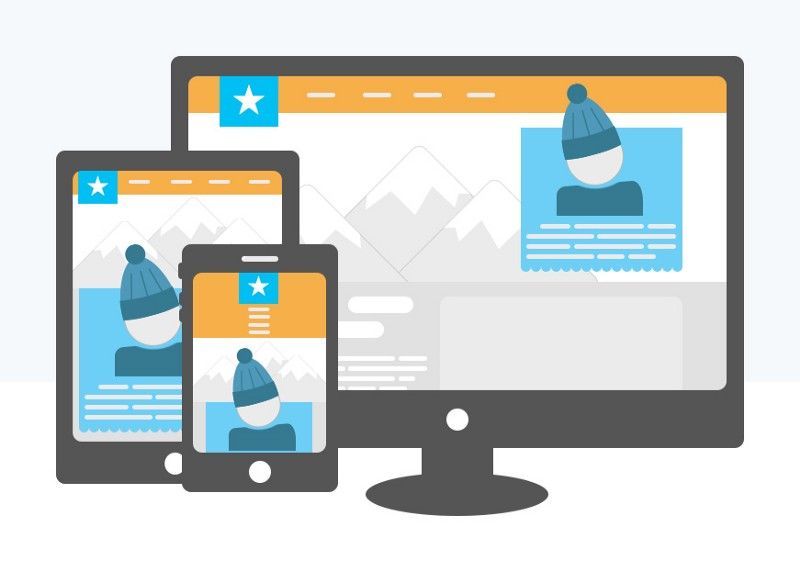
The best way to tackle this issue is by making your website images responsive so that the images you are serving to your users are optimized for all devices.
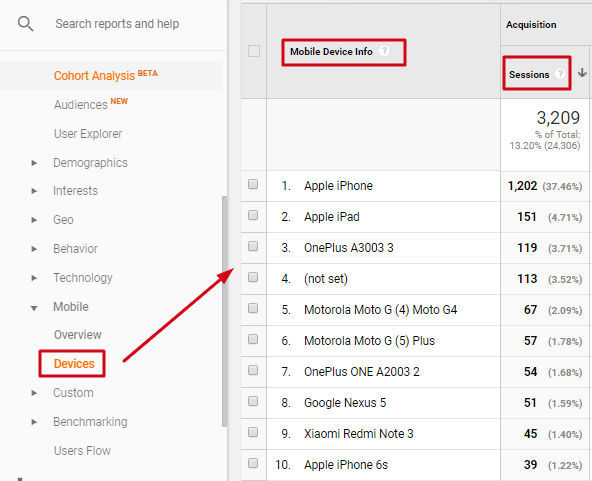
Also, using Google Analytics, you can identify various types of mobile devices used by your visitors, and accordingly optimize the images you are serving on your website.
After accessing the images once, the browser will serve the cached copy to the users instead of downloading the original image again and again. This helps in saving the website bandwidth, and reduces the page load speed. Thus, the image caching should be enabled to make use of this feature. Also, developers should use correct image caching settings.
While caching images on the browser, you should not rely on purging the content on CDN if the content of the image has changed. You should use versioning in the URL.
Not Using a CDN
Many people make the common mistake of delivering all of their website content from the origin server.
When all of your website material, including all the images and content, is delivered from the origin server, it may be problematic.
Suppose, a user from London accesses your website hosted in New Delhi. The content delivery will be slow due to the physical distance between the two, and the huge traffic requesting the same content at the same time. This will strain the server, which will, in turn, make your website loading speed slow.
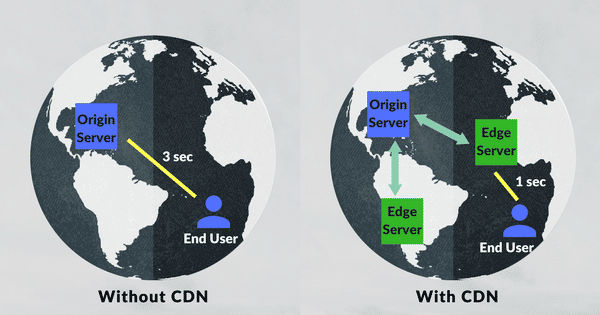
This problem can be solved easily by using a image CDN or Content Delivery Network.
CDN is a network of servers spread across the globe.
If an organization from New Delhi avails CDN services, their website data will be hosted on the main server, but when a user from London will access their website, the nearest available CDN server will deliver the data. In this way, website loading speed gets faster and less bandwidth is used.
Using Image for Button Background
While creating a website design, using image snippets to design buttons is not a good practice.
There was a time when CSS was pretty basic, and there was no option for shadow and rounded corners. People were using images in buttons to make them look fancy. This gives a bad browsing experience for users, and also enhances cost & development time.
So, to fix this problem, the best way is using the CSS rather than using images for button background or rounded corners. The same effects can now be achieved using CSS. It supports all the fancy features like rounded corners, shadow buttons, or special fonts.
So, we can conclude that considering a minor detail in your images, like using a correct image format or using image caching, can have a major benefit for your website. By using proper image optimization techniques, you can get a lot of benefits, and ImageKit solves all your image-related issues in a matter of minutes.
ImageKit provides real-time image optimization and delivers optimized images across all platforms with its global CDN. You can easily integrate ImageKit to a WordPress website, Shopify, Magento, AWS S3, and to an HTTP server. The URL-based transformation and smart cropping provide a flawless navigation experience to your users. So, try ImageKit for free and give your website a hassle-free automated optimization feature.