









“For every minute spent organizing, an hour is earned.” – Anonymous.
Every organization that deals with a large number of images and video assets is bound to struggle with asset management. The struggle hinders productivity and growth as the volume of assets and the stakeholders who use them also continue to increase.
It is here that a Digital Asset Management (DAM) solution can lend a helping hand. It can organize all assets efficiently and logically in a single destination, making it easier for everyone to access and retrieve them instantly. As a result, there would be no instances of probably-lost files, countless duplicate files, or each person in the company creating a copy of the asset for themselves.
With DAM, organizational collaboration and productivity will flourish. Sales and marketing teams can rely on a single source of branded assets. Designers do not have to constantly resize and export files according to business needs. Developers are not required to extend their bandwidth to get the images web or mobile app-friendly. Developers and IT teams can use APIs to integrate systems with a DAM to streamline workflows and access.
Rest assured, a Digital Asset Management solution can improve productivity for your organization.
Here are 10 benefits that are live proofs of how a DAM helps:
- Acts as a centralized file storage system
- Facilitates easier management of assets
- Streamlines cross-team collaboration
- Automates asset creation and distribution workflows
- Ensures consistent use of brand assets
- Exercises access control while balancing asset security
- Adherence to digital rights management
- Integrates easily with third-party applications
- Gives insights into asset usage
- Supports customer retention and business growth
In case you are looking for a DAM with all these benefits, you should check out our videos to know how ImageKit encapsulates these benefits.
Now, Let’s take a closer look at each of these benefits.
1. Acts as a centralized file storage system
Locating the correct file and its version quickly is one of the common challenges that employees of large organizations regularly face.
Ask a graphic designer how hard it is to find the correct version of an image for a campaign when at least ten variations of the same picture exist. If the designers have difficulty locating it, we can only imagine the time and energy marketers and sales teams will have to expend to find the file.
It is here that DAM can make a difference. DAM acts as a unified storage facility for a vast library of digital assets organized intelligently. It ensures quick and easy access to assets for all employees, irrespective of their location.
Be it working at home or working remotely; everybody can access the asset they want without difficulty.
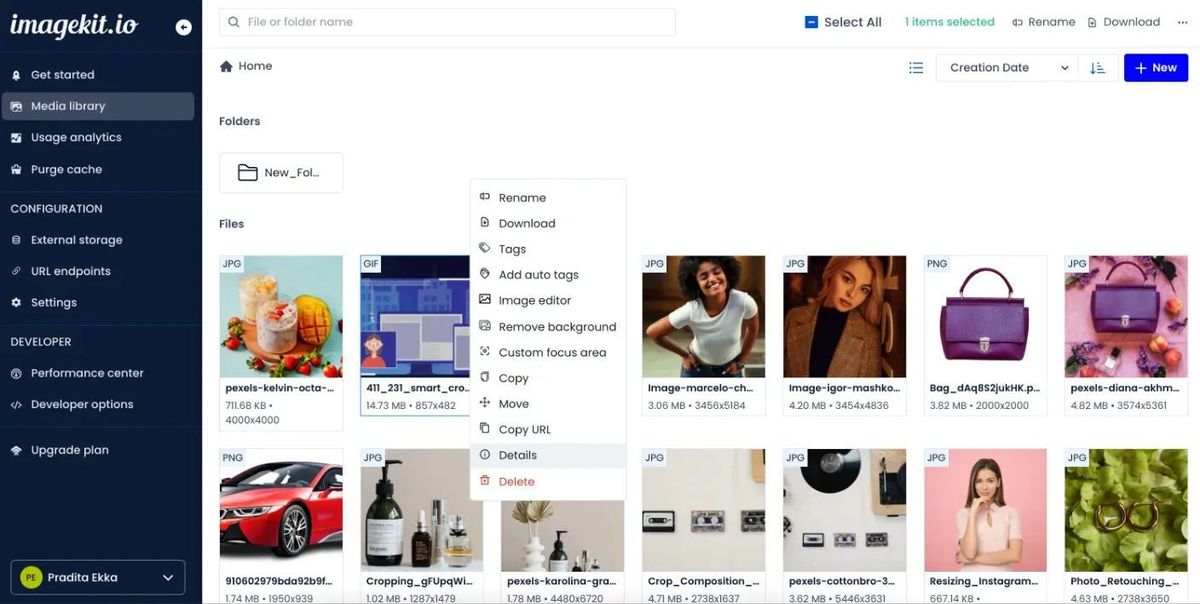
Using descriptions, tags, or keywords aids in the quick location of the assets. Further, meta-tagging and categorization ensure that users can quickly locate files using advanced search queries and filters. DAM permits you to use existing terms or values or a free range of keywords. You can save your search criteria or search within a document.
Most DAM solutions provide a preview of assets on the fly, helping you decide which asset is the right one for you. Lastly, redundant assets can be routinely archived or deleted, thus keeping the system clutter-free.
However, while a single storage destination is convenient, is managing all those assets easy? With DAM, it is.
2. Facilitates easier management of assets
Ask a project manager in a media agency handling multiple teams working on different client projects about how they manage and monitor asset-related operations. The answer is most likely to be - with the help of DAM.
Teams can create dedicated project folders for individual projects to keep all assets well-organized and easy to locate. With DAM, project stakeholders can classify and organize digital assets based on purpose, format, size, or other suitable parameters.
In addition, DAM allows you to structure your files within folders using tags auto-suggested by AI algorithms. Further, custom fields and tags bespoke to each project’s needs can make asset discovery easier.
With the help of Various file attributes, DAMs help you create advanced filters to enhance your search. Besides the basic search that uses a single field of query, one can use custom metadata and embedded fields to find the right asset that one is looking for. For example, searching within specific folders for assets created or modified on particular dates is all part of the modern DAM.
DAM systems use AI to simplify the search process by enabling visual search to find visually similar assets in your DAM, and they also offer Autocomplete suggestions for relevant content as you type your queries.
DAM users are well-equipped with features and tools to quickly create, edit, categorize, approve, reject, move, delete, download, publish, unpublish, share, and render assets.
However, multiple users have different roles and responsibilities working on a campaign. So how can they collaborate seamlessly to meet the end goal?
3. Streamlines cross-team collaboration
Check with any marketer how hard it is to coordinate between teams and get all the approvals for an asset to go live on a campaign unless they use DAM.
A single creative asset passes from one desk to another as writers, graphic designers, brand experts, marketers, and others work to create the final content. In addition, operating with a global team dispersed across cities and time zones can be challenging unless there are tools that can facilitate anytime, anywhere interaction and access with real-time updates.
DAM streamlines collaboration between internal and external stakeholders. It replaces email exchanges and messaging tools by providing a single platform where users can collaborate through real-time comments. It serves as the single source of truth, assuring there are no gaps between creation, management, and delivery.

Even when multiple variants of an asset exist, a robust DAM will allow you to preserve, retrieve, and restore every version stored in your media library. Thus, even if a file gets accidentally misplaced or deleted, it can be easily retrieved.
DAM brings transparency to asset management, which accelerates work across the board. However, no collaboration can be seamless without a linear workflow that defines who is responsible for what.

4. Automates asset creation and distribution workflows
Designers despise engaging in activities, such as media transcoding or manual tagging of content – tasks that AI and automation can easily cover.
DAM helps automate workflows that otherwise require manual and repetitive manual intervention. It can consolidate disparate processes by creating rule-driven workflows. Users can automate these workflows using versioning, metadata extraction, and AI tagging features.

Standard brand templates and customized approval processes simplify the creative processes, lowering the IT burden. Linear workflows can be created to plan, design, and distribute assets.
Also, automated workflows make it easy to standardize content and enforce brand consistency.
5. Ensures consistent use of brand assets
The embarrassment of using an incorrect brand element in a public document is unpardonable.
Organizations can centralize their brand assets and guidelines and provide controlled access to all relevant stakeholders to ensure they use the latest and approved brand elements in their campaigns, documents, or communications.
Brand assets such as approved videos, images, or texts can be categorized into different libraries for the various departments — for instance, ready-to-use brand assets for social media use or client presentations.
DAM is critical for asset creation and management and ensuring that the right asset is used for the right purpose. In other words, to uphold brand awareness and consistency. Here, access control becomes an essential feature.
6. Exercises access control while balancing asset security
Unauthorized edits to a brand asset can throw a marketing campaign off track. Simultaneously, it is necessary for employees to access and retrieve assets quickly when needed.
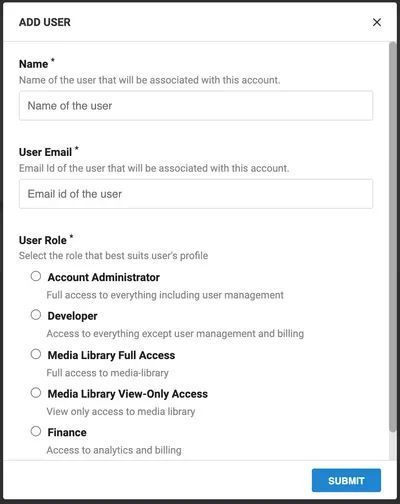
DAM makes it possible to provide different types of access depending on the user and the usage. For example, brand assets can be openly distributed with read-only access, giving permission only to administrators to make edits.
Meeting statutory requirements can be challenging when licensing terms and conditions or regulations differ as per geography. DAM helps in minimizing compliance risk.
7. Adherence to digital rights management
Unauthorized use of intellectual property, including images or video, could lead to legal trouble.
Designers or marketers may not know the legal implications of using a licensed property in the website, app, or marketing campaigns. DAM prevents such mishaps from happening by ensuring a robust content validation process that includes the participation of the legal or compliance team.
Just as we need to ensure we align with the laws of the land from where we operate, we also need to be well integrated with other enterprise tools and applications.
8. Integrates easily with third-party applications
DAM can empower users to work productivity by integrating seamlessly with other tools in their marketing tech stack.
When integrated with other components of the MarTech stack in an organization, such as the Content Management System, Customer Relationship Management, data platforms, or Product Information Management, DAM can deliver agility and efficiency.

In addition, a well-integrated MarTech can build a collaborative workspace facilitating users to leverage different platforms without any hindrances.
DAM plays a critical role in streamlining the supply chain of digital assets. Measuring the efficiency and usage of the available content is the next step to optimization.
9. Gives insights into asset usage
Without a DAM, an organization could buy and store photos that aren’t truly useful to the organization. These cost money, time, and processing power.
Photo licensing rights are expensive and form a considerable part of the budget. In addition, storage and running costs go up for every digital asset added to DAM. As a result, marketing departments must grasp the number of digital assets they own, use and manage to understand if the amount they spend on them is worth its value.

DAM can provide the metrics on the bandwidth usage on a regular basis. It can also help ensure that the business is not over-consuming resources through duplicated requests for transformation.
10. Supports customer retention and business growth
A new product launch could go awry if the right multimedia assets are not ready for its announcement.
With content becoming a critical element in any business, the ability to buy or create, maintain and distribute relevant, appropriate, and high-quality images and videos on a timely basis can make a difference to the success of a campaign. Today DAM has become essential to businesses for delivering superior customer engagement that can result in customer retention.
However, it would be wrong to believe that DAM can deliver value only to marketers and sales teams. Even internal usage of digital assets is high, for example, in training or product designing.
Bringing it all together
With a modern Digital Asset Management solution, organizations can manage, optimize, and deliver images and videos in the right format in the right size to the right audience. As a result, it reduces internal friction and maximizes productivity across the organization.
The need for digital assets will increase exponentially as the web continues to evolve. Each asset has a lifecycle consisting of five major stages - creation, management, distribution, retrieval, and archival. Each stage involves several functions: designing, tagging, reviewing, annotating, approving, sharing, delivering, searching, reusing, archiving, or deleting. As a result, the complexity of managing such a large number of digital assets will increase phenomenally.
Thus, every organization must consider investing in a Digital Asset Management solution irrespective of the size of their business.
If you are looking for a DAM solution that is easy to get started with and does not burn a hole in your budget, check out Imagekit.
ImageKit offers a comprehensive digital asset management solution with real-time image and video optimizations and transformations and a simplified development workflow to improve your web presence with a better user experience and supports the expanding content usage that comes with business growth.
