







Noon.com is the Middle-east's home-grown e-commerce platform that launched in mid-2017. With its operations spanning across the Gulf countries, Noon is currently the leader in the Middle East's e-commerce market, offering a full-fledged online marketplace for local consumers.
In 2020, the product catalog team at Noon that is responsible for all the product data and images across Noon's platforms migrated its image management and optimization operations to ImageKit from another third-party provider. Since then, it has continued to increasingly leverage ImageKit's features to streamline the end-to-end processes and workflows, adding immense value to the business and its users.
Key Results
- From 3 days to 1 minute: Noon reduced the turnaround time for putting products live on its platform from 2-3 days to a few minutes by automating a significant portion of the image editing and QC process.
- More efficient image optimization: Significantly improved image optimization and transformation times by native integration with their image storage and reduction in the number of steps required for optimization
- Better catalog = Faster Operations - Noon leveraged the perceptual hash feature to clean its image catalog of duplicates
- 90% lower image editing costs: With significant parts of the process automated, Noon reduced the costs associated with image editing software and personnel by almost 90%
- 80% reduction in image optimization costs: Better performance, native integrations coupled with a simplified billing model of ImageKit, helped cut down image optimization related costs by over 80%
"We started using ImageKit to solve one use-case - image optimization and transformation. That alone helped us achieve great improvements in processing times and costs. Since then, with their team's help, we have automated large parts of our image workflow. This has helped us improve our turnaround time for putting products live on our platform by over 90% and reducing our costs even further with automation."
- Vijay Mendiratta, VP Engineering at Noon.com
How did Noon achieve these results?
Noon has a unique way of leveraging image transformation and optimization compared to other e-commerce companies. They do not use real-time image optimizations and transformations during image delivery. Instead, they pre-generate fixed sizes and formats from their original assets, store them in their storage and then deliver them using their CDN. Before ImageKit, Noon worked with another third-party image optimization and transformation provider to pre-generate these assets.
Improving the time to optimize images and costs
"We had a limitation with our past provider. We had our storage for storing the original product images. But with them, we were forced to upload the image to their storage. That's how that service worked. It would then generate the requested image variants asynchronously and notify us when done. We then had to download them and put them in our storage", said Ankush, Engineering Manager at Noon. "This was a bit time-consuming, involving multiple uploads and downloads and waiting for the processing to get done. Moreover, we would get billed for storage of images, which we were not using really."
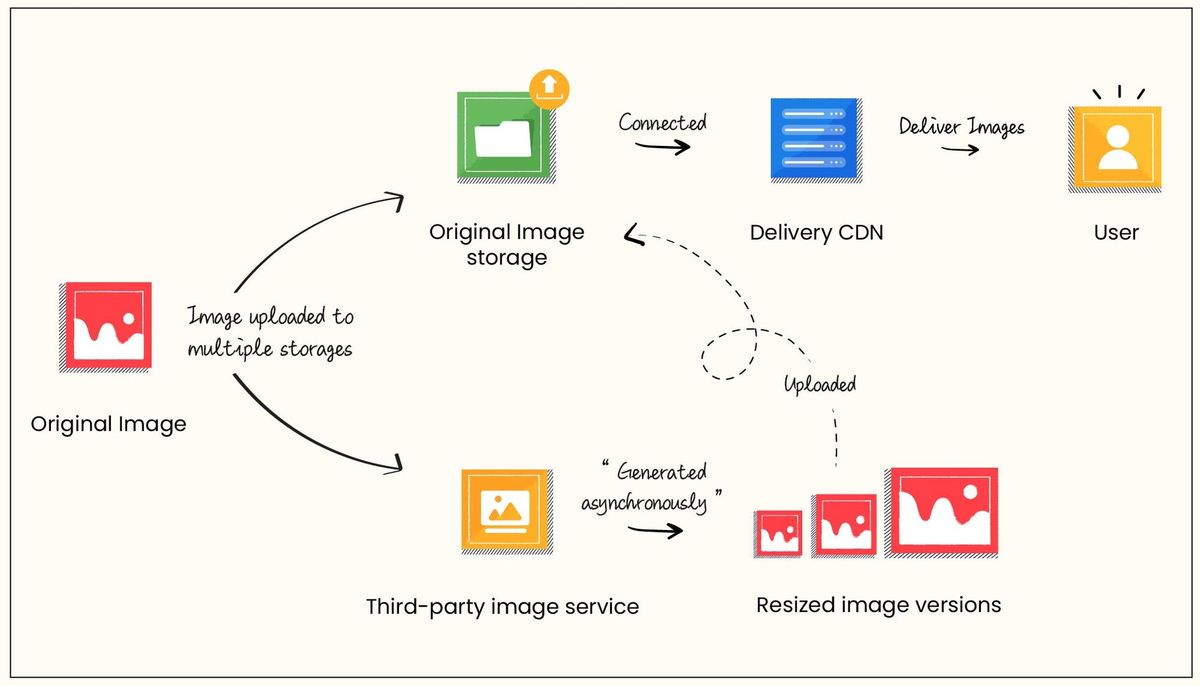
Having used ImageKit in one of his past companies, Ankush decided to give ImageKit a try at Noon.
"I had already used the product and knew that it allows native integration with our existing cloud storage. This meant that we would not have to re-upload images to their service just to optimize them. Instead, ImageKit can just pull the image from our storage when requested and give us the transformations in real-time".
And that is precisely how ImageKit works. Apart from providing its own image media library, ImageKit integrates with all major cloud storage, including AWS S3, Google Cloud Storage, Azure Blob Storage, and many more, in minutes.
Noon plugged their original image storage with ImageKit. Then, instead of waiting for an asynchronous process to complete and download the image, with ImageKit, they could just request the transformation they wanted on their original asset and get it in real-time.

"This saved us a lot of time. We didn't have to upload the images or wait for the transforms to get generated. Whenever we would need to access optimized and resized variations of images in our original asset storage, we would just download them using ImageKit's URLs and put them in our storage", said Ankush.
Not only did Noon end up saving on time to transform the images, with ImageKit's billing model that does not charge for any storage or transformations of images, or requests, they ended up reducing their image-related infrastructure costs as well significantly.
Image duplication problem and ImageKit's quick feature rollout
Noon receives millions of images for products across its platforms. Invariably, quite a few photos would be duplicates of each other. Let's say two sellers sell the same product on Noon. One sends a 1000x1000px original image, whereas the other sends a 700x700 original image that is, otherwise, the same.
To avoid reprocessing the exact product image again and storing it in their storage, Noon wanted to have the ability to be able to detect duplicate photos, irrespective of their size.
"We were already using this feature with our previous provider. We would get a hash to compare against existing images, determine how similar the two were, and avoid processing similar ones. ImageKit did not have this functionality when we started with a POC on their platform. But their team was swift in understanding the requirement and rolling out a perfectly working feature in just a couple of weeks", said Ankush.
ImageKit returns a perceptual hash in the image metadata API response which helps in identifying duplicate images. You can use it not just for the images uploaded to the media library but any image on your storage as well, as long as it is accessible via ImageKit.
Here is an example of images with their computed perceptual hashes and distances from a reference image. The identical images have a small distance value, unlike the two distinct images.


Noon now processes a few hundred thousand new images every day for its catalog. Image optimization and perceptual hash features have scaled well and can successfully handle unexpected surges in processing requirements.
Taking it a step further - automating image editing workflows
Image quality control is an essential step for any e-commerce business. Images are what a user sees on the website before making a purchase. So e-commerce companies need to take care that the images are high-quality, the product is right at the center of the image, the final images and the object in them are of the same size, and so on.
Noon too had a vast team looking at this process. Along with an external agency, this team would ensure that any product images coming to Noon meet the standard set for them—the proper padding around the object, the right size, portrait vs. landscape, etc.
Vivek, an engineer in the Product Catalog team, said, "This process had two problems. One, this process, being manual, was susceptible to errors. More importantly, we had many resources working on this, and the turnaround time was high. It could take 2-3 days to get the images manually edited to meet the final spec, and then the product would go live. This process was not scalable as our platform grew."
Given ImageKit's 40+ real-time URL-based transformations, Noon started automating this image editing process as much as possible. Most of the image editing Noon had to do dealt with sizing the object correctly, orienting it correctly, and adding the right amount of padding with the right background color around the object.
This process's first step involves using the image metadata API to determine the image's dimensions and DPI values. This helps eliminate images with lower resolution than the required specification. Depending on the image dimensions, whether it is portrait or landscape, a chain of resizing, crop, trim, and overlay transformations automatically edits the image to its final form.
For example, this is how an original image gets edited to its final specification using ImageKit, automatically in seconds.
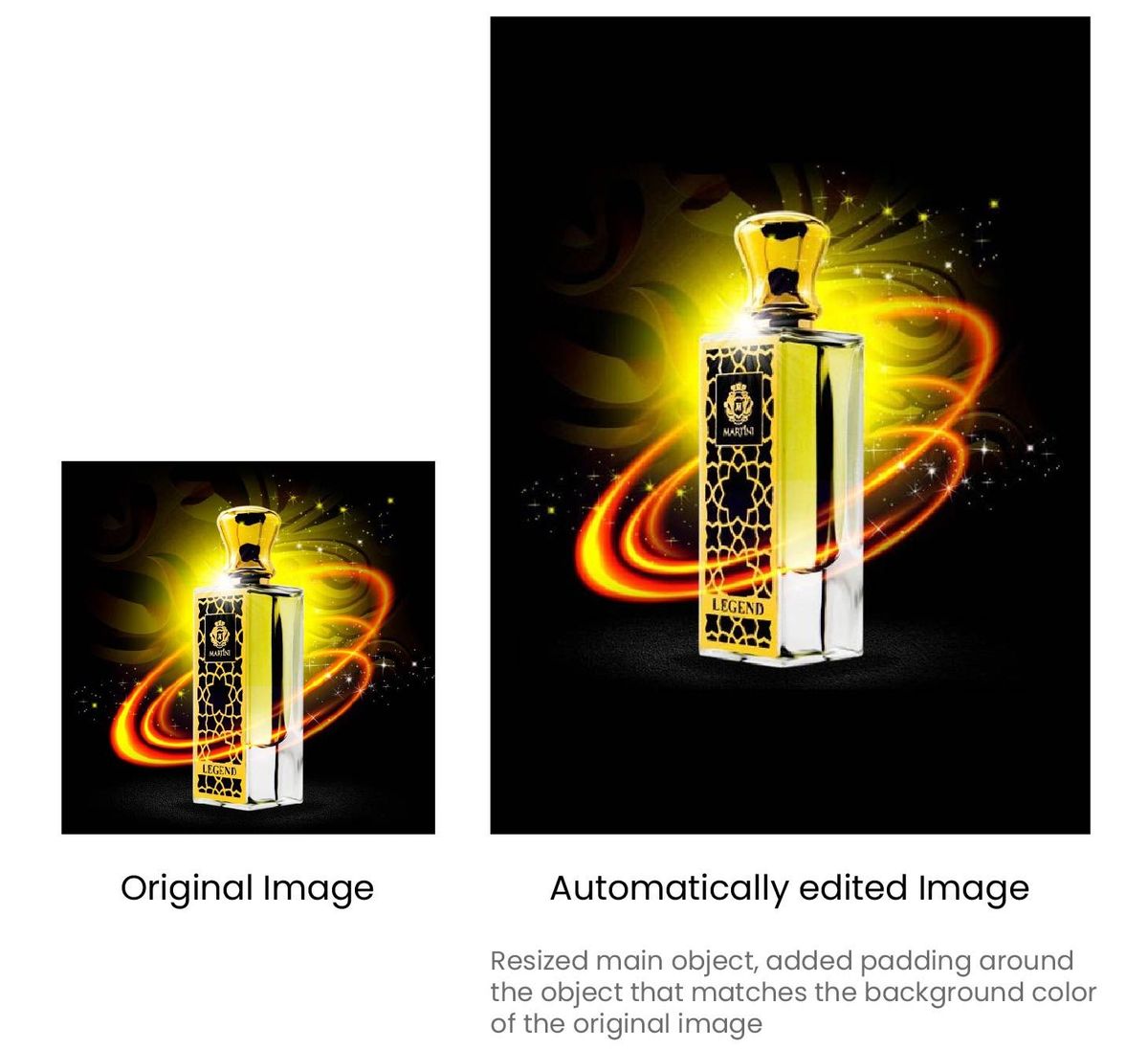
"We have now built templates for different kinds of image specifications that we have. This has reduced the time to go live for new products from a couple of days to a few minutes. 90% of the time, our designers don't have to work on the image at all. The automated transformations work like a charm. They only intervene if the image does not look satisfactory at the final product QC stage. We have seen a massive reduction in our image editing software cost and time spent by designers on these problems."
With more image transformations getting introduced every month and more capabilities getting added to the media library for digital asset management, Noon expects to streamline its image workflows further, making it scalable with its growth.
Conclusion
If your company faces a similar challenge and wants to scale its image editing, optimization, and delivery workflows, reach out to us at support@imagekit.io for a quick consultation session. You can also try out the product by creating a free account here.