





With ever decreasing user attention span, having more visuals on the website is one right way to keep the visitors engaged and entertained. Irrespective of whether you are running a media publishing website, or an e-commerce store, images have become an integral part of our businesses. People interact more with visuals rather than plain text.
In one of the previous blog posts, we have covered technical aspects of various common mistakes in handling images on the website. In this blog post, we will cover few more fundamental points, mostly non-technical, that have a huge impact on image SEO.
Use the Right Image
Using an image and using the right image are two very different things.
If your content needs the image to depict the message accurately, do add one. But don't add an image just for the sake of it.
Choose an image that is related to your content, or adding value to your content. There are more chances of getting your image a good SEO ranking if it is surrounded by relevant keywords or related text. Do not always use stock images. Stock images will look unoriginal as many other websites would be using the same pictures as well.
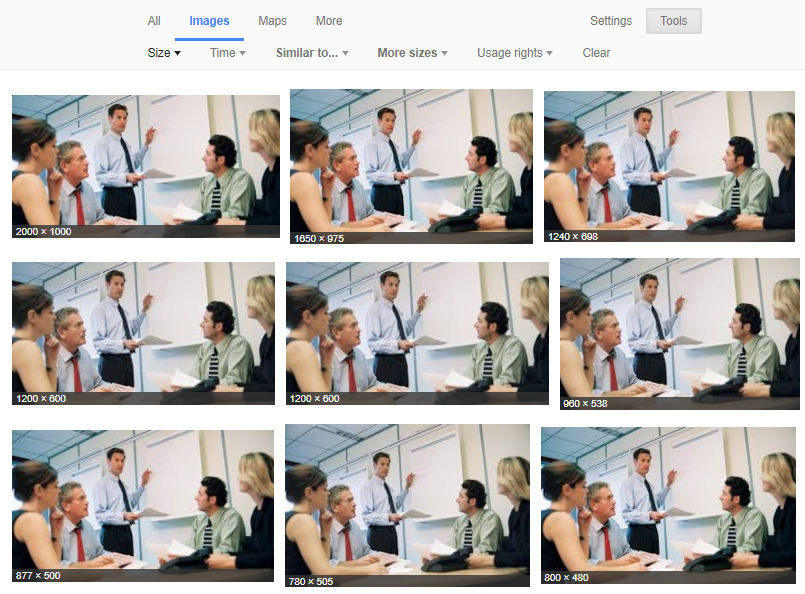
For example, Google “a business meeting” and you will find many stock results. In the below picture, you can see various results of the same stock image in different sizes. The same image has been used by huffingtonpost.de, bizfluent.com, inforum.com, etc. So, always try to add some uniqueness to your images.
You can get the help of your designer, and if you don’t have one, then you can use some excellent online tools such as Canva, Pixlr, etc.
Name Your Images Properly
It's convenient to directly upload the image with the same name as it has been saved in your local file system. It's not a recommended practice to use images with their default names.
When Google crawls your web page, it also looks for the keywords in your image file name. Image file name plays a significant role in image optimization for SEO so you should choose a proper keyword rich name for your image file.
For example, if we talk about the image below, we should not use the default name while using this image, which could be anything like DCGHTIX12.jpg. A proper descriptive name in plain English would work fine like Moto-G5s-Plus-Lunar-Grey.jpg, because your keyword is Moto G5s Plus and you are creating content around this.

You can also consider your customer’s perspective on how they can search for content that you are publishing. You can analyze various patterns using Keyword Tools or your Google Analytics account.
In the above example, your visitors may search like Moto G5s Plus 64 GB or Lunar Grey Moto G5s Plus. So, you can use these terms to name other images of the same product.
Always Use Intelligent Alt Tags
Images can be given alternative text using alt attribute in HTML. If the browser is not able to load an image, then it will show this alternate text in place of that. If your images are not rendered, then alt text is beneficial in serving the right information to your visitors. You can also check the alt tags by hovering your mouse cursor on your image.

Image showing the Alt Tag for the image of Moto G5s Plus
The alt text adds value to your website SEO, and can help your website boost its ranking.
Always use a keyword that can best describe the image as your alt text. But make sure that you are not doing keyword stuffing. For example, in above image, using “Moto G5s Plus Lunar Grey” as your alt text is good but using “Get Moto G5s Plus Lunar Grey at an affordable price now” is keyword stuffing.
So, do not leave alt tag blank next time. Using alt tags in your website images is a recommended practice for image optimization.
Use Caption with Your Images
The caption of an image speaks about the content in that particular picture, and helps your website visitors understand the meaning of your image correctly. To get a better understanding, look at any image in this blog and you’ll find that gray text.
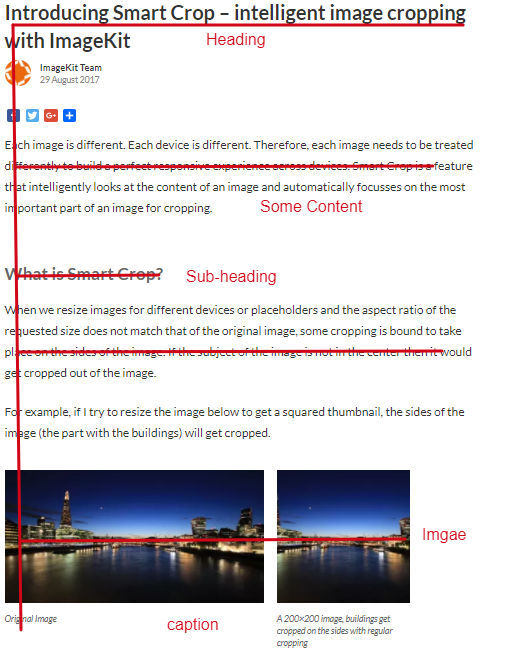
Most people follow F-pattern or E-pattern while reading. In F or E-pattern, readers first scan the blog in a vertical line down the left side to look for the main keywords or headings. When they find something interesting, then they continue reading along horizontal lines scanning titles, content, and images.
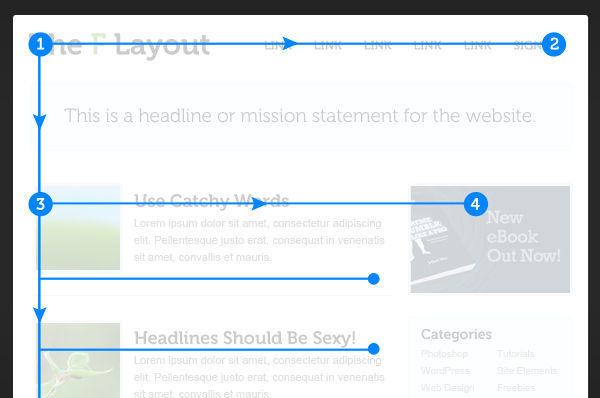
The role of the caption is evident here - to give readers the overview of images.
According to KissMetrics, “Captions under images are read on average 300% more than the body copy itself”. Effectively, when a website user interacts with the image, they always read the caption to get more insights. For example, for the pictures of Moto G5s plus, the caption can be the front & rear view of Moto G5s Plus. You can also state the image source if it's not an original image.
Don’t use captions just for the SEO benefits. Always think from the user’s point of view.
Reduce the Size of Images
Are you using jumbo-sized images on your websites? Does your site take too much time to load? If yes, then you need to improve the page load speed of your website so as to provide a good user experience to your visitors.
Nobody likes a slow website. According to Kissmetrics, most of the customers wait for a maximum of 3 seconds to load a web page on desktop devices, and abandon the website if it takes too long to load. So, if you do not want to lose your visitors to competition, consider reducing the size of your website images.
There are many options to do so. If you have a WordPress website, you can use plugins like WP Smush, EWWW, etc, to compress the images. You can also use “save for web” option in Adobe Photoshop.
Also, there are many external tools which can help you in reducing the size of your images like Tiny PNG. JPEGmini, etc.
Faster web pages enjoy the benefits of better SEO ranking. Read how you can optimize all images on your website in just a few minutes.
Use the Right Image Format
The most commonly used image formats are JPEG, PNG, and GIF. These three image formats account for 95% of the total images on websites. But you should use these formats as per their specific use cases to churn the maximum benefits.
JPEG image format is a lossy compression specification, and is best suitable for captured photographs. The compression for JPEG images work by averaging out the colors of nearby pixels. But if your images contain texts or lines, JPEG wouldn’t be a wise choice.
PNG is a lossless image format, and is best for texts, logos, or charts. PNG images look sharper than JPEG.
GIF is also a lossless image format, and is used mainly for displaying animation. Choosing the right image format can be of great use in optimizing your website images.

Yes, optimizing images on the web page is not enough. You should also consider optimizing images for social media platforms, so when you share a blog or web page on Facebook or Twitter (or any other platform), it displays your featured image correctly without distorting its size.
Enable Open Graph and Twitter Cards on your web page, and make social sharing simpler and more straightforward.
Twitter, by default, uses Open Graph meta tags if it doesn’t find any Twitter Cards on the page.
When you share a link on Facebook it displays an image, a heading, and a description because of these tags, and this influences the performance of your links on social media.

Use Image Sitemaps
Image sitemap is a type of XML sitemap which informs Google about all the images on the website.
If your site has thousands of pictures including JavaScript galleries, flash images, or HTML5 images, then an Image Sitemap is the best way to tell Google about your pictures.
An image sitemap lists all the locations where you have your images, and tells Google Bots to find & crawl those photos. Google has its image optimization guidelines to help your website get better SEO ranking. You should correctly format your sitemap so that Google can index all images, and your website images can appear in the search results.
For an e-commerce website, appearing in image search results can boost the website traffic and conversions.
To create a perfect image sitemap, take help from Google Webmaster Guidelines. You can create a separate sitemap for your images, or can also add image information to your existing sitemap.
Images are the best way to engage your users, and if you optimize your images for SEO, you can also enjoy the benefits of appearing higher in SEO ranking.
Whenever you add images to your website, just follow these tips and deliver a great user experience. You can also try ImageKit for real-time image optimization, image resizing, and cropping solutions. ImageKit provides optimized images across all platforms with its global CDN and includes URL-based transformations. So, optimize your website images to boost your website performance now.