


惯性聚合 高效追踪和阅读你感兴趣的博客、新闻、科技资讯
阅读原文 在惯性聚合中打开

推荐订阅源

小众软件
小众软件
量子位
博客园 - 叶小钗
Apple Machine Learning Research
U
Unit 42
IT之家
IT之家
F
Fortinet All Blogs
GbyAI
GbyAI
MongoDB | Blog
MongoDB | Blog
H
Hackread – Cybersecurity News, Data Breaches, AI and More
大猫的无限游戏
大猫的无限游戏
freeCodeCamp Programming Tutorials: Python, JavaScript, Git & More
The Register - Security
NISL@THU
NISL@THU
Webroot Blog
Webroot Blog
A
Arctic Wolf
钛媒体:引领未来商业与生活新知
钛媒体:引领未来商业与生活新知
V
Visual Studio Blog
Recent Announcements
Threat Intelligence Blog | Flashpoint
Blog — PlanetScale
Blog — PlanetScale
L
LangChain Blog
P
Palo Alto Networks Blog
Y
Y Combinator Blog
WordPress大学
WordPress大学
让小产品的独立变现更简单 - ezindie.com
AWS News Blog
AWS News Blog
有赞技术团队
有赞技术团队
Engineering at Meta
Engineering at Meta
C
Cybersecurity and Infrastructure Security Agency CISA
aimingoo的专栏
aimingoo的专栏
Know Your Adversary
Know Your Adversary
Cyberwarzone
Cyberwarzone
Martin Fowler
Martin Fowler
The Hacker News
The Hacker News
P
Privacy International News Feed
T
Threat Research - Cisco Blogs
G
GRAHAM CLULEY
宝玉的分享
宝玉的分享
博客园 - 聂微东
cs.CL updates on arXiv.org
Cyber Security Advisories - MS-ISAC
奇客Solidot–传递最新科技情报
奇客Solidot–传递最新科技情报
The GitHub Blog
The GitHub Blog
S
Securelist
T
The Exploit Database - CXSecurity.com
T
Threatpost
Microsoft Azure Blog
The Cloudflare Blog
F
Full Disclosure

ImageKit.io Blog

Next.js Image Optimization with ImageKit Use Video as a Background in Your Next.js Project How to Fix Autoplay Video in Next.js How Durian Scaled a Visual-First Retail Experience to 350K Monthly Visitors Online How Matsmart accelerated image delivery across countries with ImageKit AI in Digital Asset Management: From Smart Workflows to Agentic Automation How Joseph Joseph unified and secured global video delivery with ImageKit How Modall powers fast, effortless media delivery across 40+ projects with ImageKit Digital Asset Management (DAM) Trends: 2026 Report How to add a poster image to Video.js player (and automate it) HLS streaming with Video.js + React Building the future of storytelling with fast, AI-powered video delivery How PushOwl delivers 100M+ image-rich notifications seamlessly with ImageKit How Homify delivers millions of interior design images seamlessly with ImageKit Better event discovery with lightning‑fast videos & images Adding video player in React Native Video player in Angular applications Crop and resize videos in React Next.js image and video upload React image and video upload React video optimization How we quadrupled our traffic to 625K monthly page views How Apollo 24|7 boosted performance & reduced costs with ImageKit Simplify your media workflows with ImageKit DAM integrations Brand Asset Management: What is it? How does it work? WordPress Digital Asset Management Guide - Manage your WP media assets better Why Shopify retailers need a digital asset management solution DAM vs. SharePoint: Which is best for you? AI-powered Metadata and Tagging in Digital Asset Management How Hopscotch built India's largest online Kids' fashion brand with ImageKit Dropbox Vs. DAM: Which Is The Right Tool For Digital Asset Management Digital Asset Management for Photographers: A Complete Guide Why digital asset management for agencies is essential Helping both Top and Bottom Line: SaffronStays rapid, profitable growth with ImageKit How KreditBee simplified media experiences with ImageKit Google Drive alternatives for businesses (with fast-growing teams) Node.js image upload ImageKit: The Secret Ingredient in Swiggy’s Expansion Journey Streamlining the Design Approval Process: A Comprehensive Guide AV1 Codec - Complete guide for video application devs PHP image and video upload Angular image & video upload AV1 vs VP9: Which codec should you choose? Adding video player in Next.js React Video Player VP8 vs VP9 - In the context of online video delivery Exploring WebM vs MP4 7 Free Digital Asset Management Software that are not Open-Source Comparing 9 Top Digital Asset Management Tools in the Market What are Brand Standards and Why do they Matter? Boost Sales and Brand Appeal: Essential Tips for eCommerce Image Management Brand Recall: The Strategy to Create Unforgettable Brands How to upload files in HTML? Branding for Small Businesses (2025 Edition) Everything you need to know about VP9 codec Recent updates from ImageKit and what's next Best Ways to Write RFP For Digital Asset Management (+ with free RFP template) What is Brand Dilution? How to Avoid It? Explained with [Examples] The Importance of Brand Identity: Leveraging Digital Asset Management for Impact From Launch to Scale: How to Launch a Brand Campaign Digital Asset Management Requirements - What do You Need to Evaluate and How? Marketing Collateral Management: A Quick End-to-End Guide Video Content Management System: What Is It And How To Choose One? Dropbox vs. Google Drive vs. Onedrive: The Best Cloud Storage Solution How to Build Brand Trust: Get Started In 2025 Google Drive vs. Box: A Detailed Comparison How Digital Asset Management Solutions Help Protect Brand Equity A DAM Solution Can Safeguard Your Digital Intellectual Property - Here’s How WebP Vs. PNG: Which Image Format Should You Use and Why? How to Resize Images in Bootstrap Easily Progressive jpegs (PJPEG): the key to loading images faster on your website Dropbox vs. Google Drive: The Best Cloud Storage For Digital Assets Dropbox Pros & Cons In 2024: An In-Depth Analysis and Why A DAM Solution Stands Out Google Drive Vs OneDrive: The Better Storage Option For Digital Assets Manage your video assets better with video metadata Understanding DAM's Role in Strengthening Brand Identity Digital asset management strategy: What to know before creating one The Ultimate Guide To Marketing Agency Onboarding 6 Solutions To Simplify Large File Sharing Over The Web A Step-by-Step Breakdown of a Video Production Workflow 13 Digital Asset Management Use Cases You Should Know How to Conduct a Brand Audit and Manage Your Brand Assets Costly Consequences of Inconsistent Branding And How DAM Can Help Dynamic Asset Transformation: What It Is, Why You Need It, and How ImageKit Can Help Everything You Need to Know About HTML Video Autoplay How To Select Your DAM Vendor: A Complete Guide How to Boost User Experience with Smart Digital Asset Management React Image Optimization: A Guide for Web Developers Why Should DAM Be A Part Of Your MarTech Stack? Unleashing the Power of Content Repurposing with ImageKit MKV vs MP4: Which Video File Format Is Better for Your Needs? Digital Asset Management For Ecommerce: A Complete Guide How an Image Tagging Software can Transform Your Image Search How to Manage Your Content Lifecycle Effectively M4V vs MP4: Which Video Format Should You Use and Why? Why Every Business Needs An Image Management System All The Questions To Ask During A Dam Demo Which is the Best Image Format for Your Website? Uploading Multiple Files Using JavaScript: A Comprehensive Guide Headless DAM: Why API-Driven Digital Asset Management is the Way Forward
Extending Lighthouse for custom image and video optimization analysis
Manu Chaudhary · 2024-11-25 · via ImageKit.io Blog

Optimizing website performance is critical for delivering seamless user experiences and achieving better search rankings.

While tools like Google PageSpeed Insights and Lighthouse are popular choices for performance analysis, they often fall short in addressing video content, offering only generic recommendations such as "Avoid enormous network payloads."
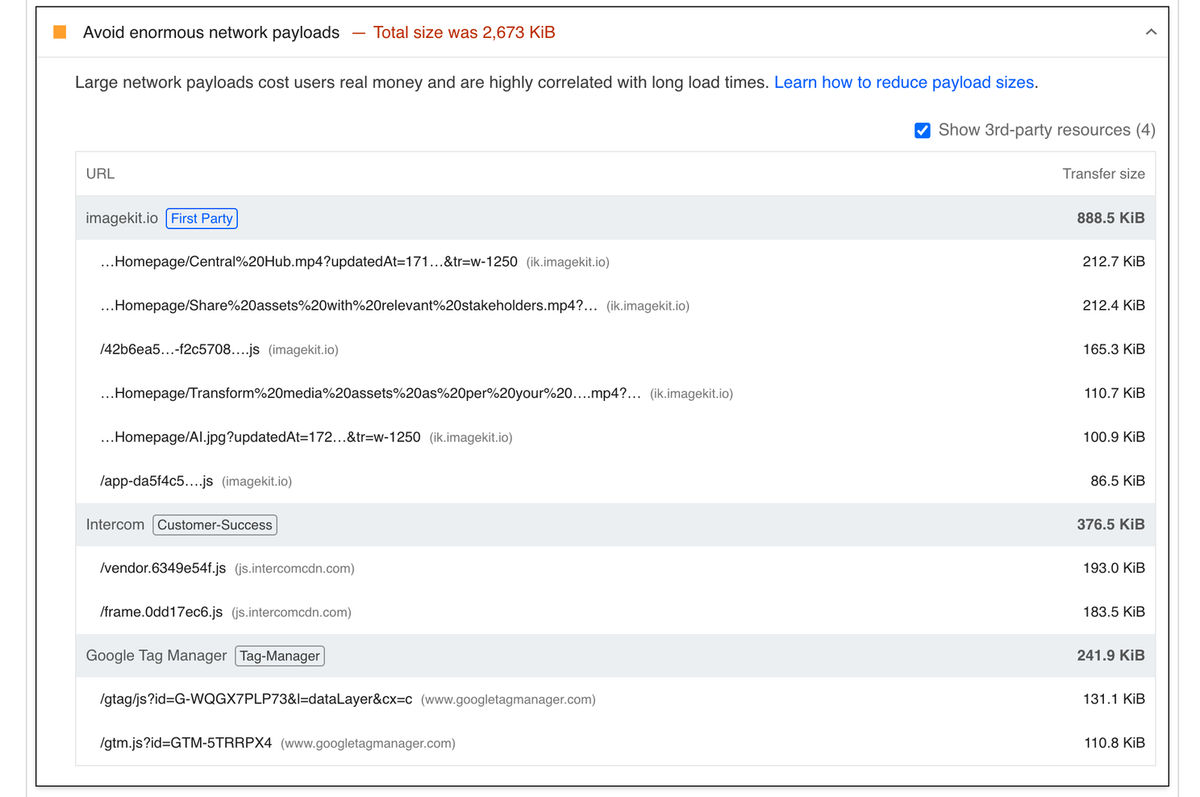
Lighthouse generic "Large network payload" audit

We faced this challenge when we wanted to develop a tool that could evaluate both images and videos. Specifically, we aimed to detect whether videos were encoded using next-generation codecs like VP9 or AV1.

So, we extended Lighthouse by creating a custom audit—and surprisingly, the process was quite straightforward.

Before diving into the details of the custom audit, let’s explore how ImageKit’s Website Performance Analyzer simplifies media performance evaluation.

How website performance analyzer works

The ImageKit Website Performance Analyzer is a free tool designed to evaluate both image and video content on your website. It generates detailed audit reports for both mobile and desktop versions, scoring websites based on key performance metrics.

Key Features

  • Device Emulation: Simulates real-world performance by replicating both mobile (e.g., Moto G Power) and desktop environments, allowing for accurate assessment across different devices and screen sizes.
  • Comprehensive overall media audit: Analyzes images and videos on your site to uncover issues such as missing size attributes, non-responsive or improperly sized media, lack of lazy loading, and the absence of next-generation formats like AVIF or WebP. Provides actionable insights to optimize media performance.
  • Video specific analysis: Identifies whether videos are encoded using advanced codecs like VP9 or AV1 to enhance playback efficiency, reduce bandwidth usage, and improve performance across modern browsers.
  • Performance Scoring: Assigns detailed performance scores based on weighted factors, helping prioritize key areas for optimization.
  • Automated monitoring with weekly alerts: Sends weekly email reports that summarize your website’s media performance. Quickly fix potential issues with these automated alerts.
  • Historical Data Tracking: Tracks and analyzes your site's performance metrics over a 90-day period, offering insights into trends and enabling continuous improvement for a better user experience.

Here’s what a sample report looks like:
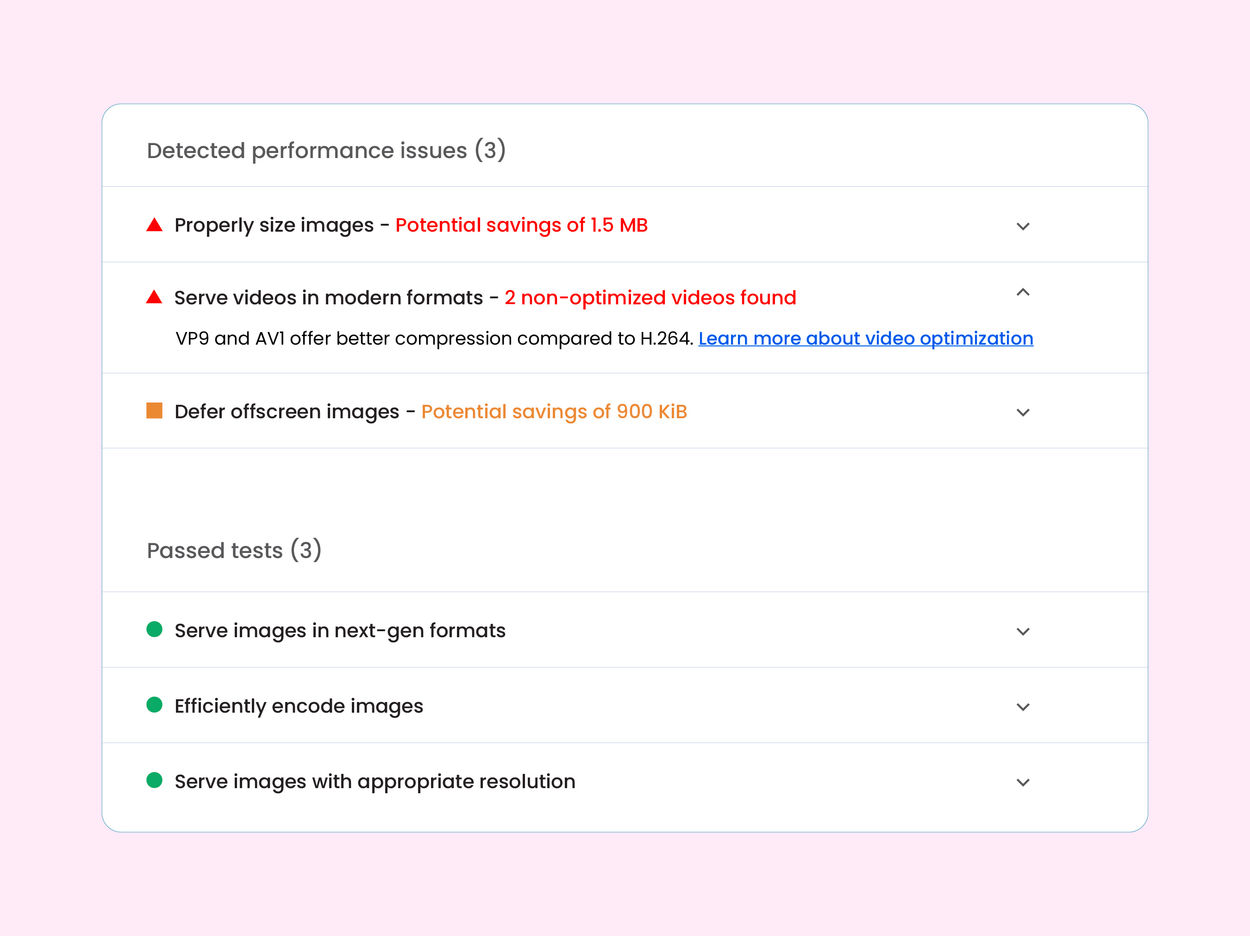
Sample Audit Report
Sample Audit Report

The analyzer’s detailed feedback empowers you to make targeted optimizations, resulting in faster websites and better user experiences.

Internals of ImageKit's Website Performance Analyzer

To evaluate media performance, the analyzer uses weighted scoring for the following audits:

AuditWeightageWhy It Matters
Unsized Images5Prevents layout shifts by ensuring explicit width and height attributes.
Responsive Image Sizing5Ensures sharp images by serving sizes proportional to display dimensions and DPR.
Properly Sized Images25Avoids oversized images, reducing bandwidth usage and load times.
Deferring Offscreen Images10Lazy-loads non-critical images to improve perceived page load speed.
Modern Image Formats20Promotes WebP and AVIF, which reduce file sizes without quality loss.
Optimized Image Encoding15Efficient compression accelerates load times and saves data.
Efficient Animated Content10Encourages replacing GIFs with video for better performance.
Modern Video Formats (Custom)10Detects VP9/AV1 codecs to ensure optimized playback and bandwidth efficiency.

Most of the audits listed above are standard, except for Modern Video Formats.

Creating a Custom Lighthouse Audit for Video Performance

Lighthouse allows extending its capabilities with custom audits. We leveraged this to create an audit that detects whether videos are encoded in next-generation formats like VP9 or AV1.

How It Works

The audit examines network requests to identify video files and checks if their MIME types match modern formats (e.g., WebM). If outdated formats are detected, the audit flags them and provides actionable feedback.

Here’s how you can implement it:

Step 1: Define the Audit Class

The audit class extends Lighthouse's Audit class. It defines metadata and the evaluation logic.

const { Audit } = await import('lighthouse');

class VideoOptimizationAudit extends Audit {
    static get meta() {
        return {
            id: 'modern-video-formats',
            title: 'Serve videos in modern formats',
            description: 'VP9 and AV1 offer better compression compared to H.264.',
            requiredArtifacts: ['devtoolsLogs'],
            scoreDisplayMode: Audit.SCORING_MODES.BINARY,
        };
    }

    static audit(artifacts) {
        // Audit logic goes here
    }
}

module.exports = VideoOptimizationAudit;

Step 2: Implement Audit Logic

The audit evaluates network requests to find videos and checks their MIME types.

static audit(artifacts) {
    const networkRequests = artifacts?.devtoolsLogs?.defaultPass?.filter(item => item.method === "Network.responseReceived") ?? [];

    const videoRequests = networkRequests.filter(item => {
      return item.params.response.mimeType.includes("video");
    });

    // Analyze if video mimeType is not webm
    const _nonOptimizedVideos = networkRequests.filter(item => {
      return item.params.response.mimeType.includes("video") && !item.params.response.mimeType.includes("webm");
    });

    // Unique videos based on item?.params?.response?.url because of multiple range requests for same video
    const nonOptimizedVideos = _nonOptimizedVideos.reduce((acc, item) => {
      if (!acc.find(video => video?.params?.response?.url === item?.params?.response?.url)) {
        acc.push(item);
      }
      return acc;
    }, []);

    const score = nonOptimizedVideos.length === 0 ? 1 : 0;

    let displayMessage;

    if (videoRequests.length && nonOptimizedVideos.length) {
      displayMessage = `${nonOptimizedVideos.length} non-optimized videos found`;
    } else if (videoRequests.length && !nonOptimizedVideos.length) {
      displayMessage = "All videos are optimized";
    } else {
      displayMessage = "No videos found";
    }

    return {
      score,
      displayValue: displayMessage,
      details: Audit.makeTableDetails(
        [
          { key: 'url', label: 'Video URL' }
        ],
        nonOptimizedVideos.map(video => ({
          url: video?.params?.response?.url,
        }))),
    };
  }
}

Step 3: Register the Audit

Include the custom audit in the Lighthouse configuration.

module.exports = {
    extends: 'lighthouse:default',
    audits: ['modern-video-formats'],
};

Save the file as modern-video-formats.js and run Lighthouse to generate a report with your new custom audit.

We now have video-specific audit results, which include a list of all videos on the page that are not encoded in next-generation codecs like AV1 or VP9. You can see the full report here.

Video optimization audit

Conclusion

By extending Lighthouse with a custom audit, you can bridge gaps in performance analysis for videos.

🚀 Try it yourself! Analyze your website’s media performance and discover actionable insights today.