





A Content Delivery Network, or a CDN as it is commonly called, is an essential part of any modern website and application. The content that you view on your phones today, on any website or app, videos or images, or any other kind of content, is very likely to be delivered using a content delivery network.
A CDN is also an essential part of our image CDN offering at ImageKit. And given the lack of example-led resources for beginners about CDNs on the internet, we decided to write this short guide to help understand what a CDN is and how does it work, using some common scenarios that you would relate with.
Looking to learn more specifically about Image CDNs?
What is a CDN - the theoretical definition
A Content Delivery Network or a CDN is a globally-distributed network of servers that helps provide high-availability, faster performance, and security to websites distributing their content via it.
Understanding CDN with an example
One of the most common use case of a CDN is to improve page load time. Let's use an e-commerce store as an example to understand how a CDN helps improve page load time.
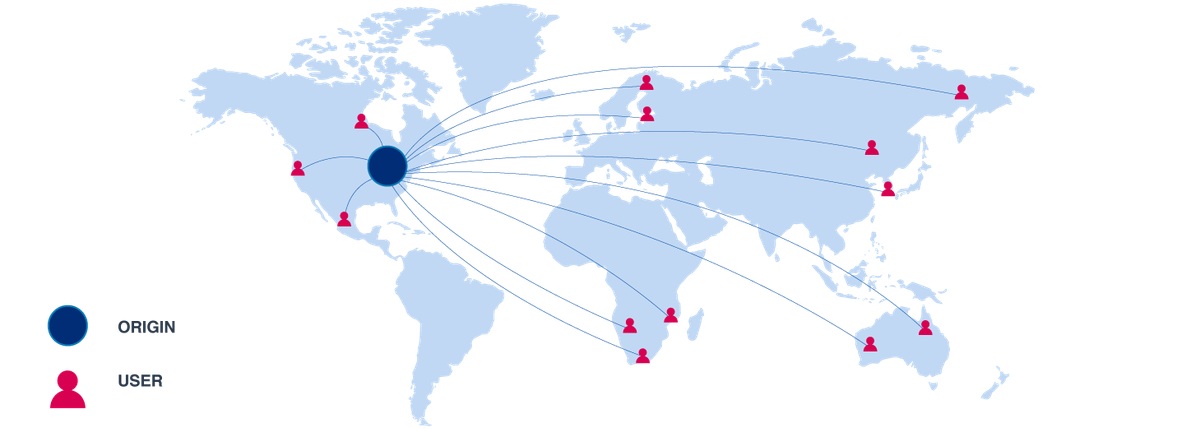
Consider that you run an e-commerce store in the US. You have developed a fantastic website and host it on a server located in a city on the US east coast, let's say, North Virginia. All the files needed on your website are stored in this server. So, when a user accesses your website, everything that loads on that website comes from this server in North Virginia.
Now, a user in California, on the west coast, is trying to access the website. For every resource that loads on the website — the textual content, javascript files, stylesheets, and images — a request goes from the user's device to your servers, where the files are stored. These two locations, the user in California and the server in North Virginia are over 2000 miles apart.
Negating all the other factors, this distance between the customer and the server is responsible for adding a few hundred milliseconds in load time of a resource. Imagine those extra milliseconds getting added up over hundreds of resources that load on your website, and you end up with a slow page load time.
And no one likes a slow website. It frustrates your users, hits your sales, and even impacts how you rank on search engines.
How does a CDN improve page load time?
As mentioned earlier, it is a globally distributed network of servers that store (commonly referred to as "cache") and deliver some or all of your website's content. Each of these servers in the CDN's network is called a Point of Presence (PoP) or an edge server.
Instead of delivering your website resources directly from your website server, you deliver them via a CDN's PoPs or edges.

In the above image, we are using a CDN along with our server in North Virginia. This CDN has PoPs present in multiple locations across the US, including the west coast as well.
Now, when the user accesses your website, instead of getting the resources from your website server on the east coast, the user gets them from the CDN server that is closer to him on the west coast. Geographically, the user and the CDN server that responds to the user's request are now just a few miles apart, which reduces the time taken to load the resource significantly.
The page loads faster, your users are happy, and your sales start looking up.
What are the other functions of a CDN?
As mentioned earlier, improving load time by delivering your content via a content delivery network is the most common use case for any CDN.
But there are other use cases as well, some that are implicit to using a CDN and some that are used by slightly larger and technologically advanced organizations.
1. Increasing Availability
This is an automatic result of using any CDN.
For simplicity, availability can be considered a simple measure of how long your website and its functions remain accessible in a given period.
Usually, when you are serving content from your servers, you need to add more servers as your traffic goes up. If there is an unexpected issue with your server or a database, it could take the application down.
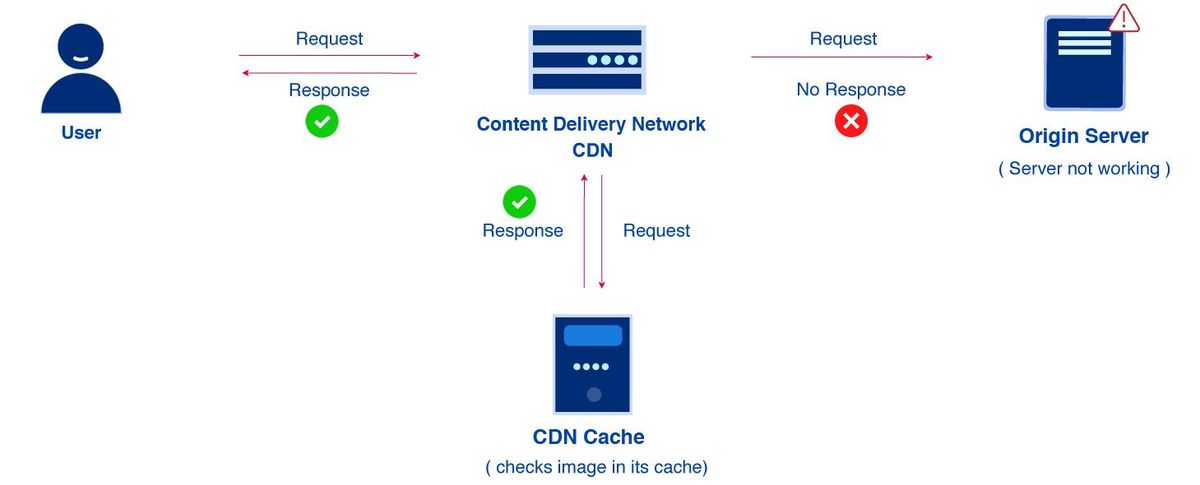
With a CDN coming into the picture, it does two things. One, a lot of traffic doesn't even come to your servers. The edge server of the CDN serves a lot of content from its cache. So, you need a slightly fewer number of servers.
Second, as long as the content is available in the CDNs cache, even if your actual servers are not working, the CDN will keep serving the content. This gives you some buffer time to fix issues on your servers while the CDN serves whatever content it can from its cache.
2. Website Security
This is a more advanced use of CDNs that is generally used by larger companies.
Since the CDN PoP or edge server is now the first layer in the system which accepts incoming traffic, it also becomes the first line of defence against attacks on your website.
Now, if a CDN can isolate bad traffic from good traffic, it can stop all the bad traffic from coming to your servers. Your servers only respond to the "good" requests coming from actual users.

Website security is a very vast topic in itself and beyond the scope of this blog. But, there are certain features like blocking access on non-HTTP ports, which are a standard feature in all CDNs, and help provide basic security. Such features are accessible to everyone.
Then there are more advanced features like Bot Protection, Web Application Firewall (WAF), DDoS protection, etc. that are available as add-ons in certain CDNs. Such add-ons are usually expensive, and configuring them takes time and effort too. Therefore, they are used by a select few companies who face such challenges and can afford to deploy more expensive customized solutions.
What kind of content can be delivered through a CDN?
Theoretically, you can use a CDN to cache and deliver your entire website. How long can you cache it on the CDN, or can you or should you cache it at all, depends on the type of content.
Quick Note: If you are someone looking to deliver optimized high-quality videos on your website, you should read about ImageKit's new Video API.
Let's look at an example.
If you are selling Nike shoes on your website, and two users are looking at that product page - the first is a male from California, and the second is a female from New York.
It's a black running shoe, and both see the same image for the product.

Such content that does not change on a per-user basis is a great candidate for serving from the CDN cache. Had you been using your server directly, that server would have also sent out the same image. Content like this image, that does not change or remains "static" for users is called static content. Javascript, which affects the interactions on your website, and CSS, which affects how your website looks, also remains the same for all users and are also classified as static content.
But your website can have different discounts or shipping rates for different regions within the country. You might want to tune product recommendations differently for your male and female audience. Or you may have an offer that is valid for only the next hour in New York. So, the actual website content, the text, the offers, and the APIs that get the product recommendations can vary for the two users.

Such content is called dynamic content. It can change on a per-user basis (like recommendations), location-basis (discounts and shipping), or on a time-basis (like a discount that is available till midnight). It becomes difficult, if not impossible, to have such content stored in a CDN's cache for a long time. Imagine an offer that was supposed to expire at 1 pm, continues to be stored and delivered from the CDN server till 3 pm. This would only result in confusion for your users and a drop in sales.
Maybe you can keep shipping rates cached for some hours on the CDN because they don't change very often. However, content like recommendations for a user is likely to change frequently as the user navigates through other products, making it non-cacheable. And if you cannot store it on the CDN, then should you be using a CDN for such content at all.
Note: This is a simple example. There are certain cases, as a breaking news item on a high-traffic news website, where even a short cache time of 1 or 2 minutes can be useful for reducing the stress on servers while accelerating content delivery. A lot of websites do that in practice. Plus, CDNs can still act as the first layer of security, and therefore it makes sense to use it even if you are not caching any content on them.
How is the CDN cache updated?
The most common use case of a CDN is to cache content and deliver it to the end-user, reducing the page load time. This means that the content should be cached on the CDN edge as long as possible. The longer it stays, the longer you get the benefit of the fast load time. Google PageSpeed, for example, penalizes you for not using a long cache time for your static content.
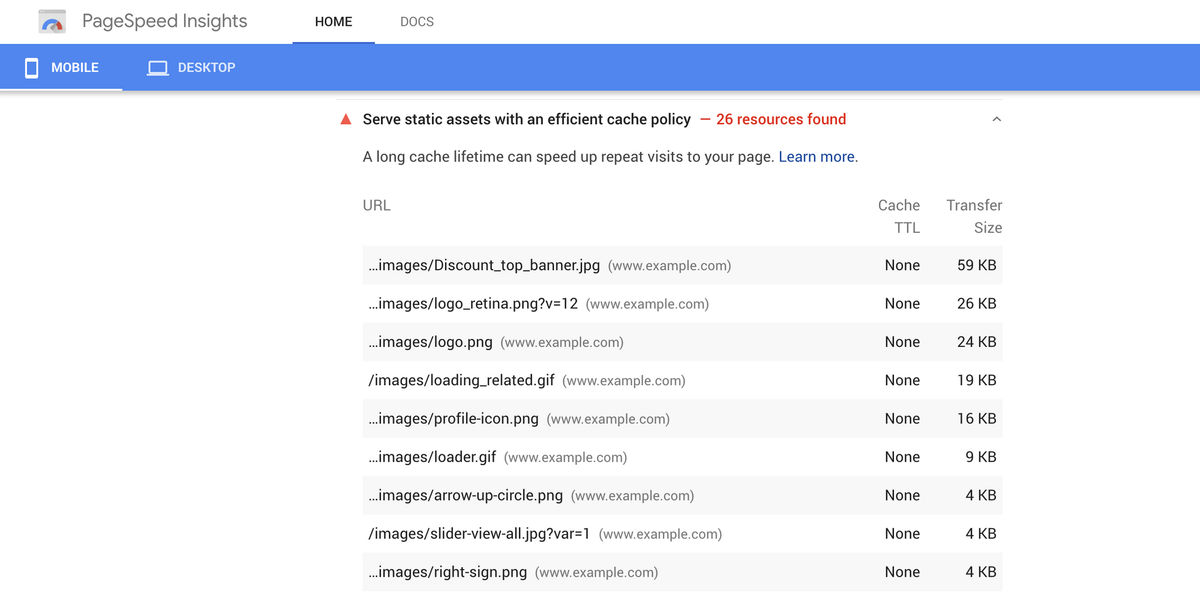
However, you should be able to control how long the content stays on the CDN and how do you force it to refresh if the content on your server has changed.
For example, your CDN has stored, on its edge servers, a copy of the black Nike running shoe that we talked about earlier. Even if you change the image on your origin server, the file cached on the CDN won't change automatically.

There are some standard cache control headers and best practices for updating your resources (and their URLs), which, when combined, ensure that the content on the CDN remains up-to-date and in sync with the updates on your servers. These techniques have been discussed in detail in this guide - The Ultimate Guide To Caching Static Assets and would require some technical know-how about HTTP requests.
Wrapping Up
This guide was intended to give you a gentle introduction of what a CDN is and how does it work. It was intentionally built as a light read, avoiding the technical jargon associated with Content Delivery Networks as much as possible.
We would ourselves follow this up with a more detailed, technical guide on how CDNs work. You are now equipped to go out on the internet and dive deeper into the functioning of a CDN.