



惯性聚合 高效追踪和阅读你感兴趣的博客、新闻、科技资讯
阅读原文 在惯性聚合中打开

推荐订阅源

Cyberwarzone
Cyberwarzone
S
Secure Thoughts
L
LINUX DO - 热门话题
C
Cyber Attacks, Cyber Crime and Cyber Security
C
CERT Recently Published Vulnerability Notes
P
Privacy & Cybersecurity Law Blog
A
Arctic Wolf
cs.CL updates on arXiv.org
C
Cybersecurity and Infrastructure Security Agency CISA
大猫的无限游戏
大猫的无限游戏
U
Unit 42
Recorded Future
Recorded Future
Hacker News: Ask HN
Hacker News: Ask HN
F
Full Disclosure
Spread Privacy
Spread Privacy
Cyber Security Advisories - MS-ISAC
Know Your Adversary
Know Your Adversary
cs.CV updates on arXiv.org
云风的 BLOG
云风的 BLOG
Stack Overflow Blog
Stack Overflow Blog
D
Darknet – Hacking Tools, Hacker News & Cyber Security
F
Fortinet All Blogs
Martin Fowler
Martin Fowler
T
Threatpost
I
InfoQ
Exploit-DB.com RSS Feed
Cloudbric
Cloudbric
L
LangChain Blog
N
Netflix TechBlog - Medium
The Register - Security
S
Security @ Cisco Blogs
B
Blog
T
Threat Research - Cisco Blogs
T
The Blog of Author Tim Ferriss
The GitHub Blog
The GitHub Blog
D
DataBreaches.Net
Simon Willison's Weblog
P
Proofpoint News Feed
Microsoft Security Blog
Blog — PlanetScale
Blog — PlanetScale
B
Blog RSS Feed
MongoDB | Blog
MongoDB | Blog
W
WeLiveSecurity
Forbes - Security
Forbes - Security
O
OpenAI News
C
Check Point Blog
CTFtime.org: upcoming CTF events
The Last Watchdog
The Last Watchdog
H
Help Net Security
SecWiki News
SecWiki News

ImageKit.io Blog

Next.js Image Optimization with ImageKit Use Video as a Background in Your Next.js Project How to Fix Autoplay Video in Next.js How Durian Scaled a Visual-First Retail Experience to 350K Monthly Visitors Online How Matsmart accelerated image delivery across countries with ImageKit AI in Digital Asset Management: From Smart Workflows to Agentic Automation How Joseph Joseph unified and secured global video delivery with ImageKit How Modall powers fast, effortless media delivery across 40+ projects with ImageKit Digital Asset Management (DAM) Trends: 2026 Report How to add a poster image to Video.js player (and automate it) HLS streaming with Video.js + React Building the future of storytelling with fast, AI-powered video delivery How PushOwl delivers 100M+ image-rich notifications seamlessly with ImageKit How Homify delivers millions of interior design images seamlessly with ImageKit Better event discovery with lightning‑fast videos & images Adding video player in React Native Video player in Angular applications Crop and resize videos in React Next.js image and video upload React image and video upload React video optimization How we quadrupled our traffic to 625K monthly page views How Apollo 24|7 boosted performance & reduced costs with ImageKit Simplify your media workflows with ImageKit DAM integrations Extending Lighthouse for custom image and video optimization analysis Brand Asset Management: What is it? How does it work? WordPress Digital Asset Management Guide - Manage your WP media assets better Why Shopify retailers need a digital asset management solution DAM vs. SharePoint: Which is best for you? AI-powered Metadata and Tagging in Digital Asset Management How Hopscotch built India's largest online Kids' fashion brand with ImageKit Dropbox Vs. DAM: Which Is The Right Tool For Digital Asset Management Digital Asset Management for Photographers: A Complete Guide Why digital asset management for agencies is essential Helping both Top and Bottom Line: SaffronStays rapid, profitable growth with ImageKit How KreditBee simplified media experiences with ImageKit Google Drive alternatives for businesses (with fast-growing teams) Node.js image upload ImageKit: The Secret Ingredient in Swiggy’s Expansion Journey Streamlining the Design Approval Process: A Comprehensive Guide AV1 Codec - Complete guide for video application devs PHP image and video upload Angular image & video upload AV1 vs VP9: Which codec should you choose? Adding video player in Next.js React Video Player VP8 vs VP9 - In the context of online video delivery Exploring WebM vs MP4 7 Free Digital Asset Management Software that are not Open-Source Comparing 9 Top Digital Asset Management Tools in the Market What are Brand Standards and Why do they Matter? Boost Sales and Brand Appeal: Essential Tips for eCommerce Image Management Brand Recall: The Strategy to Create Unforgettable Brands How to upload files in HTML? Branding for Small Businesses (2025 Edition) Everything you need to know about VP9 codec Recent updates from ImageKit and what's next Best Ways to Write RFP For Digital Asset Management (+ with free RFP template) What is Brand Dilution? How to Avoid It? Explained with [Examples] The Importance of Brand Identity: Leveraging Digital Asset Management for Impact From Launch to Scale: How to Launch a Brand Campaign Digital Asset Management Requirements - What do You Need to Evaluate and How? Marketing Collateral Management: A Quick End-to-End Guide Video Content Management System: What Is It And How To Choose One? Dropbox vs. Google Drive vs. Onedrive: The Best Cloud Storage Solution How to Build Brand Trust: Get Started In 2025 Google Drive vs. Box: A Detailed Comparison How Digital Asset Management Solutions Help Protect Brand Equity A DAM Solution Can Safeguard Your Digital Intellectual Property - Here’s How WebP Vs. PNG: Which Image Format Should You Use and Why? How to Resize Images in Bootstrap Easily Progressive jpegs (PJPEG): the key to loading images faster on your website Dropbox vs. Google Drive: The Best Cloud Storage For Digital Assets Dropbox Pros & Cons In 2024: An In-Depth Analysis and Why A DAM Solution Stands Out Google Drive Vs OneDrive: The Better Storage Option For Digital Assets Manage your video assets better with video metadata Understanding DAM's Role in Strengthening Brand Identity Digital asset management strategy: What to know before creating one The Ultimate Guide To Marketing Agency Onboarding 6 Solutions To Simplify Large File Sharing Over The Web A Step-by-Step Breakdown of a Video Production Workflow 13 Digital Asset Management Use Cases You Should Know How to Conduct a Brand Audit and Manage Your Brand Assets Costly Consequences of Inconsistent Branding And How DAM Can Help Dynamic Asset Transformation: What It Is, Why You Need It, and How ImageKit Can Help Everything You Need to Know About HTML Video Autoplay How To Select Your DAM Vendor: A Complete Guide How to Boost User Experience with Smart Digital Asset Management React Image Optimization: A Guide for Web Developers Why Should DAM Be A Part Of Your MarTech Stack? Unleashing the Power of Content Repurposing with ImageKit MKV vs MP4: Which Video File Format Is Better for Your Needs? Digital Asset Management For Ecommerce: A Complete Guide How an Image Tagging Software can Transform Your Image Search How to Manage Your Content Lifecycle Effectively M4V vs MP4: Which Video Format Should You Use and Why? Why Every Business Needs An Image Management System All The Questions To Ask During A Dam Demo Which is the Best Image Format for Your Website? Uploading Multiple Files Using JavaScript: A Comprehensive Guide
How marketing and content teams can use ImageKit's media library
Rahul Nanwani · 2020-10-15 · via ImageKit.io Blog

With content becoming central to all marketing activities, marketing teams across companies are churning out new graphics and other assets more frequently than ever. Given the explosion in the amount of content getting created, teams need to find new scalable ways to manage these digital assets. Not just that, but with so many different devices, and multiple channels like emails, social media, websites, etc. to reach to your users, you need to optimize these assets correctly for that user to create a delightful experience.

That is precisely what ImageKit's Media Library does. Built on top of a globally distributed storage and delivery infrastructure, it simplifies image management and delivery to your users to create an experience that all stakeholders - the content producers and consumers (and Google) - love. And you can start using it for absolutely free ;)

Let's look at how you can use it in your workflow and simplify digital asset management.

1. A central asset storage for your team that is ready for the web

When your creative teams are churning out several assets every day, you need to have a central place for your entire team to store and share these assets. It is a lot easier than sharing them over emails and keeping track of revisions. Your graphics team can now upload the raw files like Photoshop, Illustrator, etc. along with the finished exports like JPG, PNG, etc. in the same place. Then your content or marketing team can pick up assets as per their requirement from there.

One could argue that your team can use even Dropbox or Google Drive for the same. While these tools are useful for image storage, as we move forward in this article, we will look at advanced search, image optimization, and transformation features in ImageKit's media library that makes it a better fit for use on the web.

2. Simplify management of your digital assets

ImageKit Media Library provides you with powerful operations to manage your digital assets. You can organize your files in different folders. For example, you could create a folder named "Black Friday 2020" and put all your web, app, and notification banners in that folder.
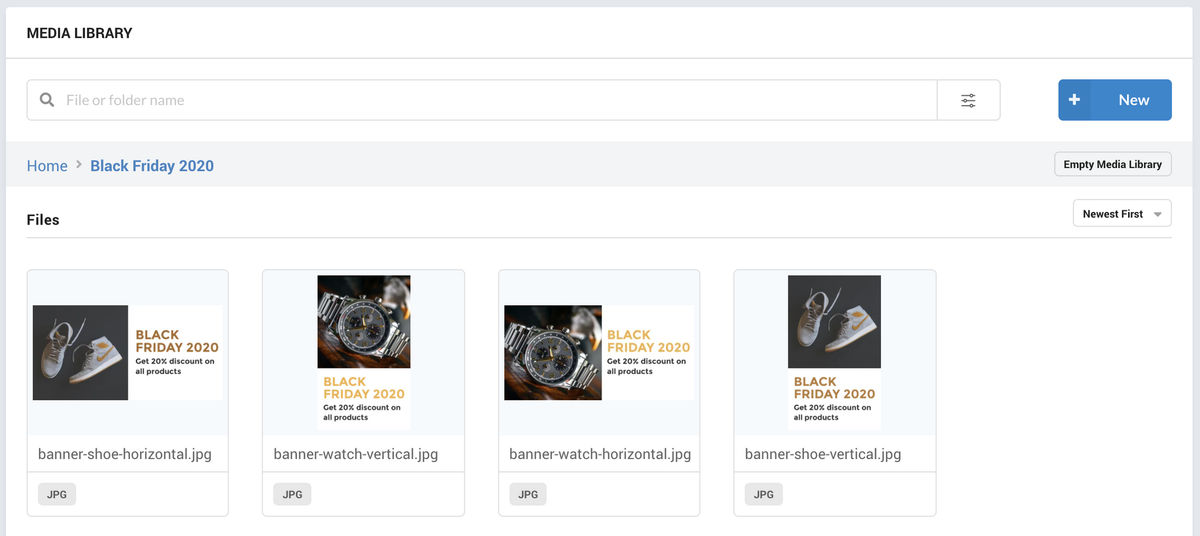
Exported banners organized in a single folder "Black Friday 2020"

You can also copy, move, or delete multiple images in one go. For example, if you are running the same banner for Black Friday and Cyber Monday, you can copy all the assets from one folder to the other.
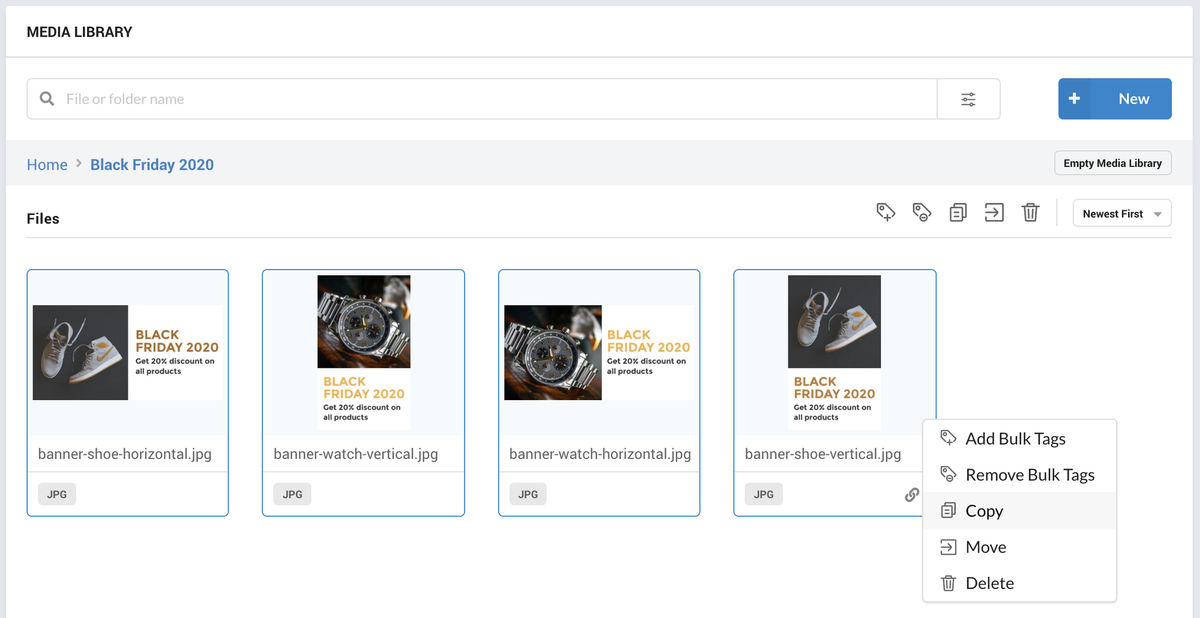
Copy, Move and other bulk operations to manage your images in the ImageKit media library

ImageKit also provides one more way to manage your assets, and it is the best of them all - image tagging.

Image tagging allows you to attach more information to an image than what is just represented by its name.

With ImageKit, you can create tags in the media library or use the AI-powered auto-tagging extension which uses Google Cloud Vision and AWS Rekognition, two industry-leading APIs that help label commonly known objects in an image.

In the example below, we have the same banners with similar offers, but different products to go along with them. So, we can tag each banner with the corresponding product like shoes, watches, etc.
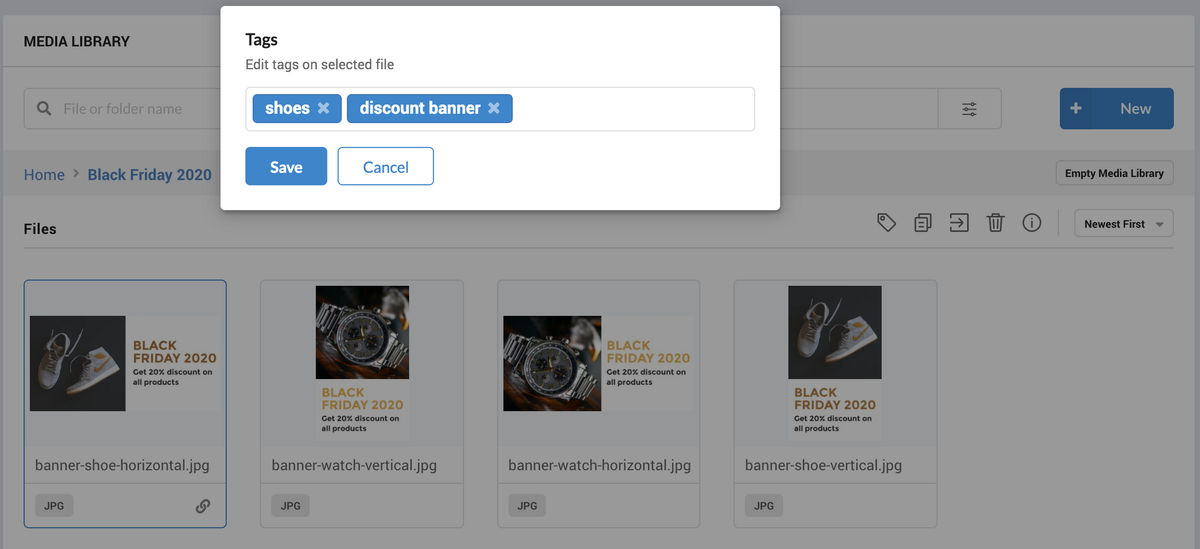
Adding relevant tags to images for easier search operations later

How would it help? Read on.

3. Find assets when you need them and save a LOT of time

You must often find yourself in a situation where you need to find an asset made by your graphics team in the last month, and you search for it on email, Dropbox, and yet, can't find it. Then you go back to your graphics team, asking them to share the resource again in the right exported format.

According to leading research, your team spends almost 20% of their time searching for files and then more time in redoing the work they had already done. That's more than one full day in a week wasted just searching for files.

ImageKit's media library not only offers an easy interface tailored for managing and viewing media files, but it also comes with better search functionalities that make it a superior choice over other storage solutions. You can not only search for files by their name but also by the tags associated with them, their dimensions, size, format, transparency, upload date and a lot more.

Here is a quick look at the search in the dashboard with its vast filtering options.

ImageKit's Advance search let's search for a file using multiple fields

Now, there can be cases when you want to search for a file with a set condition.

ImageKit's advanced search offers you conditional search with which you can combine and & or conditions to your search for a faster & effective result.

Advanced search using And/Or condition

Searches come back with a pile of images/videos, and there is a need to sort them, which is where the sorting filter in ImageKit comes into action.

Sort your search results by name, first uploaded date, last updated date, image dimension, or size

ImageKit's sort filter to help you with your searches

ImageKit's advanced search filter is certainly a powerful feature that keeps workflows optimized.

But, there is another missing piece in the puzzle that needs to be addressed.

The security of your assets.

4. Control access to your content

In a marketing team, different roles would engage differently with the assets.

For example, your graphics team would be responsible for uploading and managing the assets, whereas your content team needs just to search and download them.

ImageKit media library comes with two user access levels, specific to the Media Library - the editor and the viewer access.
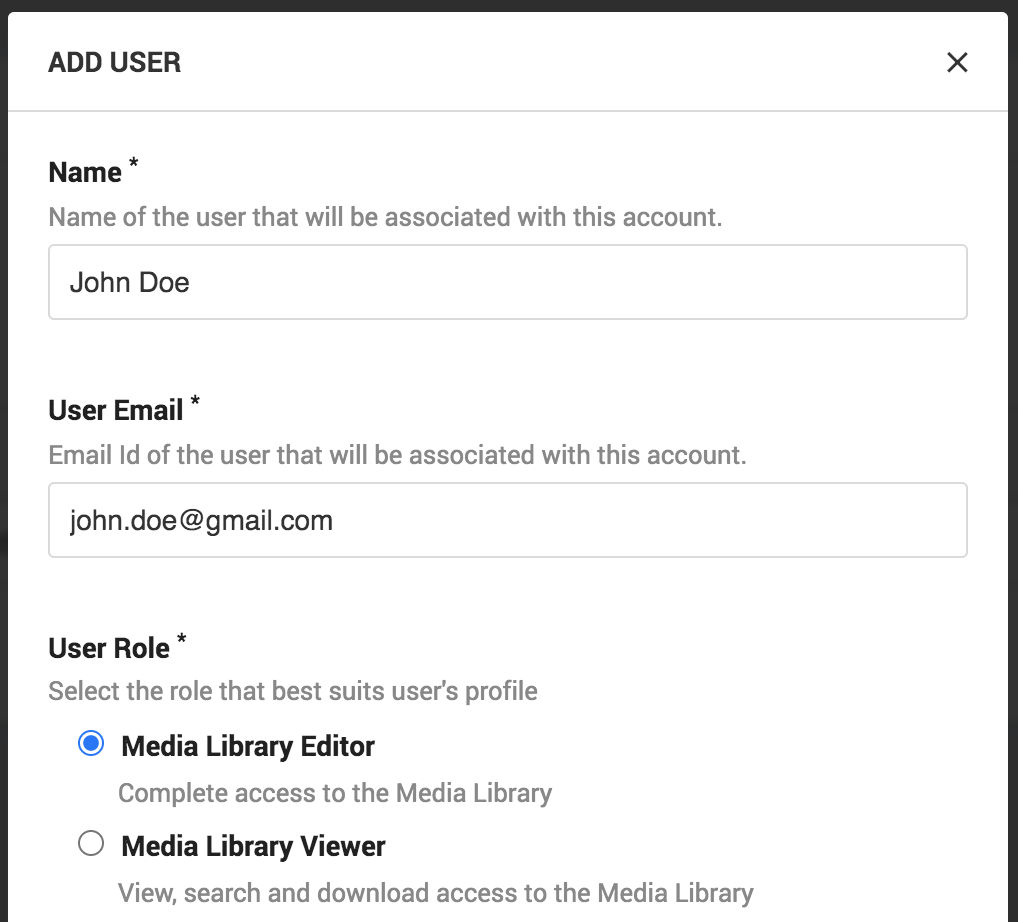
Creating a new user for accessing the Media Library

As the names suggest, the editor can take all possible actions in the media library. In contrast, the viewer can only search and access the images for blogs, emails, social media, etc.

5. Instantly optimized images ready for the web

This is the best part of the media library and puts it miles ahead of other storages. You can not only store images in the media library, but you get ready-to-use image URLs with automatic image compression and best image format selection built-in.
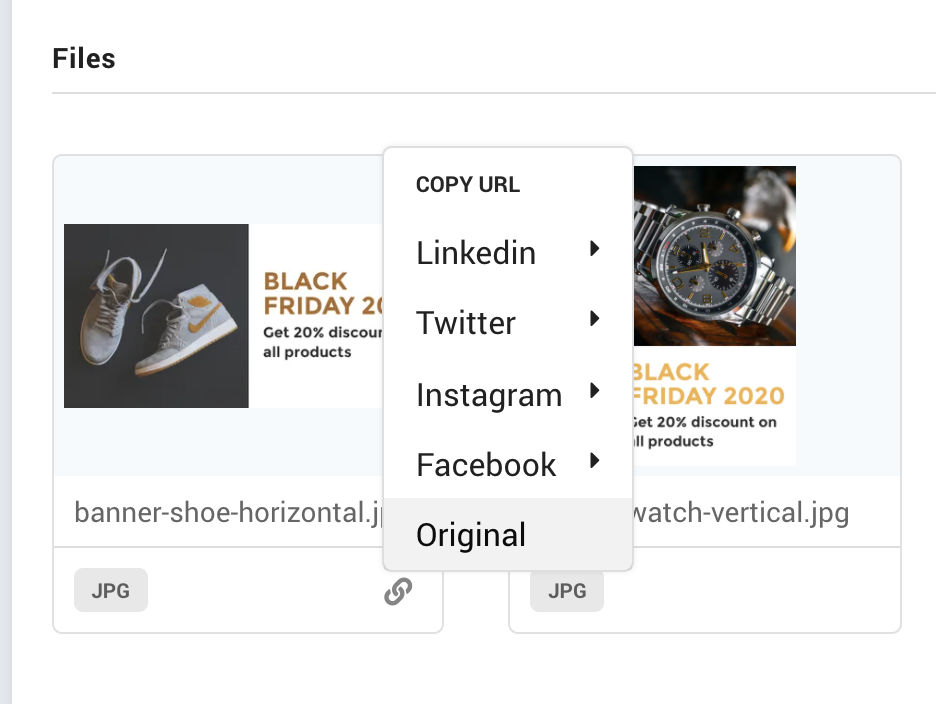
Copy URLs that are ready-to-use on the web and social media

As marketers, one of the goals is to optimize the page load time and SEO of the website. Ensuring that the images are light and load quickly plays a crucial role in that. With ImageKit's media library, you no longer have to worry about this AT ALL.
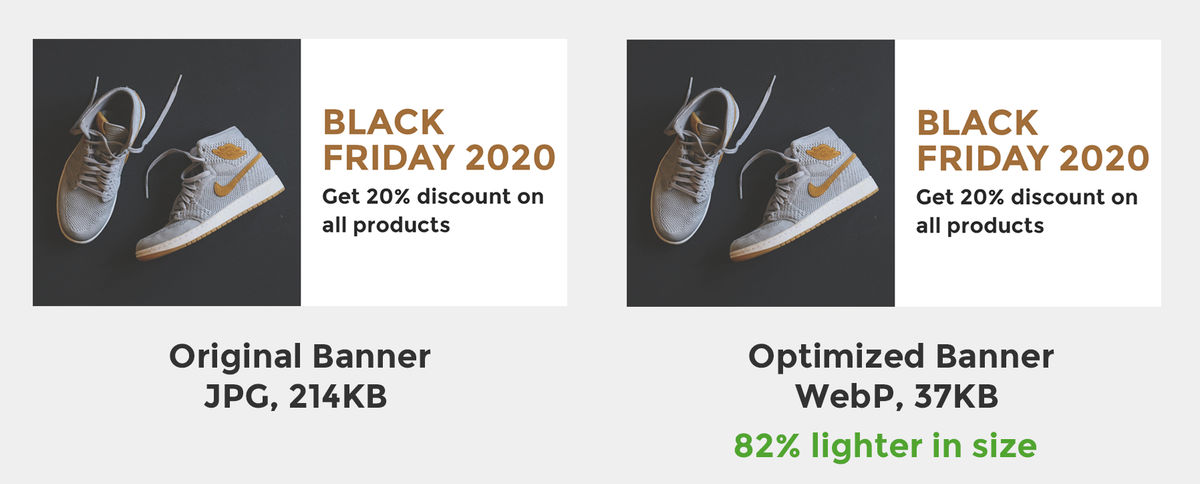
Images get automatically optimized with ImageKit's URLs for all uploaded images

You can directly use the URL you get after you upload an image to the media library on your blog, email, app notification, social media, etc. It automatically compresses the image without distorting visual quality and switches to modern, lighter formats like WebP whenever possible to reduce image size further. Google will love them for SEO, and so will your users.

6. No need to go back to your graphics team for resizing of images

Want a smaller, resized variant for the banner your team just sent you? No worries, you can do it yourself, and in real-time.

ImageKit allows you to add resizing parameters to your image URLs for real-time transformation. Just specify the height or the width that you want, and you will get it immediately. This frees up your graphics team to create other assets and makes it faster for you to get perfectly-sized images for different user devices.

https://ik.imagekit.io/ikmedia/Black_Friday_2020/banner-shoe-horizontal.jpg?tr=w-360

The sale banner resized to width 360px for mobile devices using the parameter ?tr=w-360 at the end of the URL

Image gets resized in real-time to width 360px

And to make things even simpler, you get ready-to-use URLs with resized images that comply with specifications of common post types on Facebook, Instagram, Twitter, and LinkedIn.
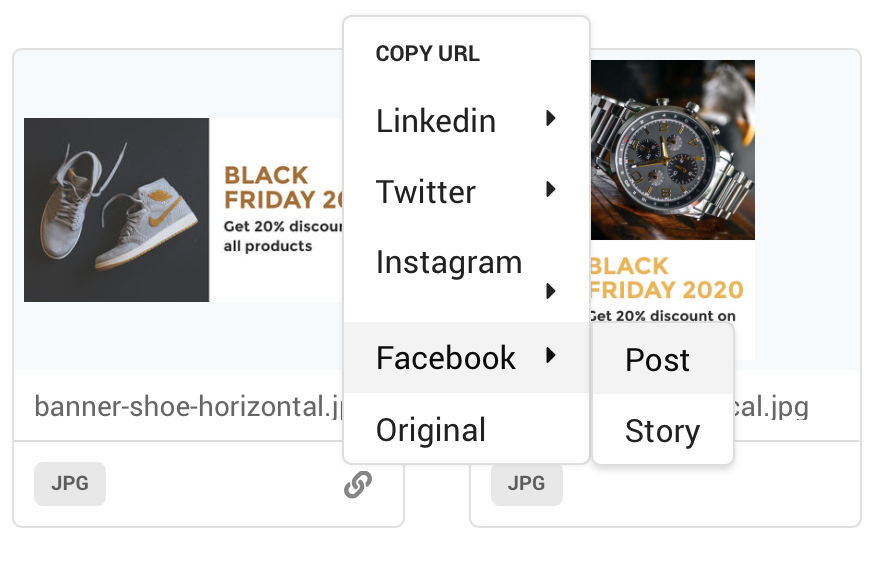
Copy URLs for instant use on common social media platforms
https://ik.imagekit.io/ikmedia/Black_Friday_2020/banner-shoe-horizontal.jpg?tr=w-1200,h-630,fo-auto

Copying the Facebook Post URL resizes the banner to 1200x630 as per Facebook's specification

In case you'd still like to edit images manually you can do it directly from the media library. Check out ImageKit's guide on editing product images.

Bonus: In case you need to remove the background of an image, you can use ImageKit's latest Background removal extension and achieve it easily & eliminate the dependency on a designer!

Wrapping it up

We have seen how ImageKit's media library can simplify your team's content management and delivery workflow, helping them become more efficient with their time and delivering perfect images to your users across all channels.

And you get to use this for absolutely free! Just head to ImageKit and sign up for a free account to start using the media library.

What are you waiting for then? Go ahead and delight your team and users.