
惯性聚合 高效追踪和阅读你感兴趣的博客、新闻、科技资讯
阅读原文 在惯性聚合中打开

推荐订阅源

aimingoo的专栏
aimingoo的专栏
Google DeepMind News
S
SegmentFault 最新的问题
Project Zero
Project Zero
D
DataBreaches.Net
I
InfoQ
L
Lohrmann on Cybersecurity
OSCHINA 社区最新新闻
OSCHINA 社区最新新闻
酷 壳 – CoolShell
酷 壳 – CoolShell
Stack Overflow Blog
Stack Overflow Blog
The Register - Security
Recorded Future
Recorded Future
Vercel News
Vercel News
博客园 - 司徒正美
freeCodeCamp Programming Tutorials: Python, JavaScript, Git & More
I
Intezer
The Hacker News
The Hacker News
F
Fortinet All Blogs
Microsoft Azure Blog
P
Proofpoint News Feed
Help Net Security
Help Net Security
cs.CV updates on arXiv.org
Application and Cybersecurity Blog
Scott Helme
Scott Helme
T
Threatpost
爱范儿
爱范儿
N
Netflix TechBlog - Medium
D
Docker
云风的 BLOG
云风的 BLOG
C
Cisco Blogs
K
Kaspersky official blog
H
Help Net Security
S
Secure Thoughts
T
Threat Research - Cisco Blogs
钛媒体:引领未来商业与生活新知
钛媒体:引领未来商业与生活新知
S
Security @ Cisco Blogs
Cyberwarzone
Cyberwarzone
N
News and Events Feed by Topic
G
Google Developers Blog
Forbes - Security
Forbes - Security
博客园 - 三生石上(FineUI控件)
博客园 - 叶小钗
B
Blog
Google DeepMind News
Recent Announcements
Simon Willison's Weblog
S
Securelist
P
Privacy International News Feed
Spread Privacy
Spread Privacy
The Last Watchdog
The Last Watchdog

ImageKit.io Blog

Next.js Image Optimization with ImageKit Use Video as a Background in Your Next.js Project How to Fix Autoplay Video in Next.js How Durian Scaled a Visual-First Retail Experience to 350K Monthly Visitors Online How Matsmart accelerated image delivery across countries with ImageKit AI in Digital Asset Management: From Smart Workflows to Agentic Automation How Joseph Joseph unified and secured global video delivery with ImageKit How Modall powers fast, effortless media delivery across 40+ projects with ImageKit Digital Asset Management (DAM) Trends: 2026 Report How to add a poster image to Video.js player (and automate it) HLS streaming with Video.js + React Building the future of storytelling with fast, AI-powered video delivery How PushOwl delivers 100M+ image-rich notifications seamlessly with ImageKit How Homify delivers millions of interior design images seamlessly with ImageKit Better event discovery with lightning‑fast videos & images Adding video player in React Native Video player in Angular applications Crop and resize videos in React Next.js image and video upload React image and video upload React video optimization How we quadrupled our traffic to 625K monthly page views How Apollo 24|7 boosted performance & reduced costs with ImageKit Simplify your media workflows with ImageKit DAM integrations Extending Lighthouse for custom image and video optimization analysis Brand Asset Management: What is it? How does it work? WordPress Digital Asset Management Guide - Manage your WP media assets better Why Shopify retailers need a digital asset management solution DAM vs. SharePoint: Which is best for you? AI-powered Metadata and Tagging in Digital Asset Management How Hopscotch built India's largest online Kids' fashion brand with ImageKit Dropbox Vs. DAM: Which Is The Right Tool For Digital Asset Management Digital Asset Management for Photographers: A Complete Guide Why digital asset management for agencies is essential Helping both Top and Bottom Line: SaffronStays rapid, profitable growth with ImageKit How KreditBee simplified media experiences with ImageKit Google Drive alternatives for businesses (with fast-growing teams) Node.js image upload ImageKit: The Secret Ingredient in Swiggy’s Expansion Journey Streamlining the Design Approval Process: A Comprehensive Guide AV1 Codec - Complete guide for video application devs PHP image and video upload Angular image & video upload AV1 vs VP9: Which codec should you choose? Adding video player in Next.js React Video Player VP8 vs VP9 - In the context of online video delivery Exploring WebM vs MP4 7 Free Digital Asset Management Software that are not Open-Source Comparing 9 Top Digital Asset Management Tools in the Market What are Brand Standards and Why do they Matter? Boost Sales and Brand Appeal: Essential Tips for eCommerce Image Management Brand Recall: The Strategy to Create Unforgettable Brands How to upload files in HTML? Branding for Small Businesses (2025 Edition) Everything you need to know about VP9 codec Recent updates from ImageKit and what's next Best Ways to Write RFP For Digital Asset Management (+ with free RFP template) What is Brand Dilution? How to Avoid It? Explained with [Examples] The Importance of Brand Identity: Leveraging Digital Asset Management for Impact From Launch to Scale: How to Launch a Brand Campaign Digital Asset Management Requirements - What do You Need to Evaluate and How? Marketing Collateral Management: A Quick End-to-End Guide Video Content Management System: What Is It And How To Choose One? Dropbox vs. Google Drive vs. Onedrive: The Best Cloud Storage Solution How to Build Brand Trust: Get Started In 2025 Google Drive vs. Box: A Detailed Comparison How Digital Asset Management Solutions Help Protect Brand Equity A DAM Solution Can Safeguard Your Digital Intellectual Property - Here’s How WebP Vs. PNG: Which Image Format Should You Use and Why? How to Resize Images in Bootstrap Easily Progressive jpegs (PJPEG): the key to loading images faster on your website Dropbox vs. Google Drive: The Best Cloud Storage For Digital Assets Dropbox Pros & Cons In 2024: An In-Depth Analysis and Why A DAM Solution Stands Out Google Drive Vs OneDrive: The Better Storage Option For Digital Assets Manage your video assets better with video metadata Understanding DAM's Role in Strengthening Brand Identity Digital asset management strategy: What to know before creating one The Ultimate Guide To Marketing Agency Onboarding 6 Solutions To Simplify Large File Sharing Over The Web A Step-by-Step Breakdown of a Video Production Workflow 13 Digital Asset Management Use Cases You Should Know How to Conduct a Brand Audit and Manage Your Brand Assets Costly Consequences of Inconsistent Branding And How DAM Can Help Dynamic Asset Transformation: What It Is, Why You Need It, and How ImageKit Can Help Everything You Need to Know About HTML Video Autoplay How To Select Your DAM Vendor: A Complete Guide How to Boost User Experience with Smart Digital Asset Management React Image Optimization: A Guide for Web Developers Why Should DAM Be A Part Of Your MarTech Stack? Unleashing the Power of Content Repurposing with ImageKit MKV vs MP4: Which Video File Format Is Better for Your Needs? Digital Asset Management For Ecommerce: A Complete Guide How an Image Tagging Software can Transform Your Image Search How to Manage Your Content Lifecycle Effectively M4V vs MP4: Which Video Format Should You Use and Why? Why Every Business Needs An Image Management System All The Questions To Ask During A Dam Demo Which is the Best Image Format for Your Website? Uploading Multiple Files Using JavaScript: A Comprehensive Guide
Shopify SEO Tips - How to Optimize Your Shopify Store
Somesh Khatkar · 2017-11-13 · via ImageKit.io Blog

In a world where customers can access and navigate through millions of products with a mere touch on their smartphones and laptops, sellers are facing a fierce competition while interacting with this vast consumer base.

Although there are many alternatives, most sellers create their e-commerce store on Shopify and hope to acquire a high number of consumers. But because of an improper SEO implementation, they fail to grab the top spots in Google SERP.

If you have also created your e-commerce website on Shopify then let’s dig into some Shopify SEO tips which can help you optimize your Shopify store.

Launching Your Shopify Store

While launching your Shopify store, the theme should compliment your brand. Also, consider the impact of your selected theme on the speed of your website as the page load speed plays an essential role in the SEO ranking.

You can check the speed insights of your store by using some tools such as Google’s Page Speed Insights. Before buying any theme, just check the theme demo URL through this tool and get the insights about the page load speed.

Remove Duplicate Content

Duplicate content can be unhealthy for your Shopify store. Various search engines like Google, Bing, etc., can penalize you for having duplicate content. Also, your website ranking gets severely affected.

Avoid duplicate content by considering two cases:

  • Off-site Duplication: Mostly, the products listed in your store will have a description from the manufacturer. This material is hard to manipulate. In such cases, there is a massive possibility of duplicity as other sellers may also include the same description on their website. To tackle such issues, you should mention a unique story for each product listed on your site.

  • On-site duplication: Due to some issues in the website content management system or CMS, you may have to deal with On-site duplication problems at times. Sometimes a user may land on a product by exploring through more than one category in the product catalog. In such cases, your CMS will generate different URLs for a single product depending on the path followed by the customer. You should use Master URLs to eliminate this problem. With this, CRM generates only one URL irrespective of the multiple routes followed by the customer in the product catalog.

Also, to ensure no duplicity in your website, regular checks should be performed. To provide 100% unique content on your site you can make use of one of the many plagiarism tools, such as Small SEO Tools Plagiarism Checker, one of the best free tools available.

Prioritize Speed

Even if your store has a bundle of useful features loaded, this does not guarantee a high customer engagement.

Most of the users will not like your website if it takes too long to load.

According to Search Engine Journal, a 1-second delay in page load can cause a drop of 7% in conversions. Running an e-commerce store with a 7% drop in conversions translates to a lot of losses.

Above all, a slow loading speed can lower your Google ranking.

To ensure faster loading speed of your Shopify store, you should take care of the following:

  • Reduce the size of JS and CSS files to only include what is necessary
  • Optimize images on your website
  • Enable browser caching
  • Make use of CDN

User-Friendly Interface

From interaction to conversion, there is a complete cycle comprising different stages of a customer's buying journey.

All the customers go through the top four stages - Attract, Convert, Close, and Delight. After attracting the prospects using relevant materials or advertisements, it is up to the user experience of a visitor at your store that converts them into a customer.

Stages of a Customer Cycle - From Stranger to Promoter Source: Hubspot

If you attract the right kind of audience, and make it easy for them to understand what you are selling, it will result in better conversions.

Also, a better user experience will improve your bounce rate and Google ranking. You can ensure a better User-Friendly Interface by considering the following:

  • Your homepage should be enough to explain what you are selling
  • Product descriptions and images should be unique and accurate
  • The whole process of searching a product till purchase should be clear and easy
  • Third-party apps or any popups should not cover essential information on the website

Optimized Product Page

Product pages should be fully optimized to ensure a high engagement with customers.

A unique and proper description should be provided which will make it easy for a customer to understand all the features of a particular product. Also, all the variants (if any) should be available on the same page to avoid duplicity.

If your customers are easily able to explore all the features of a product on a single page, your conversions will increase, which will, in turn, improve your Google ranking.
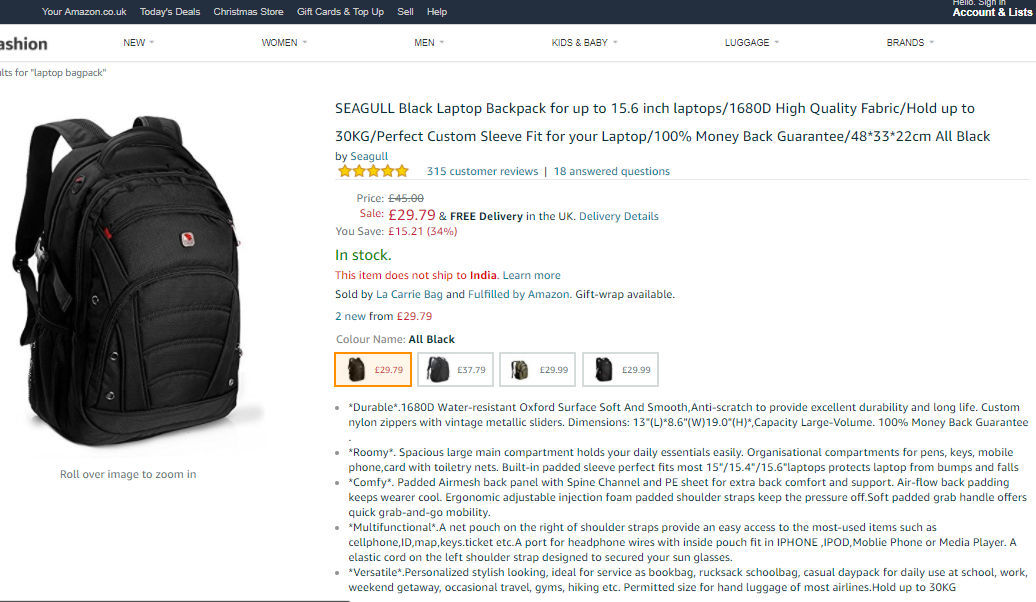
An example of Product Page (Source: Amazon). Here we can see the complete information about the product, customer reviews, different colors & variants of this Product, etc.

Include all the critical information, such as return policy, shipping, delivery time, etc., on your product page.

Customer reviews are an essential parameter of a perfect product page. It will help your website users to judge a product, and also, you will get user-generated content in the process.

Make the navigation straightforward. Link all your product pages to the home page of your Shopify store. In this way, your users will always find it easy to return to the homepage.

Google Analytics Integration

You should have a mechanism to track all the essential metrics related to your page performance.

Google analytics is an excellent and free tool which provides all these crucial parameters efficiently. Integrate your Shopify store with your Google Analytics account and get insightful data about your user behavior. You can get data about the geographical locations, device information, channels, etc., used by your website visitors.

Install Product Review App

Shopify provides various free and paid apps which can be used to optimize your store.

Review apps can be used to interact and engage with your customers. Customers who buy a product from your website can also submit their experience with the product making it easy to convince other users wanting to buy the same product.

These reviews will benefit you in two ways. First, your sales will increase, and second, you can add your product review scores to your Google search results.

Optimize Your Shopify Store Images

If you have correctly optimized your website images for SEO, then these images can appear in Google Image Search results, thus driving traffic to your website.

Always use ‘Alternate Tag’ in all your product images with relevant keywords. Do not use same Alt tag for multiple images. Always create short, clear, and unique Alt tags.

To add Alt tag in your Shopify store images, go to ‘Products’ from your admin account. After clicking on the product name that you want to edit, you will see the product image. Hover over the image and click Alt. Edit or add your Alt text and save the changes.

The SEO tips mentioned above may not be the complete guide for optimizing your Shopify store, but they are enough to improve Google ranking. After optimizing your store, you will surely experience a boost in your traffic and conversions. So, make the most out of the built-in features of Shopify and optimize your website.