


Images are the most efficient means to showcase a product or service on a website. They make up for most of the visual content on your website.
But the more images a webpage has, the more bandwidth it consumes, affecting the page load speed - a raging factor having a significant impact on not just your search ranking, but also on your conversion rates.
Image optimization helps serve the right images and improve the page load time. A faster website has a positive impact on your user experience.
With image optimization becoming a standard practice for websites and apps, finding a service that offers the most competent features with a coherent pricing model, one that integrates seamlessly with the existing infrastructure and business needs, is paramount to any website and its efficiency.
So What Are The Most Common Criteria For Selecting An Image Optimization Tool?
The importance of image optimization isn’t up for debate, your choice of tool or service for it may just be. And it is a factor you should consider carefully.
So where are the challenges?
Inability to integrate with existing infrastructure - Image optimization is very fundamental on modern websites. To implement it, you should not have to make any changes to your existing setup. But unfortunately, a lot of these tools or services can only be used with specific CDNs or are incapable of being integrated with your existing image servers or storage.
Dependency on their image storage - Some tools require you to move your images to their system, making you more dependent on them — an added hassle. And nobody wants to spend their time and effort on a virtually unnecessary step like migrating assets from one platform to another (and may be migrating to some other service in the future, if this one doesn’t work out). Not when it’s not needed. Not if you have hundreds of thousands of images and can never be sure if all the images have been migrated to the new tool or not.
Apart from the above challenges, it is possible that the choice of tool could be expensive or has a complex pricing structure. Or could have only the basic image-related features or not deliver excellent performance across the globe.
ImageKit.io is all you will need for image optimization and transformation with minimal effort and almost no changes to your existing infrastructure.
It is a complete image CDN with optimization and transformation capabilities for images on websites and apps. What does that mean?
You can feed ImageKit.io an original, unoptimized image and fetch it using an ImageKit.io URL, and it shall deliver an optimized, rightly resized image to your user’s devices!
For example:
ImageKit.io resizes the image automatically by simply specifying the size in the image URL.
https://ik.Imagekit.io.io/demo/img/tr:w-300,h-100/default-image.jpg
Here, the width and height of the final image are specified with “w” and “h” parameters in the URL. The output image has dimensions 300×100px, scaled down from an original size of 1000×1000px.
As we know, the right image formats can have a significant impact on your website’s bandwidth consumption.
For instance, the following PNG image,
https://ik.imagekit.io/demo/img/seo-img_E3VIYyKu6.jpg?tr=f-png
is almost 2.5x the size of its JPG variant.
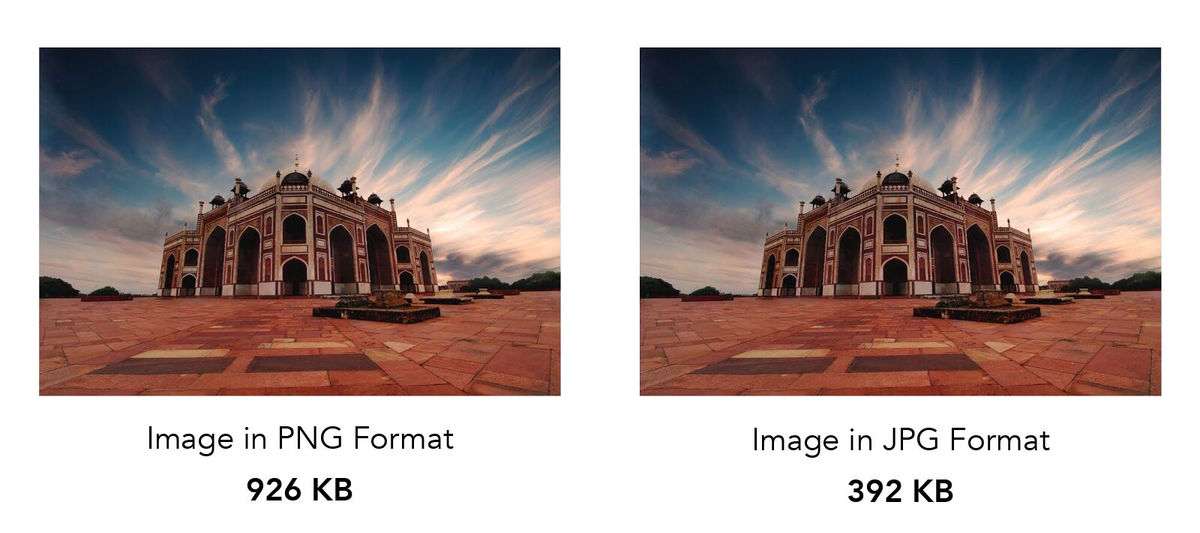
ImageKit.io automatically uses the correct output image format based on image content, image quality, browser support, and user device capabilities. Also, the above image will be converted and delivered as a WebP for all browsers supporting the WebP image format.
Just turn it on and you’re good to go!
And not just simple resizing and cropping, ImageKit allows for more advanced transformations like smart crop, object-aware cropping, image and text overlays, image trimming, blurring, contrast and sharpness correction, and many more. It also comes with advanced delivery features like Brotli compression for SVG images and image security.
ImageKit.io is the solution to all your image optimization needs. And more.
It also comes bundled with a stellar infrastructure — AWS Cloudfront CDN, multi-region core processing servers, and a media library with automatic global backups.
INTEGRATIONS
It isn’t enough to find the most appropriate tool for your website. It should also provide an optimum experience fitting in just right with your existing setup.
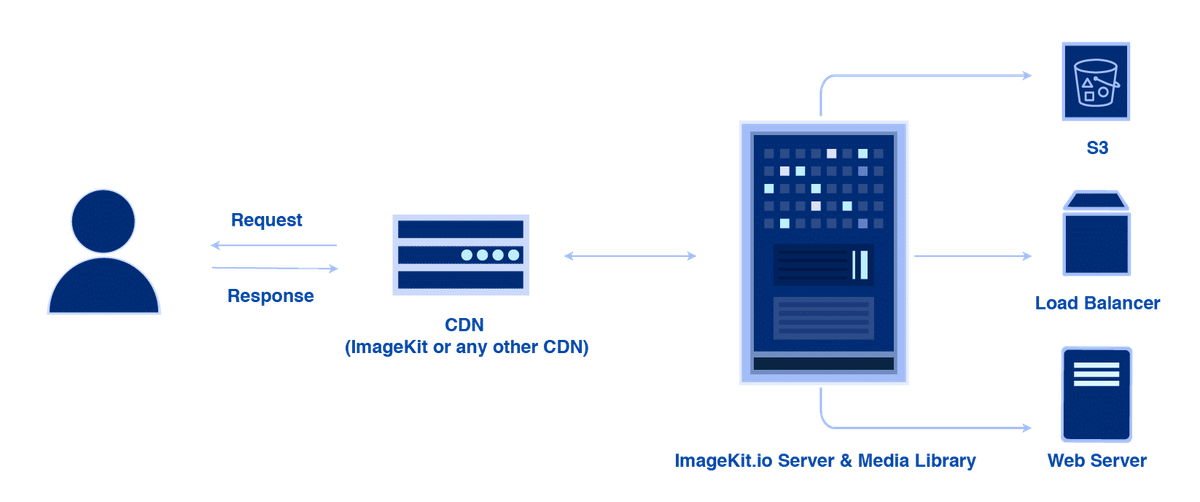
S3 Bucket Or Other Web Servers
It is usually a tedious task to integrate any image optimization tool into your infrastructure. For example, for images, you would already have a CMS in place to upload the images. And a server or storage to store all of those images. You would not want to make any significant changes to the existing setup. That could potentially disrupt all your team's processes.
But with ImageKit.io, the whole process from integration to image delivery takes just a few minutes. ImageKit.io allows you to plug your S3 bucket or webserver and start delivering optimized and transformed images instantly. No movement or re-upload of images is required. It takes just a few minutes to get the best optimization results.
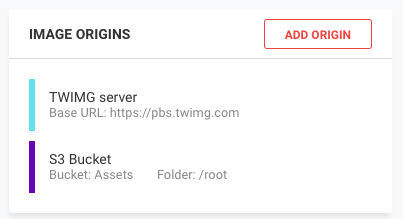
Such simple integrations with AWS S3 or web servers are not available even with some leading players in the market.
Images fetched through ImageKit.io are automatically optimized and converted to the appropriate format. And you can resize and transform any image by just adding URL parameters.
For example:
Image with width 300px and height is adjusted automatically to preserve aspect ratio https://ik.imagekit.io/your_imagekit_id/rest-of-the-path.jpg?tr=w-300
or,
https://ik.imagekit.io/your_imagekit_id/tr:w-300/rest-of-the-path.jpg
(We are using https://ik.imagekit.io/your_imagekit_id format for the URLs, but custom domain names are available with ImageKIt.io)
Learn more about it here.
MEDIA LIBRARY
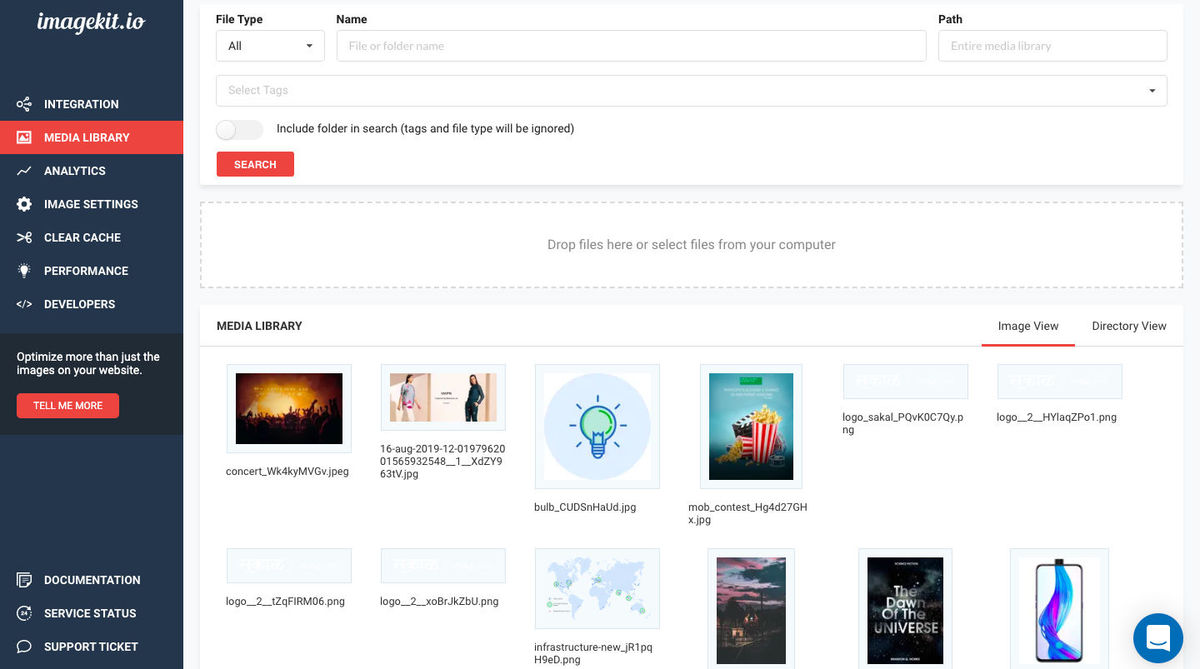
ImageKit.io also provides a media library, a feature missing in many prominent image optimization tools. Media library is a highly available file storage for all ImageKit.io users. It comes with a simple user interface to upload, search and manage files, images, and folders.
With Platforms Like Magento And Wordpress
Most SMBs use WordPress to build their websites. ImageKit.io proves handy and almost effortless to set up for these websites.
Installing a plugin on WordPress and making some minor changes in the settings from the WP plugin is all you need to do to integrate ImageKit.io with your WordPress website for all essential optimizations. Learn more about it here.
Similarly, you can integrate ImageKit.io with your Magento store. The essential format and quality optimizations do not require any code change and can be set up by making some changes in Settings in the Magento Admin Panel. Learn more about it here.
For advanced use cases like granular image quality control, smart cropping, object-aware cropping, watermarking, text overlays, and DPR support, ImageKit.io offers a much better solution, with more robust features, more control over the optimizations and more complex transformations, than the ones provided natively by WordPress or Magento. And you can implement them by making some changes in your website's template files.
With Other CDNs
Most businesses use CDNs for their websites, usually under contracts, or running processes other than or in addition to image optimizations on these CDNs, or simply because a particular CDN performs better in a specific region.
Even then, it is possible to use ImageKit.io with your choice of CDN. We support integrations with:
- Akamai
- Azure
- Alibaba Cloud CDN
- CloudFlare (If one is on an Enterprise plan in CloudFlare)
- CloudFront
- Fastly
- Google CDN
- Zenedge
To ensure correct optimizations and caching on your CDN, our team works closely with yours to set up the configuration.
Apart from the ease of integrating with any company's existing infrastructure, ImageKit.io offers some added benefits with its suite of image optimization and transformation features.
Like -
Custom Domain Names
As image optimization has become a norm, services like LetsEncrypt, which make obtaining and deploying an SSL certificate free, have also become standard practice. In such a scenario, enabling a custom domain name should not be charged heavily.
ImageKit.io helps you out here too.
It offers one custom domain name like images.example.com, SSL and HTTP2 enabled, free of charge, with each paid account. Additional domain names are available at a nominal one-time fee of $50. There are no hidden costs after that.
One ImageKit.io Account, Multiple Websites
For image optimization needs for multiple websites or agencies handling hundreds of websites, ImageKit.io would prove to be an ideal solution. You’re free to attach as many “origins” (storages or servers) with ImageKit.io. What that means is each website has its storage or image server, which can be mapped to separate URLs within the same ImageKit.io account.
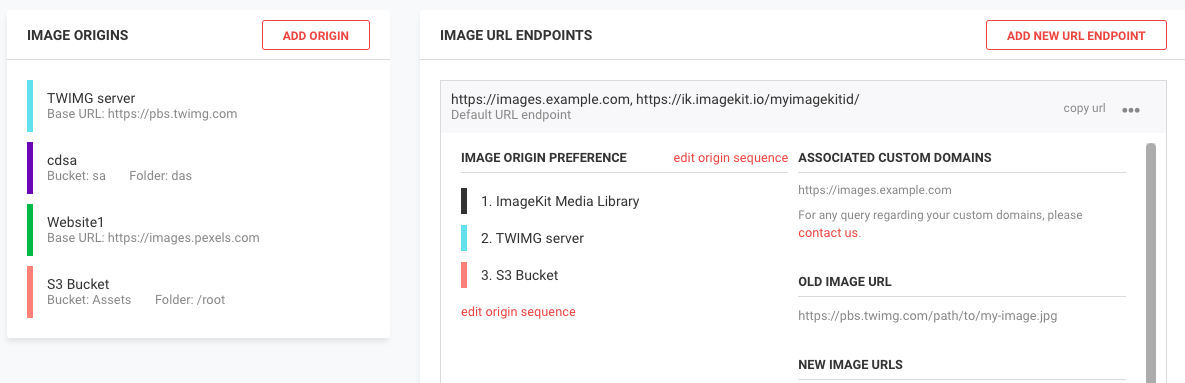
The added advantage of using ImageKit.io for multiple websites and apps is their pricing model. When one consolidates the usage across their many business accounts, and if it crosses the 1TB mark, they can reach out to ImageKit.io’s team for a special quote. Learn more about it here.
Multiple Server Regions
ImageKit.io is a global image CDN, It has a distributed infrastructure and processing regions around the world, in North Virginia (US East), North California (US West), Frankfurt (EU), Mumbai (India), Sydney (Australia), Singapore, and Canada (ca-central-1), aiming to reduce latency between their servers and your image origins.
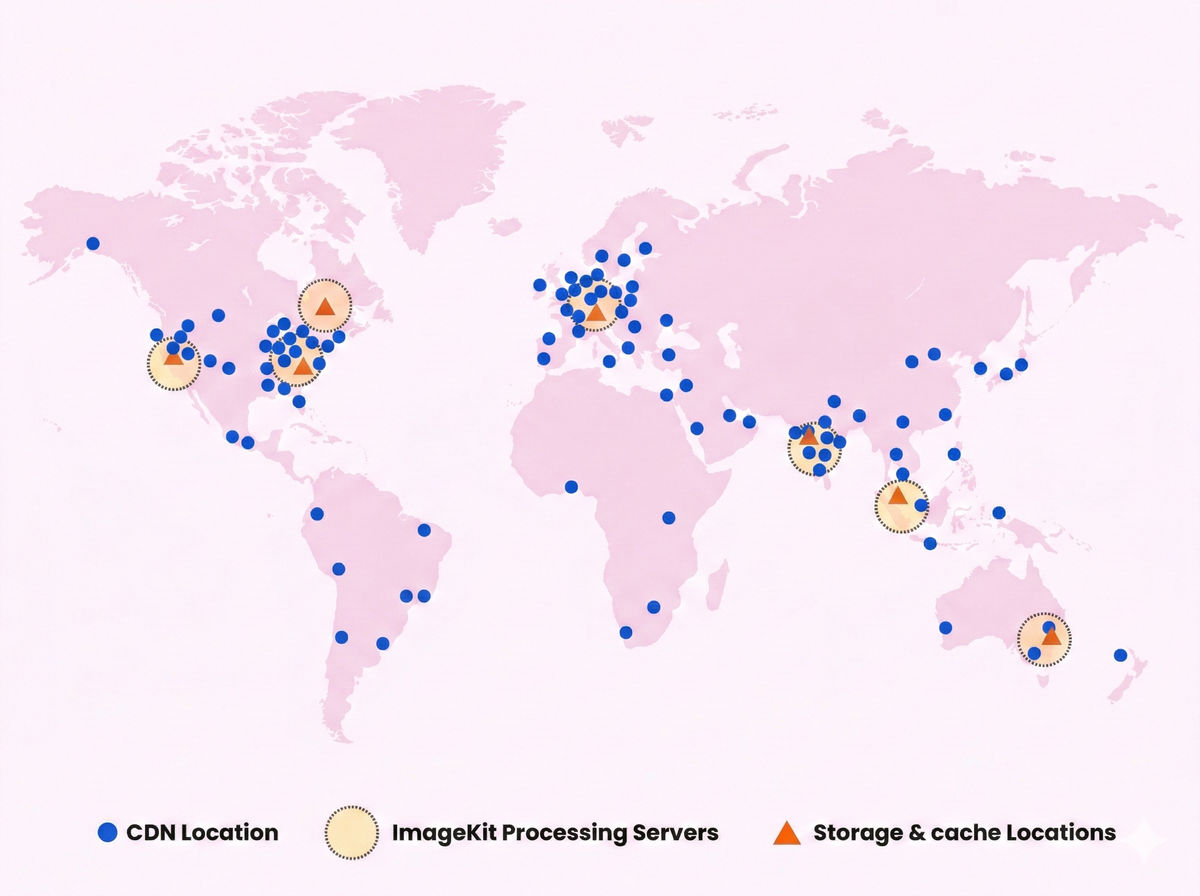
Multiple server regions with processing and delivery nodes across the globe
Additionally, ImageKit.io stores the images (transformed as well as original) in their cache after fetching them from your origins. This intermediate caching is done to avoid processing the images again. Doing so not only reduces the load on your origin servers and storage but also reduces data transfer costs from them.
Custom Cache Time
There are times when a shorter cache time is required. For cases where one or more images are set to change at intervals, while the others remain the same, ImageKit.io offers the option to set up custom cache times in place of the default 180 days preset in ImageKit.io, giving you more control over how your resources are cached.

Custom cache time
This feature is usually not provided by third-party image CDNs or is available to enterprise customers only, but it is available with ImageKit.io on request.
Deliver Non-Image Files Through ImageKit.io CDN
ImageKit.io comes integrated with a CDN to store and serve resources. And while the primary use case is to deliver optimized images, it can do the same for the other static assets on your website, like JS, CSS as well as fonts.
There is no point dividing your static resources between two services when one, ImageKit.io, can do the whole job on its own.
It’s worth a mention here that though ImageKit.io provides delivery for non-image assets, it does not process or optimize them.
With the pricing model in mind, using ImageKit.io’s CDN may prove beneficial as it bills only based on one parameter — the total bandwidth consumed.
Cost Efficiency
Most image optimization tools charge you for image storage or bill you based on requests or the number of master images or transformations.
ImageKit.io bills its customers on a single parameter, their output bandwidth. With ImageKit.io, you can optimize and transform to your heart’s content, without worrying about the costs they may incur. With your focus no longer on the billing costs, you can now focus on important tasks, like optimizing your images and website.
Usually, when an ImageKit.io account crosses 1TB total bandwidth consumption, that account becomes eligible for special pricing.
You can contact our team for a quote after crossing that threshold.
Final Thoughts
Image optimization holds many benefits, but are you doing it right? And are you using the best service in the market for it?
ImageKit.io might prove to be the solution for all image optimization and management needs. But you don’t have to take our word for it. You can know for yourselves by joining the many developers and companies using ImageKit.io to deliver best-in-class image optimizations to their users by signing up for free here.