

惯性聚合 高效追踪和阅读你感兴趣的博客、新闻、科技资讯
阅读原文 在惯性聚合中打开

推荐订阅源

WordPress大学
WordPress大学
www.infosecurity-magazine.com
博客园 - 聂微东
博客园 - 【当耐特】
Last Week in AI
Last Week in AI
量子位
S
SegmentFault 最新的问题
Hugging Face - Blog
Hugging Face - Blog
B
Blog RSS Feed
V
V2EX
酷 壳 – CoolShell
酷 壳 – CoolShell
雷峰网
雷峰网
GbyAI
GbyAI
Jina AI
Jina AI
宝玉的分享
宝玉的分享
腾讯CDC
Cyber Security Advisories - MS-ISAC
CTFtime.org: upcoming CTF events
D
Docker
博客园_首页
N
News and Events Feed by Topic
奇客Solidot–传递最新科技情报
奇客Solidot–传递最新科技情报
Help Net Security
Help Net Security
Recent Commits to openclaw:main
C
Cisco Blogs
F
Fortinet All Blogs
SecWiki News
SecWiki News
AI
AI
S
Schneier on Security
让小产品的独立变现更简单 - ezindie.com
The Last Watchdog
The Last Watchdog
Martin Fowler
Martin Fowler
A
About on SuperTechFans
T
Troy Hunt's Blog
P
Proofpoint News Feed
Blog — PlanetScale
Blog — PlanetScale
Hacker News: Ask HN
Hacker News: Ask HN
F
Full Disclosure
cs.CV updates on arXiv.org
钛媒体:引领未来商业与生活新知
钛媒体:引领未来商业与生活新知
I
InfoQ
S
Security @ Cisco Blogs
Project Zero
Project Zero
Simon Willison's Weblog
C
Cyber Attacks, Cyber Crime and Cyber Security
J
Java Code Geeks
N
News | PayPal Newsroom
IT之家
IT之家
大猫的无限游戏
大猫的无限游戏
H
Hacker News: Front Page

ImageKit.io Blog

Next.js Image Optimization with ImageKit Use Video as a Background in Your Next.js Project How to Fix Autoplay Video in Next.js How Durian Scaled a Visual-First Retail Experience to 350K Monthly Visitors Online How Matsmart accelerated image delivery across countries with ImageKit AI in Digital Asset Management: From Smart Workflows to Agentic Automation How Joseph Joseph unified and secured global video delivery with ImageKit How Modall powers fast, effortless media delivery across 40+ projects with ImageKit Digital Asset Management (DAM) Trends: 2026 Report How to add a poster image to Video.js player (and automate it) HLS streaming with Video.js + React Building the future of storytelling with fast, AI-powered video delivery How PushOwl delivers 100M+ image-rich notifications seamlessly with ImageKit How Homify delivers millions of interior design images seamlessly with ImageKit Better event discovery with lightning‑fast videos & images Adding video player in React Native Video player in Angular applications Crop and resize videos in React Next.js image and video upload React image and video upload React video optimization How we quadrupled our traffic to 625K monthly page views How Apollo 24|7 boosted performance & reduced costs with ImageKit Simplify your media workflows with ImageKit DAM integrations Extending Lighthouse for custom image and video optimization analysis Brand Asset Management: What is it? How does it work? WordPress Digital Asset Management Guide - Manage your WP media assets better Why Shopify retailers need a digital asset management solution DAM vs. SharePoint: Which is best for you? AI-powered Metadata and Tagging in Digital Asset Management How Hopscotch built India's largest online Kids' fashion brand with ImageKit Dropbox Vs. DAM: Which Is The Right Tool For Digital Asset Management Digital Asset Management for Photographers: A Complete Guide Why digital asset management for agencies is essential Helping both Top and Bottom Line: SaffronStays rapid, profitable growth with ImageKit How KreditBee simplified media experiences with ImageKit Google Drive alternatives for businesses (with fast-growing teams) Node.js image upload ImageKit: The Secret Ingredient in Swiggy’s Expansion Journey Streamlining the Design Approval Process: A Comprehensive Guide AV1 Codec - Complete guide for video application devs PHP image and video upload Angular image & video upload AV1 vs VP9: Which codec should you choose? Adding video player in Next.js React Video Player VP8 vs VP9 - In the context of online video delivery Exploring WebM vs MP4 7 Free Digital Asset Management Software that are not Open-Source Comparing 9 Top Digital Asset Management Tools in the Market What are Brand Standards and Why do they Matter? Boost Sales and Brand Appeal: Essential Tips for eCommerce Image Management Brand Recall: The Strategy to Create Unforgettable Brands How to upload files in HTML? Branding for Small Businesses (2025 Edition) Everything you need to know about VP9 codec Recent updates from ImageKit and what's next Best Ways to Write RFP For Digital Asset Management (+ with free RFP template) What is Brand Dilution? How to Avoid It? Explained with [Examples] The Importance of Brand Identity: Leveraging Digital Asset Management for Impact From Launch to Scale: How to Launch a Brand Campaign Digital Asset Management Requirements - What do You Need to Evaluate and How? Marketing Collateral Management: A Quick End-to-End Guide Video Content Management System: What Is It And How To Choose One? Dropbox vs. Google Drive vs. Onedrive: The Best Cloud Storage Solution How to Build Brand Trust: Get Started In 2025 Google Drive vs. Box: A Detailed Comparison How Digital Asset Management Solutions Help Protect Brand Equity A DAM Solution Can Safeguard Your Digital Intellectual Property - Here’s How WebP Vs. PNG: Which Image Format Should You Use and Why? How to Resize Images in Bootstrap Easily Progressive jpegs (PJPEG): the key to loading images faster on your website Dropbox vs. Google Drive: The Best Cloud Storage For Digital Assets Dropbox Pros & Cons In 2024: An In-Depth Analysis and Why A DAM Solution Stands Out Google Drive Vs OneDrive: The Better Storage Option For Digital Assets Manage your video assets better with video metadata Understanding DAM's Role in Strengthening Brand Identity Digital asset management strategy: What to know before creating one The Ultimate Guide To Marketing Agency Onboarding 6 Solutions To Simplify Large File Sharing Over The Web A Step-by-Step Breakdown of a Video Production Workflow 13 Digital Asset Management Use Cases You Should Know How to Conduct a Brand Audit and Manage Your Brand Assets Costly Consequences of Inconsistent Branding And How DAM Can Help Dynamic Asset Transformation: What It Is, Why You Need It, and How ImageKit Can Help Everything You Need to Know About HTML Video Autoplay How To Select Your DAM Vendor: A Complete Guide How to Boost User Experience with Smart Digital Asset Management React Image Optimization: A Guide for Web Developers Why Should DAM Be A Part Of Your MarTech Stack? Unleashing the Power of Content Repurposing with ImageKit MKV vs MP4: Which Video File Format Is Better for Your Needs? Digital Asset Management For Ecommerce: A Complete Guide How an Image Tagging Software can Transform Your Image Search How to Manage Your Content Lifecycle Effectively M4V vs MP4: Which Video Format Should You Use and Why? Why Every Business Needs An Image Management System All The Questions To Ask During A Dam Demo Which is the Best Image Format for Your Website? Uploading Multiple Files Using JavaScript: A Comprehensive Guide
JPEG vs PNG vs GIF — which image format to use and when?
Rahul Nanwani · 2017-05-24 · via ImageKit.io Blog

There are hundreds of image formats available each with a specific use case. I bet most of us wouldn’t have come across 90% of the image formats listed on Wikipedia. And amongst the many of them, how do we select the best image format for our needs?

In this post, we would only be looking at the three most commonly used image formats in websites and mobile applications — JPEG, PNG, and GIF. Several statistics reports, including the one from HTTP Archive, indicate that these 3 formats together comprise of more than 95% of all images loaded on websites. However, these 3 image formats have significant differences amongst themselves, thus making each of them suitable for specific use cases. Understanding these major differences would help us deliver the best possible images to our website and mobile app users.

Image Formats And Their Nuances

Use JPEG format for all images that contain a natural scene or photograph where variation in colour and intensity is smooth.

Use PNG format for any image that needs transparency, or for images with text & objects with sharp contrast edges like logos.

Use GIF format for images that contain animations.

Why?

Compression

Almost all forms of data that we see on the internet — text, image, video, etc. — are compressed to reduce the size of data and ensure faster transmission. Choosing the correct image format and compression is a major factor that determines image size.

Compression can be of two types — lossless and lossy.

In lossless compression, it is possible to reconstruct the original image from the compressed image because there is no information loss during compression. This is not the case in lossy compression. Data loss in lossy compression is irreversible. Lossy compression algorithms always have a superior compression ratio (the ratio of size of compressed image to original image) as compared to lossless compression. However, this compression ratio comes at a cost of reduced quality that becomes increasingly evident as we zoom in on the image. This noticeable reduction in quality or distortion of the image is called compression artefact.

JPEG is a lossy compression specification that takes advantage of human perception. It can achieve a compression ratio of 1:10 without any perceivable difference in quality. Beyond this, the compression artefacts become more prominent. Because JPEG compression works by averaging out colours of nearby pixels (read Discrete Cosine Transform), JPEG images are best suited for photographs and paintings of natural scenes where the variations in colour and intensity are smooth. However, if an image contains text or lines, where a sharp contrast between adjacent pixels is desired to highlight the proper shape, this lossy compression technique does not yield good results.

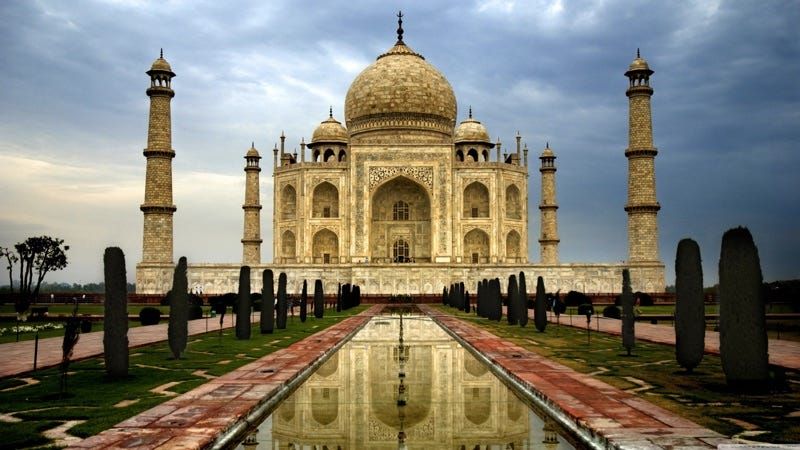
image format for image optimization
JPEG image of Taj Mahal which is indicative of a natural scene. Size of this image is 127KB. Even though further compression is still possible for this image, it still is the lightest of the three formats. Source: http://voyage.gentside.com/taj-mahal/wallpaper

PNG is a lossless image format using DEFLATE compression. No data is lost during compression and no compression artefacts are introduced in the image. For this reason, a PNG image would retain higher quality than JPEG and would look a lot sharper, it would also occupy more space on the disk. This makes it unsuitable for storing or transferring high-resolution digital photographs but a great choice for images with text, logos and shapes with sharp edges.

image format for image optimization

GIF is also a lossless image format that uses LZW compression algorithm. It was favoured over PNG for simple graphics in websites in its early days because the support of PNG was still growing. Given that PNG is now supported across all major devices and that PNG compression is about 5–25% better than GIF compression, GIF images are now mainly used only if the image contains animations.

image format for image optimization

Transparency

In a simple form, transparency indicates something that is completely invisible. Logos and icons often need to be placed on backgrounds with variable colours.

It is desirable that the background of these logos and icons is made transparent so that a single image can be used over multiple background variations.

JPEG images don’t support transparency and are hence not usable for such cases.

PNG images support transparency in two ways — inserting an alpha channel that allows partial transparency or by declaring a single colour as transparent (index transparency). Partial transparency makes the edges blend smoothly into the background. PNG8 images (discussed in the “Colours” section below) can support only index transparency whereas PNG24 images can support alpha channel transparency.

GIF images support transparency by declaring a single colour in the colour palette as transparent (index transparency). Because of absence of partial transparency, the edges (specially rounded or too-detailed edges) get a poor jagged effect. Though this can be solved to some extent using dithering, however, with improved PNG support GIF is unsuitable for images with transparent backgrounds.

image format for image optimization

Colours

There is a significant difference in the number of colours that can be supported by these 3 formats.

JPEG images can support around 16 million colours. This is what makes them suitable for storing images of natural scenes.

PNG images mainly have two modes — PNG8 and PNG24. PNG8 can support up to 256 colours whereas PNG24 can handle up to 16 million colours like a JPEG image. Use PNG8 for simple shapes with fewer colours and PNG24 for high quality, complex logos and shapes with rounded corners on a transparent background.

GIF images are limited to 256 colours. If index transparency is used then one of these 256 colours is assigned as transparent and the remaining 255 are used for other colours.

Animation

Animation, in this case, refers to any change or movement in the image. It doesn’t necessarily have to have frame rates like an animated video, but a part or the entire image changes with time.

Of these 3 formats, only GIF supports animation. This capability makes GIF image format suitable for delivering engaging ads and banners. Of late, with the advent of companies like Tumblr, 9Gag, Giphy, etc. the use of GIF format for memes has picked up.

An animated GIF Image as an example.The blockiness of the colours can be observed (check out the lamp in the background)

The use case for each image format is different, and the best way to leverage your visuals is to optimize them based on the purpose and application of each. Want to optimize images? Start your free trial today!

ImageKit.io is a cloud-based image optimisation and transformation product that can automatically deliver images in the most suitable format. This ensures that you are able to deliver an efficient graphical experience on your website and app every time, effortlessly.