




E-commerce has transformed the way business is done by transferring the power of choice and convenience into the hands of consumers. Customers must have access to a great user experience when making purchases online.
Apart from the actual product, an e-commerce platform requires the following to offer an experience that helps it stand out against its competitors -
- A mobile-friendly interface as a majority of users now come from mobile
- Fast load time for the entire application or the web page, of which images form a significant chunk in terms of size
- Excellent image quality to enhance the visual appeal of the products and to stand out from the competition
- Personalized experiences inside and outside your e-commerce store for better engagement and conversions
And this is where ImageKit comes in.
ImageKit helps you to deliver outstanding visual experiences across devices. Whether it is maintaining the right balance between a product image's visual quality and its load time or delivering a pixel-perfect experience on all devices or showcasing high-quality videos of your product, ImageKit takes care of it all.
Several public and multi-million dollar e-commerce companies, such as Nykaa, Noon, Hopscotch, Traveloka, Hyrecar, Rent-a-center, and many more, trust ImageKit for delivering perfect images on their websites and apps.
Like them, you can be assured that your team can focus on other mission-critical tasks that help your business grow without worrying about how the images look to your customers. Let's look at how ImageKit can help you achieve this.
1. Deliver correctly-sized images from a single master image
E-commerce platforms often have a vast product catalog. You get a bunch of master images from your photo studio or a third-party provider for every product. These product images then have to be resized for different pages and different devices - product listing page vs. the product detail page, web vs. mobile, high-density vs. regular screens, and so on.
With an ever-increasing number of these variations, resizing and cropping each image on your own can quickly become an impossible task. If done manually, it will take up a lot of your team's time when they could have been working on other business-related tasks. Trying to automate this on your own is not suitable for the long term. Your team spends time building, maintaining, and running the infrastructure for an activity that is not your core business. Yet, for sure, it will fall behind the curve with time as the available technology for image delivery improves.
With ImageKit, take the manual out of the process and eliminate the need to maintain complex code on your own.
ImageKit allows you to manipulate image dimensions directly from the image URL and get the exact size or crop you want in real-time. Start with a single master image, as large as possible, and create multiple variants from the same.
Want a 400 x 300 image for your product page? Just specify the dimensions in the master image's URL to get the image below -
https://ik.imagekit.io/ikmedia/ik_ecom/shoe.jpeg?tr=w-400,h-300
You can use this URL directly on your website or app for the product image and your users get the correct image instantly.

Don't want to crop the image while resizing? Try a couple of the several possible crop modes.
https://ik.imagekit.io/ikmedia/ik_ecom/shoe.jpeg?tr=w-400,h-300,cm-pad_resize,bg-F5F5F5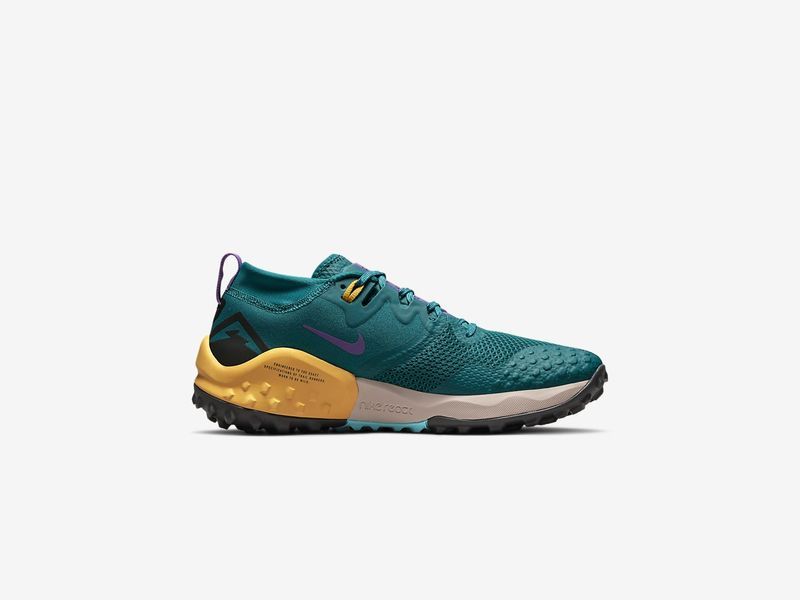

2. Optimize the images for better web performance and SEO
Resizing is just one part of the optimization process for images. For a faster page load time, which improves the user experience and your search ranking, you need to ensure that images are optimized to load quickly.
You need to deliver the image in the correct format, compress the images, cater to users on slower networks or data-saver modes, do all this in real-time for every individual user, and deliver them quickly. These optimizations for a better load time will delight your users and result in substantial SEO gains with a significant improvement to your Google PageSpeed score.
ImageKit automatically ensures that your customer gets the correct image format keeping in mind the requesting device's capabilities, browser support, image content, and more. It supports both WebP and the very new AVIF format. It additionally compresses the image, a setting that you can control, to result in a smaller image size without distorting visual image quality

/*
	Example URL
*/
https://ik.imagekit.io/ikmedia/ik_ecom/shoe.jpeg
The above image is served as WebP on Chrome (or AVIF, if enabled on the ImageKit account) and JPEG on non-WebP browsers.
High Performance Delivery
ImageKit also uses a global CDN, AWS CloudFront, to deliver the images, ensuring that most of your users get the images in just a few milliseconds. You can find out more about ImageKit's delivery and processing network here.
Custom domain names and file names for better SEO
You can integrate ImageKit with your own domain name and also change the file name in the URL without actually changing the file name in the underlying storage. This helps you take complete ownership of your image URLs and add the right keywords to them for better SEO.
3. Deliver high-quality images on all devices
While we have compressed and resized the image correctly, we have not talked about the visual quality of images. After all, shoppers base their first impression of the store on how the products "look" in the image. Showing a high-quality product image consistently across all devices is essential to get shoppers to buy more stuff.
ImageKit provides you with the tools to find the right balance between visual quality and optimization of images basis your business requirements.
You can control how much you compress your images or how much visual detail you want to preserve in the final output image. For example, in the comparison below, the image at Q = 10 has the smallest size, but it also has the lowest visual quality. The Nike logo on the shoe is almost not discernible.
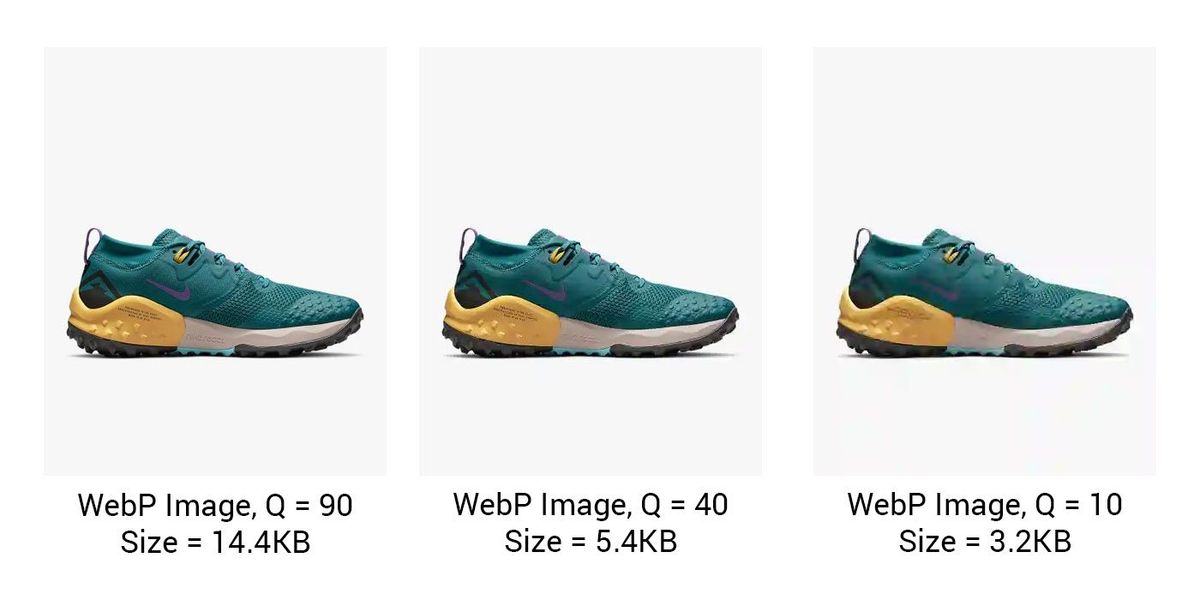
You can also use this to your advantage by delivering a lighter image to users on slower networks. Read more about network-based optimization here.
Additionally, if your users come from modern, high-end mobile devices like the iPhone, Samsung, or OnePlus devices, you need to ensure that the images look sharp on their screens too. These devices have high-density displays, and the image resizing needs to take into account the same. ImageKit's DPR transformation parameter helps you handle this.
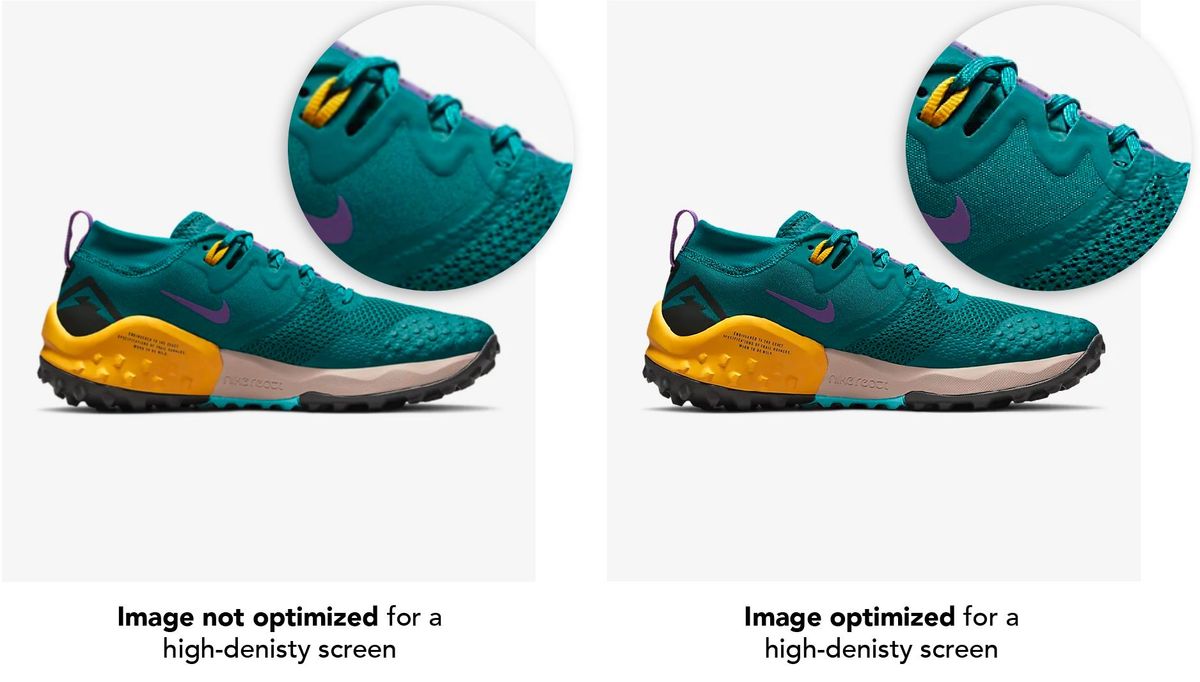
You can see for yourself in the inset that the image on the right, resized using the correct DPR value, looks a lot sharper than the one on the left.
Combine this with responsive images on the web, and you are all set to deliver a high-quality, optimized experience to all your users and search engines. You can find more details about optimizing images for retina screens here.
4. Continuously monitor image optimization performance
You have done everything possible to optimize your images correctly. With all the new product development happening and UI changes, how do you and your team stay on top of image optimization and web performance? After all, your efforts would go to waste if your team doesn't follow the best practices or correct resizing over time.
With ImageKit, you can automate monitoring image optimization and get actionable insights to fix performance issues immediately.
The health of images on key pages of your website is analyzed every day, both on desktop and mobile devices. You get a detailed report with possible improvements in image optimization and how to do them with ImageKit.

These actionable insights delivered to your team's mailbox will ensure that you remain on top of the entire image workflow and optimize better performance and SEO.
5. Edit images for your website and marketplaces
Apart from selling products on your website, you might want to diversify your sales channels. To reach out to as many customers as possible, companies list their products on different platforms like Amazon, Walmart, Flipkart, and social media platforms like Facebook or Instagram.
Each platform has a unique image requirement, which is often different from what you use on your website. They need different background colors or different dimensions. Some of them ask for a portrait image, whereas you need a square image for some social media platforms. Doing this manually to get your images suitable for every platform can quickly become an overwhelming task.

With ImageKit, there's no need to edit each image manually for each platform. Like we did earlier, you can start with a single master image, preferably with a transparent background which will allow us to vary the background of an image. You can then create templates for getting the right size and the background color required for a particular platform and store them as named transformations in ImageKit.
Facebook Post Image
https://ik.imagekit.io/ikmedia/ik_ecom/shoe.png?tr=w-1290,h-691,fo-auto:bg-DDDDDDAmazon Product Image
https://ik.imagekit.io/ikmedia/ik_ecom/shoe.png?tr=w-1000,h-1000,bg-FFFFFF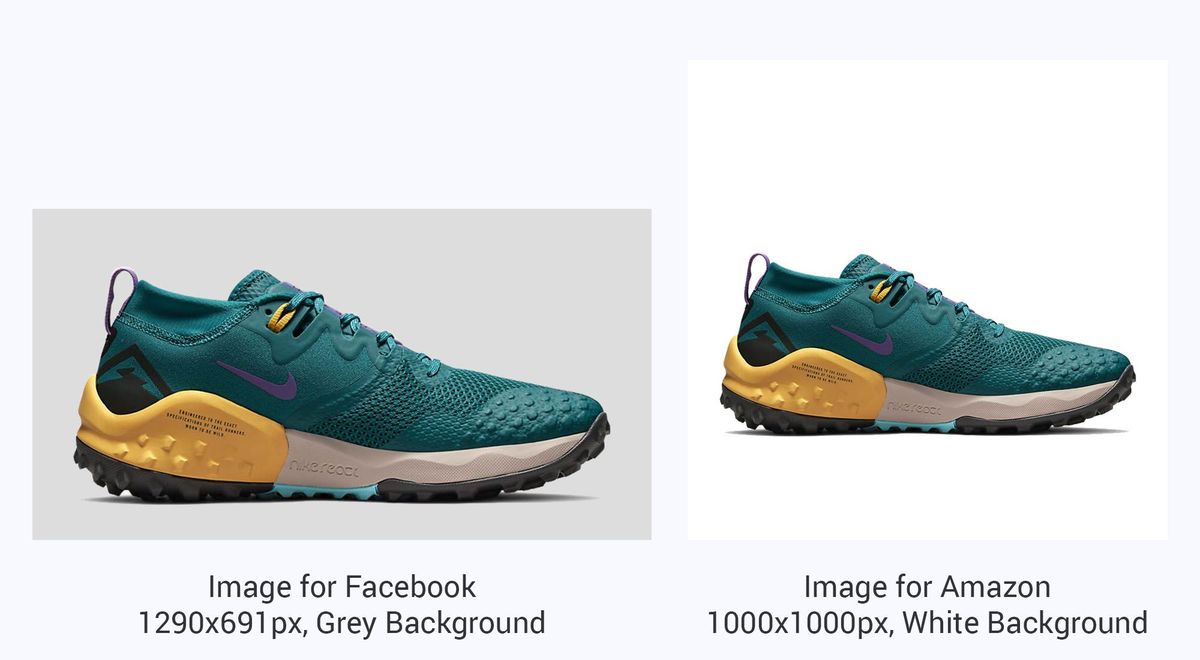
Additionally, you can use ImageKit's smart crop and trim features to help focus on the product in the final output thumbnails across all platforms. Companies like Noon and SpineMedia already use ImageKit to reduce the editing efforts of their graphics team.
/*
	Trim the edges, resize the product to 600px width, and then increase the total image canvas size to 1000x1000px
*/
https://ik.imagekit.io/ikmedia/ik_ecom/shoe.jpeg?tr=t-true:w-600:w-1000,h-1000,cm-pad_extract,bg-F5F5F5
In case you'd like to edit images manually you can use ImageKit's image editor to edit your e-commerce images to perfection. Check out our guide on editing e-commerce product images.
6. Add more context to your images and watermark them
Users scan rather quickly through a website. Additional information on your images, like a discount percentage, a tag, product category, etc., help your users to get more context while quickly scanning through the products.
This is equally applicable to even your marketing campaigns like emails or social media ads. If your product images have more context and have your brand's logo watermarked on the image, it helps you attract and engage more users
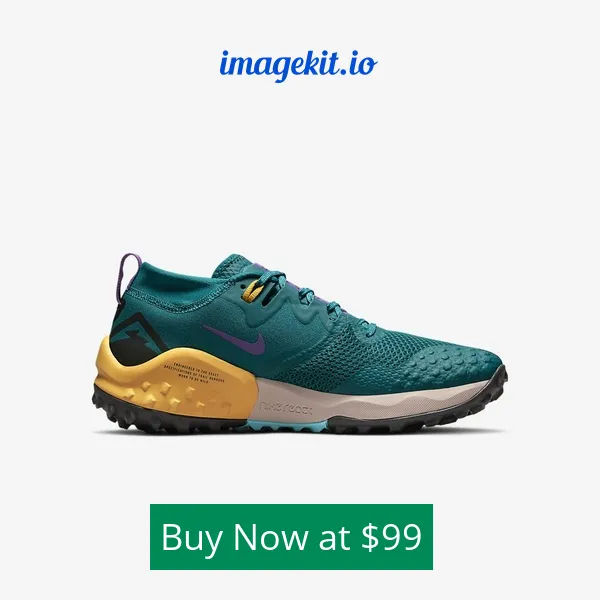
With ImageKit, you can eliminate the manual effort and create such images in real-time. ImageKit allows you to add text and images on top of any product image. You can control their position, size, and even the overlay style like font, color, typography, etc. This not only saves the time and effort of your graphics team, but because the transformations work in real-time, you can create as many variations or personalizations as you want to experiment.
Like the image below, it has the logo and price written on it in real-time using just the image transformations available in ImageKit. You could adjust the logo, text color, background color, position, and everything else instantly by editing the image URL.
It doesn’t end here. Let's take it a step further and see how you can create dynamic banners and collages using the same real-time transformations for hyper-personalized experiences for your users.
7. Create highly personalized banners and collages for your users
Your users were checking out some products on your website but didn't end up purchasing them. Now you want to get them back on to your website, so you retarget them on social media or via email.
Wouldn't it be great if you could personalize the graphics shown to the users?
You could use the product they were looking at and add a personalized message on top and a coupon code. Send each of your users this personalized image, and you do stand a better chance of getting them back to complete that purchase than regular marketing graphics.
Combining multiple overlay transformations to create a personalized banner for each user can be automated by ImageKit.
Here is the live image URL for the banner below. The name, number of sale days, and background image can all be customized to generate new banner variants personalized for every individual user.

Or you could create a collage of multiple products that they were looking at in real-time and use it in an email to get them back to purchase either of these products. This will be a unique way to capture your users' attention and stand out against the competition.
The collage below is made up of two images. The images and the text written on top of them can be edited in real-time in the image URL here.

All the use cases we have covered make use of real-time image transformations and optimizations. But what about the process before the images are ready for use on the website or app? How do we collect and organize all the marketing assets or product images? Let's look at how you can manage all your creative assets better with ImageKit's media library.
8. Manage your creative assets in a central storage
Every e-commerce business today is heavy on media assets. It is not just the product images but also the banners on your website or app, banners for social media, email, and push notifications. And you get these graphics from different sources - a photo studio, a marketing agency, an external product catalog, your internal graphics team and more.
Sharing and searching for a specific asset you have on email or generic solutions like Drive or Dropbox is painful. These solutions don't have the search or collaboration capabilities specific to images.
What you need is a proper digital asset management system like the ImageKit Media Library. It not only provides you with a central place to store all your assets, but it makes it very simple to look for them at a later date.
ImageKit achieves that by allowing you complete control over file organization & search. You can use folders, tags, and custom metadata to organize assets based on your business requirements. For example, you can assign custom metadata for the product category (t-shirt, shorts, coat, etc.), product size (small, medium, large, XL, etc.), product color (blue, red, green, etc.), and the options are endless. You can also use extensions to auto-tag assets to organize them quickly. ImageKit uses Google Cloud Vision and AWS Rekognition, two industry-leading APIs, to perform this action. These organization techniques improve the searchability of assets and increase team productivity.
ImageKit offers an advanced search mode that allows you to combine parameters from custom metadata (category, size, color, etc.) and file attributes (name, dimensions, format, etc.) to find the exact files you need.
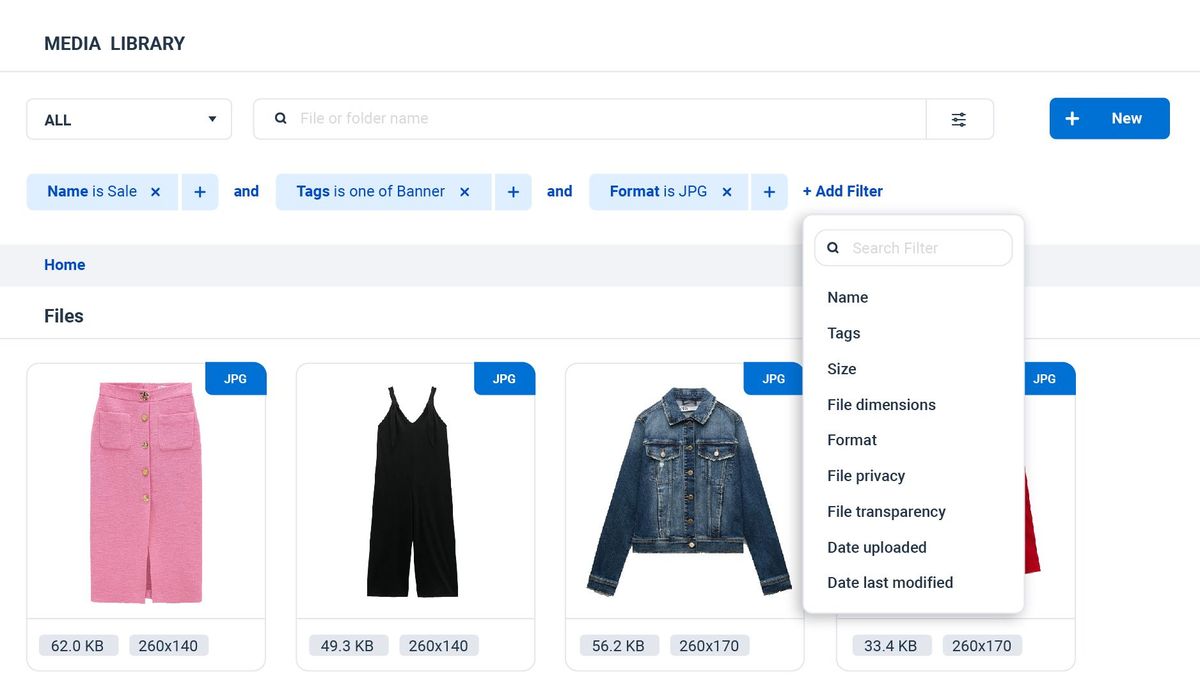
You can also leverage ImageKit's AI to simplify your search further. For instances when you can't remember the file name or the metadata you added, use content suggestions provided as you type your query. ImageKit's AI understands your input text or image and finds visually similar assets in your media library.
Bonus: With the recent raise in consumption of video content, e-commerce companies are extensively using videos on their website to deliver a comprehensive buying experience for shoppers.
Keeping that in mind, we've recently launched our new product, VideoAPI, that optimizes and delivers videos in your website without affecting the load time. So, If you are someone who delivers high-quality product videos on your site you should checkout ImageKit's Video API
Wrapping it Up
Images are the heart and soul of an e-commerce business. They are what your users see and interact with the most. You must do all that you can to ensure that the images on your store are of the highest quality while still loading in milliseconds. If you can achieve this, your users and search engines will love you. And if you want your creative teams to have a powerful tool at their disposal that can help them scale their marketing efforts to help your business grow, you must invest in a digital asset management system.
ImageKit is a single tool that will help you manage the entire end-to-end workflow for your images while you can focus on solving other problems for your business.
And you can start using it for absolutely free. If you want to learn more about how ImageKit will integrate with your store or want to discuss pricing, reach out to us at sales@imagekit.io to set up a call.