






Image SEO refers to optimizing images on your website to make them more suitable for ranking higher in image search results and getting more clicks from the users.
Search engines continue to be the predominant way in which modern consumers discover businesses online. It is therefore essential for businesses to optimize their images for better SEO.
In order to improve image SEO:
- Optimize images to a proper size and format
- Adapt the image size to that required on the target device
- Ensure that images are getting delivered to the proper devices quickly without any unwarranted delay
- Organize the images with proper naming and folder convention
These steps not just help with image SEO but also result in a great user experience.
This article will look at specific features of ImageKit that can help you achieve this.
You can read the Complete Guide to Image SEO to understand how image SEO works and how to improve it with different methods.
1. Compress the images to reduce the load time
Search engines, just like your users, do not like slow pages.
Images are often the heaviest elements on your webpage. Therefore, they have a huge impact on the load time of your webpage and your SEO rankings.
The importance of this is further highlighted by the Google PageSpeed report, which underlines the need to "Efficiently Encode Images".
Therefore, compressing your images to use lesser data and load quickly will help you improve image SEO.
ImageKit can automatically compress your images without any additional parameters in your image URL. You can also modify the default image compression level by either adjusting the value from the dashboard or adding the quality parameter in the image URL.
https://ik.imagekit.io/ikmedia/image_seo/eiffel-tower-example_V2g3MYHeu.jpg?tr=q-80Image with transformation quality q set at 80
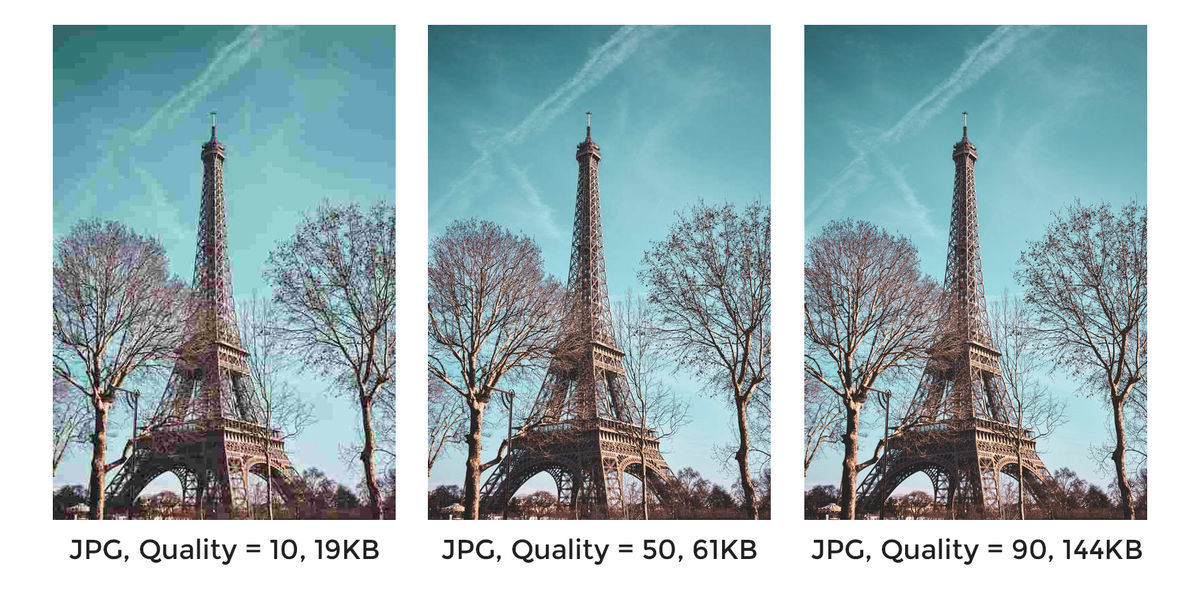
ImageKit uses a default quality value of 80. PageSpeed or Lighthouse, in its assessment, uses a quality value of 85. So, if you deliver your images via ImageKit without any other change, the warning for 'Efficiently encode images' will go away.
2. Convert the images to a proper format that balances size and quality
You can further bring down the size of your images at the same or better visual quality by delivering them in an appropriate format.
Google underlines this in their PageSpeed report under the header - “Serve images in next-gen formats”.
Each format is suitable for different kinds of images. Then there are new formats like WebP and AVIF that may not be supported across all devices but offer superior compression and visual quality. Therefore, delivering the optimal image format requires balancing various factors such as requesting device capabilities, browser support, image quality, suitability of formats for different kinds of content, and more.
With ImageKit, you have the tool to ensure that the optimal image format is delivered automatically, every time, and without writing a single line of code. Just keep the setting to deliver the correct format turned on in your dashboard, or add the f-auto parameter to the URL.
The following image is delivered in the right format on different devices automatically.
https://ik.imagekit.io/ikmedia/image_seo/eiffel-tower-example_V2g3MYHeu.jpg
You can also force an image to a specific format if needed. Or get AVIF automatic optimization turned on your account to convert your images to a newer, lighter AVIF format supported in over 60% of devices.
3. Resize images for the target device
Google places a lot of emphasis on the need to resize images on every device, especially mobile devices. It appears under the head "Properly resize images" in its report. Original high-quality, high-resolution images are not suitable for delivering to a user's device.
These images need to be scaled down for the requesting device. They also need to be adjusted for different placeholders on your website or app. For example, you would need different image sizes for mobile vs. desktop, listing vs. detail page, and so on.
You can use ImageKit’s real-time image transformations to resize an original image to any given size just by specifying the output size in the URL.
For example, the following URL will return an image with width 200px and height 400px. This transformation crops the edges while preserving the center of the image and maintaining the same aspect ratio.
https://ik.imagekit.io/ikmedia/image_seo/eiffel-tower-example_V2g3MYHeu.jpg?tr=w-200,h-400Try changing the dimensions to get new image size in real-time

You can use the real-time resize transformations to deliver responsive images that are the right size on every device.
You can combine resizing with multiple crop modes available in ImageKit to get the exact image size you want for your requirement. One exciting feature that you can explore is the smart crop, which automatically centers the subject of your image in the output thumbnail. You can do this by adding the
fo-autoparameter to the URL and works as shown below -
4. Ensure fast delivery of the images globally using a CDN and caching
By optimizing and resizing the images, you have done half the work for better image SEO. These would reduce the load time of your page. But to make it even better, you should use a CDN or a content delivery network for image delivery.
A CDN is a global network of servers that can load your images in milliseconds on your user's device regardless of their location. You should cache (or store) your images on this global network for an extended time to ensure superfast load time for your users.
Google recommends a cache time of over six months for static content like images.
ImageKit.io uses a global CDN network, AWS Cloudfront, out of the box, for its image delivery with over 215 nodes globally to reduce image load time. ImageKit's image processing network is spread across seven locations - US East & West coasts, Germany, India, Singapore, Australia, and Canada.
Additionally, you don't have to worry about caching images on the CDN as ImageKit automatically uses the correct cache directives on your behalf to do it. That will cross off another point on your Lighthouse report - "Serve static assets with an efficient cache policy".
5. Implement lazy load on your page to save up on resources
You can further enhance the loading time of your page by reducing the number of images that are loaded upfront and instead deferring them to a time when the user needs them. This allows the browser to load resources faster because there is less competition for the available network bandwidth.
This technique, called image lazy loading, can be used for images that are not immediately visible on your web page and require a user to scroll to view them. Google Lighthouse has a parameter in its report for the same, called "Defer offscreen images".
Lazy loading images would require you to pass your image URL in a different attribute that is not recognized by the browser, something like data-src. You can then use Javascript to load this URL in the src attribute.
Read our detailed guide about image lazy loading techniques here to dive deeper into the technical implementation of lazy loading.
6. Use proper image name using dynamic SEO suffix
A critical factor in SEO depends not just on how fast your images load, but also on how your images are named and organized. Every search crawler looks at the image name to understand its content and context.
While it can be convenient to upload your images with the source file name, like IMG01234.jpg, taking the time to rename them and describe them better will benefit your SEO plans.
ImageKit has a feature called the dynamic SEO suffix. With this, you can create SEO-friendly URLs of even those images which are already stored in your CMS or storage without changing the stored file's name.
For example, if your original image of the Eiffel Tower used in this blog has this URL -
https://ik.imagekit.io/ikmedia/image_seo/IMG12345.jpgYou can dynamically give it a relevant name like 'eiffel-tower-paris' with the dynamic SEO suffix feature. For example -
https://ik.imagekit.io/ikmedia/ik-seo/image_seo/IMG12345/eiffel-tower-paris.jpgYou get the exact same output image, but now with a relevant image name. This is a simple but effective way to improve image SEO.
7. Organize images in the right folders with proper paths
Apart from naming the file correctly, it would be best to organize them into subfolders that search engines and users understand. Along with the file name described in the previous point, search engines also use the file's path to understand an image's organization and context and rank them accordingly.
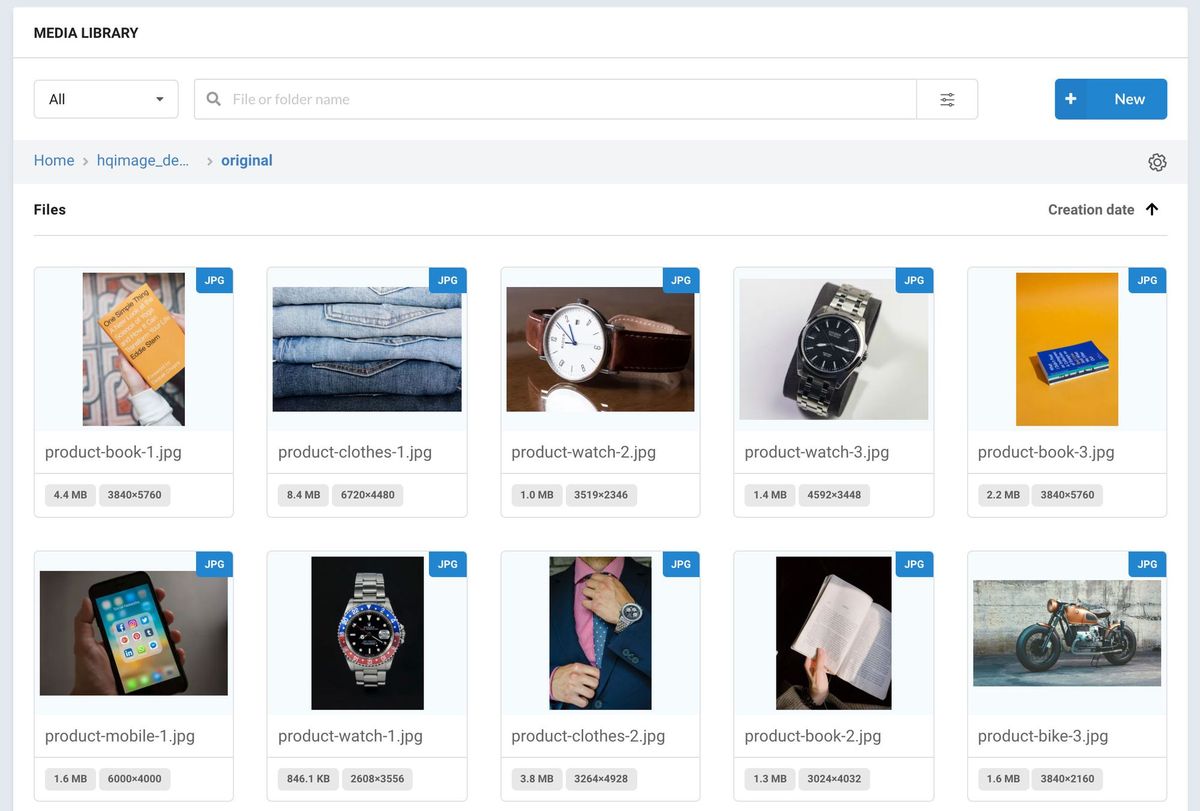
ImageKit provides you with a Media Library to store and manage your assets and organize them into folders. It comes with a simple drag-and-drop upload interface and supports advanced search, copying, moving, and renaming assets in bulk.
It also supports asset tagging for better organization and searching.
Wrapping it Up
Search rankings are critical to increase online presence and can be the difference between you and your competitor's business. With the massive increase in visual search, images will continue to play a major role in determining search rankings.
Image SEO, specifically can provide a massive boost to your search ranking when done right. 500 companies across the globe trust ImageKit to optimize their images and deliver it the right way.
Head over to ImageKit to sign up for your free account and start optimizing your images today!