



When investing in a DAM solution, evaluating the available options is essential to ensure that your chosen platform maximizes your ROI.
Most organizations look for ease, efficiency, flexibility, speed, reliability, and scalability. While these are desirable characteristics, how does one measure the suitability of a product or ensure that it meets all your needs?
For instance, for an advertising agency that wants to protect the integrity of its creative assets, granular level accessibility is a critical requirement. On the other hand, a rapidly growing e-commerce business might want to prioritize scalable storage and a robust infrastructure.
An easy way to do this is to list your use cases and then review the available DAM features to understand if what's on offer is what you need.
In case you are in a hurry, here's a list of the key areas that you should look for in a DAM solution

Now, let us look at the essential attributes you will need and the DAM features that fulfill them.
1. A central storage for all digital assets
A taken-for-granted function of DAM is to serve as a single repository of digital assets, making it convenient for stakeholders to store and access content easily and quickly. An expandable storage hub that supports different content formats and provides adequate backup with a predictably organized structure creates a positive user experience.
DAM features to look for:
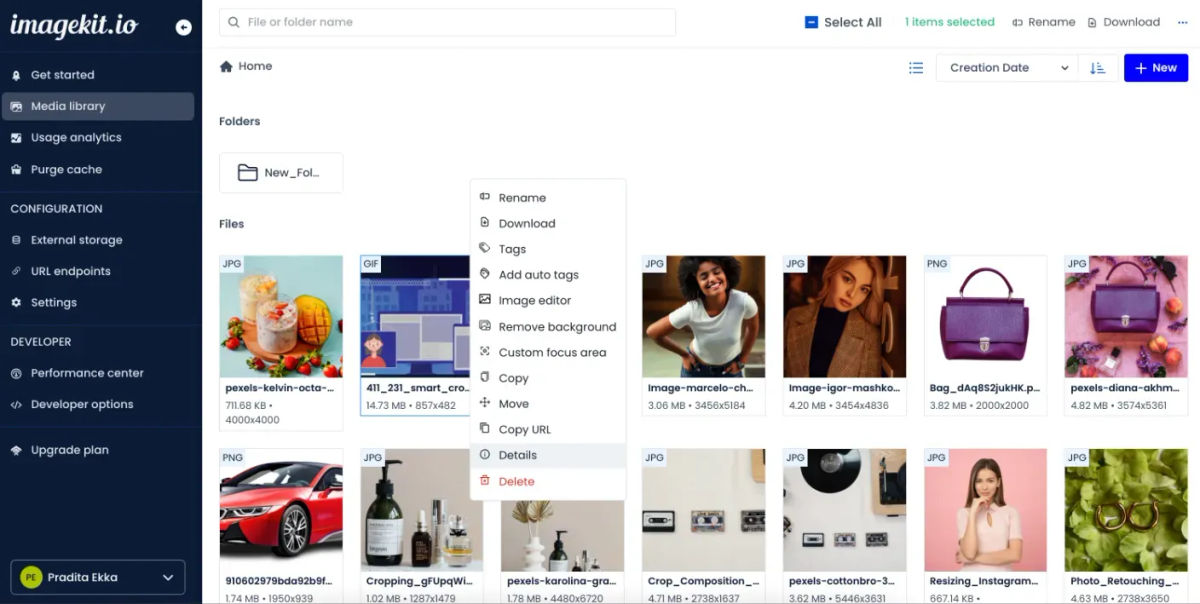
- A cloud platform, i.e., a media library, provides a centralized location that can easily store large-resolution images or video and expand on demand.
- Option to configure with their choice of external storage and yet use the features of DAM
- The data backup and sync functions ensure the availability of assets at all times.
- Tags and folders to organize assets as per various attributes. DAM that uses metadata as a parameter for asset organization is best for businesses that deal with a high volume of digital assets.
- AI tagging to auto-tag digital assets for quick organization.
- File format compatibility for wide-range support to both existing and emerging content formats.
Strong centralized storage ensures that your team's workflow is set right and thus making sure an increase in productivity. Finding an asset is as important as storing it, so here's the next key attribute to look for in your DAM.
2. Powerful search for increased asset discoverability
Since centralized storage & advanced organization set concrete foundations for asset storage, having an advanced search functionality ensures we can find the stored assets quickly when needed. A preferred DAM solution should allow you to combine different tags, metadata & file attributes to find the exact assets.
Here's ImageKit's advanced search in action:
Many AI-powered DAM solutions also offer visual search which understands your input text or image and gives relevant content suggestions as you type. This helps to increase asset discoverability and makes asset retrieval easy.
DAM Features to look for:
- Advanced search: Combine different parameters like metadata, tags, and file attributes (such as file format, dimensions, size, and upload dates), in your search query to find the exact files you need.
- Visual Search: AI understands the meaning of your input text & finds matching image content. You can perform a reverse image search or use any stored image to discover visually similar content within your DAM.
- Search Autocomplete suggestions for relevant content as you type your queries.
- Saved searches so that you do not have to repeat your query.
Read more on Advanced search in DAM:
Advanced Search in Media Library | ImageKit.io
3. Ease of downloading and uploading of assets
Creative assets are often heavy and take considerable time to upload. In addition, modifying assets in the right size and format can be laborious for the design team unless users are given the right to modify them when downloading.
Modern-day DAMs can accelerate downloading and uploading of assets with their interface and ready-to-use DAM APIs. This not only reduces the effort of the stakeholders involved but also smoothens the workflow
DAM features to look out for:
Simplify asset upload with a drag and drop interface. ImageKit offers this feature and appends a random string to the image file to avoid replacing images with the same file name.
Developer-friendly APIs to upload and operate on various assets in a single go. This makes bulk operations such as tagging, file deletions, generating job status, etc., easy and, of late, is a much-desired feature to save time and effort, particularly when the volume of assets handled is more.
Upload by external parties without logging in. An API-based upload widget can be used to facilitate client-side file uploading, a feature offered by ImageKit.
The option to download assets in zip format facilitates bulk operation and is a key requirement if you share assets with external stakeholders.
4. Frictionless sharing and distribution of digital assets
One common challenge teams face when dealing with a central repository is the absence of straightforward channels to share assets internally and externally. This might seems like a trivial aspect, but in the long run, it affects the team's workflow and can cause be a blocker to collaboration.
Consider a DAM that can make sharing and distributing assets internally and externally easy and safe.
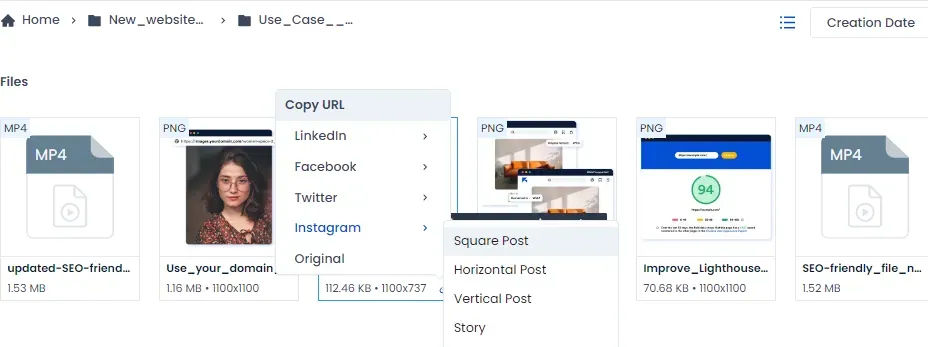
DAM features to look out for:
Social link sharing contains images in predefined social media sizes, making it super convenient for users to use them as it is.
A Cloud-based DAM for a borderless content-sharing platform for ease of use and access
5. Fortified security of your digital assets
Digital assets are unique and could be subject to creative licensing or copyrights. In addition, their usage may be restricted or confidential by nature. Therefore, protecting digital assets when in storage and during transfers must be mandatory for any DAM.
DAM Systems that support strong passwords, encryption, and other security protocols are worth investing in.
DAM features to look out for:
Custom user permissions can restrict access to people based on their roles. For example, ImageKit allows five kinds of role-based access. Administrators are given full access, including user management. A developer can access everything but not the billing or user management. The finance team can have access to analytics and billing. Full or view-only access to the media library is given based on need.
Rights management features can prevent companies from violating copyright and licensing agreements concerning assets bought or rented with limited usage rights. Tracking expiry and review dates and setting alerts for restricted activities can prevent misuse of assets.
Secure access to the dashboard. A strong password may not always be adequate. ImageKit has the provision to enforce multi-factor authentication (MFA) for all users within an account.
Security protocols like identity and access management, data loss management, and business continuity. ImageKit offers security features such as restricting unnamed image transformations and using signed URLs to access private marked images. ImageKit is also ISO/IEC 27001:2013 certified, a global standard in information security management, data privacy, and protection.
SSO or single sign-on from IdPs to ensure improved user management. Here's how it works:
6. Maintaining brand consistency
A consistent brand experience can create loyal customers. DAM helps ensure that employees adhere to the brand guidelines and are prevented from accessing legacy assets. In addition, brand templates saved on DAM can hasten the creation and delivery of standard brand assets.
DAM features to look out for:
- Version control to prevent the use of out-of-date assets. It protects original copies and incremental changes from getting lost due to unintended user actions or application failures.
Organizing and tracking content. ImageKit allows you to manage media assets programmatically. All the functionality exposed in the ImageKit dashboard is available via APIs. You can integrate these APIs into your CMS to achieve your desired integration.
Setting expiration dates for licensed assets.
Embedding assets directly into websites via asset URLs ensures an automatic update for every change.
7. Garnering insights on asset utilization and optimization
Analytics on asset usage, such as how many people are consuming your content or engaging with it, can help you assess the ROI of every asset and take appropriate action.
Most DAMs miss out on the asset delivery part, and the bandwidth or the size of the asset delivered. Insights into this can help teams optimize and save on the infrastructure cost of their setup. More the saving, better the ROI
DAM features to look out for:
Centralized reporting on asset consumption, user interaction, and rating from various sources can help you make decisions on design and strategy.
ImageKit automates asset performance monitoring and provides alerts regarding performance bottlenecks.
8. Improving collaboration between teams
The creative process involves various steps with different stakeholders. Therefore, they must be in sync to avoid errors and duplication of effort for lack of communication and seamless process flow.
While the core goal of a DAM on the outlook might seem like central storage, they come with specific features built to enhance the collaboration between stakeholders for a more productive workflow.
DAM features to look out for:
Shared folders for collaborative or concurrent work between team members
Clear definition of roles and hierarchies and the access levels of the roles
Access and update assets from any location or device
Ability to add comments or feedback to assets with the history of commenting stored. Approvals for creatives can act like a potent combination for creative workflow.
Quick edit tools to reduce designer workload
Automatic assignment of tasks with alerts for action
9. Supports unstructured data, different formats, and devices
Creative assets come in various formats, need to be used on a plethora of devices, and are targeted on multiple platforms for different segments of audiences. DAM needs to support structured and unstructured content from every source, creating the ability to repurpose or customize assets.
DAM features to look out for:
- Support common file types such as multimedia, electronic forms, digital images, scanned PDFs, and emerging formats like AR, VR, or 3D. With ImageKit, you can stream the best video viewing experience for different types of devices over a broad set of connection speeds. It is called adaptive bitrate streaming. Images are delivered based on the user's network quality. High-efficiency Image File Format (HEIF) and AVIF formats store high-quality images for superior quality and compression.
10. Flexible with third-party integrations
A DAM cannot work in isolation and needs to be well integrated with its ecosystem to deliver maximum value. An organization works with several tools such as editors, CMS, or legal systems. The DAM you use must work with all the systems your company uses or plans to use so that users can easily switch between platforms without leaving the DAM software.
DAM features to look out for:
- Built-in integration tools such as project management applications
- API connection and custom configurations
ImageKit supports Magento, WordPress, and Shopify. In addition, it comes with a URL Rewriter for your existing vendors and a media library widget for integrating any web application.
With new playgrounds such as the metaverse, digital assets are expected to play the hero's role in every organization. They will rise in volume and creativity. We can expect to see more features as this space evolves.
In case you missed getting the list above here's the list to evaluate your DAM buy
To get a first-hand experience of the latest DAM features, we urge you to try ImageKit's free version and discover why our customers find them so invaluable.
We would love to hear your feedback and ideas about the features that you would love to see but are missing in the market. Write to us at support@imagekit.io.