
惯性聚合 高效追踪和阅读你感兴趣的博客、新闻、科技资讯
阅读原文 在惯性聚合中打开

推荐订阅源

M
MIT News - Artificial intelligence
有赞技术团队
有赞技术团队
S
Schneier on Security
aimingoo的专栏
aimingoo的专栏
T
Troy Hunt's Blog
U
Unit 42
Hacker News - Newest:
Hacker News - Newest: "LLM"
V2EX - 技术
V2EX - 技术
T
The Blog of Author Tim Ferriss
V
Visual Studio Blog
H
Heimdal Security Blog
H
Hacker News: Front Page
Blog — PlanetScale
Blog — PlanetScale
博客园 - 司徒正美
Cloudbric
Cloudbric
Google DeepMind News
C
Cisco Blogs
The Cloudflare Blog
C
Cybersecurity and Infrastructure Security Agency CISA
Microsoft Security Blog
MyScale Blog
MyScale Blog
F
Fortinet All Blogs
N
News | PayPal Newsroom
Attack and Defense Labs
D
DataBreaches.Net
N
News and Events Feed by Topic
Security Archives - TechRepublic
Forbes - Security
Forbes - Security
Simon Willison's Weblog
F
Full Disclosure
The Register - Security
L
LINUX DO - 热门话题
Webroot Blog
Webroot Blog
Google Online Security Blog
AI
AI
奇客Solidot–传递最新科技情报
奇客Solidot–传递最新科技情报
I
Intezer
S
Security Affairs
阮一峰的网络日志
阮一峰的网络日志
K
Kaspersky official blog
云风的 BLOG
云风的 BLOG
博客园 - 叶小钗
T
Threatpost
Spread Privacy
Spread Privacy
小众软件
小众软件
AWS News Blog
AWS News Blog
S
Secure Thoughts
S
Security @ Cisco Blogs
钛媒体:引领未来商业与生活新知
钛媒体:引领未来商业与生活新知
J
Java Code Geeks

ImageKit.io Blog

Next.js Image Optimization with ImageKit Use Video as a Background in Your Next.js Project How to Fix Autoplay Video in Next.js How Durian Scaled a Visual-First Retail Experience to 350K Monthly Visitors Online How Matsmart accelerated image delivery across countries with ImageKit AI in Digital Asset Management: From Smart Workflows to Agentic Automation How Joseph Joseph unified and secured global video delivery with ImageKit How Modall powers fast, effortless media delivery across 40+ projects with ImageKit Digital Asset Management (DAM) Trends: 2026 Report How to add a poster image to Video.js player (and automate it) HLS streaming with Video.js + React Building the future of storytelling with fast, AI-powered video delivery How PushOwl delivers 100M+ image-rich notifications seamlessly with ImageKit How Homify delivers millions of interior design images seamlessly with ImageKit Better event discovery with lightning‑fast videos & images Adding video player in React Native Video player in Angular applications Crop and resize videos in React Next.js image and video upload React image and video upload React video optimization How we quadrupled our traffic to 625K monthly page views How Apollo 24|7 boosted performance & reduced costs with ImageKit Simplify your media workflows with ImageKit DAM integrations Extending Lighthouse for custom image and video optimization analysis Brand Asset Management: What is it? How does it work? WordPress Digital Asset Management Guide - Manage your WP media assets better Why Shopify retailers need a digital asset management solution DAM vs. SharePoint: Which is best for you? AI-powered Metadata and Tagging in Digital Asset Management How Hopscotch built India's largest online Kids' fashion brand with ImageKit Dropbox Vs. DAM: Which Is The Right Tool For Digital Asset Management Digital Asset Management for Photographers: A Complete Guide Why digital asset management for agencies is essential Helping both Top and Bottom Line: SaffronStays rapid, profitable growth with ImageKit How KreditBee simplified media experiences with ImageKit Google Drive alternatives for businesses (with fast-growing teams) Node.js image upload ImageKit: The Secret Ingredient in Swiggy’s Expansion Journey Streamlining the Design Approval Process: A Comprehensive Guide AV1 Codec - Complete guide for video application devs PHP image and video upload Angular image & video upload AV1 vs VP9: Which codec should you choose? Adding video player in Next.js React Video Player VP8 vs VP9 - In the context of online video delivery Exploring WebM vs MP4 7 Free Digital Asset Management Software that are not Open-Source Comparing 9 Top Digital Asset Management Tools in the Market What are Brand Standards and Why do they Matter? Boost Sales and Brand Appeal: Essential Tips for eCommerce Image Management Brand Recall: The Strategy to Create Unforgettable Brands How to upload files in HTML? Branding for Small Businesses (2025 Edition) Everything you need to know about VP9 codec Recent updates from ImageKit and what's next Best Ways to Write RFP For Digital Asset Management (+ with free RFP template) What is Brand Dilution? How to Avoid It? Explained with [Examples] The Importance of Brand Identity: Leveraging Digital Asset Management for Impact From Launch to Scale: How to Launch a Brand Campaign Digital Asset Management Requirements - What do You Need to Evaluate and How? Marketing Collateral Management: A Quick End-to-End Guide Video Content Management System: What Is It And How To Choose One? Dropbox vs. Google Drive vs. Onedrive: The Best Cloud Storage Solution How to Build Brand Trust: Get Started In 2025 Google Drive vs. Box: A Detailed Comparison How Digital Asset Management Solutions Help Protect Brand Equity A DAM Solution Can Safeguard Your Digital Intellectual Property - Here’s How WebP Vs. PNG: Which Image Format Should You Use and Why? How to Resize Images in Bootstrap Easily Progressive jpegs (PJPEG): the key to loading images faster on your website Dropbox vs. Google Drive: The Best Cloud Storage For Digital Assets Dropbox Pros & Cons In 2024: An In-Depth Analysis and Why A DAM Solution Stands Out Google Drive Vs OneDrive: The Better Storage Option For Digital Assets Manage your video assets better with video metadata Understanding DAM's Role in Strengthening Brand Identity Digital asset management strategy: What to know before creating one The Ultimate Guide To Marketing Agency Onboarding 6 Solutions To Simplify Large File Sharing Over The Web A Step-by-Step Breakdown of a Video Production Workflow 13 Digital Asset Management Use Cases You Should Know How to Conduct a Brand Audit and Manage Your Brand Assets Costly Consequences of Inconsistent Branding And How DAM Can Help Dynamic Asset Transformation: What It Is, Why You Need It, and How ImageKit Can Help Everything You Need to Know About HTML Video Autoplay How To Select Your DAM Vendor: A Complete Guide How to Boost User Experience with Smart Digital Asset Management React Image Optimization: A Guide for Web Developers Why Should DAM Be A Part Of Your MarTech Stack? Unleashing the Power of Content Repurposing with ImageKit MKV vs MP4: Which Video File Format Is Better for Your Needs? Digital Asset Management For Ecommerce: A Complete Guide How an Image Tagging Software can Transform Your Image Search How to Manage Your Content Lifecycle Effectively M4V vs MP4: Which Video Format Should You Use and Why? Why Every Business Needs An Image Management System All The Questions To Ask During A Dam Demo Which is the Best Image Format for Your Website? Uploading Multiple Files Using JavaScript: A Comprehensive Guide
How To Increase Conversions On Your Shopify Store?
Somesh Khatkar · 2017-11-15 · via ImageKit.io Blog

While running a retail business, the most crucial task is to convert a visitor into a buyer, whether it's an offline store or an online e-commerce store. And to make a conversion, these online stores try almost everything from creating a perfect home page to implementing a smooth checkout process.

As more and more buyers are now choosing to purchase online, the e-commerce websites have also geared up for this shift. The competition in acquiring these shoppers has also been increased. In such a competitive market, even a slight improvement in conversion rate matters.

So, what is helpful in increasing conversions on a Shopify store?

First, let’s focus on the product page of your store. The product page is the most critical place where you can turn a visitor into your customer. Here your visitor gets acquainted with the product and tries to make up their mind for purchasing. So, if your product page solves all the queries and wins the trust of the potential buyer, then it’s working. If not, you should work on your product page.

So, let’s deep dive into some tactics which can help you create a perfect product page, and in increasing conversions on your Shopify store.

Add Multiple Images of Product

When you shop online, you check the product’s appearance by clicking on its pictures. Unlike offline stores, you can’t touch, feel, or try the product while buying.

When you visit a shop, you can physically analyze the look and feel of the product and then can make your decision. But, when you buy something online, the first thing that you encounter is the image of the product. You see the pictures, examine its look, and then take the next step. So, it’s essential to add beautiful and real images of your products on the product page.

Click pictures of your product from different angles so that your buyer can see each and every corner of your product. Always use a white background so that your product looks bright and bold. You can also add a video of your product to interpret its usage and style better. A simple video without any audio showcasing the product would work better. You can easily embed a video in your Shopify store. Make sure that the real product and its images or video are not different. Always use actual pictures of the product. Do not try to show something else and sell something else. Trust is hard to gain once lost.

Beautiful product images serve the purpose of showcasing your products, but at the same time introduce a new set of performance problems. That doesn't mean you should shy away from using beautiful pictures, learn more about this on our blog post on how to optimize images in your Shopify store.

Allow Customer Reviews

Customer reviews can do wonders for your products. A long list of features and promises is not valid if there is no social proof of your services.

When a prospective buyer visits your product page, checks out the images and features, then they want to validate the same story by checking the reviews. Customer reviews speak for the degree of excellence of your services.

Do you deliver your promises? Does the product fulfil all that you have written about it there?

Your buyers can get all these answers by checking what other people are saying about that product. These reviews are the best way to gain trust of the customers. This shows the transparency of the seller and other people’s opinion about their services.
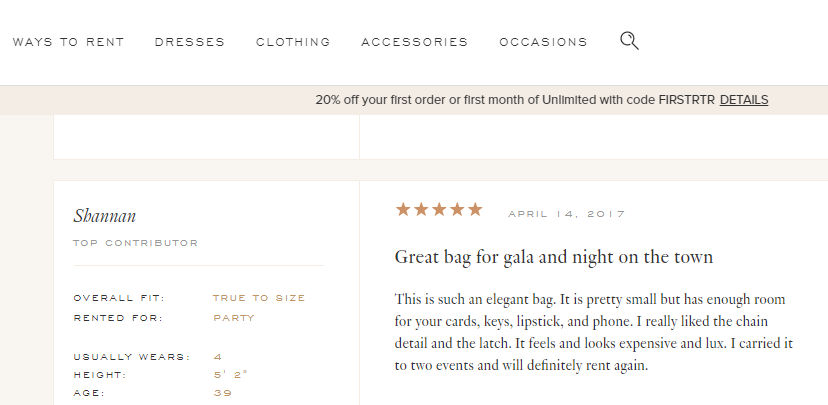
Check a different way of adding customer reviews on the product page. Source: Rent the Runway - An online dress rental portal.

Most of the e-commerce websites allow customers to leave the reviews. Customers can share their experience by adding an image or video also.

Customer reviews are also the best way to generate user content. User-generated content also impacts the ranking of your website, and you grab some SEO benefits.

These reviews also make your brand’s social appearance strong. A good number of reviews is a useful indicator of how many people are interested in what you are selling. If you have just started your online store, you can personally ask your customers to share their feedback after purchase.
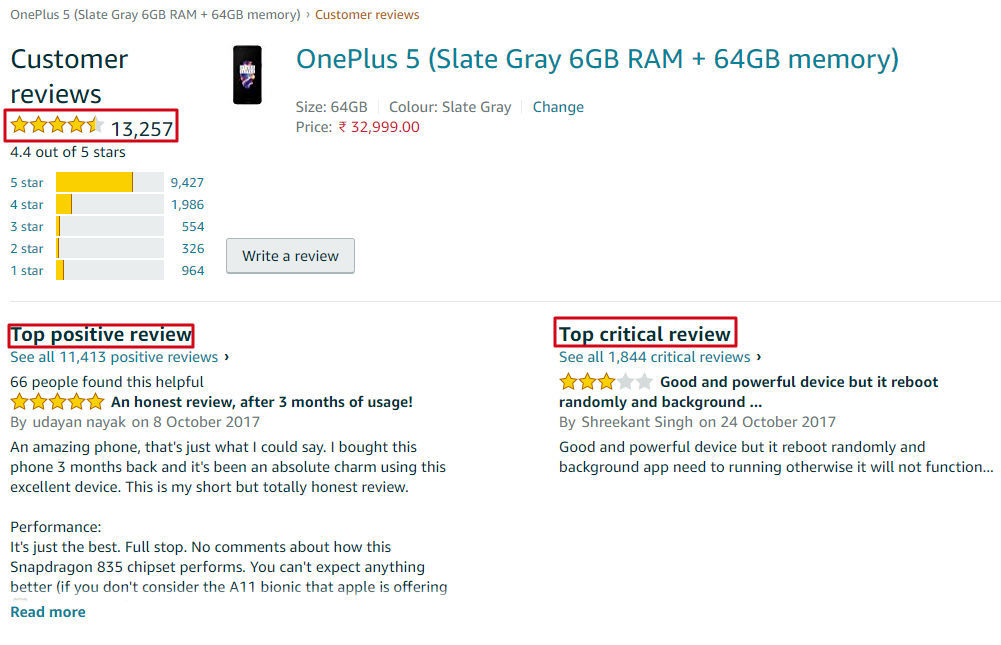
Here you can see the number of reviews highlighted with the star count. Also, the positive & negative review section displays the transparency of the seller. Source - Amazon.in

Add Frequently Asked Questions

If a customer has queries or doubts about a product while buying at an offline store, he or she can ask those questions from the salesperson and get all the answers there and then. But when you provide an online shopping platform, you aren’t physically present there to answer any queries your customers may have.

So, if your customers resist buying a product because of some unanswered doubts, then you may lose a lot of conversions. To resolve this dilemma of your customers, you can provide answers to their queries by adding an FAQ section in your product page. Include some frequently asked questions and their answers, and help your customers in making a purchase which will boost the conversions of your Shopify store.
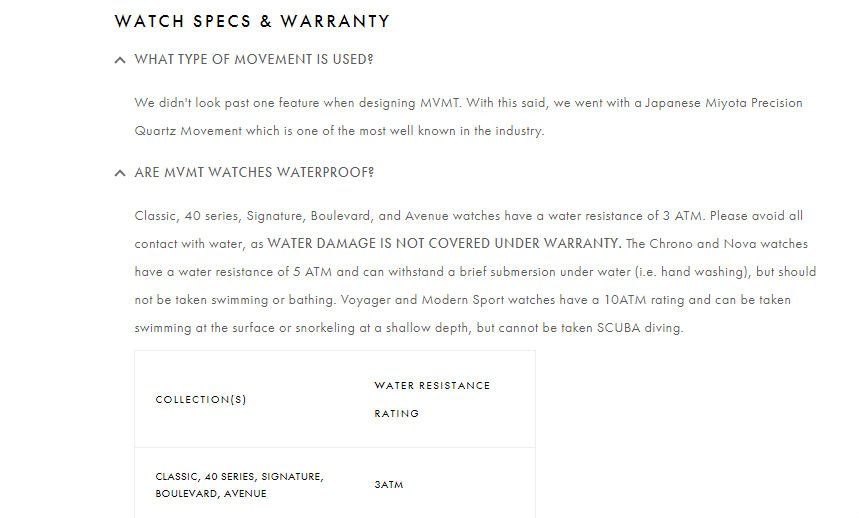
The FAQs section should cover each & every query of the customers. The example of mvmtwatches.com where the FAQs are categorized & answered beautifully.

Offer an Easy Way to Contact You

Always offer your customers an easy way to contact you. It can be a customer support number, a support email, or a live chat option.

If your customers are finding any difficulty while making a purchase, they should be able to contact you easily. Some businesses do not feel the necessity of having a live chat option. But it can do wonders for your conversion numbers. According to Forrester, the conversions of Wells Fargo increased by double-digits when they integrated live chat to their website.

Contacting a customer support number, waiting on the line, or sending an email are time-consuming processes when compared to live chat. Also, these are mostly suitable for serious issues, but if a customer is having a short query or some doubts about your policies, then live conversation is the best way to get connected.

Live chat is a prompt and easily accessible way to post a query and get that resolved. It makes your customers feel your presence all through their buyer journey, giving them a sense of security and confidence. There are plenty of live chat options in the Shopify App Store, you can easily integrate one into your website.

Here you can see different Live Chat options in the Shopify App Store. Source: Shopify

A Convenient Return Policy

While buying online, a customer often debates the many points influencing his decision to purchase, and the return policy is one of them.

When you buy online, you put your faith in the services of an online seller and order the product without even trying it. So, it’s vital for the e-commerce sites to have an easy-to-understand and convenient return policy to win the trust of customers. You should explicitly display your return policy, or money back guarantee terms on your product page. It shows that you are confident about the quality of your services and products. Your customers should trust your services and should not feel any uncertainty while buying from your store.

In the return policy, you can offer a complete 100% refund to your customers if you don’t deliver the promised services, or you can provide an exchange policy. This will assure your customers and encourage them to proceed towards check out.

Let’s take an example of AO.com. AO or Appliances Online is one of the largest online retailers dealing mainly in appliances. It offers a convenient return policy to its customers including different ways to return a product, like providing a full refund, product exchange, get customer care support, etc.

Return Policy of AO.com. Source - AO.com

The e-commerce industry is growing tremendously, and competition is increasing day by day. Thus, being a seller, you should keep experimenting with your product pages to provide an excellent shopping experience to your customers. Sometimes, even a small change can make a huge impact. Your goal should be to remove all hurdles from the path of your customers while they are in the process of making a purchase. It's best to keep experimenting to stay ahead. Stay tuned to ImageKit for such amazing tips. Check out Shopify SEO Tips for some more useful ideas.